ADAU1701 IIS input 192Khz signal to enable filter, DAC playback has noise
Specific operation description:
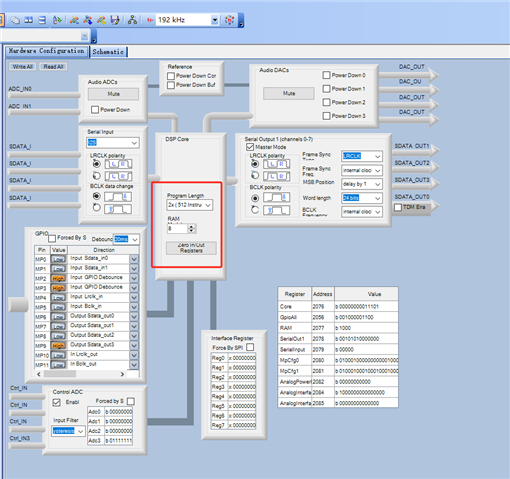
As shown in the schematic diagram above, currently only one General 2nd filter is added, set to hpf and 60Hz corner frequency. Set the sample rate to 192K and the DSP core to 512instruction.
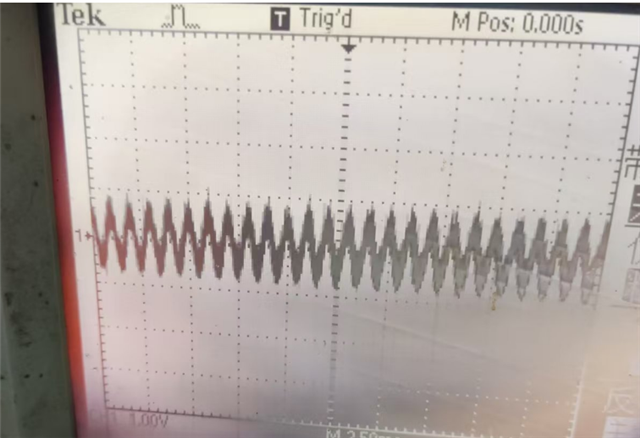
When disabling the General 2nd filter, the DAC output is normal as shown in the following figure
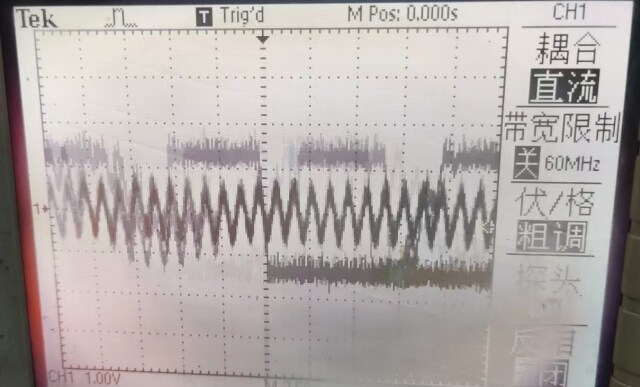
2 When enable the General 2nd filter, the DAC output is normal as shown in the following figure
Under the same conditions, input sine wave signals of 176Khz, 96Khz, and 48Khz, and follow the above steps to change the sampling rate and DSP core. After testing, there were no issues.
At present, it is preliminarily judged that the clock of ADAU1701 input 24.576 may be close to the maximum input limit. It is unclear whether ADAU1701 can input the maximum clock. I need help analyzing the problem
Thread Notes
Harishgowtham - Moved from Processors and DSP to SigmaDSP Processors & SigmaStudio Dev. Tool. Post date updated from Thursday, May 22, 2025 7:56 AM UTC to Friday, May 23, 2025 4:47 AM UTC to reflect the move.
Harishgowtham - Moved from Processors and DSP to SigmaDSP Processors & SigmaStudio Dev. Tool. Post date updated from Friday, May 23, 2025 4:47 AM UTC to Friday, May 23, 2025 4:47 AM UTC to reflect the move.
Audio Signal Processors
software
When inputting a 192kHz/24bit/0dB 1kHz sine wave via the IIS interface to the ADAU1701 with activated filters
ADAU1701 IIS input
the DAC output exhibits noticeable noise (observed via oscilloscope). IIS signal parameters: MCLK: 24.576MHz BCLK: 12.288MHz LRCLK: 192kHz
SigmaDSP Audio Processors
adau1701
Show More
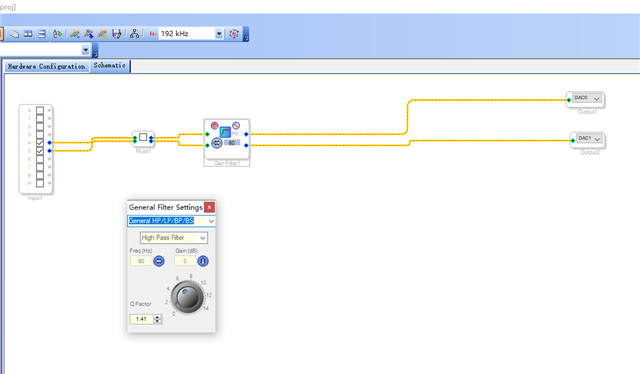
Hello Hogan,
The 1701 's fundamental clock is the MIPS clock, which always operates at 49.152 MHz (roughly 50 MIPS) for any "standard" sample rate (48 / 96 / 192 KHz). The only exception is when a sample rate of 44.1 KHz and its multiples is desired -- in that case the chip runs about 8% slower, at 45.1584 MIPS. Your crystal and PLL settings need to produce a 49.152 MHz MIPS from your hardware MCLK or crystal input.
As you know, the base 48K sample rate allows for 1024 instructions. 48000 times 1024 equals the 49.152 MIPS rate. Switching to 192 KHz allows for only 256 instructions, because 256 x 192000 still equals 49.152 MHz. The chip doesn't run any faster, so you must trade off some program capacity for sample rate. You set the tradeoff in SigmaStudio's hardware config screen, which in turn sets the core control register in the -1701. No hardware changes at all. You can run 48 K, 96 K, or 192 K with the exact same crystal and PLLMODE pin settings.
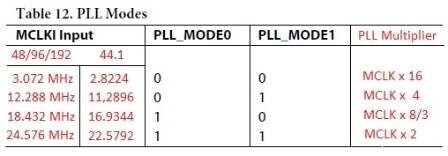
Unfortunately, figure 12 on page 18 of the ADAU1701 data sheet is confusing. It makes it appear that you must alter the PLLMODE pin configuration to change the sample rate. This table would make sense if it were set up like this:
Thus, with a 24.576 MHz crystal, both PLL_MODE0 and PLL_MODE1 should be pulled up. If you have PLL_MODE0 grounded, you're overclocking your ADAU1701 by a factor of two! This may explain the subpar performance you're experiencing.
For nominal operation, first either pull PLL_MODE0 high or replace the crystal with a 12.288 MHz one. Then, go into your SigmaStudio HW Configuration, Register Settings window and change the Program Length to 4x. You'll only have 256 instructions to work with, but that's the breaks.
Best regards,
Bob

Please log in to reply.