MCU RAM usage with delay blocks
Hi,
While working with delay blocks in projects for the ADAU1467, using SigmaStudio v4.7, I observed that when I add delay blocks, the size of the exported program (xx_IC_1.h) increases significantly.
It seems that not only does the DSP allocate its internal RAM for the delay line, but the initialization data for these buffers is included in the exported image, regardless of which memory type (DM0, DM1, or PM) I select for the delay block in SigmaStudio.
Based on my experience on ADAU176x, it did not happen with this family: Adding delays in ADAU176x did not increase the size of the exported file, and delay buffers were managed internally by the DSP.
Is there a way to avoid this RAM duplication? For example, can I prevent SigmaStudio from exporting unnecessary buffer data, or instruct the DSP to self-initialize delay RAM (as in the ADAU176x family)?
Calculating 192KB of memory for one second of delay with a sampling frequency of 48KHZ, and taking into account that some of our devices need up to 1600ms of delay, it is unfeasible to spend this amount of memory in MCU!!
Regards,
Etienne.
Audio Signal Processors
software
adau1467
sigma studio 4.7
SigmaDSP Audio Processors
Hello Etienne,
Please see if the below method works for you.
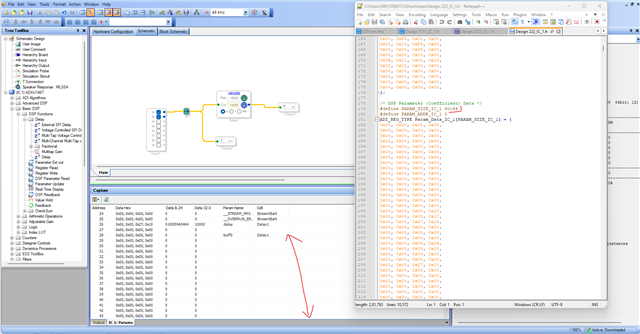
Before changes made in the framework configuration in sigma studio. This is what you are generally seeing.
You can see the memory allocated in the capture window as well as in the exported files.
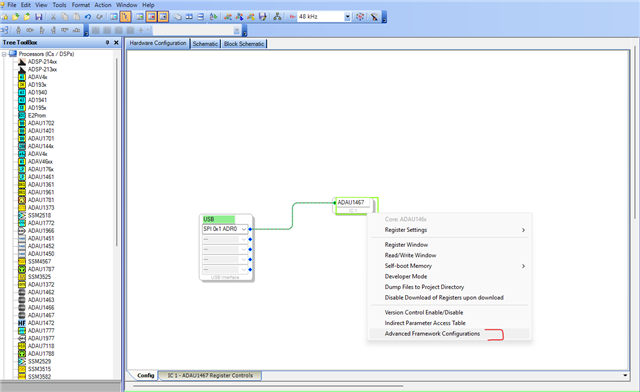
Please go the hardware schematic page >> click on the DSP IC >> Advance framework config like below
and check the below marked check box, then you can see the changes in the exported file.
I guess this is what you are looking for.
Regards,
Harish

Hello Etienne,
I am going to add a few comments to what Harish has mentioned. First, I think I should mention that you right-click on the DSP GUI object to get to that menu.
By getting rid of the zero initializations you will have random data in the delay buffers. There can be a few strategies to overcome this. One is after the DSP starts running, mute the audio output long enough to allow the buffers to flush out the random data. This might mess up a compressor or limiter threshold in the sidechain since some of the data might be close to full scale for 32 bit data. Remember there is 42dB of headroom in the DSP. I guess you could simply add a mute block on the output of each delay line. Have it muted when you do the last link/compile/download. Then export the system files. This way the mute will be muted in the export files. Then once the DSP starts you wait long enough for the delays to flush out then have the controller unmute the delay outputs.
Another way is to have your controller clear out the RAM after the program is loaded but before you start the DSP running. I am fairly sure the delay memory address is detailed in the address data in the export files.
I just do not want you to be surprised by loud noises when you start up and possible damage your speakers or your ears!!
Thanks,
Dave T
Ok, thanks for your quick answers,
I have tried the method suggested by Harish, and it does indeed fix the RAM usage issue.
Regarding Dave’s contribution, the proposal to erase the delay memory just before starting the program seems to me to be well thought out.
Let me try it out, and if any issues come up, I'll mention it in the thread.
Thanks!
Please log in to reply.