ADAU1452 TDM8 Slave Mode Setup
Hi,
I'd like to add an ADAU1452 board into 2 TDM_8 chains of a digital mixer. One chain is AD to DSP, CS5368 and ADSP 21489, another chain is DSP to DA, ADSP21489 and CS4385. So the ADAU1452 should be set as all slave. I connect the TDMOUT pin of CS5368 to SDATA_IN0, and SDATA_OUT0 to ADSP21489. BLCK and LRCK from the mixer are connected to domain 0, both clock input and clock output. All the serial ports are set to Slave from domain0. The level meter in the program shows the input signals are right, but the output has no luck. I can't make the output right. I've tested many ways, gets full level noise or silence, no audio. Reconneting AD straightly to DSP still gets the right sound. The DSP to DA chain has not tested yet. Please help.
Best regards,
Burt
Audio Signal Processors
adau1452
hardware
SigmaDSP Audio Processors
Hello BurtMeng,
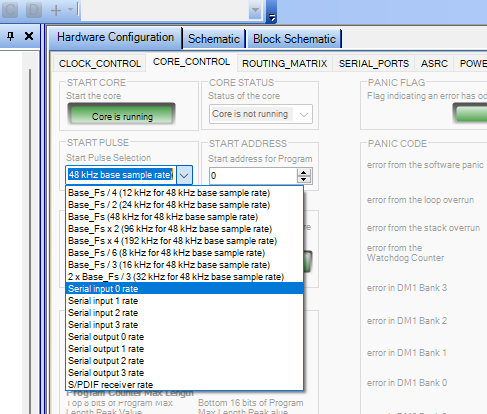
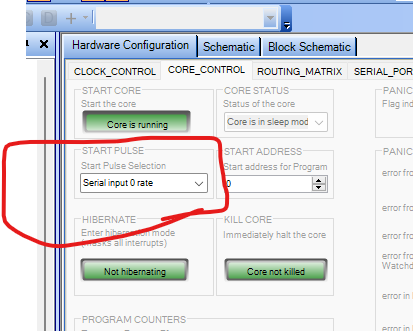
The only thing you did not mention is the start pulse setting. This sets when the program will start running. This needs to be synchronized with when the new sample is ready to be picked up. Since you have the same clock going to the serial input port and serial output port pins, it does not matter which you choose. Here is where you find the setting..
If you still have problems then you need to look at the clock and data pins with a scope to be certain they are correct.
Then also send over your project.
Thanks,
Dave T
Hi Dave,
The start pulse is set to serial input 0. I made a simple test project and found the input serial port 0 should be set as 16ch, although the signal path is 8ch,or I will get high level noise on ch4(maybe ch5), but I still can not get the right output. Unfortunately I have no scope. Please take a look at my project. Thanks a lot.
BurtTDM Passthrough.dspproj
Hello Bert,
Thanks for supplying the project. I will open it up in a bit but I really need to know the format of the audio being sent from the other device into the DSP. The number of channels, the number of bits per channel slot and of course the number of bits in the audio data itself. Then the bit clock frequency and the type of LRCLK (sample rate clock) that is being used. This is all covered in the "format" of the audio signal.
I cannot tell what the correct settings will be without knowing what is being sent to it. This is where a scope is needed but you should be able to get this info from the register settings of the sending device.
Then for the DSP output I need to know what the receiving device is setup to accept? Same questions apply.
I talk about it in this post about taking scope captures of the audio signals.
(+) How to Take Meaningful Screenshots of I2S Audio Signals - Q&A - Audio - EngineerZone
Dave T
Hello Dave,
The device sending into the DSP is an 8ch, 24bit convertion, 32bit channel length ADC CS5368. In the mixer it is software controlled and I have no scope so is a black box, everything is under testing, so I put 8 level meters to each input channel in the project file. The right metering means the right setting. I read the datasheet of CS5368 again and found the LRCK should be set as pulse mode which solved the noise of ch5. The right input setting still doen't mean the right output setting. The ADAU1452 board should acts as a staight line with slaved clock in my project file. The core control page also shows error in DM0 Bank 3.
The ADAU1452 output connects to ADSP21489 which is the heart of the mixer. It connected directly to CS4385 before. It means the mixer accepts the same audio format as CS5368 provides. I just break the audio path and insert the ADAU1452 board to get more amazing functions, but I'm still getting 8ch full level noise. When I connect the sdata cable back to CS4385, sound also goes back.
I'm a sound system engineer. I'm sorry for testing without a scope.
Burt
Hello Burt,
OK, Thanks for the info. You are very much trying to drive a car with a blindfold on and wondering if you need to turn right or left?
I have some videos on my personal YouTube channel about how scopes work and then I have a lab I have my students do. But, let's not get bogged down here.
First, you said in your first post of this thread that you connected the LRCLK and BCLK from the ADCs to both the serial input and output pins for the LRCLK and BCLK correct? Because that is important. There is no internal connection between the input and output port clocks when slaving. If you use internal clocks then of course they both have access to the same internal clocks.
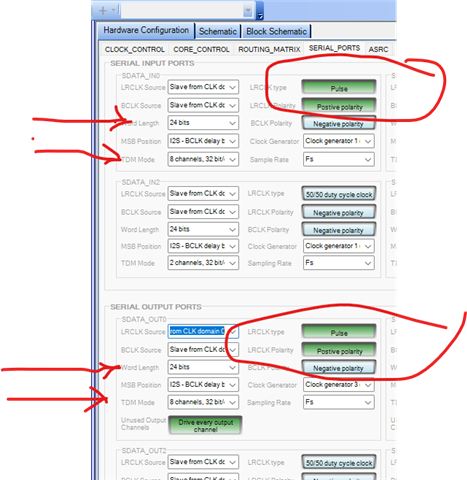
You need to change the settings to be a pulse mode for sure!
Then you need to have the data be 24 bits unless the ADC has a 32 bit output? If it does then you might have to lower the gain when it enters the core. But you are just passing this through so it would be up to the SHARC to deal with it although, you do plan to do some processing here but let's cross that bridge later.
You have to change it to 8 channels and 32 bits per channel slot.
Then I am guessing on the LRCLK polarity. Usually with a pulse style, the start of the frame is when the LRCLK goes from low to high. So a positive setting. As far as the BCLK is concerned. Without scope shots I am also working in the dark. You can go to the ADC datasheet and see what it says about the output format when it is set the way you are setting it? If there is an exact diagram then attach it.
Here is what I think you need to do:
Then I commend you for setting this correctly:
That is perfect!
A
All these errors mean nothing unless you set it up properly and clear it after the program is loaded etc. So do not worry about any of these.
It is actually unlikely that you will get zero errors when loading in a program especially when you first power up.
Now, how are you doing this physically? Long jumper wires? How is power handled? What type of cables? Take a picture of your setup. There is a lot of room for issues with complicated setups and hacking in other boards. I have been-there, done-that enough times to have run into issues often.
Dave T
Dear Dave,
Thanks a lot for your replying. I'm ont at home today so I can't take pictures. I use very short cables to connct the pins. The clock cables are connected to both input and output zones. From the meters in the project I can make sure the input is correct with the settings of pulse LRCK, negetive polarity LRCK, 24bit length, 8ch 32bit TDM. The input meters are jumping with the input signal correctly. But I can't get the right output. If I solder the sdata input and output cables away from the ADAU1452 board then connect together, the sound will be okay. It means the jumping cables affect nothing. I have tested many ways of output settings and sdata out ports 1 to 3 with no luck. I'm planning to order an ADAU1467 board and try. I leave this ADAU1452 board for learing SigmaDSP.
Best Regard,
Burt
Hello Burt,
In all my testing programs I always have the ability to select a different input. So I can select input from the serial input ports but also from an oscillator generated in the DSP. So this is a known good signal source and at a known level.
Now you mentioned the ADAU1452 eval board. You mentioned other codecs and DACs and so I assume you are not trying to use the codec built into the eval board correct? Because that codec cannot easily be set to receive TDM-8 signals so if you are listening to the built in outputs in the eval board it will be a mess and not work properly. I detailed the modifications required in the user guide for the eval board.
At this point I think you have to correct settings on the DSP. So it is a matter of the receiving device. Is it set for the same signal? (You did mention jumpering and bypassing the SigmaDSP so I think you are good there but I need to mention it. Then it is cabling or ground loops and that sort of thing. I will avoid talking about a scope again! LOL
Dave T
Dear Dave,
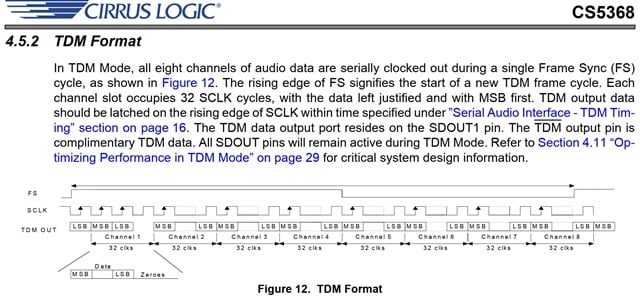
Today I tested a new ADAU1466 board, I get the output sound, but not high quality, sounds like modulated hiss mixed in the music. The system is the same as before: ADC to ADAU1466 to main SHARK in the mixer. According to the datasheet of ADC CS5368, I set the input port as pulse/positive LRCK, positive BLCK, left jusified, is it right? I can get the best output with these settings, but not perfect. I have never been succeeded on ADAU1452 with these settings before. The same settings apply on output port will get worse sound. I tried many other settings but can not get the perfect output. To aviod ground loop, I use a separate 5V power source and connect the ground cable to the main capacitor negative lead on the main DSP board. The clock and data wires are about 10cm of length, not tied together. Any kind of direct connection via those wires, ADC to main SHARK, main SHARK to DAC, even ADC directly to DAC also gets perfect sound. It mains the DAC uses the same format and clock as ADC. Without a scope, this test helps a lot. I'm planning to buy a logic analyzer.
Burt
Datasheet of ADC CS5368
Dear Dave,
I did a test today. I added a sine wave generator to an output channel and read the spectrum from the RTA window of my mixer. The generator was set to 1KHz, -6dB. I could see harmonics from the RTA windows, even at about 160Hz. I also heard the tone with a little dirty hamonics and the 160Hz tone. Nomatter how I change the output settings, I can not get the right output. I have ordered a logic analyzer to help.
Burt
Hi Dave,
Tonight the test I did was important. I found the power supply from USB bus was 4.7V, caused a 3.0V output from the LDO. I think it was the reason of wrong timing, maybe also the reason of ADAU1452 test failure. The 5V power was connected from the mixer before. To avoid ground loop, I use USB power instead. Now the only setting of TDM in from ADC is LRCK pulse/negative, BLCK negative, left justified. TDM output to main SHARK DSP still have high THD problem. I added an AES/EBU output circuit and connected to BSS soundweb processor, the sound was still not clean enough with the best setting. Tomorrow I will test the SPDIF port. I'm looking for the buffer circuit, maybe WM8805.
Burt
Please log in to reply.