Serial Port Setting to CIRRUS Products
Dear Dave and All,
I'm modifying my digital mixer by adding ADAU1466/1452 chip into the TDM signal path. The mixer uses Cirrus Logic ADCs and DACs, the heart is ADI SHARK. I have tested for a long time but still get high THD sound. From the datasheet of Cirrus, we can find the difference of them. The channel block is delayed by one bit clock from LRCK rise. How can I set the serial ports as this? I2S with one bit delay does not work properly.
Thanks to all,
Burt
Audio Signal Processors
software
SigmaDSP Audio Processors
adau1466

Hello Burt,
You have to set the SigmaDSP in pulse mode with positive polarity and format is 1-BCLK delay.
Not sure whether you want the setting in input side or output side, but the settings are similar in both sides just like below screenshot.
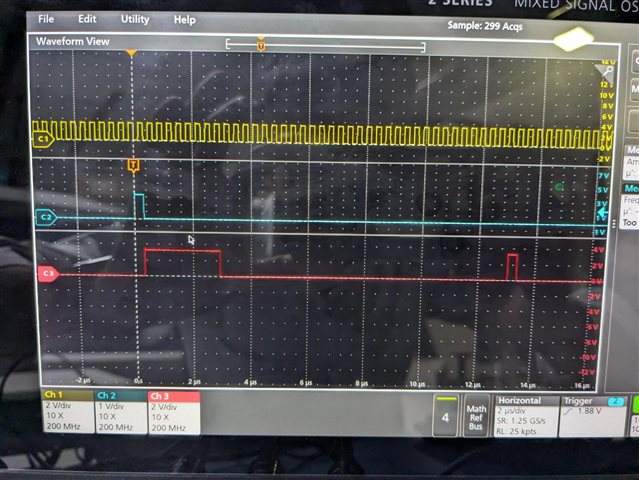
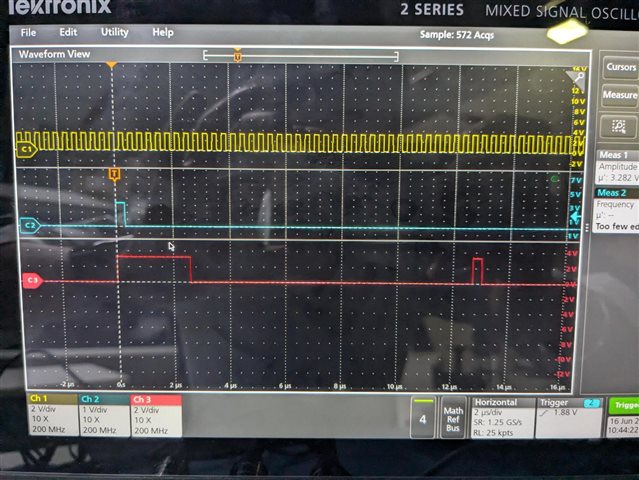
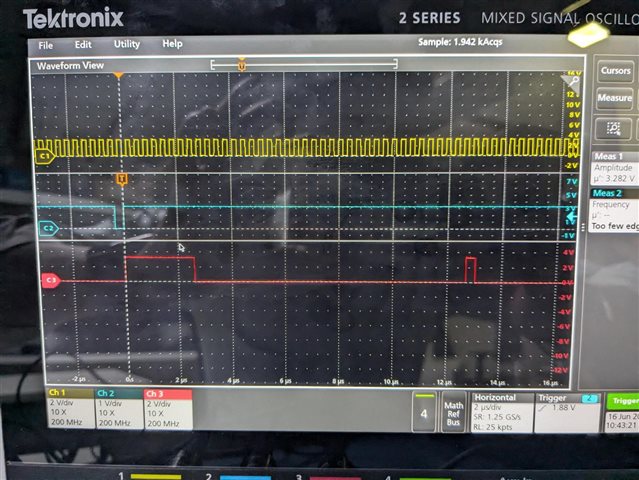
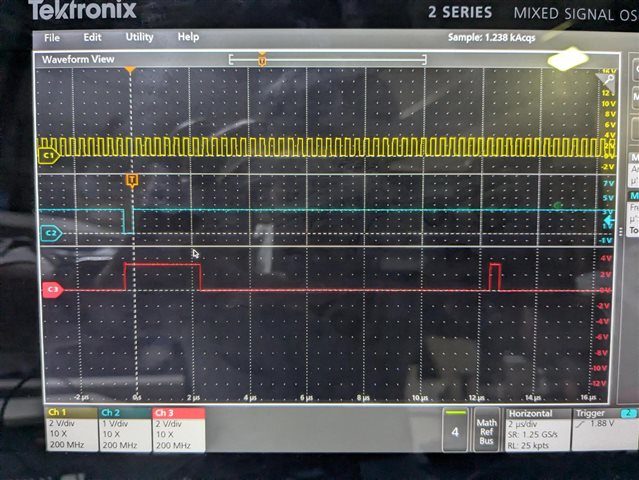
Below are some of the scope shots with pulse mode settings for your reference.
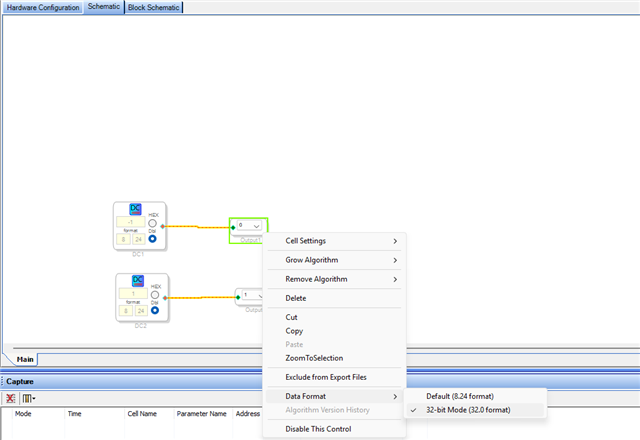
This is my schematic, and I set it to output in 32.0 mode.
I'm feeding -1 to output 0. so, my 8 MSB's are '1' for channel 0 which is -1 in 2's complement. (refer datasheet for number formats)
1) Pulse mode - positive polarity- 1-BCLK delay
2) Pulse mode - positive polarity- Left justified
3) Pulse mode - Negative polarity- 1-BCLK delay
4)Pulse mode - Negative polarity- Left justified
Hope this helps!
Regards,
Harish

Dear Harish,
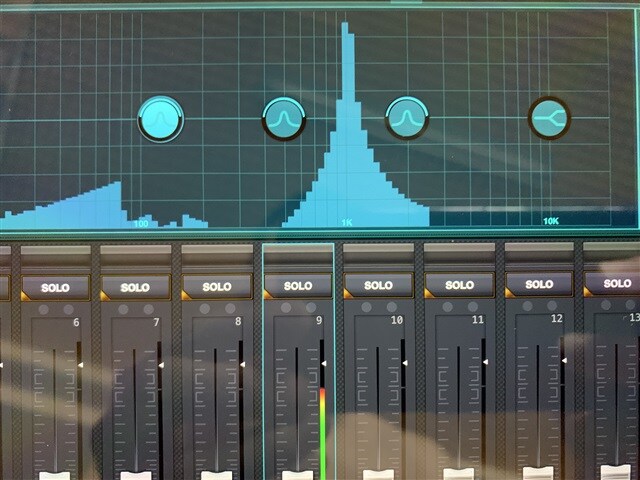
Thanks a lot for your replying. The scope shots help me to understand the clock settings. I set the serial ports as you showed, the problem is still the distortion. I put a sine wave generator with 1KHz/-6dB setting in the project and feed to the output port directly. From the RTA screen of the mixer, I can see a lot of harmonics. The sound is dirty. The 1466 board should follow the clock of the mixer so I set the clock to slave, the clock wires are connected to both input and output side.
Best regards,
Burt
Hello Burt,
So, the serial output port is a slave, right? You may need to use the ASRC if your DSP sample rate is derived internally (Crystal and PLL).
where is the MCLK to the DSP coming from? Is it from a crystal or other chips in the system?
what's the sample rate and how many channels?
Kindly attach your project and the distortion picture that you are observing at the output. It seems like a clocking issue or signal integrity issues.
Regards,
Harish
Hi Harish,
All the serial ports are slave from the mixer, the MCLK is from the on-board crystal. I thought the 1466 chip ignores the MCLK input and generate the internal clock by PLL if all the serial ports are slaved and the PLL source is set to PLL clock. And I don't know how to set the ASRC. If I dismantle the crystal and connect the MCLK input to the mixer, is ASRC still needed? I also need the S/PDIF input with ASRC but I don't know the way too:(
Please take a look at my project file. Please add the ASRC if needed. If this passthrough test is passed, I can build my DSP system. I'm not at home today so I can't capture the RTA screen.
Best regards,
BurtTDM TEST 1466.dspproj
Hello Burt,
I am on vacation today so this is a quick reply.
the PLL is derived from the MCLK input. So it is synchronous to it. The internal system clock is divided down to eventually be the sampling rate.
Since you are getting your signals from external sources then the sampling rate will NEVER be exactly the same. It is impossible for two clocks to be exactly the same. So what will happen is the samples will come in and be held in memory. Then the core will get a start pulse to tell it to "GO!!" because it is a new frame. So it picks up the sample from memory and processes it and then drops it off in a memory location. Then the serial output port will pick it up when its LRCLK edge comes by.
Since all these rates will never match, what happens is that every once in a while a sample will be missed or a sample will be picked up twice. This can be audible and you can see it in distortion plots.
The solution depends on your entire system and looking at clocking for your entire system!! If you are getting things from Bluetooth or networks then the actual source MCLK is not available. If you have converters then you can send the same MCLK to all the parts. The ADCs, the DSP and the DACs and you are good.
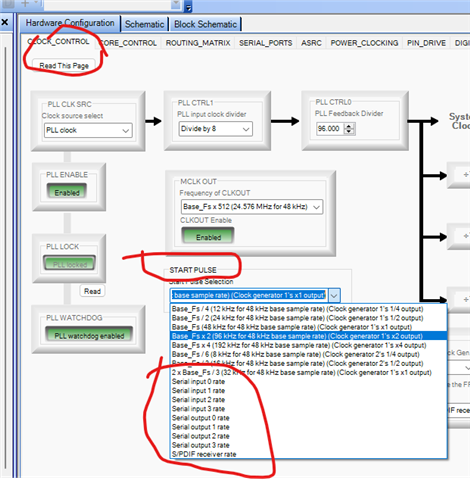
Most of the time there is a mix of sources. So either you use ASRCs for everything to go into and out of the core, which is usually not practical and desired, or if you have a system controller you could change the Start Pulse setting in the DSP to tell it to pick up the new sample when the serial port says it is ready!
But, if you switch to a different input that is on a different MCLK then you need to change it to that serial port. Mute the audio and change it then unmute the audio. A system controller can do this.
But, you still have to deal with the DACs. If they are on their own MCLK then you have to use the ASRC.
This part is super flexible so it is very difficult for me to tell you exactly what to do because it all depends on YOUR system!
And also what you want to do or not do.
By the way, when you set the start pulse to some external clock, you will end up with a variable about of instructions per frame. This is rarely a problem because this processor has a lot of instructions per frame.
Dave T
Dear Dave,
Thanks a lot for your reply on vacation! From the sound replay I think it is the synchronization problem, but I think the PLL will follow the input port since I set all the ports to slave and they share the same domain. In my system, the mixer provides all the needed clocks (includes MCLK) to the 1466 board, ADCs and DACs. Everything is synchronized to the heart of the mixer. I just simply connect the sdata_out pin of the ADC straight to the sdata_in pin of the DAC and get the right sound. But I have not tried to connect the MCLK to 1466 chip. If it is necessary, I have to remove the crystal. I wanted to use the src function, because I'm lack of SigmaDSP programming knowledge, I don't know how to set the ASRC:(
Best regards,
Burt
Dear Dave,
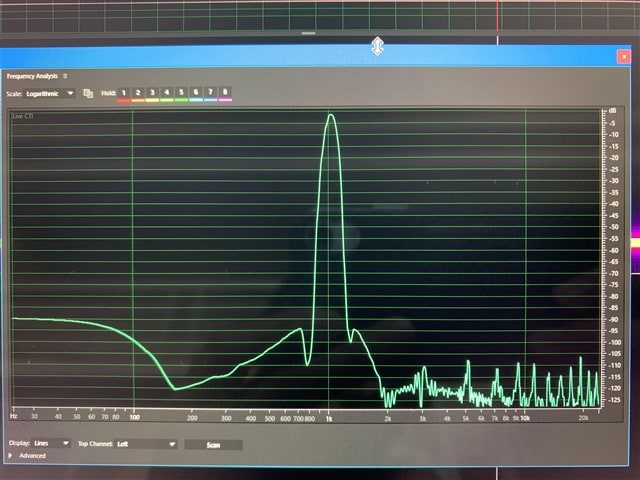
I hope you enjoyed the vacation. I did a quick setup, removed the crystal and feeded the MCKL from the mixer. I found tthat the HF harmonics disappeared, only some LF noise with very low level and it was inaudible. I recorded to USB memory with wav format and analyzed by Adobe Audition, the noise was -90dB lower than the signal. The recording source was the direct input of the channel, not bus mixing. It is good enough, at least better than multiple ADs and DAs. Thank a lot for your help!
Best Regards,
Burt
Please log in to reply.