No sound on down-up sample
Greetings,
I'm working on a project on the eval board EVAL-ADAU1467z
I have a portion of the project in a downsample/upsample loop (in order to save processing)
The software sample rate is 96KHz everything works
I realized that the codec was in standalone mode so 48KHZ (filter cutoff freqs were wrong, also delays were 2x larger than expected, that's how I realized)
So with the help of an example project I found on the forum I managed to put the codec in managed mode (physically by flipping the switch on the board) change the clock source freq by changing the divider value and manage the codec via i2c. Now the codec runs in 96KHz
That works until I add the "downsample/processing/upsample" portion of my project (which should run in 48k) then i got no sound.
So, to sum up :
The sound passes when in standalone mode 96K software / 48k hardware with down/up sample path
The sound passes when in managed mode 96K software / 96k hardware without down/up sample path
The sound does NOT passes when in managed mode 96K software / 96k hardware WITH down/up sample loop => why ? How can I make it work ?
I attached 2 example projects (same register config, one has down/up sample path and does not pass sound, the other does not have the path and passes sound)
Thanks
Repro_no_sound_on_down_up_sample.zip
Edit Notes
added file
[edited by: JBAX at 5:14 PM (GMT -4) on 26 Jun 2025]
Audio Signal Processors
software
adau1467
SigmaDSP Audio Processors
Hello JBAX,
There are some bugs in this, when multi rate blocks are included in the schematic, the I2C master control port doesn't work as expected. so please try the below method as a workaround.
In your project, I noticed that there is no program to split the I2C registers, it must be added in schematic while usually programming the CODEC from master control port. But, in the below workaround we are not going to do that. I also noticed that your project doesn't have any anti-aliasing filters.
Now, we will have two programs one to program the CODEC, Link compile download this program while S2 is set for I2C mode, then DON'T reset/power cycle the board, now link compile download the actual program with multi rate processing, now you will be able to hear the audio.
1) codec program
2) actual program
I will attach the projects and the xml file below.
codec_prog_at_96KHz.zip
please refer the below thread for more info. Go to the bottom and check out my reply.
ADC192k down to 12k - Q&A - SigmaDSP Processors & SigmaStudio Dev. Tool - EngineerZone
Regards,
Harish
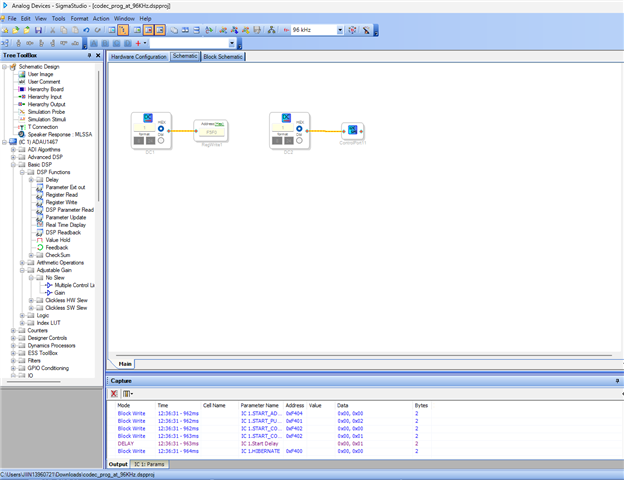
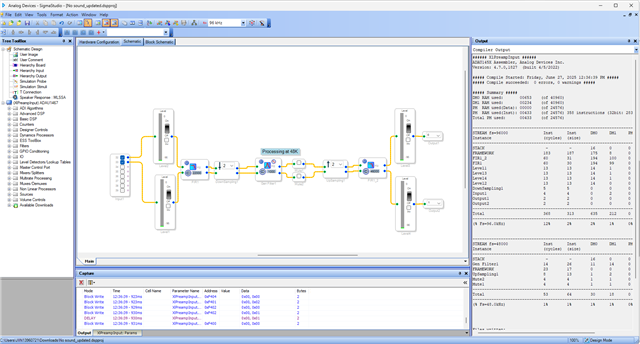
Remark : You write 1 to the F5F0 register but I've done this in the IC register controls ("multipurpose1" tab, "secondary I2c m*ster enable" parameter, at the very end) so it should not be necessary right ? In my tests it is equivalent.
I've tested the workaround and it indeed seems to work.
Regarding the bug, I'm happy to know there is a bug and a bit gutted that I didn't find the forum post in my research as I spent quite some time trying to figure it out.
Are they plans from AD to fix it ? I must admit the workaround is no ideal for my project.
Anyway, thanks for the workaround
Please log in to reply.