EVAL-ADAU1452REVBZ - no serial output
Hi,
I have been testing the EVAL-ADAU1452REVBZ with 2-channel SPDIF input, and following that I2S, via ASRC, and was previously getting audio out via both 3.5 mm analogue outputs, as well as via SDATA out.
Now I am not getting any audio output at all, and suspect a hardware failure. However, it is possible that it is caused by an error on my part in software.
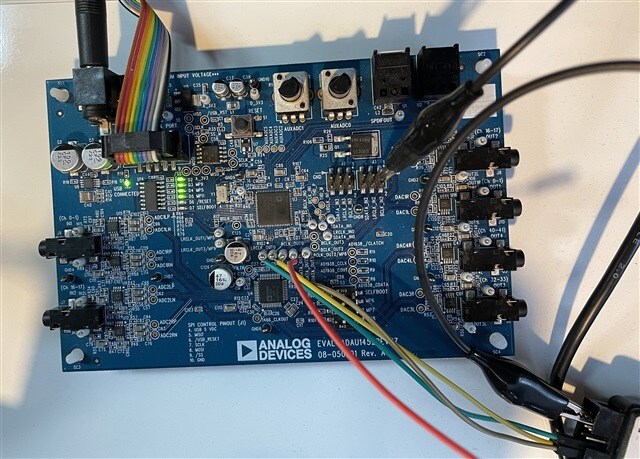
I have started from scratch with an oscillator and level control fed to channel 0 of serial output. There is no output from the SDATA_OUT0, as shown, only bit and sync clock.
See connections below
I have also attached my project file (created using Sigma Studio v4.7)
testtone.zip
Would be much appreciative if someone could take a look and see if I have overlooked something crucial that would result in there being no audio on the output
Thanks,
James
Audio Signal Processors
adau1452
hardware
i2s
SigmaDSP Audio Processors

Hello James,
Looking at your project,
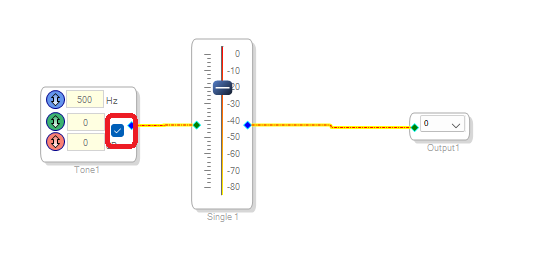
You will need to enable/unmute the oscillator block, then only you will get the data at the output .
Regards,
Harish
Hi Harish,
Thanks for your response. I can confirm that the oscillator was unmuted when I was running my tests.. As I mentioned in the original post, I previously had audio output with SPDIF input and I2S input to the DSP before, but now regardless of the input or internally generated signal, I am not getting any output. Just using the internally generated signal now to try and isolate the problem.
Thanks,
James
Hello James,
Gee, I do not see any reason for why you do not have output.
I was going to suggest you check the CLKOUT pin but you have LRCLK and BCLK in your screenshots! So no reason to not have data.
I checked your setting for start pulse and other core settings and that all looks fine.
I suggest you use some READBACK cells to see if you can actually "see" data in your program inside the core using the USBi.
A simple READBACK will show you changing and data that is non-zero.
You also could use a RealTime display to watch the data.
Using an internal oscillator is a good idea.
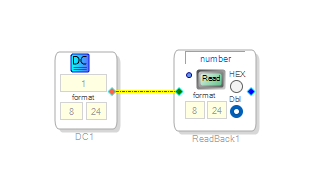
The first thing I always do with my projects is put in this:
This is a simple test to see if I have communications with the DSP core. It tells me the USBi is connected and able to program the DSP and read back data.
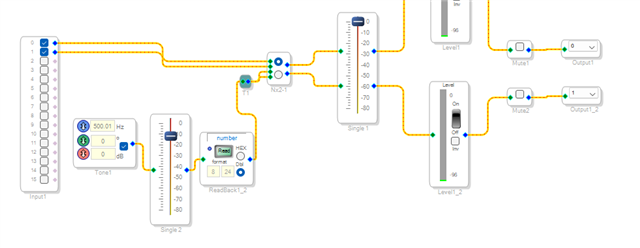
Then add a meter into your project!! See if you see level and see it come and go when you turn the oscillator on and off.
you can also add a READBACK on the output of the osc if you like. Like this:
You may want to watch my video on YouTube about Troubleshooting. I cover some of these topics.
How to use SigmaStudio for troubleshooting
Dave T
Hi Dave,
Thank you. Agree that metering in the project is a very fundamental tool for diagnosis, while the quick example file does not include it, I have looked at this with a level meter before the output and I can see the oscillator signal come and go when turning the oscillator on and off.
Thanks for the tip on the READBACK and the link to the video, very useful.
An additional observation since posting this, when I probe SDATA_OUT1, 2 or 3 with my logic analyser, I notice they are always reading low, while SDATA_OUT0 reads high. This seems to be the case regardless of which output I send the data to. Eg if I send the oscillator to output 32, SDATA_OUT2 reads low and SDATA_OUT0 is still high
Thanks,
James
Please log in to reply.