TDM8 Master Output Setup
My ADAU1452 takes a TDM8 signal in SDATA_IN0. I then want to output this TDM8 signal to SDATA_OUT2.
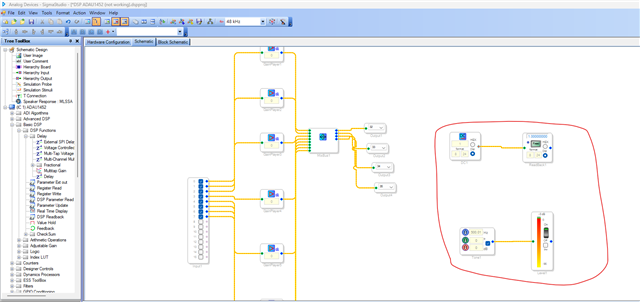
I have the following configuration in SigmaStudio:
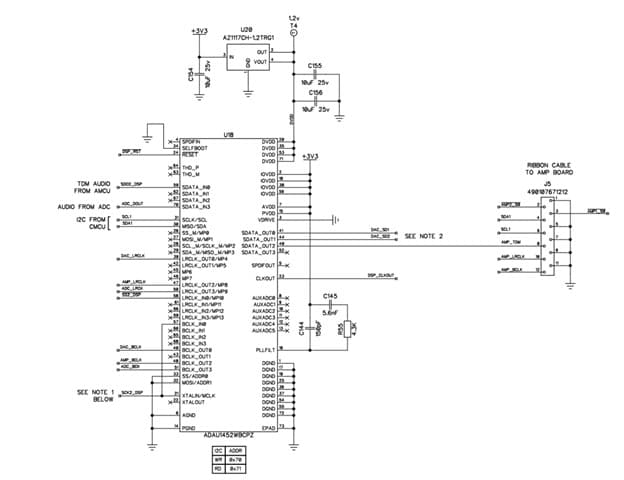
This is my schematic (very simple, I just want to get it to work):
When I run this project, I do not see the BCLK_OUT2 running or the LRCLK_OUT2 running, even though I have set SDATA_OUT2 clocks correctly.
I previously had this working with a ADAU1401. We now need to use the ADAU1452. Here is my ADAU1401 setup:
Apologies if this question seems ignorant. I'm sure the answer is simple, I just can't seem to figure it out!
If I change the PLL CLK SRC to use the MCLK directly, I do get a BCLK and LRCLK, however not the right frequencies, and in the data sheet it explicitly says 'In most use cases, do not use the direct XTALIN/MCLK input option because the range of allowable frequencies on the XTALIN/MCLK pin is is an upper limit that is significantly lower in frequency than the nominal system clock frequency.'
Any help would be greatly appreciated.
Cheers,
Daz
Audio Signal Processors
adau1452
software
sigmaStudio 4.7
SigmaDSP Audio Processors
Hello Daz,
Your schematic and pictures are not visible; I can just see the picture icons. I'm sure where the issue is.
Anyway, I have created a project from what you described. please try this and get back to us.
Daz3 said:
If I change the PLL CLK SRC to use the MCLK directly, I do get a BCLK and LRCLK, however not the right frequencies, and in the data sheet it explicitly says 'In most use cases, do not use the direct XTALIN/MCLK input option because the range of allowable frequencies on the XTALIN/MCLK pin is is an upper limit that is significantly lower in frequency than the nominal system clock frequency.'
Yes, you MUST choose 'PLL clock' in the PLL clock source register, this register is not quite named correctly. It's not the source to PLL, but the source to the system clock. If your MCLK in is 12.288MHz and you set this register to 'Direct from MCLK', then your system clock will be 12.288MHz which is 24 times slower than the nominal system clock (294.912MHz), and all clocks derived from clock generators will be wrong.
The attached project will help you with correct configurations.
TDM_8.dspproj
Regards,
Harish
Hi Harish,
Many thanks for your reply.
Harishgowtham said:
Your schematic and pictures are not visible
Huh weird, I can see the images on my PC.
Harishgowtham said:
Yes, you MUST choose 'PLL clock' in the PLL clock source register,
Okay, noted.
Harishgowtham said:
The attached project will help you with correct configurations.
Thanks for sending. I tried your project. I changed the outputs to numbers 32-39 so it would output on SDATA_OUT2. However I still see no BLCK or LRCLK on my SDATA_OUT2.
I've attached the aforementioned 2 projects. One is my current ADAU1452 project that is not working, the other is my previous ADAU1401 project (on a different board revision), that was working.
Here is a picture of the DSP schematic (hopefully it shows).
DSP ADAU1401 (working).dspproj
DSP ADAU1452 (not working).dspproj
Please let me know if there's something wrong with the clock settings, or something obvious I have missed. Also let me know any other details I can provide.
Really appreciate your help!
Daz
Hello Daz,
Is the communication between the DSP and USBi fine?
You can check that with the schematic below.
Your project does work fine in my eval board. So, I don't think your project has a problem.
It seems like you are not using sigma studio and booting from an MCU. Is that correct? I can also see there are no pull up resistors in I2C lines. (maybe It wasn't covered in the schematic you sent)
I can see that your project doesn't have a USBi module, so if you are booting from an MCU then just step back for a moment and connect the USBi and program the DSP from sigma studio, it will help you debug the problem. If everything is working fine when connected to sigma studio, then we can concentrate on the communication between MCU and DSP.
Regards,
Harish
Harishgowtham said:
Your project does work fine in my eval board. So, I don't think your project has a problem.
So your BCLK and LRCLK on SDATA_OUT2 are outputting and functioning correctly?
Harishgowtham said:
It seems like you are not using sigma studio and booting from an MCU. Is that correct?
Yes you are correct. A very important point I missed out, my apologies.
Harishgowtham said:
I can also see there are no pull up resistors in I2C lines. (maybe It wasn't covered in the schematic you sent)
Yes they are there, just elsewhere in the schematic. But good shout.
Harishgowtham said:
so if you are booting from an MCU then just step back for a moment and connect the USBi and program the DSP from sigma studio, it will help you debug the problem.
Unfortunately I don't have the means to connect the USBi and program in this way. This is on a custom board connected directly to the MCU. However I am not getting any errors communicating over I2C with the DSP, and I have noticed changes (e.g. changing the PLL Clock Source register), so I suspect my code is downloading to the DSP. That being said, diagnosing in the dark like this is certainly not ideal.
As mentioned, I was able to get this to function using the ADAU1401. Obviously as this is a different chip the schematic for this was different, but not drastically so.
If you're suggesting that the project and configuration on your eval board is working, then I worry the issue is something to do with the hardware.
Something to note is the MCLK input to the DSP is the same BCLK going into BCLK_IN0. Both 12.288MHz. I did this previously with the ADAU1401 and it functioned.
Any other things that come to mind that I can test or try?
You help is very much appreciated Harish. Many thanks,
Daz
Hello Daz,
I will jump in here and add a few comments. Harish and I work together a lot and are on opposite time zones on the planet which helps us cover the forum!
I looked at your project. The first thing I noticed was that the serial input port is a slave and everything else is a master and you are not using ASRCs but then I did read in the earlier posts that you are sending the BCLK-IN0 to the serial port and also to the MCLK input. Perfect! This means that the DSP core will be running in synchronization with the incoming rate so no ASRC needed and the clocks developed by the clock generators will also be in sync. The LRCLKs will not be exactly the same as in going low at exactly the same time but they will not drift around such that you miss a sample or repeat a sample. We have internal buffers to adjust for this. However, in your system I am not sure if you are doing the same? If the signal is going back to your MCU then your program needs to be written such that it looks for the transition on the serial output ports if it is reading that data. If it is just going out to a DAC then it should not be any problem.
Have you looked at the clock and data format coming out of your MCU and also coming out of the DSP? I know you reported you did not see any clocks but do you see data? If you do not see clocks then there is something up with the MCLK input. Look at the CLKOUT pin. That is the output of the PLL. See what is going on there?
I see you have a net called DSP_RST. What is going on there? I have seen this part be a little fussy with the reset line. If it is too quick after power up or too fast it will not properly initialize. I am going from memory here but you should hold it low and wait for the power rails to be stable. Then hold it low for another 200ms or so. Look at the datasheet of our reset generator. Those work great with these parts. I think it is 200ms or perhaps 300ms? Anyhow, wait a while then take it out of reset and then wait for the internal initializations etc. Let me stop here and just point you to the datasheet.
There is a section called "System Initialization Sequence" on page 32. There is also a handy table, Table 27, that walks you through what you should be doing with the init process. These are all really important. I spent a lot of time working on this a number of years ago now. I did not write the original datasheet but I wrote the extensive updates in 2018 listed in the revision history. Table 27 was one of the things I made adjustments to based on our experience with the part and helping customers work out issues.
I also suggest you think about one of Harish's suggestions which is to use the USBi. It will save you a ton of time and frustration if you could leverage the beauty of SigmaStudio to work out the program. All you would have to do is bring out the I2C lines and ground and in your MCU code simply disable the I2C port and make sure they are tri-stating so they float.
I also want to make some other comments about troubleshooting. You are doing this the absolute most difficult way and taking zero advantage of the power of SigmaStudio! I am guessing you might be a musician, imagine you setup the entire PA system. Then the first thing you do is walk up to a mic on the stage and say "Testing Testing" ! Then nothing is coming out of the PA speakers. Then you ask the engineer what is wrong? It could be ANYTHING!!! Mic could have a On/Off switch? No power to the stage? Mic plugged in wrong, channel not on in the console, You get the point. You have to be able to isolate where are you getting and losing signal? Setup a switch in the project with a test oscillator. Then you can test the output. Setup meters so you can test the inputs. Setup a DC cell and Readback to test if the core is sunning! Watch my video on Troubleshooting. How to use SigmaStudio for troubleshooting - YouTube
You should be able to get some ideas.
I also have a post about taking screenshots and looking at serial signals using a scope. I really need to make another one specifically about TDM but have not had time to do that. (+) How to Take Meaningful Screenshots of I2S Audio Signals - Q&A - Audio - EngineerZone
Checking that the signal coming in is there and what you expect out of your MCU is great and then "seeing" what is coming out of the DSP is also great.
Enough for now.
Thanks!!
Dave T
Hi Dave,
Wow! My sincere thanks and appreciation to you Dave for taking the time to explain things in such detail.
DaveThib said:
If it is just going out to a DAC then it should not be any problem.
Correct. It's just going back out to a DAC.
DaveThib said:
Look at the CLKOUT pin.
Ah, very good point. I couldn't see anything on the CLKOUT. So clearly the DSP isn't running.
DaveThib said:
I also suggest you think about one of Harish's suggestions which is to use the USBi.
DaveThib said:
All you would have to do is bring out the I2C lines and ground and in your MCU code simply disable the I2C port and make sure they are tri-stating so they float.
I completely forgot that the USBi interface can work over I2C! For some reason in my head I thought the evaluation boards had some additional interface.
I have done that, and can confirm that when programmed via SigmaStudio, I can see BCLK, LRCLK, and a CLKOUT! Following Harish's schematic, I can see that communication between the DSP and USBi is okay.
So clearly the issue is related to my DSP download.
I then investigated my SigmaStudioFW.h implementation, and realised I took my 'SIGMA_WRITE_DELAY' function from this forum post:
Boot DSP
In this post (and in others I found online for SigmaStudioFW.h) the function is implemented with a simple busy loop:
nCount=0xFFFFF;
for(; nCount != 0; nCount--);
Obviously if your MCU is running at higher speeds (as mine is) then of course that will be too fast!
DaveThib said:
There is also a handy table, Table 27, that walks you through what you should be doing with the init process
An incredibly helpful point. Looking at this table made me realise my mistake.
I have changed the 'SIGMA_WRITE_DELAY' to instead have a slightly longer delay, such that is more than enough to satisfy the timings in this table.
After doing that, I can see the BCLK and LRCLK, so can safely assume my DSP is running! The problem was the download from the MCU not having the correct delay timings. Urgh, such a simple rookie error. But glad it's fixed.
My sincere thanks again to both of you Harishgowtham and DaveThib. Legends.
Cheers!
Daz
Please log in to reply.