How can I adjust AEC parameter ?
I am using the AEC algorithm module to cancel echo, and I refer to the DEMO project.
The demo project use " AEC+RES+NR", however, after these signal processing I found that I cannot get far voice except some noise.
As I disabled the RES module I can get the far voice, but there is still some residual echoes.
It doesn't work whatever I change the parameter "Temp Smoothing, Spectral Smooth and Smoothing Factor".
Could you please tell me how to solve this problem? And how to change the parameters to cancel residual echoes?
Audio Signal Processors
adau1452
software
sigma studio 4.7
parameters
SigmaDSP Audio Processors
sigmastudio4.7
Show More
Hello Yuchen001,
Which band are you using? Is it the wide band or narrow band?
Have you made any changes in the demo project? if you did then please attach the project.
It would be great if you can record the output and send us, we can see at what level the echo is present.
Please also attach the picture or block diagram of your setup.
This information will be helpful to better understand what's happening in your system
Regards,
Harish
Yes, I put the projest in the attachment.
Please help me to cheek the module and setup I use first.
The output voice will upload later.
Thanks very much!
7356.Design 1.dspproj
Hello Yuchen001,
Please find the attached working example project for the wideband AEC algorithm.
Please try this project and see if works as expected for you.
adau1452_aecnr_wb_trial (1).zip
Regards,
Harish
Thanks,
I tried the wb project,after "AEC+RES+NR", I can get voice from "MIC IN".
However there is some other voice witch I don't want. It sound like some music, and it almost coverd the voice I want.
Could you please tell me how to cancel these noise?
Play this audio clipPlay this audio clip
Hello Yuchen001,
Harishgowtham said:
adau1452_aecnr_wb_trial (1).zip
I have tried my project attached above, below is my recording and it seems to be working fine for me.
So please attach your hardware setup, what mic are you using? and how is it connected to the board?
Make sure that the grounding and other things are properly handled.
does your mic sound the same before AEC block? Connect an output block right after the mic input and see how it sounds.
Below is what I recorded.
Play this audio clip
So, it may be a hardware or connection related problem, please attach your setup and hardware schematic and let's see if we can find something in there.
Regards,
Harish
Hi, Harish
I think it is not the problem of my hardware, because if I bypass the AEC, the voice seems fine.
Play this audio clip
And the noise whitch sound like the sound of a water drop disappeared if I disabled RES
I don't know why
Best wishes
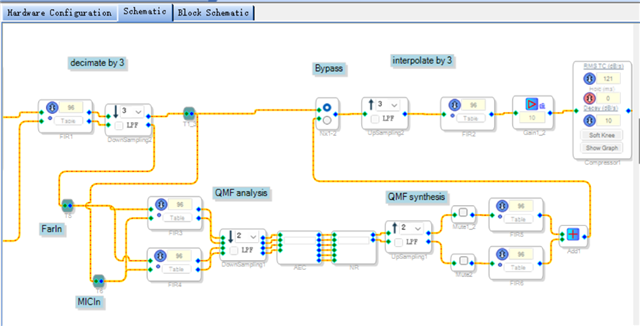
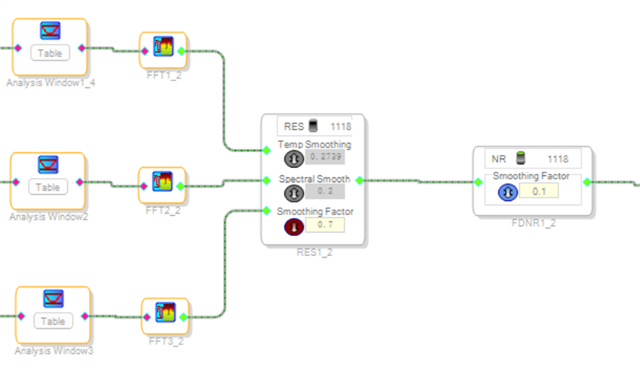
Hi,Harish,
Could you please help me to solve this problem?
Thanks
Regards,
Hello Yuchen001,
I couldn't reproduce this issue in my hardware, so are you getting the same result every time you run?
Can you confirm all similar example projects that you have behave like this? did you try creating a new project and test the same?
Yuchen001 said:
And the noise whitch sound like the sound of a water drop disappeared if I disabled RES
did you find any significant change (noise/echo/distortion) in the audio output after disabling the RES module (other than the disappearance of water drop sound) or it's just clear?
The example project that you used initially and the project I attached, those two projects just behave in the same way? and you got the same water drop sound before disabling RES module?
Please attach a picture of your hardware setup.
Maybe can you please record the audio for few seconds with RES enabled and disabled, just to see the difference,so that I can ask someone reg this internally by showing that clip.
Regards,
Harish
Hi, Harish,
Yes,it appeared every time I run the hardware.
When I disabled RES, there is still some echo.
The project I used initially cancelled voice from mic, I can only hear the water drop sound. After using the demo you proved, I can hear voice from mic, but problems like water drop sound still exist.
The hardware project is big and not so convenient to put here, are there some key point need to notice? What are the factors that might cause this water drop sound?
Here is the recording before ans after disabled RES:
Play this audio clip
Play this audio clip
2235.Design 1.dspproj
Hi, Harish.
I put the new project.
There is still the problem.
This has been assumed as answered or has been handled in PM or email.
Regards,
Harish
Please log in to reply.