Add two input channels to ADAU1701
Hello:
I am looking to add two analog channels to the inputs of the ADAU1701, presumably using the i2s interface. Can you direct me to any parts suggestions for the ADCs and any suggested reference schematics?
Thank you
Audio Signal Processors
adc
hardware
Additional input
processors and dsp
reference design
SigmaDSP Audio Processors
Processors and Microcontrollers
adau1701
Show More
Hello Mark,
Gee, as with so many things with designing, there are so many options and lots of factors to consider. We do not have a good option for a stereo ADC. All of our options are rather old. We have the AD1871 but that stereo ADC is not recommended for new designs. We have several quad ADCs like the ADAU1977 or ADAU1979. But this is a larger part that would require a system controller and I do not know if you have a system controller in your design?
Then the other options are our codecs like the AD1938 which is a quad ADC but eight DACs which you probably do not need.
My first suggestion is to use two ADAU1701 DSPs. Then connect the serial ports between the two so they can exchange audio data. Then you could also run the DACs differential and gain a few dB better specs.
If you go to an external part like the AD1938 then I suggest you just move over to the ADAU1452 or ADAU1467 family of parts to give you more ADCs but a lot more DSP power for processing. Just look at the EVAL-ADAU1452RevB evaluation board as a design suggestion and a good start for your design.
There are parts from other companies and other people on the forum has mentioned using them. As far as which exact one I have to leave that up to you and I do not have any schematics handy for connecting up only an ADC. However, I do have a schematic for an eval board that uses both the analog and digital input to the 1701.
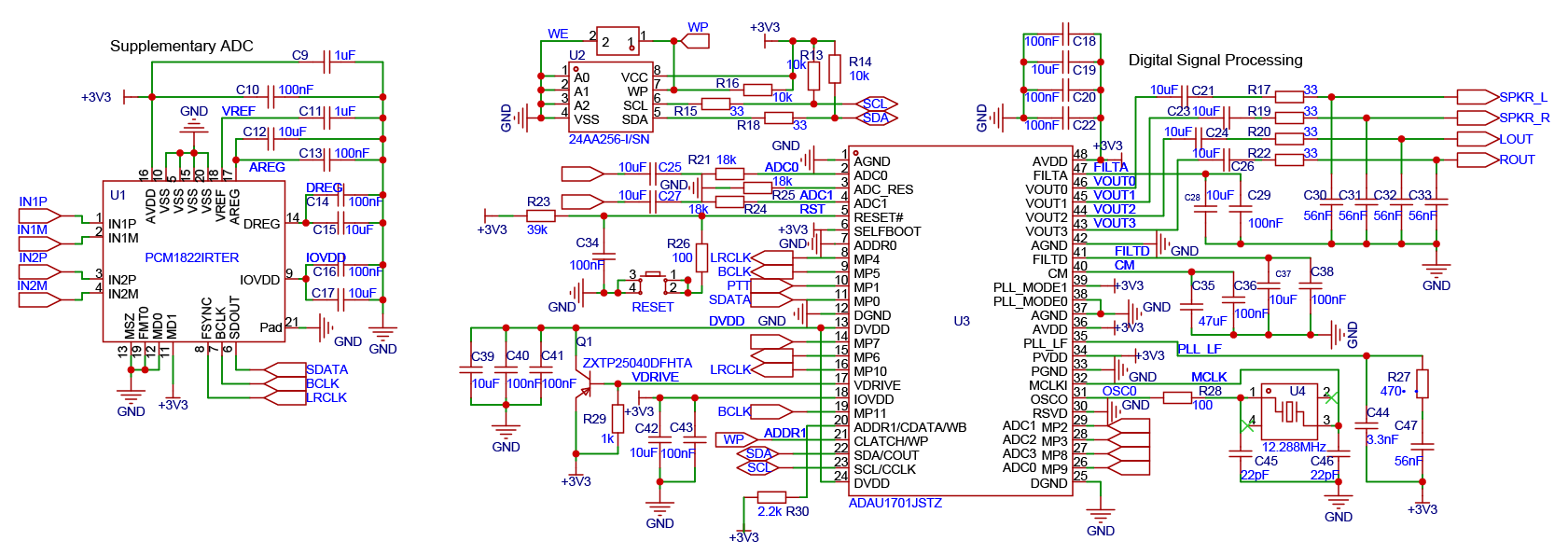
This is the schematic for the EVAL-AD2437B1MZ evaluation bard. This is an end node to an A2B network system and it had an ADAU1701 on it that uses the analog inputs and also connects to the network using the serial port so this should give you a good idea on how to design this.
Here is the schematic.
The rest of the information on this board can be found here:
EVAL-AD2437B1MZ Evaluation Board | Analog Devices
Dave T
Thank you for your generous help.
I have tried on my own to better understand the process of connecting two ADAU1701’s using their serial ports. However, in looking through the available documentation from ADI, I wasn’t able to find much at all about how to implement this otherwise attractive solution.
Can you direct me to any specific information about how to make these connections, and how to use the SigmaStudio to support this. My preference would be to use an external EEPROM to boot the system, rather than bo to an external MPU as I’ve done in the past. Would the two ADAUs be able to share the same EEPROM? Is there documentation available for this?
Hello Mark,
It is actually fairly simple. Each serial port has two clock pins. BCLK and LRCLK. Then it has two data pins, a data out and data in.
So the clock pins need to be connected together. then the data pins such that the out of one goes to the in of the other.
I will call one of these the main unit and the other the DSP sub main.
1701_Main 1701_Sub_Main
BCLK (MP5 pin 9) ----> BCLK
LRCLK (MP4 pin 8) -----> LRCLK
SDATA_OUT0 (MP6 pin 15) ------> SDATA_IN0 (MP1 pin 10)
SDATA_IN0 (MP1 pin 10) <-------- SDATA_OUT0 (MP6 pin 15)
Note that the arrows I drew will denote the direction of the clocks.
The main unit should be the serial port clock master for both BCLK and LRCLK. The Sub_Main will be the clock slave
So this means one thing right there. That the register settings will be different!! So you will HAVE to have two EEPROMs each one connected to the correct DSP.
Also, the programs will most likely be a little different so you will not be able to share one EERPOM and it is really not a great idea anyway.
Next is the master clock or the crystal. I suggest you only use one crystal or clock oscillator module connected to the main unit. Then "Y" the BCLK output to go to the MCLKIN pin of the Sub_DSP. Now this branches off this conversation over to the PLL settings. I am thinking you will want to run the DSP in TDM-8 mode as long as they are close to each other. If you are running at 48kHz fs then the BCLK for a TDM-8 signal is 256x fs or in this case 12.288MHz. This is the perfect frequency for the MCLK input and you are probably using a 12.288MHz crystal. So this means both DSPs need to have the PLL mode pins set to 256cfs mode. However, give yourself some flexibility in your PCB design!! Here is why:
In TDM8 mode you have eight channels of audio to set to a from both DSPs. This is a lot of flexibility but relies on good PCB design and good signal integrity. Should you run into problems then give yourself the ability to switch over to dual data ports both running a stereo I2S signal. This will give you four channels to exchange between the DSPs. BUT!!! you need to be able to connect the SDATA_1 pins between the two DSPs like we did with the SDATA_0 pins. So make those provisions in your PCB design and hopefully the MP0 and MP7 Pins are available.
Then the other detail is that the BCLK frequency will now be 64x fs so you will need to change the PLL Mode pins on the Sub_DSP to be 64x mode. So add pull up and pull down resistors and only populate the ones you need.
Now on to SigmaStudio:
In SigmaStudio you can drag in the two DSPs and have both programs in the same project. This might be handy. You will need to set the I2C address of the two DSPs to be different. Both in SigmaStudio and of course on the PCB itself.
This is going to impose a problem with SigmaStudio programming the EEPROMs. They both will need to have the same address because in selfboot the DSP will go to the same address. So here lies the problem. If you connect both DSPs to the same I2C bus then both EEPROMs are connected together and both will have the same address. Making it impossible for SigmaStudio to program them and for the DSPs to selfboot with their own EEPROM. So you need to make provisions with jumpers or switches to deal with this.
One simple way is to have two different I2C connections so you can use two different USBi interfaces or just control one DSP at a time. There is some simplicity in this arrangement. The two I2C busses are separate so no issues with selfboot. You can also easily program the EEPROM from SigmaStudio. You would work on one DSP program for let's say the Main DSP and then set that to self boot. Then switch the USBi connector over to the other bus and start working on a second program file for the second DSP. you will end up going back and forth a few times because if you are like me you will forget to do something with the audio signal path or want to do something different.
If you choose to try to do it ll in one project. Then you set the EEPROMs in the project to different names, IC3 and IC4 for instance. So when you compile it will store the hex file into a different folder for that IC name. But, you will need to be able to join the two I2C busses together as you run SigmaStudio and then have a switch or jumpers to disconnect them when you want them to self boot and work on their own.
Now, for programming the EEPROMS they are physically both set to the same address. So if you have both busses jumpered together they are connected together and that will not work!! So you will need to be able to have the USBi connect to only one EEPROM at a time. Maybe you setup your jumpers to be able to set the USBi to go to one or the other I2C bus or go to both when you want to work on the program for both.
Then adjust the jumpers when you need to program the EEPROMs from SigmaStudio.
These concepts are fairly simple but it gets confusing. In short, you CANNOT change the EERPOM address because the internal DSP state machine is hard coded to go to Address 0xA1 and you cannot change that. So both EEPROMs will need to be set to that address and you can see that if they are on the same I2B bus there is an address conflict. This is what I tried to explain above. The DSP itself will need to be set to two different addresses but there are address pins to do that. Pin 7 and pin 20
This all seems somewhat complicated but it is not too bad and I was giving you a lot of options.
I do NOT suggest you use two different crystals. This would cause clicks and pops because the two part will never run at the same exact sampling rate so you have to send an MCLK signal from one to the other but do not do it with the OSC_Out pin. It is best to use the Bit clock output.
Dave T
All of that is both very helpful and fascinating.
I agree that it doesn’t sound overly complex, but the solution might still be impractical. My intention is to embed this into a commercial product, and I’m concerned that the need to program two EEPROMs individually, coupled with the problems I often have with getting the USBi to connect and communicate consistently, make this a bit daunting, though I’ll try.
in the meantime, if any readers have some specific advice on what seemed to be the easier solution (add two ADC channels asan i2s input) I’d be much in debt.
Thanks all!
Would ADI’s AD1974 be a solution to add a couple of input channels to the ADAU1701 in TDM mode, with minimal support electronics? Are you able to provide development advice in a configuration like that?
Hello:
After much consideration, I think that I am best off using an external ADC in SLAVE mode, receiving its clock data from the ADAU1701. The terminology around the clock names is a bit confusing. I am presuming that the FSYNC on the PCM1822 functions as the MCLK
I believe that I have the correct, and simple circuit to add two input channels to the ADAU1701, by using a readily available ADC. As this is my first time making such a design, I would appreciate comments from anyone as to whether this looks correct, especially the highlighted connections for the i2s clocks and data.
Might someone please have a look before I send these out for manufacture?
Thanks so much to anyone who replies.
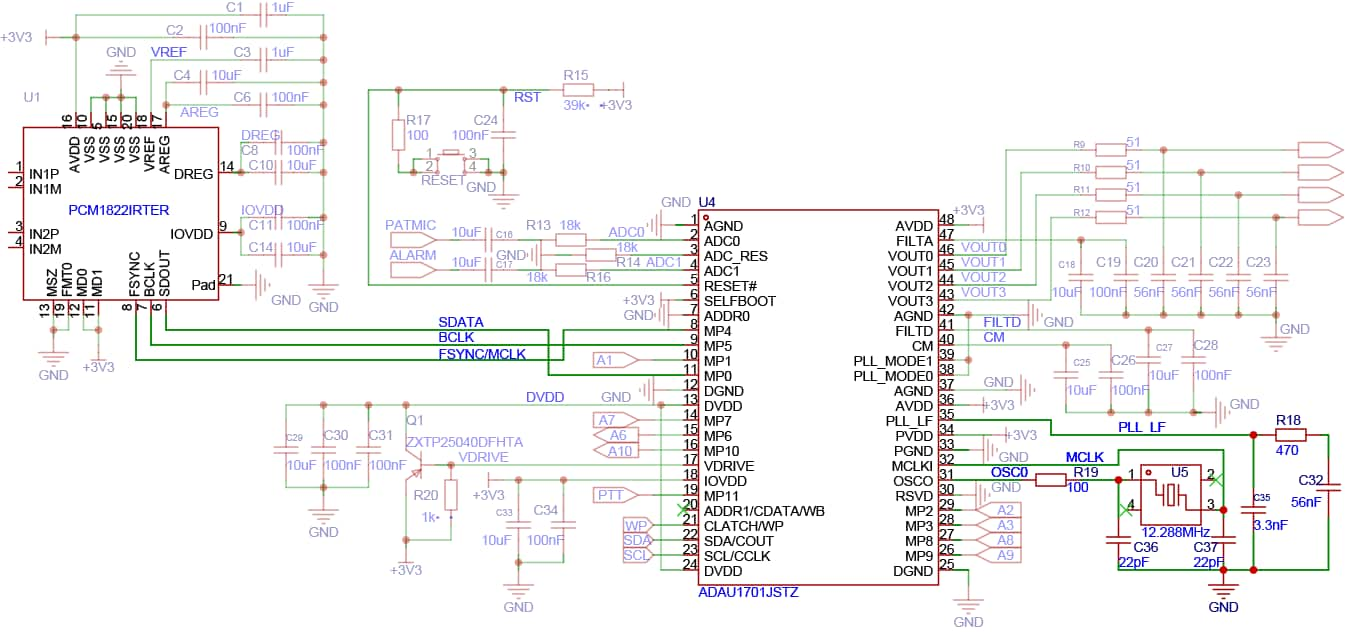
Hello Mark,
Of course, I do not know this ADC since it is a TI part but I am guessing they are using the BCLK pin and their internal MCLK. FSYNC is the sampling rate clock and you have it correctly connected to the 1701 LRCLK which is our sampling rate clock.
You are connecting the FSYNC to MP4 which is the serial input port LRCLK and the BCLK to MP5 which is the serial input port BCLK connection and the SADATA to MP0 which is the serial input data in. All of this is good.
So the only problem I see is your labeling the line in the schematic as FSYNC/MCLK. It should be labeled FSYNC/LRCLK and don't label any of them as MCLK.
Dave T
Oh no! I built the circuit exactly as shown here (with the addition of 5.6k pull-up resistors to 3.3V on SCA and SCL. However, when I use a known-good USBi interface I receive a communications error and cannot communicate with the board
can someone (please) help me to find the problem?
Hello Mark!
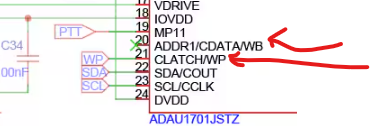
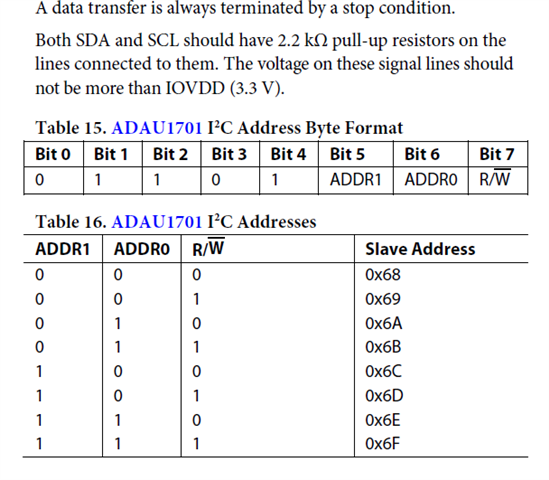
I think I see the problem. You have the address set to 0x6C ad best I can tell.
Here is your board:
Pin 20 and 21 sets the address of the part.
Pin 20 is not connected to anything so usually that will float high. So I am assuming that is a "1"
The WP pin label, the other end of the label is not shown in your schematics so I have no idea if it is high or low.
Here is the info in the datasheet.
So you will need to set the address in SigmaStudio to match the address in the hardware.
You set the address here:
Dave T
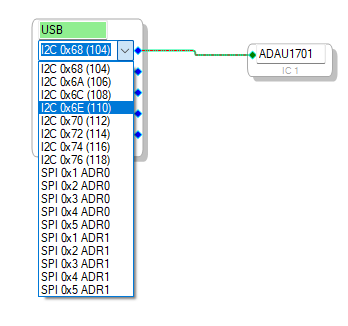
Thank you for that. Fixing the address now makes it possible to interact with the ADAU1701 using USBi.
Woe is me, however, that this still is not working correctly. I am able to download programs to the ADAU1701 without trouble. However, form all four outputs, DAC0-3, I see only 1 1V oscillation, on top of a roughly 2.8V offset, that is slightly erratic at 146kHz.
This oscillating signal is not present on any other pins. As best as I can tell, the signals and voltages on all other pins are nominal.
I know that you can't really comment on the ADC portion, which was my original question. But this seems to be limited to the ADAU1701.
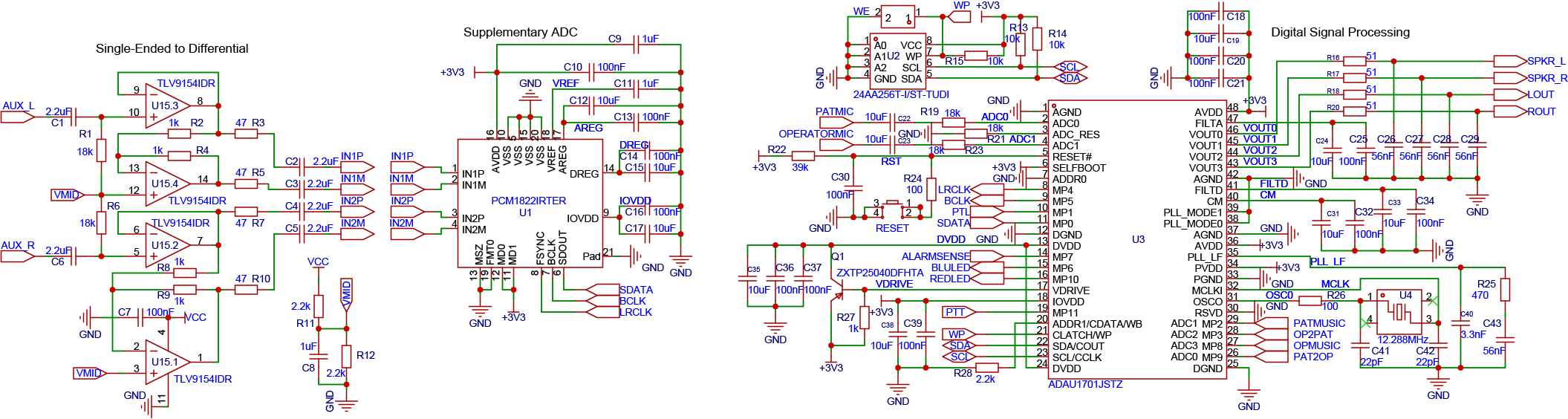
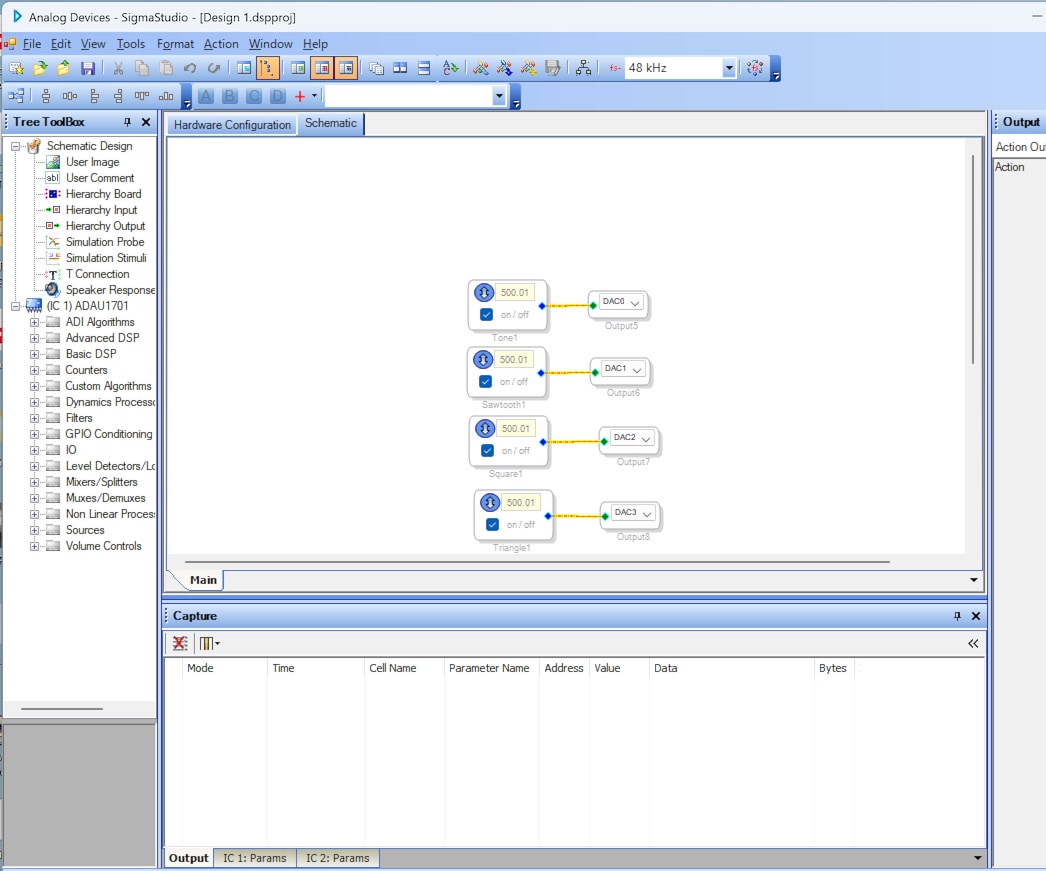
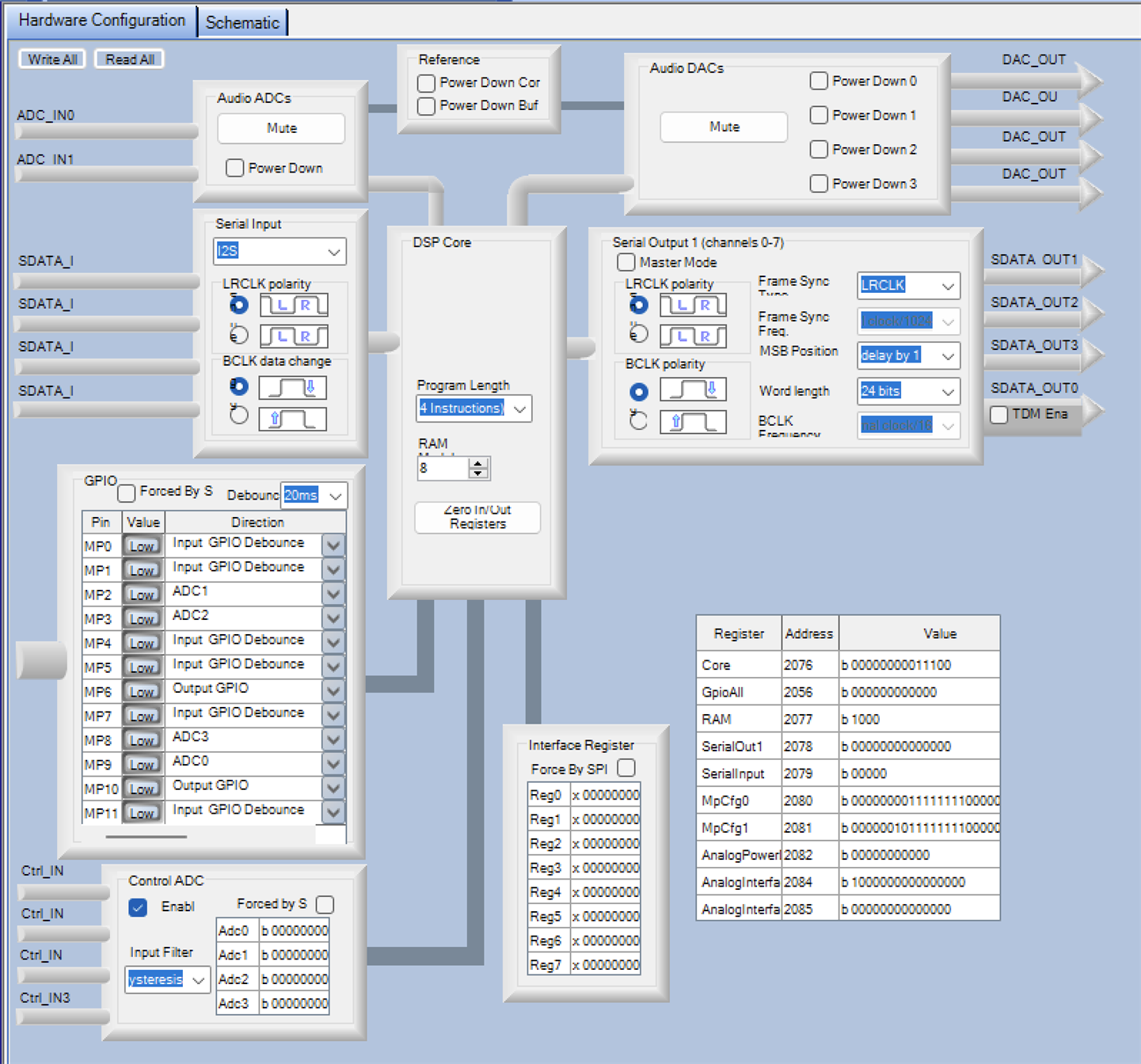
I have attached the schematic, as well as the simple program I am using to test the ADAU1701, and the register settings
You have been so very helpful. Perhaps you can get me through this one.
Hello Marc,
I cannot really explain your measurements and the units are not mentioned so I am not going to focus on your numbers at the moment.
Let me explain a couple of details which might help.
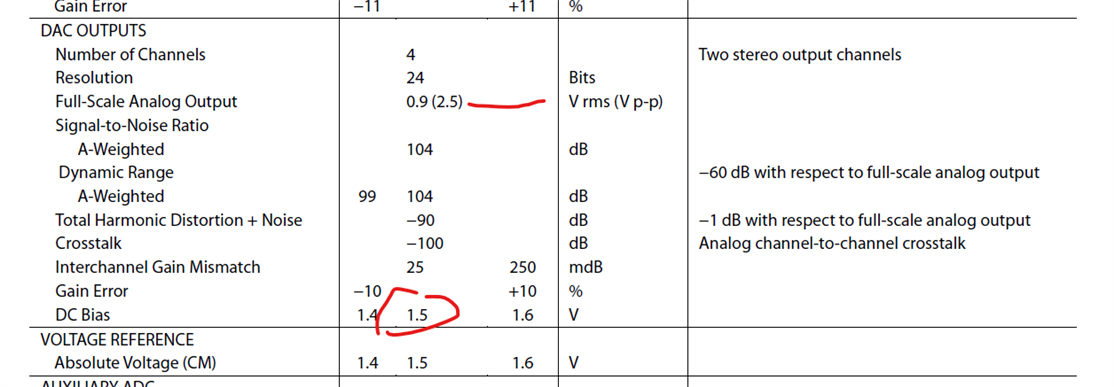
First, here is the specs on the DAC:
Your output shown in the schematic is DC coupled output so it will be sitting up on the common mode voltage which will be around 1.5V.
It is listed as the DC bias and the line below the CM pin is also shown. So this is the "zero" output value if you mute the DAC. It will go positive and negative from there.
The DAC full scale output is given as 0.9Vrms. Which is 2.5V-peak to peak.
So divide that by 2 to get the positive and negative swing from the CM voltage.
2.5V / 2 = 1.25V
Positive swing will be 1.5 + 1.25 = 2.75V
Negative swing will be 1.5 - 1.25 = 0.25V
This will depend on the AVDD being equal to 3.3V. If that is high or low then these numbers need to be adjusted.
Now, why am I spending so much time detailing the full scale signal levels? Because, you are sending exactly a 0dBFS signal to the DACs. You are running them right on the edge!!
Here is your program:
These oscillator blocks put out EXACTLY 0dBFS signal. I suggest you insert a volume control and drop it like 6dB and it might look better.
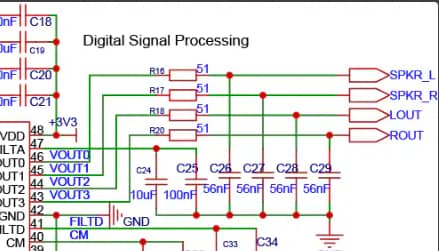
Here is your DAC output circuit that you showed us:
You only have a single pole filter and no series cap to block the DC bias. So if you directly connect this out to some other device this might be loading down the circuit a lot!!
Also, the filter is not a lot so this high frequency you are seeing might be related to the DAC oversampling noise that is not being fully filtered out. Just a guess at this point.
Dave T

Amazing, and Thank You. I will make those changes, which should be easy enough.
In the meantime, I believe the for my intended uses with ADAU1701 acting as master for the PCM1822 as slave, I also need to physically connect MP4 to MP10, and MP5 to MP11.
I hope that I have the clock inputs to the ADC organized correctly.
As always, thanks for the generous advice. I am happy to report that I now have a stable solution with the PCM1840 as an ADC and am listing it here to share with others.
The electrical connections are essentially the same as the PCM1822. The SigmaStudio Register Control has:
MP0: Input Sdata_in0
MP4: Input Lrclk_in
MP3: Input Bclk_in
MP10: In Lrclk_out
MP11: In Bclk_out
Serial Input is set to TDM
In the DSP Core the program length is 4 instructions and RAM is set to 8
The Serial Output is set to Master Mode
In the schematic I have set fs- to 48 kHz
I hope that this proves useful to someone.
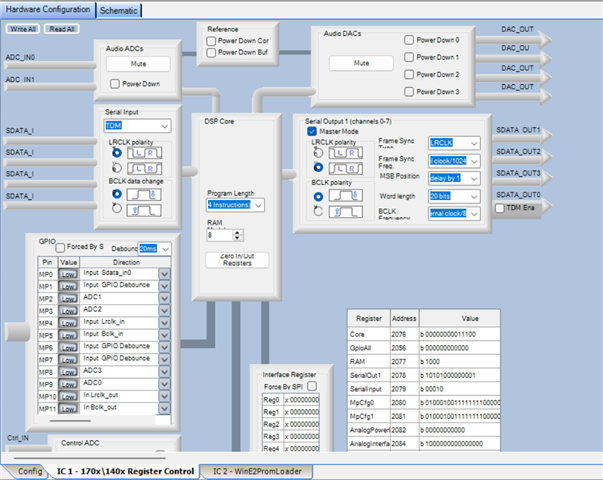

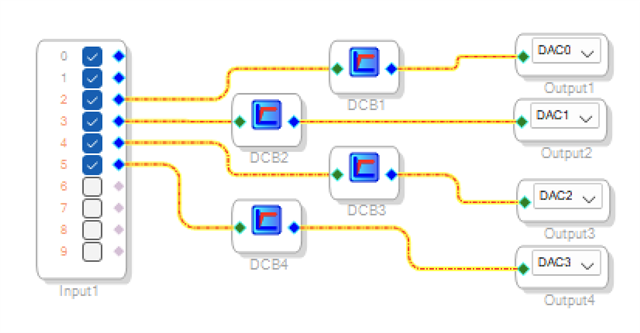
To my dismay, I still am unable to read all four ADC channels. Using the above register control settings, and the simple DSP program below, no data seems to pass from USBi input 5, which is channel 2 of my supplementary ADC.
I've tried multiple permutations of the register settings. If I change the LRCLK Clock polarity, I can see USBi channels 2, 4 and 5, but not channel 3. Thus, I suspect that the frame reads on the TDM are not operating correctly.
I understand from Dave's kind notes that the TDM implementation in ADAU1701/SigmaStudio may not be complete. However...
If anyone here can offer me suggestions to resolve this it would be a great help to me. Thanks in advance.
At this junction, I'm prepared to modify my PCBs to accommodate a TDM8 chip, such as the ADAU1978. This is a large change, however. Is there a reference design or schematic to interface the ADAU1978 to the ADAU1701?
Hello Mark,
Yes, you need to connect those pins, the MP4 to MP10 and connect MP5 to MP11.
I wish I could go back in time and be on the design team for this part. I would have told them that is makes zero sense!!! Just internally connect the output clock connection to the pins of the input clock. Then if it is a master it will get the same clocks as the input side, if it is s slave again, it will get the same clocks. You cannot clock these differently!! So this wastes two valuable MP pins that could be used for other things!!!
The settings I see in your screenshot look OK. It looks like a standard I2S signal but you should verify this on a scope.
It should still work most likely, you would just have the channels reversed or wrong level or lots of pops and clicks.,
Dave T
Far be it from me to complain about the design. Yes: those two MP pins would make a substantial difference, but the core functionality really is great.
I found other voltage anomalies on my assembled PCB once I debug this fully, I’ll share my results and hopefully make this thread very useful to others who need a cost-effective and relatively simple means to augment the analog inputs on the ADAU1701.
Apparently, this is a never-ending saga. I remedied a lot of errors in the schematic shown above. Importantly the caps on the PLL line are now referenced to +3v3 (instead of ground). I also replaced the EEPROM. As best I can tell, the ADAU1701 is actually working fine. It uploads, runs and burns to the EEPROM simple programs.
MP4 and MP10 show the alternating 3v3 LRCLK, while MP5 and MP11 show the correct BCLK.
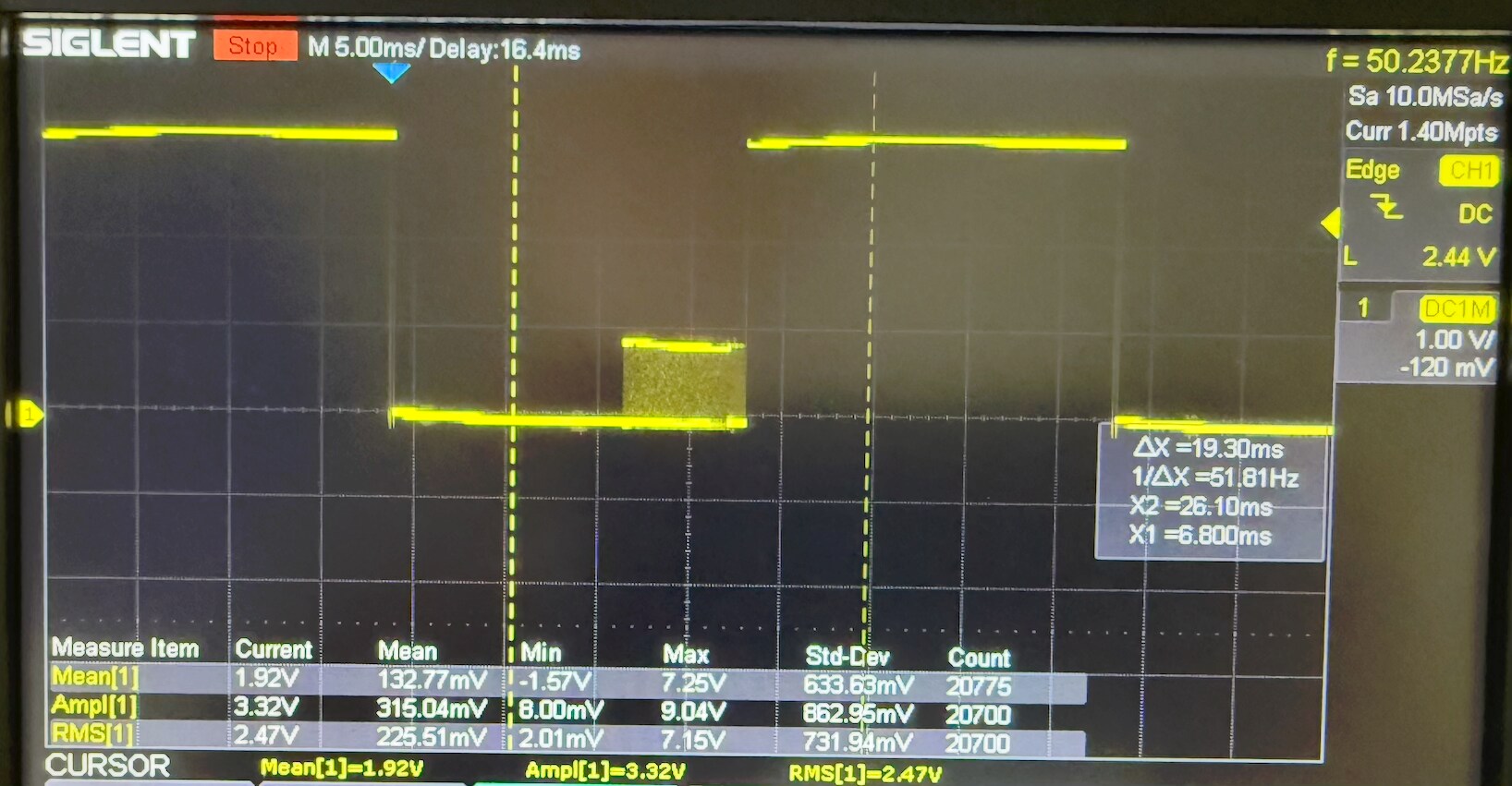
However, with the modified circuit, I am getting confusing signals on the SDATA (MP0) pin. In particular, the SDATA components are about 0.8V, discontinuous, and are superimposed on a roughly 50Hz 3.3 Volt square wave, as shown in the scope image. Zoomed in, the SDATA signals look like rational digital timings.
As the SDATA signal is shared with the ADC, I've also posed the question to the other vendor's support site.
I apologize for the many support questions. I think (hope) that this is almost done.
In answer to your comment on the output filters above, there is additional downstream filtering on the output.
Hello Mark,
markscohen said:
However, with the modified circuit, I am getting confusing signals on the SDATA (MP0) pin. In particular, the SDATA components are about 0.8V, discontinuous, and are superimposed on a roughly 50Hz 3.3 Volt square wave, as shown in the scope image. Zoomed in, the SDATA signals look like rational digital timings.
In an earlier post back on the 9th you had MP0 set to be a GPIO input, not SDATA_in0. Although as an input I have no idea where a 50 Hertz signal would come from? Is that pin ONLY going to the SDATA pin of the ADC?
I wish I could see your project so I can look at other settings more quickly.
It almost looks like it is setup to output a GPIO signal.
Now, I do not know this ADC but it looks to me that IOVDD is not connected to any power at all! Just floating. If you are in Europe then 50Hz could be power line interference getting in.
DREG I would guess is the pin to decouple and filter an internal regulator output correct?
IOVDD supply would be used for the SDATA output.
Dave T
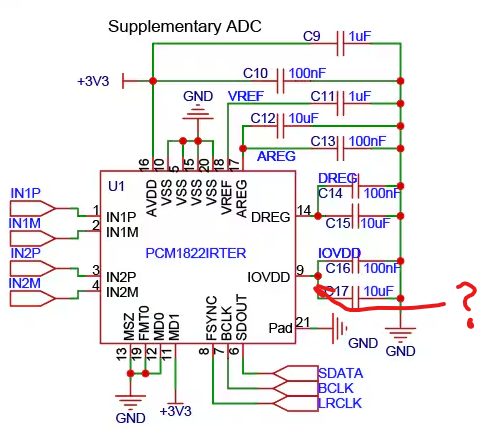
So, for your loyal readers: Everything about the ADAU1701 circuit is now correct (thank you, Dave). However, My wiring for the PCM1822 was not. It should be connected to the logic level HIGH, which in this case is 3.3V.
I cannot thank you enough, Dave, for your patience in helping me through this. While I am not just a hobbyist (this is for a real product), I know my analog much better than my digital and made some novice errors.
If someone want to reach out to me for help, I am happy to offer it, now that things are working properly.
Although everything is working just great, the requirements have change, and I now need additional inputs. I intend to use the PCM1840 ADC, which has a TDM output. Before I go too far and build PCBs, might someone (Dave???) confirm that as for the ADAU1701, I would still use the same serial data input connections, but change only the SigmaDSP code for this change?
Thank you.
Hello Marcscohen,
I am a little confused because your original questions were about using external ADCs and TDM. So are you adding a second quad ADC for 8 channels? What sample rate are you operating at?
Dave T
I apologize for any confusion. Our product requirements changed, such that I need two additional inputs. The PCM1840 will be used as a replacement for the PCM1822. The crucial difference is that the PCM1840 has four channels instead of two.
Because the additional channels, i2s is not a viable solution, so I intend to use the PCM1840 in TDM mode, which should allow four channels to be clocked in on the serial data line.
As for sampling rate, the PCM1840 operates at 192 kHz.
From my reading of the technical documents, the physical communication layer for TDM is the same as for i2s, unless something has to be done differently on the ADAU1701 to support TDM.
I have prepared the PCB design for the new ADC - I'm just hoping that it is compatible, and would appreciate any assurances that TDM doesn't require any modifications to hardware.
Thanks so much.
Hello markscohen,
Very good questions.
The 1701 was designed when TDM was still a new thing so there is not much flexibility in the setup. It is detailed in the datasheet, Page 46 of Rev-C. However, you have either I2S or TDM-8 with no settings for TDM-4.
I am guessing that you may still be OK because I think that when the sample period ends, the LRCLK edge arrives for the new sample period, it will just reset back to looking for the first channel. So the result will be that the first four memory locations for the serial data will be updated and the last four will never be reached or written to which is not a problem for you. I have actually never tested this and at the moment I am not able to.
Are you using a 50/50 duty cycle for the LRCLK or a pulse?
Then one more detail that is in the datasheet:
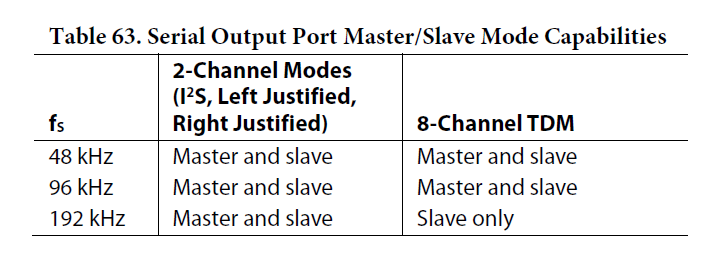
Running at 192kHz FS you will have to have the ADC be the clock master. However, make sure both parts are getting the same master system clock. MCLK.
Otherwise, the connections are the same, LRCLK, BCLK and then data.
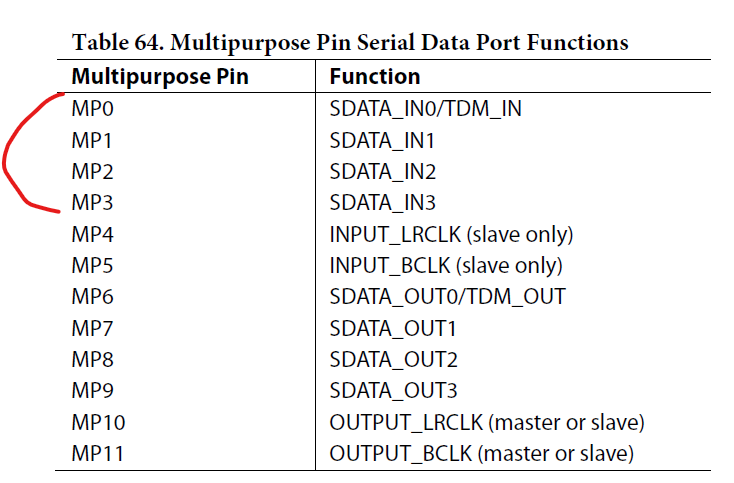
Keep in mind if the ADC has the ability to operate in I2S mode and output two channels on one data pin and two channels on another data pin, the ADAU1701 can handle that. It has several MP pins that also serve as data inputs for more channels of I2S data.
So you can send it two data lines to bring in four channels. The positive part of this way to do it is that the BCLK is a lower frequency and is therefore more tolerant of data timing and signal integrity issues.
The bad part is you use two pins. This you would have to plan for in your PCB layout. If you have one of the MP pins unused, then make options to possibly use it for serial data. Just make sure it is MP0 to MP3 as listed in this chart:
Dave T
Unfortunately, I need all of the ADAU1701 GPIOs. Therefore, I will be left in TDM8. I am concerned that the clock mastering will end up in disaster for me, asI have designed (and ordered) boards that assume that the ADAU1701 controls the clock.I'll study this and cross my fingers.
Please log in to reply.