The issue of the PLL startup sequence of ADAU1787
Hi!
I am developing the ADAU1787 and hope to use it as an IIS receiving device. External signals are input to it as MCLK or BCLK, and an internal clock is generated through the PLL for operation.
However, during this process, I encountered some problems. I disconnected the pins of the crystal oscillator and directly connected MCLK to XTAL_IN. Then, I opened Sigma Studio and configured PLL_EN, clock input, and other settings (PLL Bypass). It was burned in via USBi, but there was no result.
I would like to ask, is ADAU1787 set to the XTAL mode by default? Should we first burn in the PLL-related configurations through USBi when an external crystal oscillator is present, and then switch the clock input from XTAL_IN to MCLK or BCLK?
Can the ADAU1787 be started without an oscillator, but with MCLK and BCLK present? If so, how should I proceed?According to the data manual, although it does not explicitly state, it seems to imply that it is possible.
Thank you!
Edit Notes
Make the problem description clearer
[编辑人: DrCai 编辑时间: 25 Jul 2025 3:10 AM (GMT -4)]
sigma studio
hardware
ADAU1787
sigma studio 4.7
Integrated/Special Purpose A/D Converters
SigmaDSP
Audio CODECs
Show More
Hello DrCai,
DrCai said:
Can the ADAU1787 be started without an oscillator, but with MCLK and BCLK present? If so, how should I proceed?According to the data manual, although it does not explicitly state, it seems to imply that it is possible.
Yes, it surely can.
What is the MCLK frequency that you input to the XTAL_IN pin?
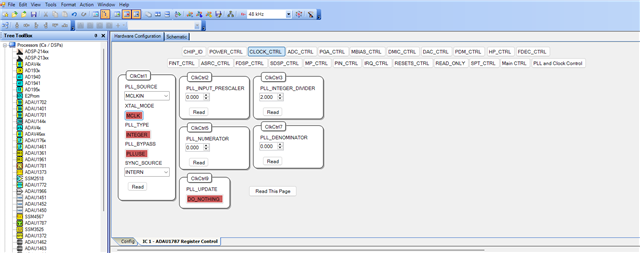
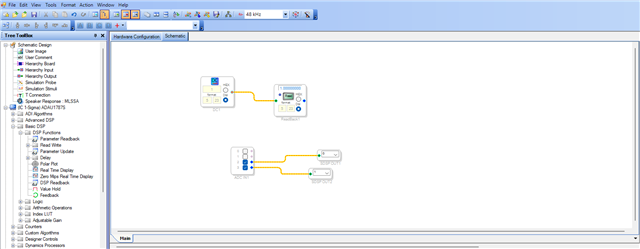
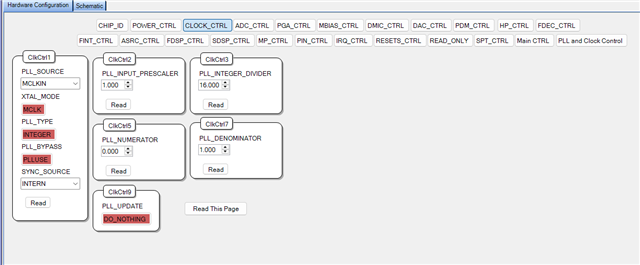
I have just tried it, connected a 24.576MHz clock to the XTAL_IN pin, selected 'MCLK' in the XTAL mode register and link compile download, my eval board works as expected. Below is my clock setting and schematic.
DrCai said:
I would like to ask, is ADAU1787 set to the XTAL mode by default? Should we first burn in the PLL-related configurations through USBi when an external crystal oscillator is present, and then switch the clock input from XTAL_IN to MCLK or BCLK?
Just make the wire connections, set that XTAL mode register to 'MCLK' in GUI and power on the board and link compile download the project.
Please attach your project, I will run that in my hardware and get back to you.
Regards,
Harish
Thank you ! Harish!
I successfully started the DSP. The reason for my previous failure was that after frequency multiplication, it was not a multiple of 24.152. I previously used the PLL bypass to avoid using the PLL because I didn't have a 12.288 clock. Then in the afternoon, I re-read the data manual and found that the Bypass must be a 24.152 MHz clock. So I used a clock that was close to 12.288 MHz and successfully started it through the PLL. Sorry, I'm not a default English speaker. I'm not very good at reading the data manual and tend to be sloppy in my reading.
Attached is my current PLL configuration. I was expecting to output a 500Hz sine wave, but the output is fluctuating between 493 and 494Hz. The reason I think is:
1.My input clock is 12.5 MHz generated by the internal clock of the MCU. This clock is quite unstable, so when I use a logic analyzer to observe it, I find that its duty cycle seems to be incorrect.
2.The PLL parameters cannot precisely bring the clock to the desired value. There are many decimal places involved, so the error is amplified after many cycles. (1. The errors within it have also been magnified.)
I'm wondering what would happen if my MCU were powered by a clock with a frequency of 12.288 MHz or 24.576 MHz. The output MCLK might be more stable, so the output sine wave would be closer to the frequency I desire?
There is another additional issue. When I need to make an IIS input. Is clock synchronization required? What I mean is, since BCLK is in the machine state at this moment, does it necessarily need to be used as the input for the PLL in order to synchronize the internal clock of the DSP with the IIS clock?
If possible, could you please send me a sample routine for IIS/TDM input and DAC output?
Hope to see your recovery. Thank you!

Hello DrCai,
I can see that your MCU is the audio clock master, so I believe it can produce 3.072MHz BCLK and 48KHz LRCLK (if your sample rate is 48KHz). If it can, then there is no problem.
You can use the incoming BCLK as a source to your PLL and generate the system clock for the DSP. Since your MCLK and serial clock is from same clock domain (MCU), you will not be having any sync problems, it will be fine.
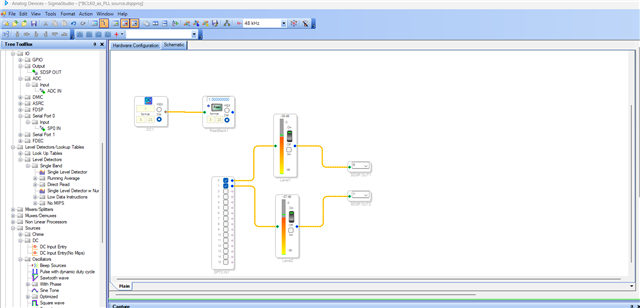
I will attach an example project, where serial port 0 receives an I2S input from external chip (MCU) at 48kHz and routed to DAC. I also used BCLK0 (incoming BCLK from MCU) as the source to the PLL.
So, you just connect the BCLK, LRCLK and DATA, GND from your MCU to the DSP and run the attached project. You will be able to hear the output.
There are two ways,
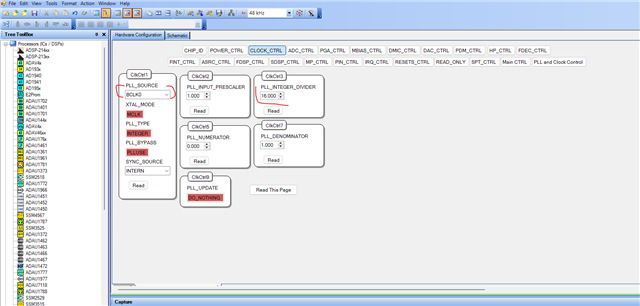
1) Connect the BCLK, LRCLK, DATA from your MCU to Serial port of ADAU1787 and set the PLL Source to BCLK0/BCLK1 (which serial port you are using to receive audio signals from MCU)
Enable PLL, serial ports in power control register.
Below is my schematic and project with this setting.
BCLK0_as_PLL source.dspproj
2) If you want to use the MCLKIN pin, then split the BCLK coming from the MCU into two and connect one of them to the serial port as BCLK and other one to the MCLKIN pin.
set the PLL source register as MCLKIN like below.
The rest of the settings will be the same, you can use the above project for both of these methods.
Using the BCLK0 as PLL source will be the easiest way.
Please try this and let me know how it goes.
Regards,
Harish
Thanks for your help, Harish
I have no more questions.
Have a nice day!
Please log in to reply.