INMP441 and ADAU1701 no visible activity
Hello,
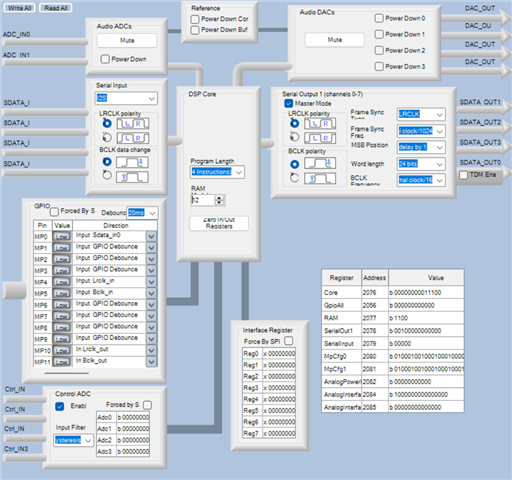
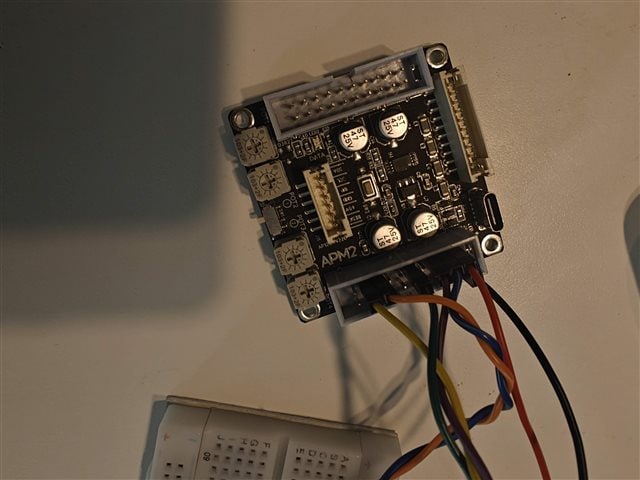
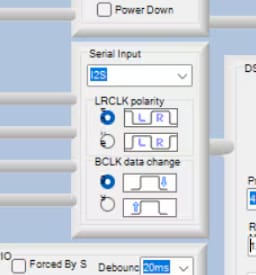
Sorry for my poor English, I'm french and for basic questions, I'm a newbie. I'm trying to analyse a signal from a INMP441 mems microphone with a WONDOM ADAU1701. The 2 devices communicate with I2S protocole, ADAU1701 as the main and the INMP441 as a subordinate. My configuration :
MP4, MP10 and WS are connected together
MP5, MP11 ans SCK are connected together
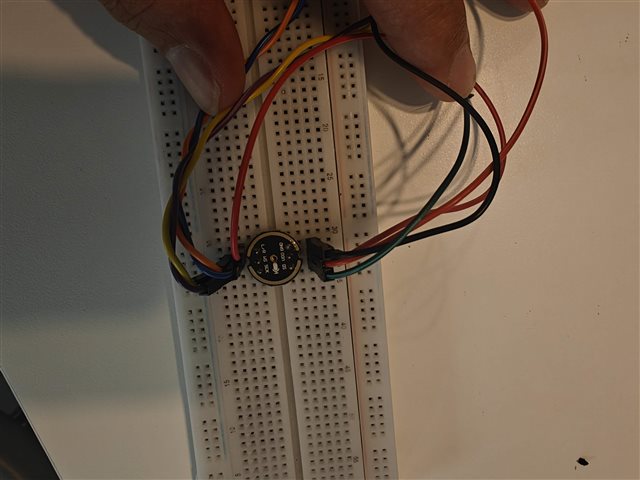
VDD and L/R are connected together in INMP441 (right side)
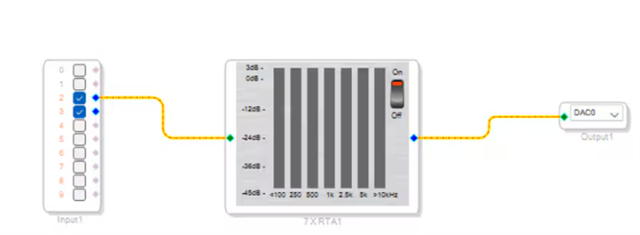
I insert a seven band level detector to see if it works :
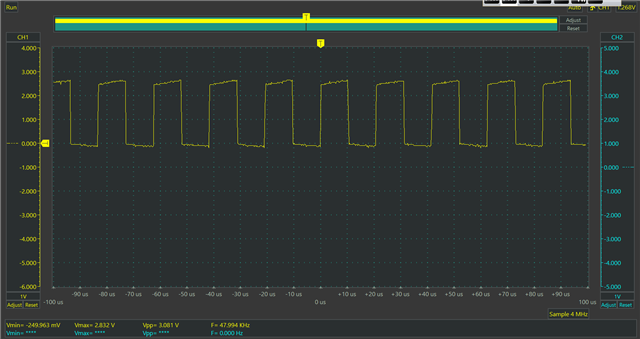
But I don't see anything. Verify SCK/BCLK and WS/LRCLK and this is my observation
SCK/BCLK
WS/LRCLK
Everything seems to be OK, so I don't anderstand what's wrong. If someone have any ideas...
P.S. : Thanks all for the many informations I've found here
Audio Signal Processors
software
sigmaStudio 4.7
SigmaDSP Audio Processors
adau1701


this might be a dumb aswer but im a noob using sigmastudio aswell have you done the link compile connect then link compile download in the top tool bar before this procedure there is no software sent to the dsp chip and to make it persist when its shut down you need to go to the hardware configuration and write click the adau1701 block and click write latest configuration to 2eprom also have you setup the hardware config? also the gpio's need to be setup correct for them to work
hey
this might be a dumb aswer but im a noob using sigmastudio aswell have you done the link compile connect then link compile download in the top tool bar before this procedure there is no software sent to the dsp chip and to make it persist when its shut down you need to go to the hardware configuration and write click the adau1701 block and click write latest configuration to 2eprom also have you setup the hardware config? also the gpio's need to be setup correct for them to work
edit: the input block has asfar as i know dedicated channels for analog input(1 and 2) digital input(?) bluetooth input(4 and 5) and more tho i use a amplifier board with the adau1701 onboard so it might be different in your case
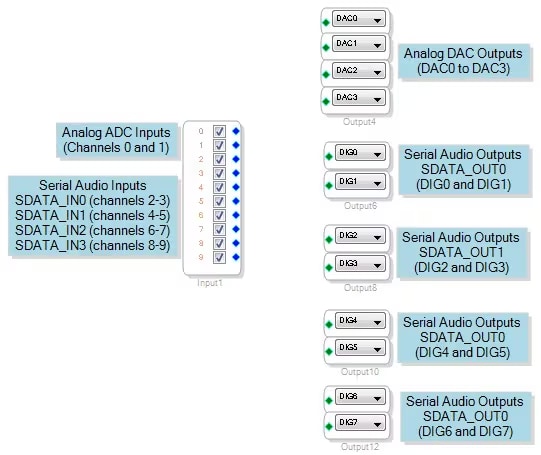
Thanks for your answer. I write the latest configuration and it doesn't work anymore. For the input it seems to be OK if I follow this instructions :
ADAU1701 Input and Output Signal Routing
Hello Khoeds,
Your connections to the input block is correct. Pins 2&3 are the connections to the first two channels of the serial digital input port.
One thing I noticed was that the two screenshots you posted are the same. They seem to both be the LRCLK at 48kHz fs. Also, I found it strange that the signal voltage did not reach 3.0 V? The IOVDD should be 3.3V. You will have to check what it is the actual DSP board. If it is also 3.0V then I guess you are OK. If it is 3.3V then the signal voltage is getting close to the point where it might not see it as a "1".
You should take a peek at my post about taking screenshots:
(+) How to Take Meaningful Screenshots of I2S Audio Signals - Q&A - Audio - EngineerZone
Your jumper cables are not too too long but the shorter the better. I usually try to use ribbon cable to do this and alternate between ground and a signal line to help with signal integrity.
Feel free to attach your project.
I actually have a bunch of these Wondom boards at home but no mics. However, I can connect it to the Audio Precision and test it.
Dave T
Hello Dave,
It's a mistake for the screenshot BCLK. I haven't found the "persistence" mode on my oscilloscope, sorry. Some new screenshot with 3.3V alimentation.
LRCLK
BCLK
LRCLK and BCLK
LRCLK and data
BCLK and data
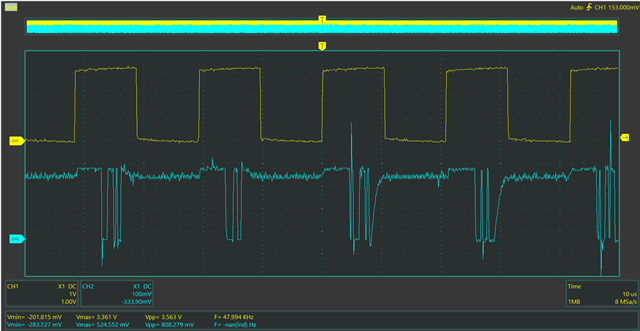
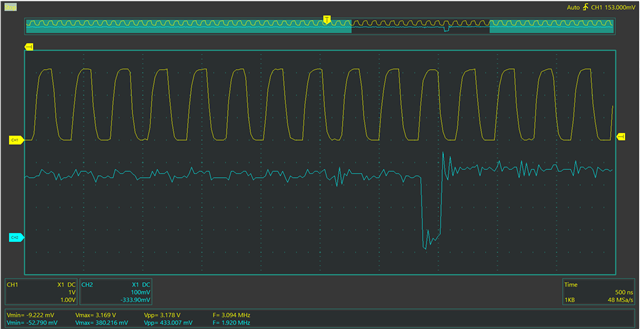
The last screenshot seems to show that there is not a lot of information in data signal


Hello Khoeds,
There is something super wrong here. It looks like you might be driving ground or have two outputs fighting each other.
Look at the actual voltage of the data. It is around 300mv!! just set both scope channels to 1V pre division and it will be obvious that the data output pin is not able to drive the load it is seeing. It may be trying to drive ground or some other output pin so they are fighting each other? Disconnect the data pin from the DSP and see if you see any real data on that line? You can still have the scope triggered to the LRCLK, and you should. So that is the first test, disconnect the SDATA from the mic but send it clocks from the DSP. Then clip the scope to the wire itself that is dangling.
Verify that you did connect the LRCLK, BCLK and SDATA pins of the DSP to the correct pins on the mic. Of course check the power and ground pins of the mic that it is getting the correct voltage. Check that while it is connected.
So right now you have garbage for data. It is not real data and not at the correct voltage levels.
This has to be something simple. Oh! one other thing. Make sure you are using the correct ADAU1701 serial port data pins. They are pins 10 and 11, MP0 AND MP1.
This should be a simple issue here.
Thanks,
Dave T
Thanks a lot for your remarks and explanations. They were very helpful. It doesn't works anymore but I supposed it's the microphone itself. I command another mem's microphone to check if that solve the problem.
Hello
I've received my new microphone. In Sigmastudio it's a little bit better but no more good :
I've found the problem with the voltage on CH2 in my oscilloscope, there is a 1X-10X switch and it was on 10X sorry
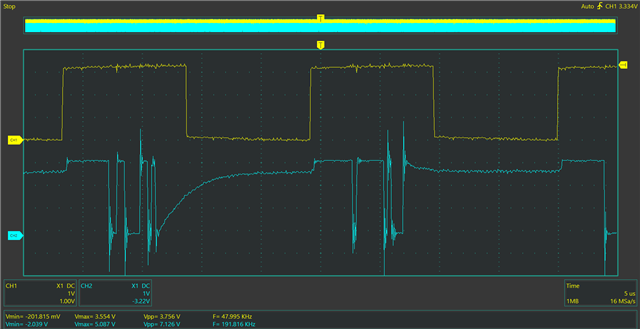
So, here is my new screenshot :
Any ideas???

Hello Khoeds,
Ugh!! those pesky 10X switches!!! It has gotten me a few times too! I suppose I should have asked!
OK, it is hard to tell with just 2.5 samples shown but what is shown looks like a negative number and may be a negative DC offset with some noise. That is not a problem and a DC block cell can take care of that easily. However, what I do see is that the signal is coming out on the right channel and you have everything setup in your project to pick up the left channel .
Set for left when LRCLK is low. This is pretty much normal.
Here is your screenshot of your project:
You are taking channel 2 which is the left channel.
Place a meter on the channel 3 output and you may see it there.
So then it is a matter of either changing your project to use the right channel or changing the voltage going to the microphone telling it which channel to use. Either way is fine. Nothing wrong with either way.
Dave T
Thank you very much. It works, I'm so stupid for the canal error
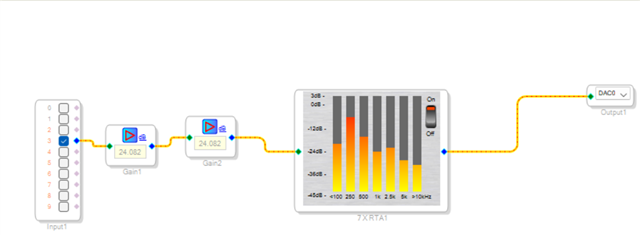
But I don't know why I have to put all the gain to obtain a response
It's not the most important
Hello Khoeds,
Wow! That is a TON of gain!! It looks to me like that might be the noise floor and there is no signal present?
I was wondering about if you had the serial port settings a little off but that usually only messes you up by 6dB of so.
I did make a video about digital levels but it does not apply too much with what you are seeing here.
Levels and Headroom
So I think you are just seeing noise.
I need to make a video using a scope showing how the signals should look. The scope plots you showed earlier were only snapshots in time but the levels shown were very low. Are you able to get close to a full scale digital signal when looking at it on a scope?
This is not a video but I do show screenshots of full scale signals on this post:
(+) How to Take Meaningful Screenshots of I2S Audio Signals - Q&A - Audio - EngineerZone
Dave T
Hello Dave,
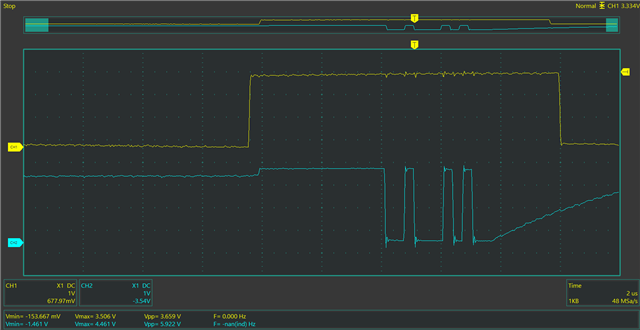
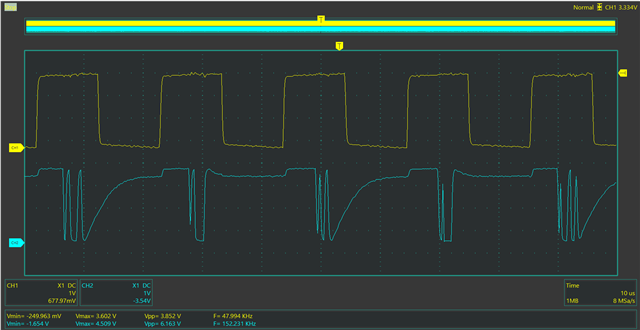
I don't think it's only noise because when I whistle next to the microphone, I show the impact on the Level detector. If I don't put this TON of gain I only show the level detector moving when I clap my hands. In this scope plots all the amplitudes of the signals are about 3.5V.
BCLK and LRCLK :
LRCLK and data
It seems there is less modulations in my data signal than in yours. Is it a beginning of explanation?
Hello Khoeds,
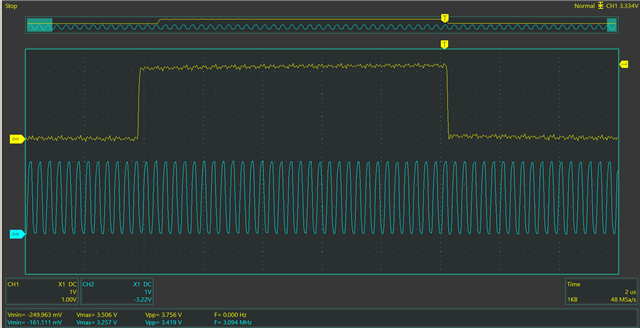
From the screenshots you show above. The middle one I can somewhat count the bits even without the bitclock to reference and it looks like only about a 8-bit signal and the bottom 8 bits of a 24 bit signal. That is a really quiet signal.
The lower screenshot is more difficult to count bits but all of those are low level samples and negative as well. Because the sign bit and all the upper bits are a "1". No that this is a problem because it is a snapshot in time but I just mentioned it.
So I suggest you insert an oscillator into your project so you can generate a known signal level in the core to test the output circuits. Take it one piece at a time.
I will attach my basic project for testing an ADAU1701. Note, I have an oscillator and mutes on every channel so I can verify the signal path correspond with the output I am hearing. Also note I have the faders set low to prevent a super loud signal coming out of the speakers when you start up the project. The Oscillator is always a full scale 1.23 signal so I reduced that by 30dB. Then the main fader I also setup at -20dB. So you will need to bring these up and I also used the better meter for looking at overall levels.
So you will need to bring up the two faders but this should give you an idea of how loud your incoming signal is. I would add some meters right at the input.
Dave T
ADAU1701 Basic In-Out-Osc.dspproj
Please log in to reply.