Need idea for generating filter index values from DC input
Hi,
I'm using the ADAU1701 to implement a multi-band audio equalizer via the General 2nd Order w/ var Param/Lookup/Slew filter module.
The design works properly in SigmaStudio and now I need to be able to select the filter curves from the outside world. My plan is to use linear potentiometers to feed DC voltages to the AUX_ADC inputs and somehow use those voltages to generate the required index values. The issue being that I'm drawing a blank on how to do this in SigmaStudio. Any ideas would be much appreciated. Thanks.
Audio Signal Processors
software
sigmaStudio 4.7
SigmaDSP Audio Processors
adau1701
Hello,
The AuxADC maps its 0 -- 3.3V input to a decimal ("5.23 format") number from 0.0 to just under 1.0. The Index Filters accept an integer ("28.0 format") number from 0 to (N-1), where N is the number of filter curves in use. See this document for an explanation of number formats.
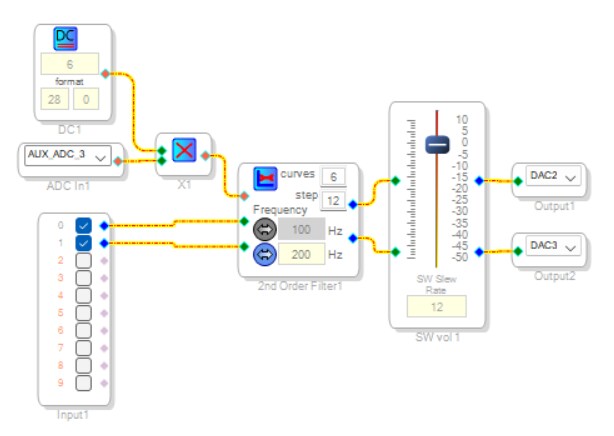
There's several ways to convert the AuxADC's decimal range to the integer range required by the Index Filter. The easiest is to multiply the AuxADC value by the desired number of curves in 28.0 format. Since the AuxADC output never reaches 1.0, and the multiply rounds down, this provides a range from 0 -- (N-1). An example bass control project is shown below:
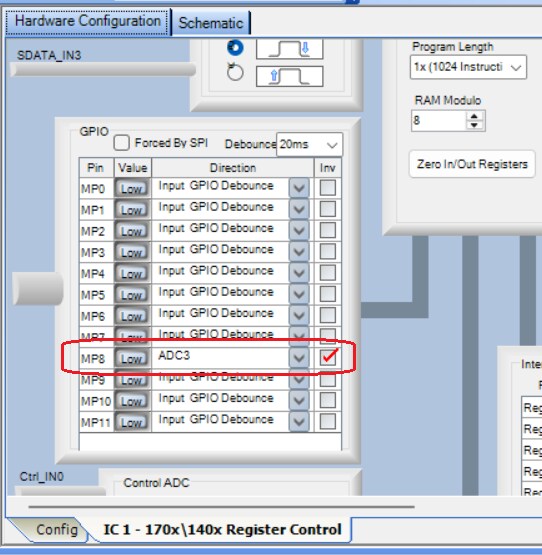
Not visible in the schematic is the necessary Register Settings to make the AuxADC work. Whether laying out your own PCB or using a ready-made board, up to four pots can be wired to four Multipurpose pins configured as Auxiliary ADC inputs. For this example, my Eval-ADAU1701MINIZ board has one pot wired to MP8 -- which can be set to AuxADC3 as shown:
This example project is attached below. I cranked the bass all the way up and played the first Jurassic Park movie through a good pair of cans. When those Brachiosaur feet hit the ground...
Simple-index-tone-control.zip
Best regards,
Bob
BTW -- There used to be a link atop this forum to Dave Thib's How To SigmaDSP YouTube channel. It features tutorials on many applications like this one. Here's the link.
Bob,
Thank you for reminding me how to do the conversion to an index value.
Mark
Please log in to reply.