Getting my subwoofer to work
I have a SigmaStudio project where I have two bookshelf speakers and a subwoofer hooked up. I have the subwoofer on a separate volume control handled by the I2S input amp that I'm using. I just want the sub to be as loud as possible, but I want to avoid clipping. How do I make that work?
Audio Signal Processors
software
SigmaDSP Audio Processors
adau1701
2 Studio Monitors and a Subwoofer.dspproj
This is my current project
Hello Chace,
Great project. Looks like you are having fun working on this!
I have a number of comments. Some off topic a bit but things I noticed.
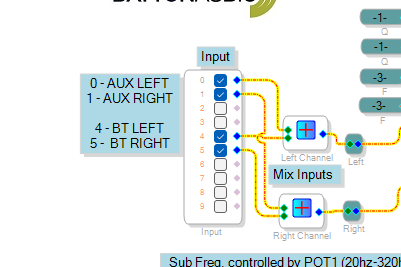
First detail is the input stage:
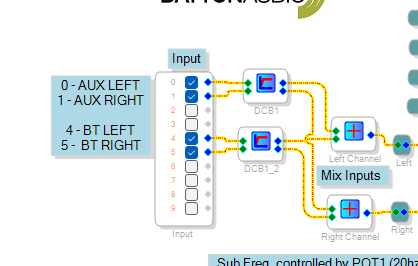
I suggest you put in DC Block filters. Because there is no HPF on the ADC converters so the DC level that EVERY ADC has will be amplified and sent to the subwoofer.
Here is your input before any changes:
So add the DC block filters.
You really only need them for the ADC input but to be safe I would include the Bluetooth input as well.
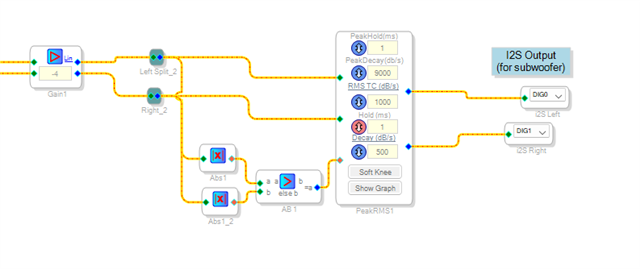
Here is the part of your project that takes care of the subwoofer output.
The two inputs you see on the screenshot is coming from the crossover outputs. I have not opened up that block to see the settings at the moment...
OK, here is what you are doing and some of this is just not good.
First, you are multiplying by a factor of "-4". If you multiply with a negative gain factor you are inverting the audio. Not a problem but it is NOT reducing the level.
Then you are multiplying by 4 which will gain up the signal by 12dB !! So you are inverting the signal and adding 12dB of gain.
Then you are getting the absolute value of the signal. That is great but redundant. Inside the peak RMS compressor the sidechain input will be rectified (ABS) then accumulated with time constants to build up the level and then to allow it to discharge. Attack and Release times. So there is no need to get the ABS before the sidechain input.
Then you are comparing it and getting the greater of the two. I guess that is fine but usually not done and usually not an issue. What I would do is sum the two signals. If they are both at the same level then you will be gaining up by 6dB. You can use the Signal Merger block which will add the two signals and subtract 6dB. You can experiment with this with test signals from an Audio Precision and look at the subwoofer outputs on a scope to see where and when it clips.
Here is where I advertise my YouTube channel. Have you watched the Troubleshooting video? What I would do to show you what is happening by using DC cells, Readbacks and looking at the results!
Here is where I will prove these things I was mentioning above:
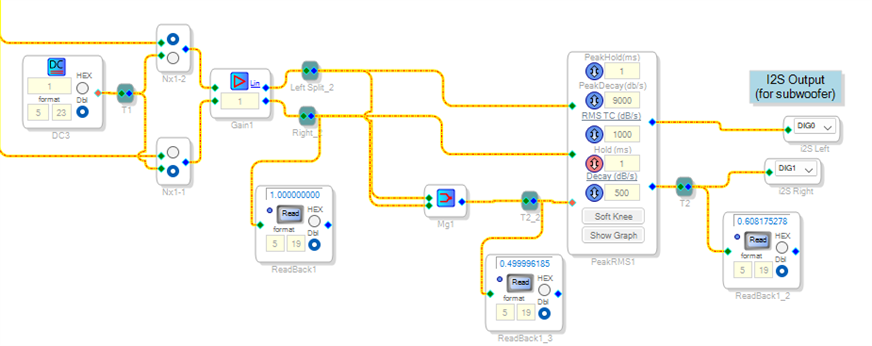
Note, I added switches on the input side to choose a DC cell.
Then I am looking at the results in several places. The output of the Gain cell, the output of the AB-Block, and then the output of the Compressor.
Note, I have the DC cell set to 1.0". Which is a 0dBFS signal into or out of the core and/or serial ports. In the core we have headroom but ultimately you have to go out of the core. This is what the limiter should be doing. Limiting it to a max but you do not want to have the limiter working when you do not need it! That will affect the audio!
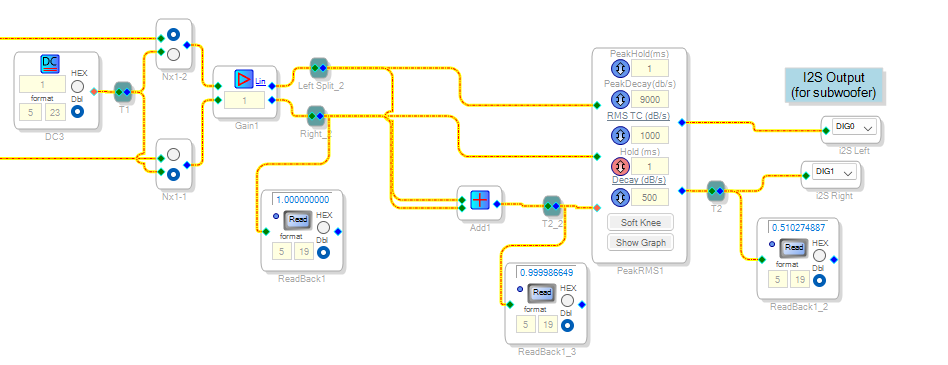
Look at the screenshot. The "1.0" is multiplied by -4 so the result is -4. That is 12dB over 0dBFS. Then after the absolute value blocks and the AB-Block you have +4.0. As it should. Then you have the compressor set so the top compressor point is a factor of 0.61 when the signal at a level of +6dBFS. Look at the output, it is -2.04. Remember, it is a -4 being multiplied by 0.61 but the line is extrapolated past +6dB so with it being at +12dB so the -2.061 seems right to me. Although, I think it is limited to this as a max level.
Anyhow, I have a feeling this is not what you want.
I made this change. I added the merger block:
The -4 after the merger is -2 because it is reduced by 6dB.
The -4 in still coming in which is really hot so the result is still -2.04. So the output is still roughly reduced by 6dB.
Because the input to the sidechain is still really hot.
So the next thing to get rid of is the gain cell. There is no reason to invert the signal and no reason to amplify it. If anything, you might want to multiply it b 0.5 to reduce the signals by 6dB. But, you may not need to do this.
So now a 1.0 remains 1.0 into the compressor audio input.
After the merger it is reduced by 6dB so you see a 0.5. (well, 0.4999999) I call that 0.5.
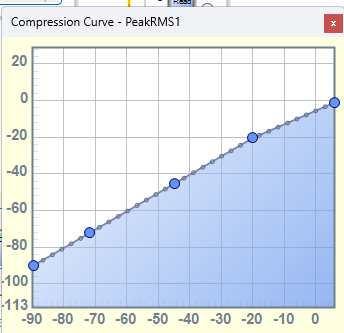
Then the tough thing with the compressor curve is knowing exactly what the gain factor will be between the points settings. So the level into the sidechain is -6dB so it looks like the gain is being reduced by around -4.3dB. Looks about right.
Here is the graph that you had it set to:
This curve is not too bad. You are preventing a signal that is greater than 0dBFS in the core to be reduced by at least a few dB.
This block is not exactly a limiter. It is good in that it starts reducing the audio in a way that is not as audible. But, you might want to follow this up with a hard limiter. This can be done a couple of ways. Either with a limiter or a hard clipper block.
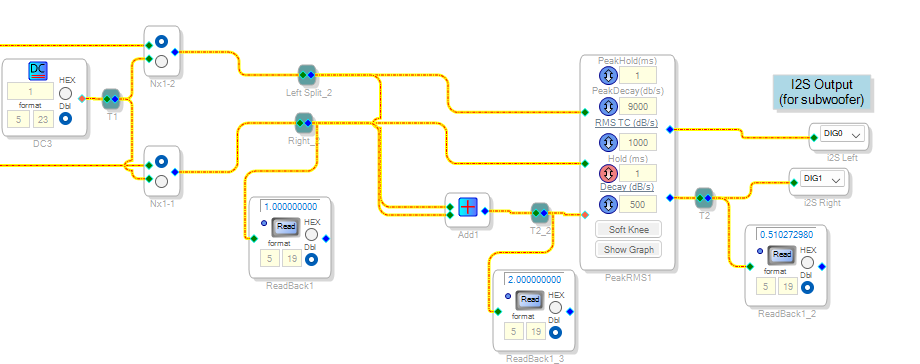
OK, If you do not want to get the 6dB of reduction in the sidechain input. Then just sum the two channels.
Here is what that looks like with the screenshot above. a 0dBFS signal on one channel will be sensed at a 0dBFS signal in the sidechain. So that ends up with around a 6dB reduction in level which looks about right with the compression curve.
By the way, you can add points to the graph and get more choices of values you can input.
So I would remove the gain cell and the other things I outlined and this setup is fairly good to prevent any clipping.
On this screenshot I added a 1 on both channels. So it is a 2 going into the sidechain. It still is reducing the audio by 6dB
Well, this is getting long enough.
Here is my project with the edits I showed.
Dave T
2 Studio Monitors and a Subwoofer-DT-Edits.dspproj


Holy crap! I was not expecting for my project to have that many issues! THANK YOU for taking the time to work on it for me!!!!! I'll get it tested
It worked PERFECT! I messed with the curve a little bit but kept it below 0. The clipping is completely fixed! Thanks once again
Please log in to reply.