tsa1701 y dir9001
Hola...soy nuevo en este mundo , y aunque me defiendo con los ajuste con minidso,,,,ahora tengo muchas dudas
Tengo una tsa1701 , que ya tengo funcionado y estoy aprendiendo y exprimiendo.
Queria implementar una entrada digital, y he adquirido una Dir9001,,,pero no encuentro información sobre como conectar los cables entre las 2 placas.
Alguien podria ayudarme o indicarme...Gracias
hardware
TSA1701
Hello Sergica,
We politely ask that everyone post in English since we have people from all over the world posting so we are trying to keep it welcome for all. Your post is short so I pasted it into Google Translate. Here is the result:
Hello... I'm new to this world, and although I manage with the settings on the minidso, I now have many doubts.I have a tsa1701, which I have already got working and I am learning and exploring.I wanted to implement a digital input, and I have acquired a Dir9001, but I can't find information on how to connect the cables between the two boards.Could someone help me or guide me... Thank you.
There are a few questions I have. You said you have a tsa1701. ??? Did you mean an ADAU1701?
The DIR9001 is a TI product so that makes it a little tricky for me to be supporting.
It has a master clock output that is selectable for different multiples of the sample rate.
It has a bit clock, an LRCLK (left/Right sample rate clock). and a Data output. We call those pins pretty much the same names. BCLK, LRCLK, and SDATA.
Here lies the problem you will have to find a way around. The DIR9001 is an SPDIF receiver. This means that the FS output and MCLK output will synchronize to the incoming clocks on the SPDIF signal. This is going to be different than any other clock on the 1701 board.
So when a valid SPDIF signal is present, the clocks coming out of the DIR9001 will not be synchronous with the crystal running the ADAU1701. The ADAU1701 is an early digital part and is not flexible enough to deal with this. So when it sees these clocks that do not sync properly it will mute all the outputs. So you will get nothing.
Your options:
1) Do not use a crystal for the ADAU1701. Drive the MCLK IN pin from the DIR9001 but this has its problems. When there is no valid signal there is no output... well, actually there is a free-running output. You really need to read the DIR9001 datasheet for the details. It is not for me to tell you how to operate that part.
If the ADAU1701 is not getting valid clocks it will not work, it will not boot up and could cause all sorts of anomalies like clicks and pops.
2) The DIR9001 has a way to operate it so it will use a crystal input and output those clocks when the SPDIF signal is invalid. So this might work. However,... and this is a big "however", it does not guarantee a smooth transition between the clocks from the crystal and the clocks coming in on the SPDIF signal. either when it starts or stops receiving a valid SPDIF signal.
This will most likely cause mutes, clicks or pops. Might blow up a speaker or two!
My recommendation is to buy an ADAU1452 evaluation board and use the ADAU1452. This part has a built in SPDIF receiver and along with some programming tricks in the DSP you can make it switch cleanly between an SPDIF signal and any other signal.
You can use the 1701 but it will require some clever engineering to make it work cleanly with no horrible noises when the SPDIF signal comes and goes or changes sample rates.
Dave T
Thank you very much for your reply.
I'll write in English, sorry.
I purchased a TSA1701 board containing an ADAU1701, but now, after further research, I've seen that the TSA1701 is a closed system, inputting and outputting analog inputs with no option for changes. Or at least, changes that are manageable based on my knowledge.
I've always worked with a Flex Eight miniDSP, but my hobby has led me to the TSA1701.
I see, I read, that an ADAU1701, ADAU1452, or even a TSA1701D is simpler, so I can input digital inputs from my streamer.
It's a great system, a bit more complicated than the MiniDSP but much more configurable—it's brilliant and fun.
I can't adjust the delay between my active speakers. I've installed a delay module in Sigma Studio for my full-range speakers, but even when I change the values in ms, I can't match the pulses. Any advice?
And finally, a thought out loud. How can an environment with so many possibilities and options have so little impact and user information on the internet?
It's almost a trial and error process, since I can't find much information for beginners.
Thanks a million.
Hello Sergica,
Have you found my YouTube channel yet? I did make some videos to help people who are new to SigmaDSP and SigmaStudio.
(3) How to SigmaDSP and SigmaStudio - YouTube
It is odd that you installed a delay module and you do not see any difference? Please attach your project and also explain how you are connecting to the converters or the amps? Which outputs are being used etc.
Dave T
Hello.
My Wi-Fi Ultra streamer system is connected via RCA to a TSA1701 input.
And from the TSA1701, 4 channels are output to two Audiophonics amplifiers. One feeds a pair of full-range speakers, and the other a pair of 12" woofers.
Subscribed to your channel. Thanks for the information.
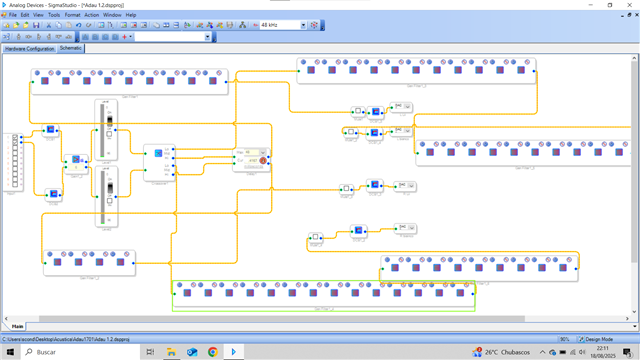
Hello Sergica,
Thanks for the screenshot. It helps a little but the full project would be a little better.
I do have some observations.
First is that you do not need the set of DC blocks on the outputs. The DC block on the inputs will get rid of the DC and it is rather tough to introduce it back in later. So save the instructions and keep your low end as flat as can be.
Next observation is that you have a eight stage filter on the left channel and four on the right for the high end output. This WILL create a phase shift difference between the two channels which is usually not a good idea.
You are doing something similar on the low end. I have no idea what your actual filters are but IIR filters will all have some phase shift so going through more of them is more phase shift. Do the same things to both channels as much as possible.
It looks like you have the delay set to 0.4167 milliseconds for a max. This is not a lot of delay at all. With a sine wave and the difference with the filters you might have difficulty seeing the difference. Especially since you are comparing a low frequency to a high frequency. It is hard to get a measurement point with a slow low frequency waveform. Try to set the delay to a much higher number. This will depend on how much memory you have a available so getting rid of the DC_block blocks will help you be able to get a longer delay. Plus, you are delaying the low end a lot more by going through all the EQ as well. So you may need a ton of delay on the top end to line these up just from the filter difference. Not to mention mechanical speaker mounting.
Have you tried to input a fairly high frequency signal like 10kHz or 15kHz and then comparing the input to the output and then varying the delay setting? You might be able to see it changing a little easier.
Thanks for subscribing! I hope you find it helpful.
Dave T
Please log in to reply.