adau1787 Control volume with external switch
Hello,
I previously used the eval-adau1761 and had experience controlling the volume with buttons.
I switched to the eval-adau1787 development board and am trying to implement the same functionality with this board, but it's not working. I've attached the project below.
ADAU1787_pushbutton.dspproj
hardware
ADAU1787
Integrated/Special Purpose A/D Converters
SigmaDSP Audio Processors
Audio CODECs
Hello jinjnjinjin,
Thanks for including your project. All I can say is that it is super difficult to figure out and fix a problem if you are running blind!!
Have you found my YouTube channel yet and watched my video on Troubleshooting?
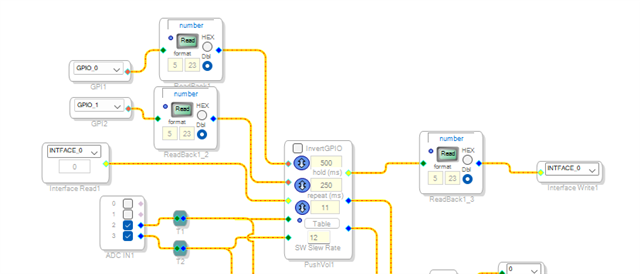
I have edited your project and added READBACK cells to you can "see" what is working and what is not working!
Here is a screenshot of what I did:
I added readbacks so you can see the button presses happening. It might be something in hardware that is not causing the GPIO pin to change? A register setting? I did check and I think you have it set correctly. This part is not one I support a lot but I think you have it set correctly?
Then I added a readback on the interface write output pin. I have a post somewhere on the forum with an example of how this all works. That readback will tell you what table index is the current setting of the pushbutton block. This is the table index number not the value that is in the table for that index. I did glance at your index and the values are spread out in a linear fashion not log so the volume will change drastically only near the end. But that is a minor detail.
Here is your project with my edits:
ADAU1787_pushbutton-DT-Edits.dspproj
Dave T
Please log in to reply.