ADAU 1701 2.1 System
I am currently building a 2.1 system and need to program the DSP. Now I have one with external Volume Controls and Potentiometers preinstalled and also 2 switches. I never programmed one of these before and need some help.
This is what I did. So as you see I want 3 Band Tone Controls for my 2 outs for the sattelites and one Sub Volume Control for the Sub. Now all of this doesnt really work. The Audio Cuts of if i dont have the Potentiometers turned all the way and it does nothing to the sound. Also the cone of my speaker is moving in Impulses even with no music playing. How do I get rid of that. I also want this to be pretty loud as well. I dont know what to do with the switches tho. Easiest for me here would be if someone could provide me with a step to step or an actual schematic. Advice to fix this schematic would also be great so I understand more.
Thanks!
Audio Signal Processors
sigma studio
software
4.7
SigmaDSP Audio Processors
adau1701
Show More
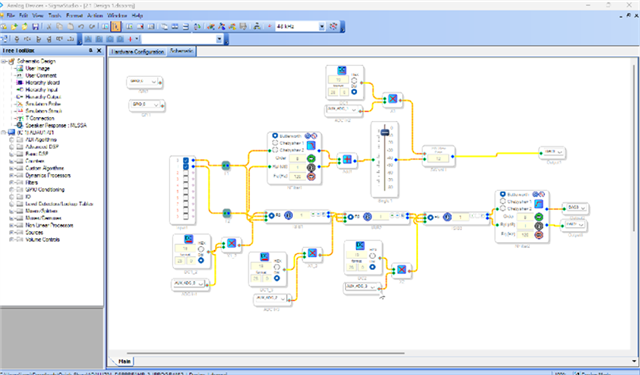
Hello lue,
Your screenshot is too small to be able the read the detail like what are you multiplying the AUXADC data by to then send to the volume control? I suspect that is the issue.
I was able to notice that you do not have a DC block on the input from the ADCs. So you will see the DC offset from the converters and that will make your woofer coils move!
I think you should watch some of my videos. I actually do have a 2-way crossover example in on video and also how to use the AUXADCs all for the ADAU1701. Watch the videos for the 1701.
(5) How to SigmaDSP and SigmaStudio - YouTube
This should get you dancing to the music in no time!
Dave T
Here is a better Res picture. So the Tone control series is right this way? You said something about the multiplication modules. What would be right for those or is there an easier way? Also can you explain where to put the extra dc module to get rid of the driver moving without music? I also want this to be a very loud system. How can I max out the gain without causing clipping?
Thx I am currently watching the vids.

Hello lue,
Yes, the multiply block is a huge problem and why you cannot get any volume. You are multiplying the 1.23 full scale AUXADC value by 19 in 28.0 format. That is a SUPER small number!! You also need to watch my video about fixed number formats.
https://www.youtube.com/watch?v=TcfLSveLONA&t=1s
I have other videos about AUXADCs and another one about Volume Controls. You might want to watch the one about Readbacks and also Troubleshooting. Most of these videos I got the idea for from issues I have seen people have on the forum. Plus, the professor in me likes to create lectures!!
Dave T
Is there a better way to do tone controls via Potentiometer without a Multiplication block? Or is the one in my schematic already good except for the DC multiply numbers? Can I just leave the DC blocks out?
Also 2 more things i noticed: there is a very high frequency noise coming out the speaker that disappears when connecting the amp directly to the input. How do I get rid of that?
Hello lue,
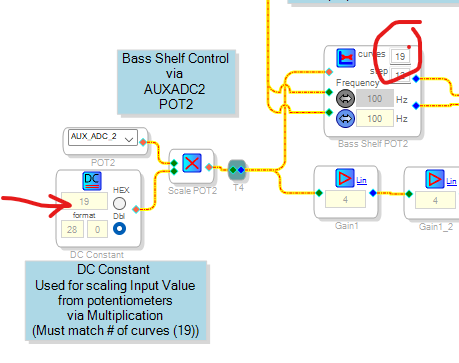
You are doing this all wrong. First you are using an index selectable filter as a volume control? Plus, you only have one filter. The DC cell you are using to multiply is good for index selectable blocks but you only have one selection. So only a zero should go into the control. If you send an higher number, which in your case you are sending 0-18 then it will pick up the data from the wrong memory address. It is a pointer. This is the part of the program I am talking about.
Then you are not using the crossover blocks for the crossover. Yes, you could do it with a high order filter but it is harder.
I will attach a project I wrote for the Dayton Audio KABD-430 board.
I have a bass shelf control using an index controlled filter. You will recognize the DC block and multiply but look at the number of curves in the filter!
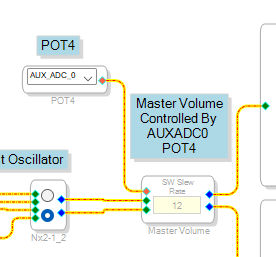
Here is how I did the volume control with a pot:
See how simple it is!
Here is the entire project:
0410.Stereo 2-way with Pot Controls Rev7 Cleaned Up.dspproj
Dave T

I think it is because the input is unterminated and so will pick up garbage from the air.
I would simply mute the audio until you have something connected.
It is possible to use a jack with a switch that you can use to connect to a GPIO input so that when you plug something in, it will unmute the input. Or you switch to some other input or signal.
By the way, some jacks can short the input to ground when nothing is plugged in. I am not sure what board you are using. Sometimes designers choose the wrong ground to tie it to and that can cause problems. I did a LOT of work in recording studios around the world dealing with grounding issues. It is not a simple thing at times. I think it is simple but I can "see" how it all works.
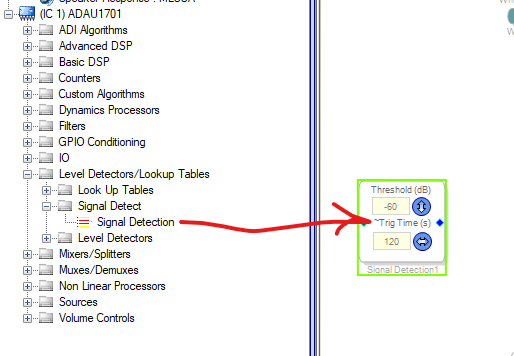
We do have blocks that can mute the audio when there has been no signal for a period of time then unmute quickly once it returns.
Here is where you find it:
This block has a few strange things about it when you try to make it stereo.
This discussion is for another time.
Dave T
I use the Wondom AA-AP23123 board. That comes with external Volume control so I dont need that. The Volume Control in Schematic is for the Subwoofer Volume since this is a 2.1 system and the sub needs its own DAC. I just want working Tone controls for DACs 2 and 3 (the Stereo speakers) that I can control with my Potentiometers and a way to increase gain because my input is at -14db when at max Volume. The board i am using for the input can also switch between Wifi and Bluetooth audio, so I would need a switch for the gain to be higher when on Bluetooth and lower on Wifi. The board comes with two on/on style switches and I would want to use one of them for this.
I already corrected the Subwoofer Volume control and removed the DC input and multiplying block and just connected it to the control pin.
And of course I also want to get rid of that high pitched backround noise that is always present when the dsp is connected. could I do that with a Compressor or would that hinder Audio quality?
Hello lue,
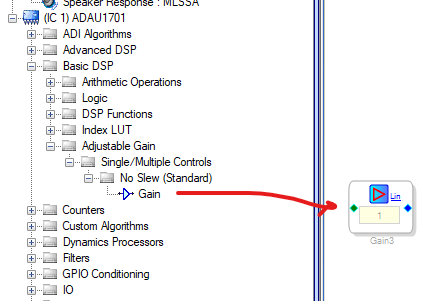
I showed you how to do a volume control, how you use it is up to you. All of our gain controls can add gain to. Right click and change the scale. Or you can simply use a linear gain block to add the 14dB you need. The block can be set to dB as well. Click on the little blue "Lin" text.
I will attach a project I did for a graphic EQ example. That is a good starting point for an AUXADC controlled EQ.
Regarding a few other little things. Bluetooth is a problem with this core because there are no sample rate converters in the part. so you HAVE TO use the MCLK from the Bluetooth to drive the MCLKIN of the DSP. If it is not exactly synchronized then it mutes all the DACs. Well, the MCLK output of a Bluetooth module is not always on! So you need to switch between sources and that is a problem. You would have to have a system controller or some external switches or something like that to switch sources.
By the way, WiFi is a similar issue because you have to use the clocks from the WiFi source not a local crystal. WiFi is a little easier because usually the clocks remain there always even if there is no audio.
Then you mention the high pitched noise. There are so many reasons for this. It light be the power supply and poor grounding? It might be a grounding issue between the output of the DSP board and whatever you are going into? If it is a computer audio card then that can also be a problem! You could have a sampling rate issue. I am not sure how much filtering is on the DAC outputs on that Wondom board but that can be an issue too.
You are correct, a compressor will NOT help with this at all. It really takes some study of the noise with an oscilloscope and with a spectrum analyzer to see what the harmonics are? Then you can sometimes get a hint as to the source.
Dave T
2630.ADAU1701 Graphic EQ Example.dspproj
Alright thank you. I now have working tone controls and the gain issue is also solved. I also synced the sample rate of the dsp with the input board wich removed some of the noise but the high pitched one was actually because i had the input board and the dsp plugged into the same psu. Well now the noise is gone and the tone controls work so question answered.
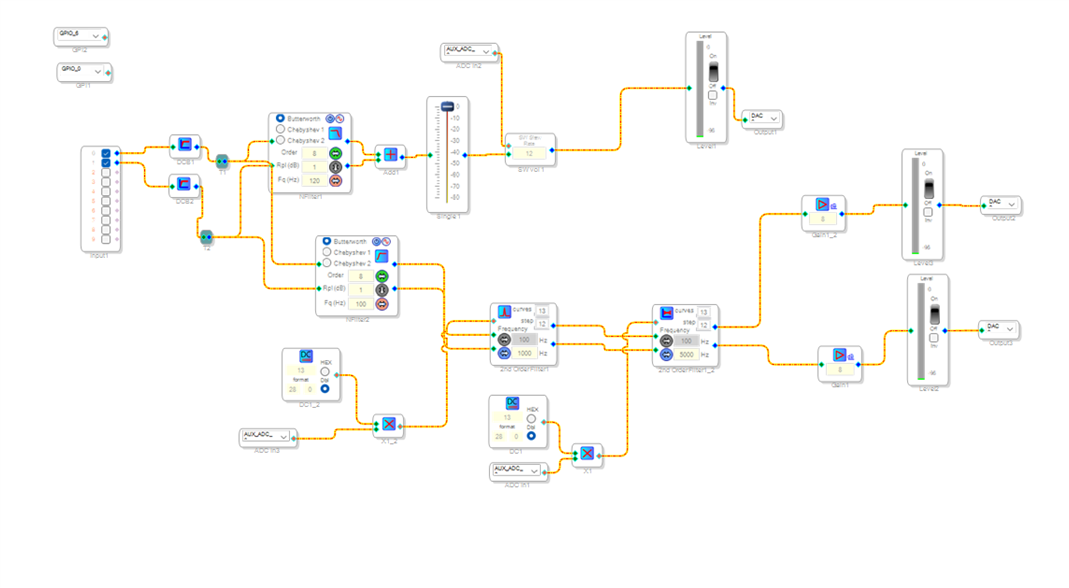
I do have one more question tho: I wanted to switch between a 100hz and a 20 Hz High Pass filter for the stereo out via one of my 2 external switches but just couldnt get it to work. Maybe you have one of these great examples for this too.
Thank you for your help.
Here is my schematic:
Please log in to reply.