ADAU1452 script quesntion how to set the parameters value by script
Hello Support Team Guys,
Please help me to resolve the two issues with my script. The attachment is my script file.
The issue 1 is why the input(3-8) cannot be connected with the nxm mixer1.
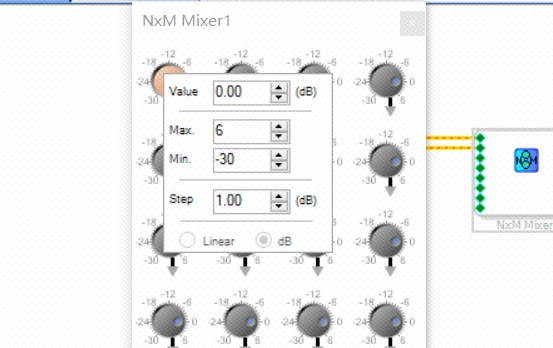
The issue 2 is why my script cannot be set the parameters. I'd like to change the value,max,min and step with the script. Would you please help me how to make it.
Thanks & Best regards,
xiangzhi wu
Fullscreen
two_issues_script.txt
Download
// #LANGUAGE# C#
int inputs = 8;
int outputs = 4;
//*********Local Vars*************//
double GainInc = 0.01;
double DCInc = 0.1;
double[] InputDCValues = new double[inputs];
double[] OutputReadBackValues = new double[outputs];
object[] DCModuleObjects = new object[inputs];
object[] RBModuleObjects = new object[outputs];
double[,] GainValues = new double[inputs, outputs];
double[] ActualResults = new double[outputs];
double[] ExpectedResults = new double[outputs];
HResult rest;
ss.EnableLoggingMode(true);
// Create Input Vectors.
ss.ProjectNew();
Object IcObject = ss.ObjectInsert("ADAU1452", 300, 100);
Object USBiObject = ss.ObjectInsert("USBi", 50, 100);
rest =ss.ObjectConnect("USB Interface", 0, "IC 1", 0);
int X = 300;
int Y = 100;
int i;
object InputCellObject = ss.ObjectInsert("Input", X, Y);
rest = ss.ObjectSetProperties("addAlgorithm", InputCellObject, "IC 1", "ADAU145x Inputs 0-15");
rest = ss.ObjectSetProperties("growAlgorithm", InputCellObject, 0, inputs, 0); // input growth
ss.PrintLine("audio input Module Added");
object OutputCellObject1 = ss.ObjectInsert("Output", X+400, Y);
object OutputCellObject2 = ss.ObjectInsert("Output", X+400, Y+100);
object OutputCellObject3 = ss.ObjectInsert("Output", X+400, Y+200);
object OutputCellObject4 = ss.ObjectInsert("Output", X+400, Y+300);
ss.PrintLine("output Module Added");
object MixerCellObject = ss.ObjectInsert("NxM Mixer", X+200, Y);
rest = ss.ObjectSetProperties("addAlgorithm", MixerCellObject, "IC 1", "NxM Mixer Slew");
ss.PrintLine("Mixer Module Added");
// growth input and output
rest = ss.ObjectSetProperties("growAlgorithm", MixerCellObject, 0, inputs - 2, 0); // input growth
rest = ss.ObjectSetProperties("growAlgorithm", MixerCellObject, 0, outputs - 1, 1); // output growth
ss.PrintLine("Mixer Module Grown");
for (i = 0; i < outputs;i++)
{
object OutputCellObject = ss.ObjectInsert("Output", X+400, Y+i*100);
rest =ss.ObjectConnect(MixerCellObject, i, OutputCellObject, 0);
}
for (i = 0; i < inputs;i++)
rest =ss.ObjectConnect(InputCellObject,i,MixerCellObject, i);
int index = 1;
string display_str;
for (i = 0; i < inputs; i++)
{
for (int j = 0; j < outputs; j++)
{
GainValues[i, j] = index++ * GainInc;
display_str = GainValues[i, j].ToString();
ss.PrintLine(display_str);
rest = ss.ObjectSetProperties("setControlValue","NxM Mixer1", j, i , "Value" + j +"_" + i, GainValues[i, j]);
}
}
Audio Signal Processors
adau1452
software
4.7
scripts
SigmaDSP Audio Processors
Show More

Hello,
Issue 1
The inputs you want to use need to be enabled (checked) It seems this does not work from a script,
for example this should enable input 2, it returns true, but it does not work:
Res = ss.ObjectSetProperties( "setControlValue", "Input1", 0, 0, "Ch2", true );
ss.Print("Set: " + Res.ToString() + "\n");
I suggest you create a project that has the input cells with all channels checked, then use a script to add your other elements
Issue 2
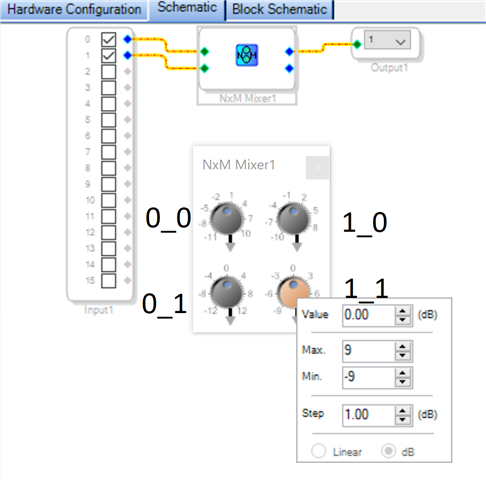
Yes, it is possible to set max, min, step (resolution). You need to use correct names with column and row indexing. See the attached script
Fullscreen
NxMMixer.txt
Download
// #LANGUAGE# C#
HResult Res;
Res = sigmastudio.ProjectNew();
sigmastudio.Print("ProjectNew: " + Res.ToString() + "\n");
ss.ObjectInsert( "USBi" );
ss.ObjectInsert( "ADAU1452" );
ss.ObjectConnect( "USB Interface", 0, "IC 1", 0 );
object Input1 = ss.ObjectInsert( "Input" );
ss.ObjectSetProperties("addAlgorithm","Input1","IC 1","ADAU145x Inputs 0-15");
// this returns true but does not work:
Res = ss.ObjectSetProperties( "setControlValue", "Input1", 0, 0, "Ch2", true );
ss.Print("Set: " + Res.ToString() + "\n");
object Mixer1 = sigmastudio.ObjectInsert("NxM Mixer");
Res = ss.ObjectSetProperties("addAlgorithm", Mixer1, "IC 1", "NxM Mixer Slew");
Res = ss.ObjectSetProperties("growAlgorithm", Mixer1, 0, 1, 1);
object Output1 = sigmastudio.ObjectInsert( "Output" );
sigmastudio.ObjectSetProperties("setControlValue","Output1",0,0,"SelectedChannel",1);
sigmastudio.ObjectConnect( Input1, 0, Mixer1, 0 );
sigmastudio.ObjectConnect( Input1, 1, Mixer1, 1 );
sigmastudio.ObjectConnect( Mixer1, 0, Output1, 0 );
sigmastudio.ObjectSetProperties("setControlValue",Mixer1,0,0,"Gain`max0_0",11);
sigmastudio.ObjectSetProperties("setControlValue",Mixer1,0,0,"Gain`min0_0",-11);
sigmastudio.ObjectSetProperties("setControlValue",Mixer1,0,0,"Gain`res0_0",22);
sigmastudio.ObjectSetProperties("setControlValue",Mixer1,0,1,"Gain`max0_1",12);
sigmastudio.ObjectSetProperties("setControlValue",Mixer1,0,1,"Gain`min0_1",-12);
sigmastudio.ObjectSetProperties("setControlValue",Mixer1,0,1,"Gain`res0_1",24);
sigmastudio.ObjectSetProperties("setControlValue",Mixer1,1,0,"Gain`max1_0",10);
sigmastudio.ObjectSetProperties("setControlValue",Mixer1,1,0,"Gain`min1_0",-10);
sigmastudio.ObjectSetProperties("setControlValue",Mixer1,1,0,"Gain`res1_0",20);
sigmastudio.ObjectSetProperties("setControlValue",Mixer1,1,1,"Gain`max1_1",9);
sigmastudio.ObjectSetProperties("setControlValue",Mixer1,1,1,"Gain`min1_1",-9);
sigmastudio.ObjectSetProperties("setControlValue",Mixer1,1,1,"Gain`res1_1",18);
Res = sigmastudio.ProjectLinkCompile();
sigmastudio.Print("Compile: " + Res.ToString() + "\n");
Hello Support Team Guys,
Thanks very much for your feedback. The second issues is partly fixed. I based on your script to change it to meet my requirements. But I failed.
(1) there is only two inputs cannot connected. The other inputs cannot be connected by script.
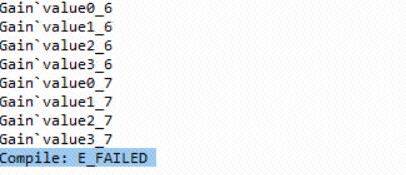
(2) I used the varialbe index to change the parameters. it doesn't work. And the return of compile is E_FAILED. I don't know why.
Fullscreen
modified_two_issues_script.txt
Download
// #LANGUAGE# C#
// #LANGUAGE# C#
int inputs = 8;
int outputs = 4;
//*********Local Vars*************//
double GainInc = 0.01;
double[,] GainValues = new double[inputs, outputs];
HResult rest;
ss.EnableLoggingMode(true);
// Create Input Vectors.
ss.ProjectNew();
Object IcObject = ss.ObjectInsert("ADAU1452", 300, 100);
Object USBiObject = ss.ObjectInsert("USBi", 50, 100);
rest =ss.ObjectConnect("USB Interface", 0, "IC 1", 0);
int X = 300;
int Y = 100;
int i;
object Input1 = ss.ObjectInsert("Input", X, Y);
rest = ss.ObjectSetProperties("addAlgorithm", Input1, "IC 1", "ADAU145x Inputs 0-15");
rest = ss.ObjectSetProperties( "setControlValue", "Input1", 0, 0, "Ch2", true );
ss.Print("Set: " + rest.ToString() + "\n");
rest = ss.ObjectSetProperties( "setControlValue", "Input1", 0, 0, "Ch3", true );
ss.Print("Set: " + rest.ToString() + "\n");
ss.PrintLine("audio input Module Added");
object Mixer1 = ss.ObjectInsert("NxM Mixer", X+200, Y);
rest = ss.ObjectSetProperties("addAlgorithm", Mixer1, "IC 1", "NxM Mixer Slew");
ss.PrintLine("Mixer Module Added");
// growth input and output
rest = ss.ObjectSetProperties("growAlgorithm", Mixer1, 0, inputs - 2, 0); // input growth
rest = ss.ObjectSetProperties("growAlgorithm", Mixer1, 0, outputs - 1, 1); // output growth
ss.PrintLine("Mixer Module Grown");
for (i = 0; i < outputs;i++)
{
object OutputCellObject = ss.ObjectInsert("Output", X+400, Y+i*100);
rest =ss.ObjectConnect(Mixer1, i, OutputCellObject, 0);
}
for (i = 0; i < inputs;i++)
rest =ss.ObjectConnect(Input1,i,Mixer1, i);
int index = 1;
string display_str;
string Gain_str;
for (i = 0; i < inputs; i++)
{
for (int j = 0; j < outputs; j++)
{
GainValues[i, j] = index++ * GainInc;
Gain_str = "Gain`value"+j.ToString()+"_"+i.ToString();
ss.PrintLine(Gain_str);
sigmastudio.ObjectSetProperties("setControlValue","Mixer1", j, i , Gain_str, GainValues[i, j]);
}
}
rest = ss.ProjectLinkCompile();
ss.PrintLine("Compile: " + rest.ToString() + "\n");
The attachemnt is my script. would you please have a look.
Hello,
To set gain use Gainx_y not Gain`valuex_y:
ss.ObjectSetProperties("setControlValue",Mixer1,0,0,"Gain0_0",-3);
As I said, you cant enable inputs from a script, see my suggestion in previous reply
Your compile fails because you have unconnected inputs
Hello Support Team Guys,
Thanks very much for your supporting. the two issues has been fixed. Thanks again.
BTW, would you please share the guideline how to get the different parameters name?
Thanks & Best regards,
xiangzhi wu
Hello xiangzhi,
The document is confidential and we do not send it out on a public forum. I can see you work for a distributor not a manufacturer. So this is very risky for us. I guess we would need a lot more information and possibly an NDA to be signed.
Dave T
Please log in to reply.