ADAU1787 expanding design to support microphone and another digital input
Hi,
I'm using ADAU1787 on our custom board.
It is connected to:
SPT1 - MCU input. MCU is defined as slave
SPT0 - Input from Modem , Output to modem. Modem is Master (is this possible to configure?)
AIN0 - Microphone
DAC0 output - connected to Mono speaker.
My current project implements only MCU->SPT1 -> ASRC->DAC0->Speaker. Sending files played using the speaker. This part works and I'm attaching my SigmaStudio project for reference.
I now need to add SPT0 connection (again the ADAU1787 is a slave since the modem requires Master configuration). So I need your help with adding configuration to the following paths:
1. Microphone->AIN0->ADC0->SPT0->Modem
2. Modem->SPT0->DAC0->Speaker
A few questions regarding this configuration:
1. Is possible to sync 2 separate inputs, both are i2s masters, using the ASRC? and how?
2. How should I configure the Modem input via SPT0 to output the data to the same DAC0 connected to the speaker?
Thanks,
Einat
7266.ADAU1787-SALI-SPT1.dspproj
software
ADAU1787
Integrated/Special Purpose A/D Converters
Audio CODECs
Hello Einat,
I have couple of questions reg your project setup.
You mentioned SPT1 is connected with an MCU and MCU is defined as slave, which means the DSP should be the master but SPT1 is set as slave in your project. The bus will have no clocks in this setup if both MCU and DSP are set as slaves.
EYR said:
SPT0 - Input from Modem , Output to modem. Modem is Master (is this possible to configure?)
Yes, if the modem can only act as a master, then we can use the ASRC to sync it with the DSP.
EYR said:
My current project implements only MCU->SPT1 -> ASRC->DAC0->Speaker. Sending files played using the speaker. This part works and I'm attaching my SigmaStudio project for reference.
You don't need an ASRC if the DSP is the master and MCU is slave. But I guess there is a typo with your first line saying " SPT1 - MCU input. MCU is defined as slave ", because your project is set up for slave and you used ASRC correctly just like the MCU being the master. So let me know what's the actual set up is.
since you mentioned your project works fine, I will assume the MCU as master. In this case you need ASRCs.
EYR said:
1. Microphone->AIN0->ADC0->SPT0->Modem
Yes, it can be done like this.
so, the flow will be, Mic->AIN0->ADC0->DSP->ASRC->SPT0 (slave) ->Modem (master)
You may need ASRC in the output side, because the DSP will run at internal rate (from crystal) and it deposits the output data at this rate, but the SPT is slaved to external clock, so an ASRC is needed.
EYR said:
2. Modem->SPT0->DAC0->Speaker
This is fine.
EYR said:
1. Is possible to sync 2 separate inputs, both are i2s masters, using the ASRC? and how?
This seems to be the problem, because you have asynchronous inputs on both Sports (SPT0 and SPT1). we do have four ASRC inputs, but the input source to the four ASRCs should be either SPT0 or SPT1, but not both. So, we can't configure 2 ASRCs for SPT0 and 2 ASRCs for SPT1.
We can find some other ways if you can explain about clocking in your system. Where is the MCLK to the DSP coming from? Is it from a crystal?
I believe the MCU has its own MCLK. Can the MCU provide MCLK to the DSP? or can the MCU accept MCLK_IN from the DSP?
The 1787 can send CLKOUT via an MP pin which can be used by the MCU's MCLK_IN.
EYR said:
2. How should I configure the Modem input via SPT0 to output the data to the same DAC0 connected to the speaker?
This can be done via a MUX in the DSP. The input from MCU and an input from modem can be input to the MUX, and user selectable input will be routed to the output which is DAC0. If you want to select it manually then a switch type MUX can be used or if you want to select the input by any logic, then index selectable MUX can be used.
If you can give me some of the details that I asked for, I will be able to create a project with your specifications and share that with you.
Regards,
Harish
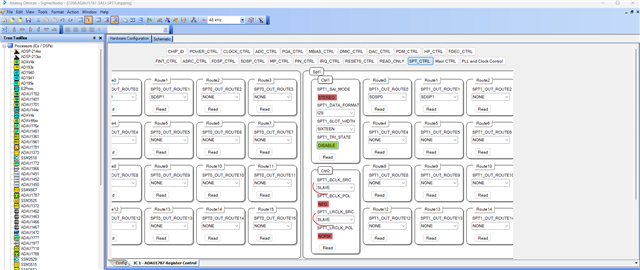
Hi Harish,
Thanks for your quick response.
It was a misfortunate typo. My challenge here is the the MCU is Master and also the Modem must be master. This is why I use ASRC. and this was my question. I do not have any external Mclk connected to the MCU. Just the 4 I2S lines for each serial port. The Mclk is connected to the ADAU1787 device from an external oscillator. In the current design there is no option to change this design to make the MCLK come from the MCU. I also need the ability to change the Mux selection during run time (using the I2C port to send commands). I'm attaching also the schematic HW design of the device so you can see.
Thanks,
Einat
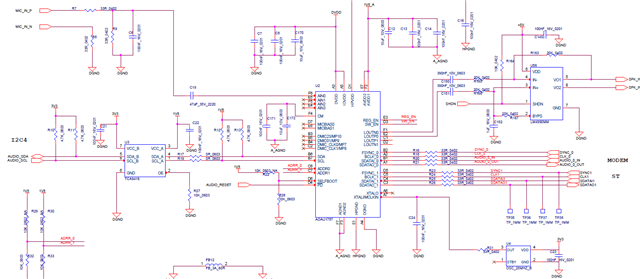
Hello Einat,
I'm working on a response and will reply soon.
Regards,
Harish
Hello Einat,
It looks like you are using a 25MHz Osc module which is quite odd. Usually, the MCLK will be 256xfs or 512xfs which is basically evenly divisible by the audio clocks (BCLK, LRCLK).
However, you can use 25MHz MCLK and use the fractional PLL mode to bring out the core clock, which is evenly divisible by the sample rate, but your project wasn't set up for exact PLL register values. You can get the exact PLL register values in the tool itself by entering the MCLK_IN frequency in the PLL calculation page (Hardware config>>PLL and clock control where you can see the PLL registers and flow).
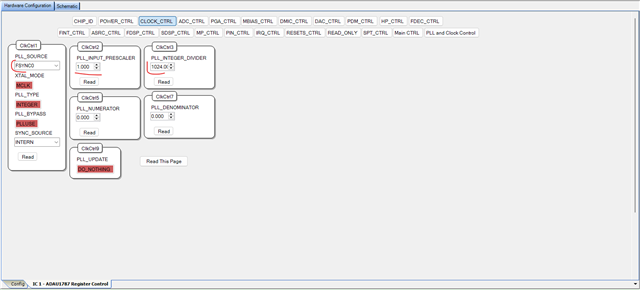
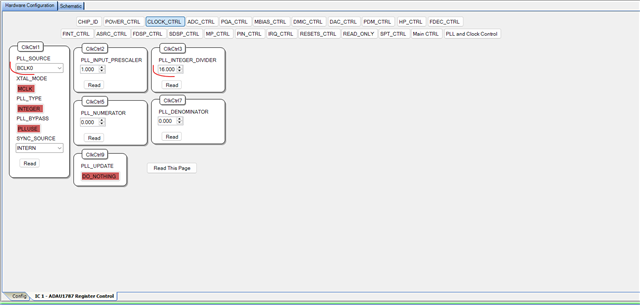
Anyway, we are not going to use that 25MHz MCLK, rather we use the incoming LRCLK (FSYNC) as a source to the PLL, then the entire system clock, sample rate clock, peripheral clocks will be derived from the incoming LRCLK (FSYNC). we will have to set the PLL registers for that incoming frequency of 48KHz, you can also use BCLK as the source to the PLL and adjust the PLL registers according to that. The LRCLK and BCLK are usual audio clocks you don't need to use the fractional PLL mode.
If FSYNC of 48KHz is the source to the PLL, then
PLL_INPUT_PRESCALER = 1
PLL_INTEGER_DIVIDER = 1024
If BCLK 0f 3.072MHz is the source to the PLL, then
PLL_INPUT_PRESCALER = 1
PLL_INTEGER_DIVIDER = 16
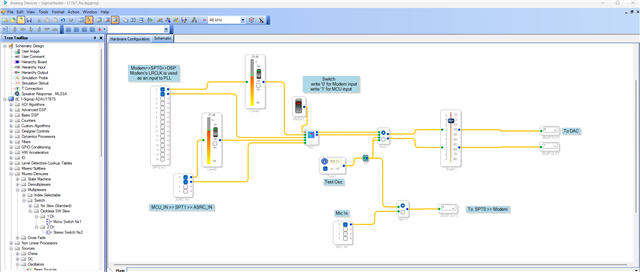
Here in this example, I'm using FSYNC0 (SPT0) of 48KHz which is coming from the Modem, since I'm using my Modem clocks to derive the system clocks, the modem input will be in sync with the system clock and sample rate clock, hence it doesn't need ASRC in the input side and also it doesn't need ASRC in the output side too. The incoming mic signal from ADC can go thru the DSP and to SPT0 to Modem.
My other audio input which is MCU input (SPT1) is external to the DSP clocks, so it needs ASRC in the input side. I have configured two ASRC's for the MCU input.
In schematic side, I have used an index controllable Mux which will be used to select which input either modem (SPT0) or MCU (SPT1) should be routed to the output. I have connected a switch (28.0) module as a control input for the Mux; you can find that switch module's address in the capture window and write either '0' or '1' to select the input from your controller. I have also added comments in the project which will help you understand the flow.
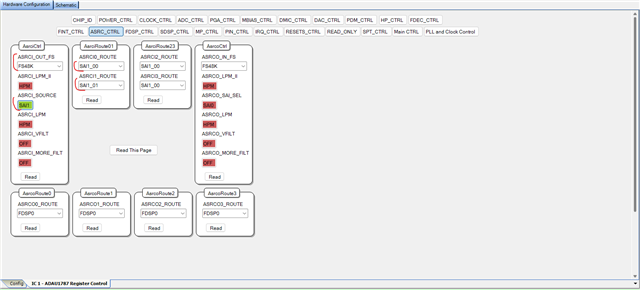
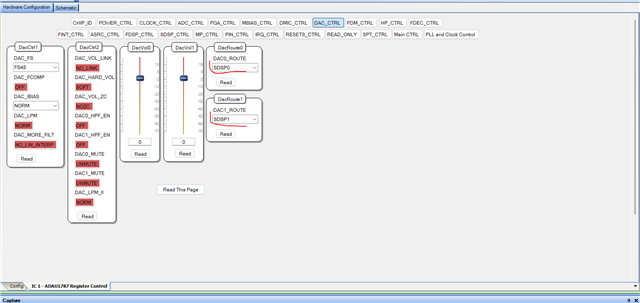
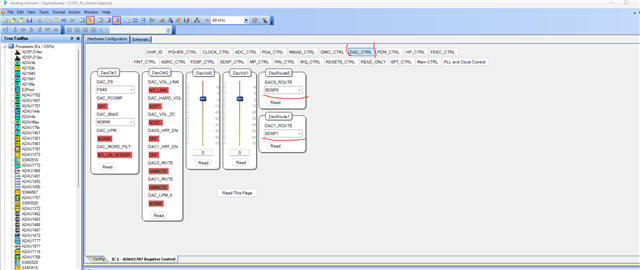
In DAC Control registers, I chose SDSP0 and SDSP1 to be the DAC's input source.
I routed the Mic input to SPT0's output, I routed it to channel SDSP2 in the DSP schematic and chose SDSP2 as the source to be transmitted as I2S signal to the Modem. I just configured one channel (SDSP2), so you will see only left channel and right channel will be empty if you probe and see the I2S signal. If you want to route any other channel, then you can configure it.
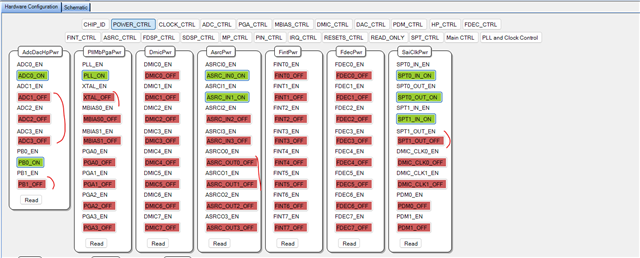
If you are not using SPT1's output or any unused things, then you can shut that off in the Power control register tab.
According to your description and schematic, I didn't need to use ASRC output, SPT1's output, so I turned them off.
And you are only using one ADC0 and one DAC0, so I turned off the rest.
If you need anything then configure it and don't forget to turn them on in the power control register.
NOTE: One important thing is that the Modem's clock must be present and stable all the time, if the clock goes away then the DSP will stop running since it doesn't have a MCLK. so, you will have to choose which of your two inputs will always be present and stable and use that source as the source to PLL. If MCU is the one which will be always present and stable, then simply select FSYNC1 as the source to the PLL and also now ASRC must be used for modem's input (SPT0) and output. You will have to use two ASRC's for modem input and one ASRC for modem output.
No worries, I will make the changes for you, if needed.
I hope I haven't missed anything, so I will attach the project. Please try this and let me know how it goes.
I think it will work fine for you, if you come across any issues then let us know.
1787_Rx.dspproj
Regards,
Harish

Hi Harish,
Thank you for your detailed accurate response. I really like the approach. Unfortunately all I2S signals from the MCU are only present when playing an actual audio file. when no sound us being played, the clock signals (fsync and bclk) are 0.
In any case I can't rely on the modem to give me the clock since the modem is an external module , and the system should work independently without it.
So in this case I understand the only option would be to connect the MCLK pin for the ADAU1787 to an MCLK signal coming from the MCU, since i need a steady clock always present.
One more option I wanted to check with you: If the ASRC is only used on the input, can I somehow put the mux before the asrc and when switching from spt0 to spt 1 the data from one port at a time will go into the ASRC->DAC->speaker? or will the clock domains issue affect also the input signal from the microphone to the modem?
Thanks,
Einat
Hello Einat,
EYR said:
So in this case I understand the only option would be to connect the MCLK pin for the ADAU1787 to an MCLK signal coming from the MCU, since i need a steady clock always present.
If this is possible then the work will be very simple. If your MCU has any CLKOUT pin which can provide MCLK to the ADAU1787, then connect the MCU's MCLK out to the 1787's MCLK_IN. Now your I2S signal from MCU will not need ASRC, it can directly be routed from SPT to core.
Then use two ASRC for modem inputs. In this case, Modem's I2S input can be optional to be present all the time.
The MCU's I2S signal can also be optional since MCLK_IN to the DSP is coming from MCU's clock out pin but note that MCU must be active all the time to provide MCLK to the DSP, Irrespective of the I2S input's status.
EYR said:
One more option I wanted to check with you: If the ASRC is only used on the input, can I somehow put the mux before the asrc and when switching from spt0 to spt 1 the data from one port at a time will go into the ASRC->DAC->speaker? or will the clock domains issue affect also the input signal from the microphone to the modem?
If the above-mentioned method (MCU provides MCLK from clock out pin) is viable then you don't need any ASRC switching since MCU I2S input doesn't need ASRC, so Modem Input can use the ASRC completely.
If MCU or Modem can't provide MCLK to the DSP, then we can do ASRC switching but any one of the inputs must be active at a time. Does system require both I2S input be active at any time? or either one I2S input is active at a time, I mean if MCU is outputting I2S signal to DSP then modem is not streaming that time (it can be sending out clocks, but DSP won't take it) and if modem is outputting I2S signal then MCU is not streaming (it can be sending out clocks, but DSP won't take it) . If this is your requirement then we can do ASRC switch between these two inputs. One other thing is that your Mic input is sent out to Modem, so modem must send out clocks to SPT0 for DSP's output, but for input we can switch between modem and MCU. we can use crystal as MCLK input of the 1787 since MCU and modem can't provide MCLK
The Mux is a logical operation which happens inside the DSP. but here we will have to change the routing path before the DSP. So, it requires a register write, you will have to write to the ASRC's control registers via I2C/SPI to change the ASRC's input source. we don't need a mux inside the DSP since we bring only one signal into the DSP that can be directly routed to DAC.
Assume either MCU or Modem I2S input will be active at a time, and it can be a user input to decide which I2S source to be active at a time. Instead of saying active, you can think that both MCU and Modem is streaming but DSP (ASRC) will take inputs from the SPT chosen by the user. Now the SPT0 is connected to modem and SPT1 is connected to MCU. I use two ASRC to receive I2S input from SPT, my register write will decide from which SPT the ASRC will be receiving the signal.
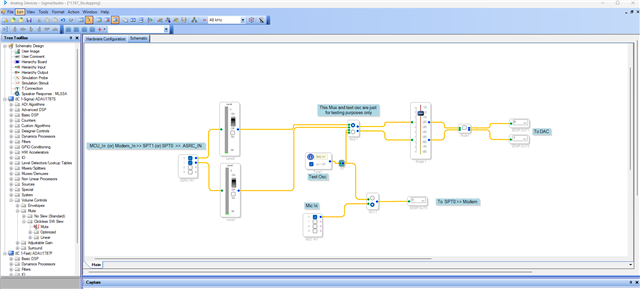
Below is my new signal flow.
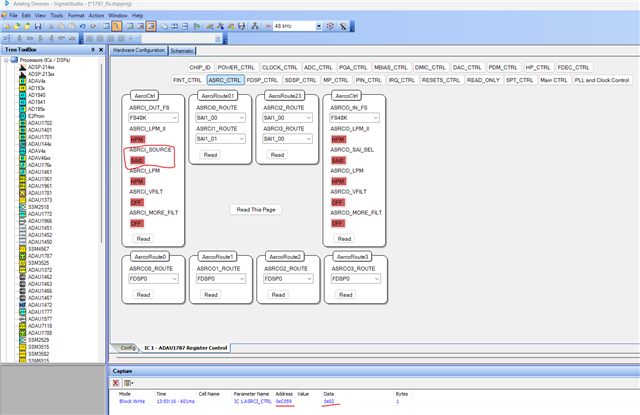
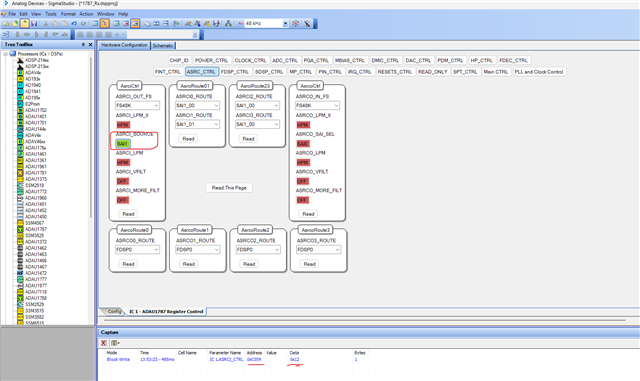
Below is the register that you will change from your MCU/SS to tell the ASRC that from which SPT it should take the signals and convert it to core rate.
when you write '0x2' to the address 0xC059, then the input ASRC will take input from SPT0.
when you write '0x12' to the address 0xC059, then the input ASRC will take input from SPT1.
One important thing is that, before we write to the register for changing the ASRC source every time, you will have to mute the outputs and once the write is done, then you can unmute the outputs after some time. I have also included mute blocks in my schematic; you can find the address in the capture/param window or exported files.
This method is not viable if you want both your I2S inputs simultaneously.
Also, if you want your mic input to be continuously send to SPT0 and then to modem, then modem should send out clocks all the time (though MCU input is active currently), since the ASRC would be set up to use MCU input, it doesn't consider modem clocks but that clocks will be necessary for Mic input to SPT0 output.
If your MCU can provide stable MCLK, then forget all this, you can bring in two I2S signal simultaneously, the MCU input will directly come into the core and modem input will go thru ASRC and then the core.
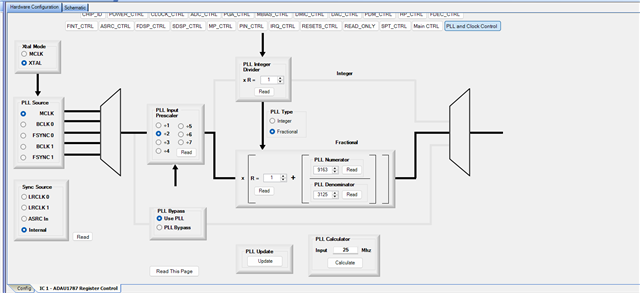
If you are going to use your 25MHz Osc module as an MCLK In, then set the PLL registers like below.
MCLK_input = 25MHz,
Input prescaler = 2
(so 25MHz/2 = 12.5MHz)
R=1
PLL Num = 9163
PLL Den = 3125
System clock = 12.5MHz * (R + (PLL Num/PLL Den)) = 12.5MHz * 3.9326 = 49.152MHz
Below is the reference,
So, please let me know which method works for you and which method suits your requirement.
Regards,
Harish

Hi Harish,
Thank you for your clear elaborate solution. Since I have a given hardware I'm going to try to use your solution for switching the ASRC input. 2 more questions if I may:
1. As I understand it, the DAC can only play one signal at a time anyway is that incorrect? in your first solution, using the modem clock, the logical mux inside the DSP had a switch changing between inputs. So I don't see the advantage of sending both SPT inputs at the same time. Did I understand correctly?
2. I'm going to use your solution no dought, but just for my understanding, is it possible to configure the MCU as a slave, even though it is the one initiating the sound signal, and this way it will receive the bclk and fsync from the codec and it also solves the problem?
Just to clarify completely let me describe my system:
My MCU is playing audio files to the speaker from time to time - this is the normal behavior of the device.
The modem is used by the system to perform a phone call using the microphone and the same speaker.
While a call is active, the MCU might need to play some audio message then the call continues.
I hope this is clear and covers everything.
I'll keep you updated on the results using your solution (MCLK from external osc 25Mhz, ASRC input switched between SPT0 and SPT1 during run time according to system needs.
Thanks,
Einat.
see my response below and also, could you please post the .dspproj file?
Hello Einat,
EYR said:
1. As I understand it, the DAC can only play one signal at a time anyway is that incorrect?
The ADAU1787 has stereo DAC, each DAC's input source can be individually selected. For ex, you can select one DAC for your MCU input and one DAC for your Modem input or both DACs for MCU inputs or both DACs for modem input. There are so many ways to set the source of the DAC. You can also change DAC's source at run time with proper precaution taken.
Below is where the register located, just click the drop down and see the sources.
EYR said:
using the modem clock, the logical mux inside the DSP had a switch changing between inputs. So I don't see the advantage of sending both SPT inputs at the same time. Did I understand correctly?
Initially I thought, you want to bring in two inputs (MCU, modem) into the DSP and you want the one that you select to be the output. So, you can select one of your two inputs to the output using the mux.
EYR said:
is it possible to configure the MCU as a slave, even though it is the one initiating the sound signal, and this way it will receive the bclk and fsync from the codec and it also solves the problem?
Yes, you can do that, you can set the ADAU1787 to be the serial clock master. I believe you mean the DSP 1787 as 'codec'. If you set the DSP as master, then the MCU input doesn't need ASRC. You can directly bring into the core. So, the ASRC switching method is not needed.
EYR said:
My MCU is playing audio files to the speaker from time to time - this is the normal behavior of the device.
So, your MCU will be playing audio files (as I2S output) to the DSP from time to time and the DSP will route that to the DAC and then to the speaker, right?
EYR said:
While a call is active, the MCU might need to play some audio message then the call continues.
So, the MCU will send some audio messages which will be sent to DAC and speaker, then the modem will play the call to the DAC > speaker right? so, one of the two inputs will be routed to the DAC.
For this, you can use a Mux inside the DSP to route which input should be sent to the DAC.
If you set the MCU as serial clock slave, then you don't need ASRC for MCU inputs, you can two ASRC for modem input and you can bring in two I2S inputs into the core, and you can select the MCU input when MCU sends the audio message and then you can switch to modem input when the call is active.
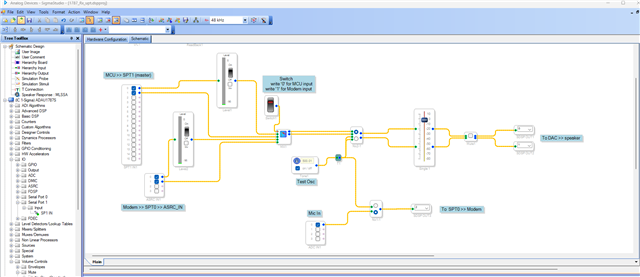
The below schematic will do the job. No need for ASRC switching.
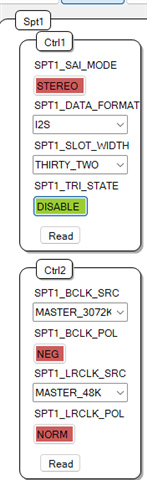
I have changed SPT1 where MCU is connected as master.
I have changed the ASRC source as SAI0 (SPT0) which is modem.
The below project assumes that the MCLK_IN to the DSP is coming from 25MHz Osc module. The MCU (SPT1) is serial clock slave and modem (SPT0) is serial clock master, so it goes thru ASRC.
A switch is used as the control input for index selectable Mux, so write to that switch's address from your MCU to select the input to be routed to the output. switch's address can be found in the param's window/exported files.
1787_Rx_upt.dspproj
Regards,
Harish

Hi Harish,
Thanks again for your extensive help.
I need some more info. I deleted my previous response since now to my understanding I need to play both SPT1 and SPT0 together. Muting one signal is not an option. the phone call must continue while the the sound from the MCU is played and none of them can be muted. Given this new data, How can I implement this? assuming that I will configure the MCU SPT1 to be slave and the master will be the ADAU1787 (since i can control the MCU software) and the modem on SPT0 will be master and the ADAU1787 will be slave.
Now my main issue would be to mix both signals together.
Can you assist?
One more thing I forgot, I tried playing the test osc signal on my EVB (I changed the PLL to fit the OSC on the EVB) and I was not able to play the test osc sound (my EVB works fine with other dspproj files). so I wonder why this is.
Thanks,
Einat
Hello Einat,
EYR said:
I need some more info. I deleted my previous response since now to my understanding I need to play both SPT1 and SPT0 together. Muting one signal is not an option. the phone call must continue while the the sound from the MCU is played and none of them can be muted. Given this new data, How can I implement this? assuming that I will configure the MCU SPT1 to be slave and the master will be the ADAU1787 (since i can control the MCU software) and the modem on SPT0 will be master and the ADAU1787 will be slave.
Okay then the connection will be,
The DSP will use the Osc module for MCLK_IN.
Modem (master) >> SPT0 (slave) >> ASRC >> Core
MCU (slave) >> SPT1 (master) >> Core
One more question I have is, I can see that only one of your DAC is being used in the schematic.
So, The MCU will bring in one channel (one of the slots is empty in I2S format) and modem will bring in one channel (one of the slots is empty in I2S format), then you will have two channels inside the core, and you want to mix them and send it out to DAC0. Is that what you are planning?
Let me know about this, I will change the schematic accordingly.
But for now, I assumed each sport gives 2 channels, so it will be four channels inside the core, and you want to mix it and send that to two DACs. If this is not what you want, then we will change it in a matter of time, no problem.
I used merger in this project to mix the input, it will take two inputs and reduce the level by 6dB, just to avoid clipping. You can add additional gains if you want. I will come to that DSP part later, once we finalized the peripheral side.
I have not set the PLL for 25MHz, I don't have the source for 25MHz, so I couldn't test it with a 25MHz MCLK_IN. So, please change the PLL settings for 25MHz as I mentioned in my previous reply.
Just try to run a basic pass thru project with 25MHz MCLK and see if it works without a problem. Because I haven't tested with 25MHz MCLK.
EYR said:
Now my main issue would be to mix both signals together.
It's not a problem; we can mix it however we want.
EYR said:
One more thing I forgot, I tried playing the test osc signal on my EVB (I changed the PLL to fit the OSC on the EVB) and I was not able to play the test osc sound (my EVB works fine with other dspproj files). so I wonder why this is.
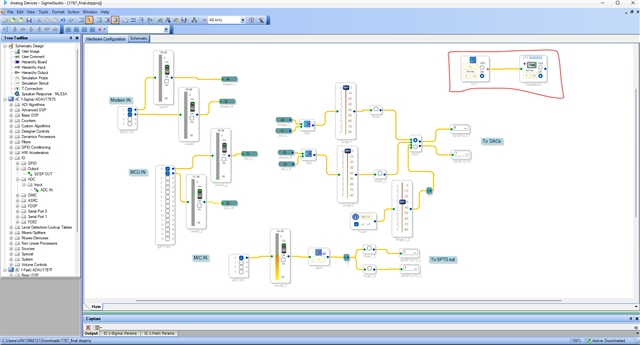
Just add a DC cell and readback module like below and test if the DSP is running. You will have to read the correct value.
Since we changed the PLL settings, we will have to test if the DSP is running in the first place.
1787_final.dspproj
Please try and test the above asked things, we will proceed further. I haven't fully reviewed your schematic yet.
One more important thing is that the IOVDD is 1.8V max, so your modem and MCU should work with 1.8V, otherwise you will need level translator between them.
Regards,
Harish
Hi Harish,
Thanks for your reply. I really appreciate you help.
Regarding the clock, it was actually you who gave me the parameters for 25Mhz PLL values. see here: https://ez.analog.com/dsp/sigmadsp/f/q-a/593697/problem-with-custom-board-sound/563158 . I'm testing this carefully step by step since I'm only able to test on the hardware after generating the c code then programming my MCU and the see the HW behavior. Unfortunately I dont have the ability to connect sigmaStudio directly to my custom board.
Regarding the signal mixing and DAC - The speaker output is mono, so I can only play one channel and this is why I use one DAC.
You got this correctly, We neew both signals played togethern (Think about a phone call, with some audio messages from the device in the background, all from the same speaker).
So far I was able to test making the MCU slave and ADAU1787 master and this works with these parameters for the clock control.
Pre input scaler = 5, PLL integer divider = 9, N/M = 519/625,So, for a 25MHz MCLK input, 25MHz/5= 5MHz= 5MHz (R + (N/M)) = 5MHz (9 + (519/625)) = 5MHz (9 + (0.8304)) = 5MHz x 9.8304 = 49.152MHz
I'm now starting to test the modem and will keep you updated.
Thanks,
Einat
Hi Harish,
I finally managed to operate the modem. I have now configured the device as follows (according to your last response):
1. MCU->ADAU1787>speaker - connected to SPT1 input, Codec is Master, MCU is slave, signal is mixed with Modem input via SPT0 - path working well.
2. Modem->ADAU1787->Speaker - Connected via ASRC (configured to work with SAI0), Modem is master, codec is slave, signal is mixed with MCU input via SPT1 - path working well (with some echo but this is a minor issue)
3. MIc->ADAU1787>Modem - connected via ADC, then output via SPT0 out. Here I'm having issues. I'm not sure, I think its connected via ASRC out, please verify my project. In any case the sound is transferred but with a lot of noise. And I suspect it might be a misconfiguration. These are the following issues I suspect:
1. The modem works at 8kHz sample rate, I changed the entire project to work with 8Khz (I only change it using the button "set system sampling rate"
2. the ASRC out connection might not be correct
3. I think maybe we should use an AGC block to make the signal better.
Attaching the sigma studio project
6330.ADAU1787-SALI-SPT1.dspproj
Thanks,
Einat
Hello Einat,
I have couple of questions.
EYR said:
The modem works at 8kHz sample rate, I changed the entire project to work with 8Khz (I only change it using the button "set system sampling rate"
It seems the MODEM is streaming audio at 8KHz, do you want to use ASRC to upsample the MODEM inputs to core rate (typically 48KHz) or you want the core to run at 8kHz (MCU input, ADC inputs must be changed to 8KHz)?
What is your intended project sample rate? If 48kHz is your intended project sample rate, then you don't have to change anything, use ASRC for MODEM inputs and outputs.
Changing the sample rate at the top of sigma studio won't change the actual sample rate of the system, it's done in hardware registers. The setting at the top of sigma studio is what we can call as software sample rate, the timing-based modules, filters, etc will be compiled at that rate. So, hardware sample rate and software sample rate must be the same to make everything work well in our system.
In your project, the serial port settings and ASRC settings are not configured correctly. I can make the changes and attach the project but before that we have to sort out this sample rate confusion.
Now, the serial port (master), ADC, DAC, DSP core everything is running at 48KHz, if MODEM alone is running at 8KHz, then we can use ASRC to up-sample the signal to 48KHz in reception and down-sample back to 8KHz while sending out (since MODEM is the clock provider).
Note that the MODEM signals have the bandwidth of 4KHz, any high frequency content in the signal path (after mixing inside the DSP @ 48HHz) will be removed once coming out of output ASRC (to MODEM).
Kindly let me know about the sample rates, I will attach a project with those configurations.
Regards,
Harish
Hi Harsh,
Thanks you for your rapid response.
The audio files played by the MCU are at 48kHz sample rate. So I think the best option is to use the asrc for upsample/downsample (I thought i was already using the asrc). I'm attaching the latest version. Do you think the noise I'm experiencing from the microphone->codec->modem path is caused by the frequency difference?
6204.ADAU1787-SALI.dspproj
Thanks,
Einat
Hello Einat,
There are couple of corrections.
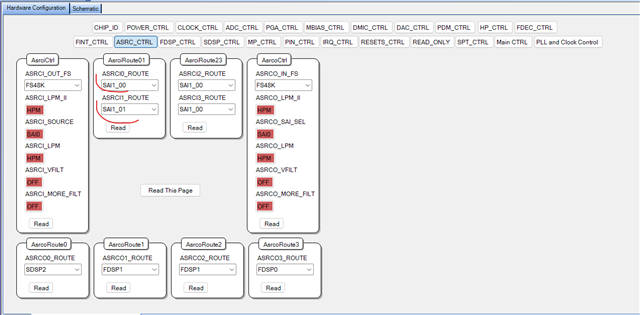
You are using two ASRCs at the input side, but left channel from MODEM is fed to two ASRCs, right is ignored. I have corrected it below.
And it seems you are sending out only one channel back to the MODEM, so the right channel is empty? Because you only used SDSP2. No problem with that.
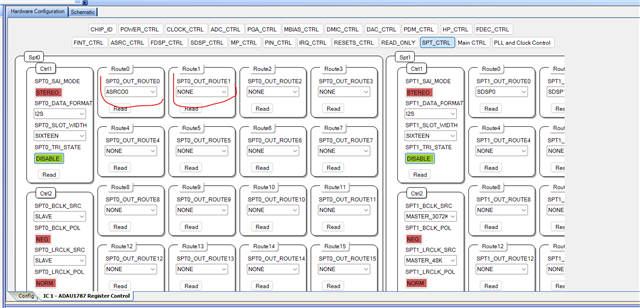
But you didn't set the serial port out routing correctly, the source to the serial port out must be from ASRC out, NOT SDSP. Please refer the below screenshot, since you are using one channel, I set the second channel as NONE.
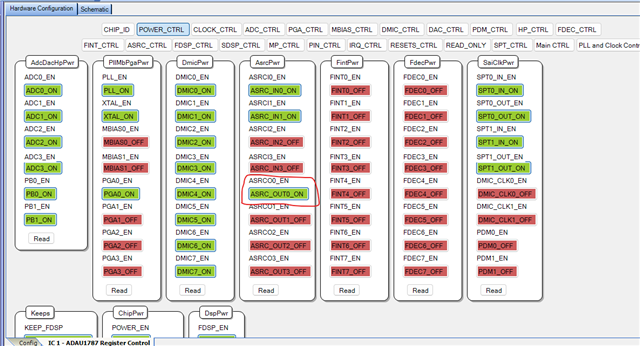
And the most important thing you missed is to enable the ASRC outputs in the power enable section.
This is what I can quickly see in your project, and I have made these changes and attached below.
ADAU1787-SALI-SPT1_upt.dspproj
If you still hear any noise in the MODEM path, just route the SDSP2 to DAC and listen to the output.
Regards,
Harish
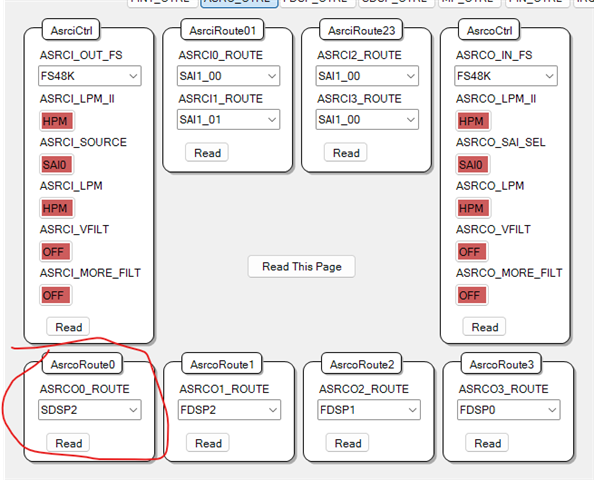
What about ASCRO0_ROUT? what does it mean?
Hello Einat,
That's ASRCO0_ROUTE (ASRC Output 0 Route). Input source to the output ASRC unit, Here the input source (rate) to the output ASRC unit is from channel SDSP2 (internal 48KHz) and output rate of ASRC out unit is SAI0 (which is incoming clock at port 0). So, the ASRC converts the internal core rate (48KHz) to incoming port 0 rate (48KHz).
Regards,
Harish
So I understand I should leave the ASRCO0_ROUTE set to SDSP2.
About the 2 channels, I only have one input from the MIC, connected to ADC0. can I somehow send it to the modem in stereo? duplicated the input?
Hello Einat,
EYR said:
So I understand I should leave the ASRCO0_ROUTE set to SDSP2.
Yes, that's correct.
EYR said:
About the 2 channels, I only have one input from the MIC, connected to ADC0. can I somehow send it to the modem in stereo? duplicated the input?
Yes, of course. You can route any signal as the second channel and send it to MODEM as a stereo out. You can duplicate the inputs, or you can send ASRCO0 twice.
There are so many routing options, just click the drop down of SPT0_OUT_ROUTE1 tab and choose which one you want to route.
Regards,
Harish
Hi Harish,
After applying your fix (in mono not stereo), the sound is still not good enough. I enabled the PGA and it helps a little but still speech is not clear, and in order to hear anything I need to be very close to the microphone. Can I send you any further data to assist me with this issue? Do you need scope images or anything else?
Hello Einat,
Did you try routing the mic signal directly to the DAC instead of sending to MODEM and analyzing? you are analyzing the mic output in the MODEM side right?
If you are analyzing in the MODEM side, then send a test sine tone to the MODEM and see if you have any distortion.
Please add a level detector and gain blocks into the path and see what's the incoming level of the mic input.
Please attach the scope shots and if possible, a recording of the output too.
Regards,
Harish
Hi Harish,
Thank you very much for your help.
I routed the mic signal (SDSP2) directly to DAC and could hear better. However the signal is weak and when I raise the volume, it adds noise.
The test tone
I added a video of the input level:
Hello Einat,
Please make sure that your mic input level is correct and it's in the range given in the datasheet. If the input voltage is low, then you wouldn't hear it properly. I can see the meter shows something around -40dB which is lower.
Here is the spec from the datasheet.
Are you using any pre-amp for the mic? or Micbias?
Regards,
Harish

Hi Harish,
We don't have a hardware pre-amp. We are using an Electret mic with external bias of 3.3V. The input level was measured and it is within the spec.
I was able to clear the signal using a high order shelving filter on the mic input (attached my updated project). I'm also using PGA gain to amplify the signal.
Please let me know what you think about this solution.
Also one last issue you might be able to assist here. During the phone call, the speaker from the other side can hear his own voice coming from the speaker. Is there an easy method to subtract the data sent to the speaker so it won't appear in the output to the modem?
3364.ADAU1787.dspproj
Thanks,
Einat
Hi Harish,
I just want to add that in the Graphic EQ I change the left value gain to 5.28db which makes the audio being sent to modem sound very good.
Still waiting for more information regarding the echo cancellation.
Thanks,
Einat
Hello Einat,
I need some info.
Is the distance from speaker to the mic fixed?
If it is, then we can use something like the delay-line echo subtractor, it will work as long as the acoustic path is fixed and simple.
what is the distance between the speaker and mic?
Below is the simple block diagram.
speaker_out[n] →── delay D ── gain α ── invert ──┐
▼
mic_in[n] ----------------------------------------------------→ subtract → e[n]
To find the delay samples,
d - distance between the speaker and mic
Delay in seconds = d/343 (speed of sound)
Delay in samples = (d / 343 m/s) × sample rate
Try implementing this and see if it helps.
Regards,
Harish
what should be the gain alpha?
Hello EYR,
You need to optimize the cancellation. Send a signal to the speaker then adjust the gain so it will provide the most cancellation where you are subtracting them. It is difficult to calculate ahead of time. So it is best to just adjust it for the max cancellation of the signal.
Dave T
I was not able to remove the speech from audio call. the data coming from the MCU is successfully subtracted but the audio from the phone call cameoing from the modem (Which is merged with the MCU data) still exists and you can hear an echo during the call.
Thanks,
Einat
Please log in to reply.