ADAU1452 Hardware
Hello, my project requires using the ADAU1452 to acquire ASRC from SPDIF and aims to output via SDATA_OUT1 in TDM8 format (stereo to Dolby audio conversion). Additionally, the ADAU1452 must operate as a slave device and acquire an external clock from BCLK_OUT0. I have configured the hardware as described in the attachment. However, when measuring the chip's pin waveforms, I still detect waveforms even when the external clock is disconnected. What could be causing this?Design 3.dspproj
Edit Notes
Corrected spelling mistakes
[edited by: mww at 3:40 AM (GMT -4) on 12 Sep 2025]
Audio Signal Processors
software
sigma studio 4.7
SigmaDSP Audio Processors
Hello mww,
There are a couple of things I noticed in your project which is not correct.
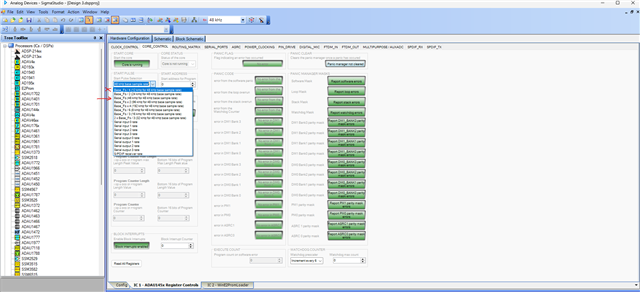
The sample rate of the DSP (start pulse) is set for 12KHz. Here is how, it's using CG1's/4 clock where CG1 is set to output 48KHz (N/M=1/6 default config (Base_fs)), but start pulse is set to Base_fs/4 which will give you 12KHz.
You have to select the setting I marked with an arrow to run the DSP at 48KHz.
Your serial port settings are fine with the sample rates, you selected 'Fs' correctly.
Your ASRC setting for SPDIF reception also seems correct since you selected ' use internal Fs' instead of ' use DSP core start pulse setting' in the ASRC output rate register. If you had selected 'use DSP core start pulse setting' then your incoming SPDIF would be converted to 12KHz, since start pulse was set for 12kHz.
Now in the routing matrix,
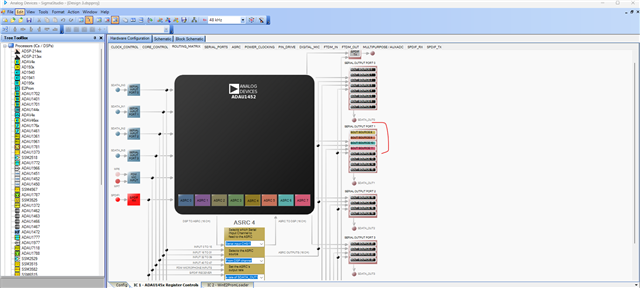
You selected all 8 output tabs of serial output port 1 which not right, because each tab is stereo, that's why there are 8 tabs which represents total 16 channels of output port 1.
So, if you select
SOUT SOURCE 8 (it will map channel 16-17),
SOUT SOURCE 9 (it will map channel 18-19),
SOUT SOURCE 10 (it will map channel 20-21),
SOUT SOURCE 11(it will map channel 22-23)
The first four tabs will give you TDM8.
Below is how it will look like after I changed it to correct settings.
Then, you are mapping it to output port 1 but the output port 1 is set to 'slave from clock domain 0' which means it will use whatever clock the output port 0 gets externally in the bus but output port 0 is set as master which means there will be no clocks on the bus internally for the output port 1 to pick.
So, you will have to connect your external clocks to output port 1 and set port 1 as 'slave from clock domain 1'.
There are cases where you can set output port 1 to 'slave from clock domain 0' when output port 0 is also set as slave to external clocks. Now port 0 will have clocks internally that port 1 can use, for that port 0 and 1 should have same configs like sample rate, no of channels etc. maybe I will explain it clearly when it's needed.
For now, if you are using port 1 alone then set it to 'slave from clock domain 1' and connect your external clock to output port 1. You are using 32-bit/channel TDM8 at 48KHz. so, your BCLK should be 12.288MHz, LRCLK is 48KHz. Make sure that it's correctly coming from the external chip.
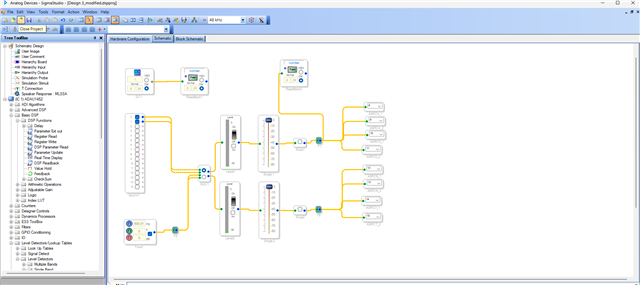
Below is what I added in the schematic.
I have attached the modified project, give it a try.
Design 3_modified.dspproj
Regards,
Harish
Hi Harish,
Thanks for your quick response and the correction of my program.
I have additional questions.
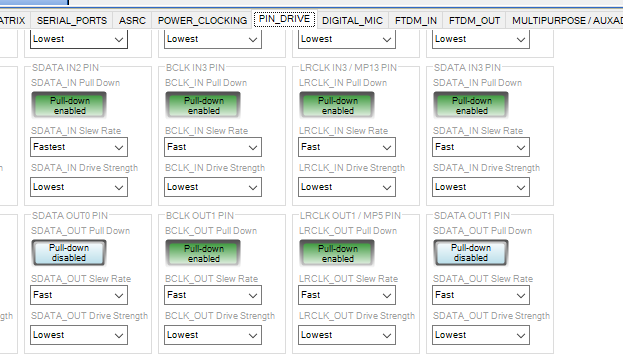
Does the part related to OUT1 in the pin drive page need to be adjusted.
Looking forward to your reply.
Thanks,
mww
Hello MWW,
This is not a simple answer. It all depends on the PCB layout and if you are using jumper wires etc. This is an area called Signal Integrity.
Usually you do not need to change these unless you are going with very long traces or wires.
Also, since you are setting up the BLCK and LRCLK to be a slave, the settings for those pins have no effect because this has to do when the pin is driving the signal not receiving it. The only pin that has any meaning would be the SDATA pin because that pin is driving a signal out.
So no need to mess with this unless you are getting lots of corrupted data with clicks pops and dropouts. However, if that is true then chances are there is more wrong than just these settings.
I hardly ever have to mess with these unless it is a high sample rate or long runs over wires.
Dave T
Hi Harish,
Very thanks for your reply,
let I could get some things to learn.
Please log in to reply.