The calculation method for the coefficient of filter Peaking
Could you please provide the calculation method for the Peaking coefficient of the filter?
Thread Notes
Santhakumari - Moved from Processors and DSP to SigmaDSP Processors & SigmaStudio Dev. Tool. Post date updated from Saturday, September 13, 2025 8:50 AM UTC to Monday, September 15, 2025 4:54 AM UTC to reflect the move.
Santhakumari - Moved from Processors and DSP to SigmaDSP Processors & SigmaStudio Dev. Tool. Post date updated from Monday, September 15, 2025 4:54 AM UTC to Monday, September 15, 2025 4:54 AM UTC to reflect the move.
Audio Signal Processors
software
sigmaStudio 4.7
SigmaDSP Audio Processors
adau1466
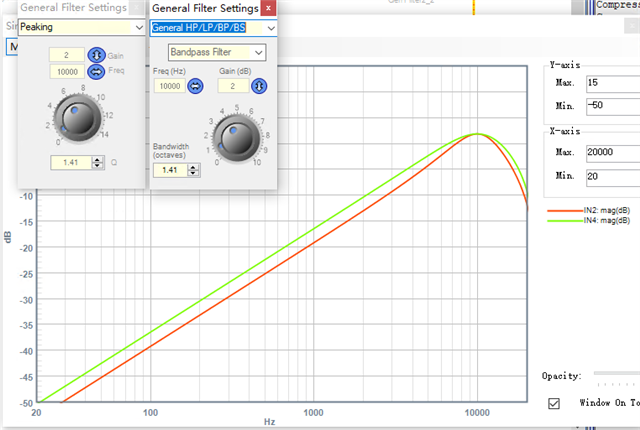
Hello hmr,
Please find the wiki page link here. It has the formula for 2nd order IIR Biquad filters.
This is the audio cookbook formula for Biquad filters. You can find the peaking formula there.
One thing to note is, if you manually calculate the coefficients for a particular filter setting and compared them with sigma studio's coefficients for the same filter setting, you may find some differences (which is mostly ignorable). The reason for that is explained here
Regards,
Harish
Hello Harishgowtham,
Thank you for your help.
alpha = sin( omega_c )/(2 * Q);
a0 = 1 + alpha;
a1 = (-2 * cos( omega_c ))/a0;
a2 = (1 - alpha)/a0;
b0 = (alpha *gainLinear )/ a0;
b1 = 0;
b2 = (-alpha *gainLinear)/ a0;
1.Using the same coefficient calculation method, I found that the results varied when different parameters were input.
2.Input F0 = 1KHz, FS = 48K, Q = 3.0. The result is the same as that of SigmaStudio.
3.Input F0 = 10 KHz, FS = 48 K, Q = 3.0. The result is different from that of Sigmasoft.
4.Input: F0 = 10 KHz, FS = 48 K, Q = 3.0. The result is the same as the Q = 4.08 result obtained from the simulation in Sigmastudio. What is the reason for this?
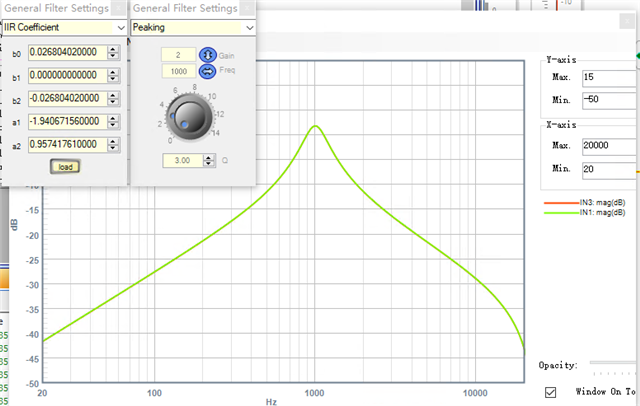
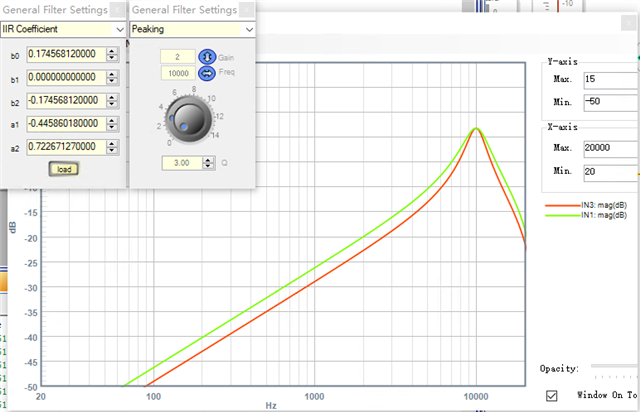
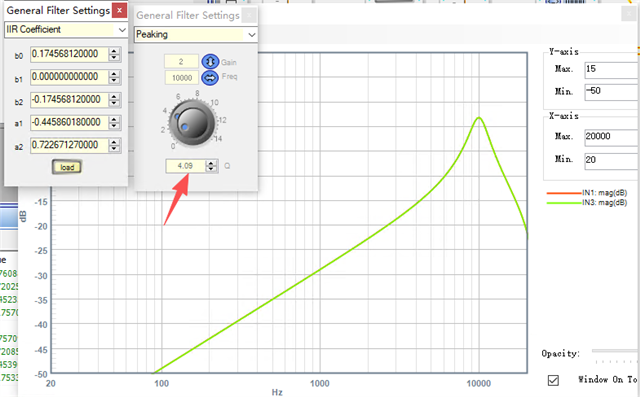
Hello hmr,
Have a look at the below spreadsheet, it has been around for a while and it's very useful and handy. Bob added and updated a lot of stuffs.
I'm not sure if this is the latest spreadsheet but this is what I have.
6683.1st-2nd-Order_IIR_Coefficient_Calculator.zip
when you enter the parameters, it will give you the coefficients. Many people use this.
Please try this.
Regards,
Harish
Hello Harishgowtham,
Thank you very much for providing the spreadsheet.
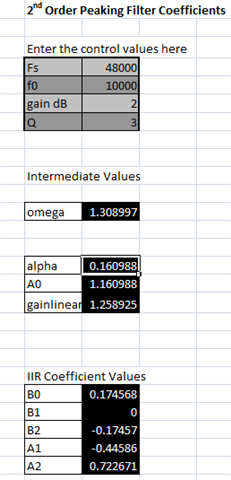
I verified the parameters using a table, and the results were the same as those I calculated.
This parameter imported into SigmaStudio shows a difference from the simulation. Can I ignore this difference?
Hello hmr,
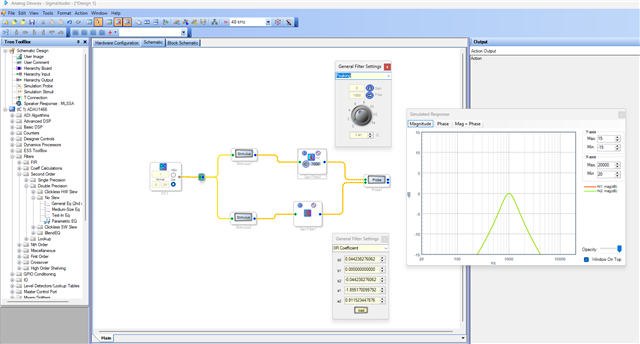
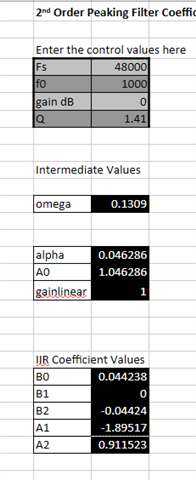
The spreadsheet's coefficients and Sigma studio's coefficients are exactly the same for the given parameters. So, you can use the spreadsheet coefficients and formula.
Below is what I quickly tried.
Regards,
Harish
Hello Harishgowtham,
Please try this set of parameters: F0 = 10 KHz, FS = 48 K, Q = 3.0
Hello hmr,
I have found this thread which has some info reg this mismatch, please have a look and see if it's useful for you.
Regards,
Harish
Please log in to reply.