How to use GPIO to show audio input?
Hi,
I need a GPIO to drive a led to show if there is audio input to 1701.
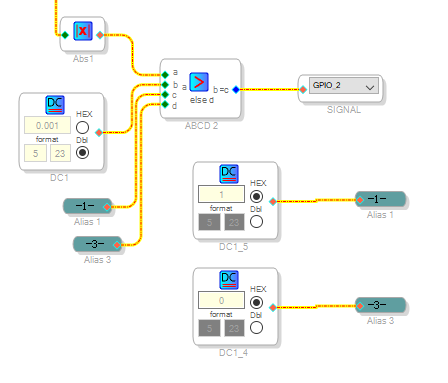
My idea is like below, but it doesn't work.
I compare the audio input and a DC level, if the audio is greater, GPIO output 1, otherwise output 0.
Please help me to improve this idea, thanks!
Audio Signal Processors
software
SigmaDSP Audio Processors
SigmaStudio4.4
adau1701
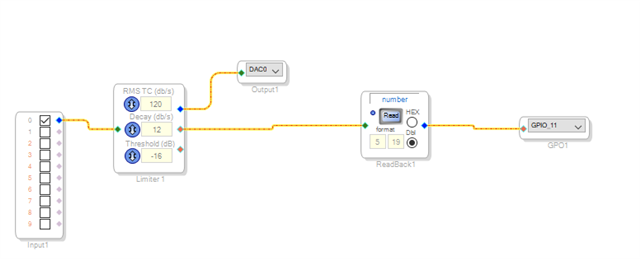
Hello, I needed an LED indicator to know when a limiter has engaged, here is a snapshot of the schematic and of the hardware config registers. This design outputs to GPIO 11, to which I attached a 1K resistor and a very efficient LED, which illuminated well at only 800 uA. Be sure the MP11 register is set to Output GPIO and that Forced by S is unchecked (see red oval).

Hi,
Thanks for your reply, it's really a good method in many powerful sigmaDSPs such as 1452.
Howerver the limiters cost so much in 1701. In my project, there are no more instructions for several limiters to drive the GPIOs.
I just want to find some simpler methods to save the instrutions.
I hear you! I eliminated the limiter in my project for audible reasons and went with compressors. I offered the design as an example of driving an LED, which confounded me until I realised the "Forced by S" must be unchecked. BTW, I notice you are using SS 4.4, is there a reason you are not using 4.7? +pb
In fact, I have already used several versions like 4.4, 4.6 and 4.7.
There are many projects developed by 4.4 which is stable enough,if it is not necessary(for example, some new modules only available in higher version) to use the higher version, I will not change it.
In my experience, if the scheme is drew by 4.4 and then use higher version to change it. There may be some compatibility issues which make the audio abnormally.
Please log in to reply.