Writing to EEPROM does not work
Hi folks,
I have similar issues as described here: Issues writing to EEPROM - Was previously working.
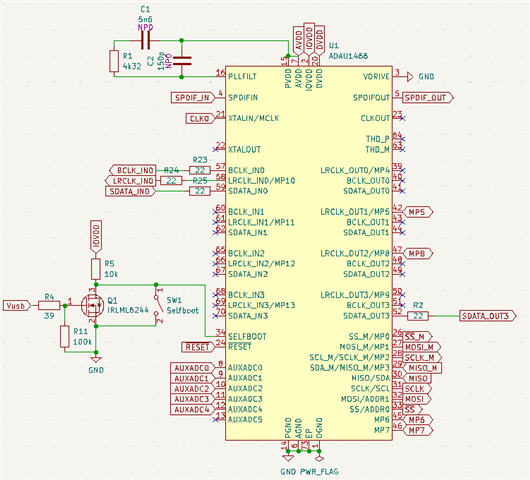
I built my own board which is in it's core similar to the 1466 eval board. The EEPROM is of type 25LC1024. It is connected to the 1466 exactly as the schematics of the eval board show. Selfboot is tied to ground, the scope shows 0V. I use a switch like the eval board and the switch is always set to "no selfboot".
I built a short program to test my peripherals: audio codec and SP/DIF works fine. But:
I am not able to program the EEPROM via SPI. I tried everything with exactly the same settings like mentioned in the post above. I created the two projects for writing the EEPROM directly with data from a file and reading it. The result are always zeros and not the values I set up in the file. I checked the lines with the scope and wonder why the SS_M line does not go low for selecting the chip. Therefore the CLK line is always high, like the datasheet says (CPHASE=1). I compared my measures with the lines of the DSP while programming and SS line is going up and down several times, I see some data and the clock. But on the EEPROM lines there is nothing to see.
So my question is: Did I forget something? For me the settings in hardware configuration -> multipurpose are not clear. The settings for MP0 to MP3 are "Primary function of the pin is selected". Do I have to set some registers different as the default for a new project?
Thanks in advance
Stephan
Audio Signal Processors
1466
hardware
eeprom programming
eeprom write problem through DSP
SigmaDSP Audio Processors
adau1466
Show More
Hello Stephan,
Please attach the hardware schematics and sigma studio project.
wambi said:
The settings for MP0 to MP3 are "Primary function of the pin is selected"
Yes, that's correct. It should be set as 'primary function'.
wambi said:
Do I have to set some registers different as the default for a new project?
No need, you don't have to set anything in hardware register settings like MP pins etc.
A default project and setting will work fine, all you have to do is design your signal flow, add EEPROM into the schematic and verify the EEPROM's properties window and link compile download the project.
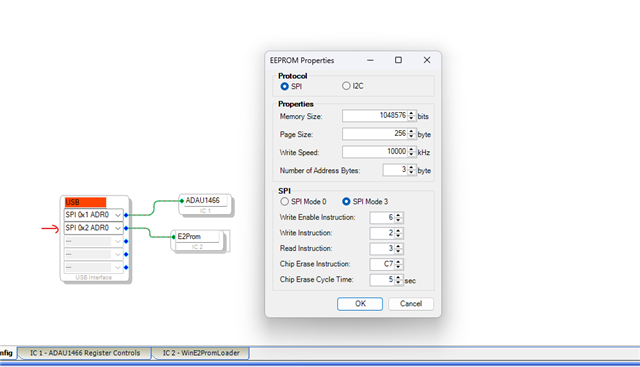
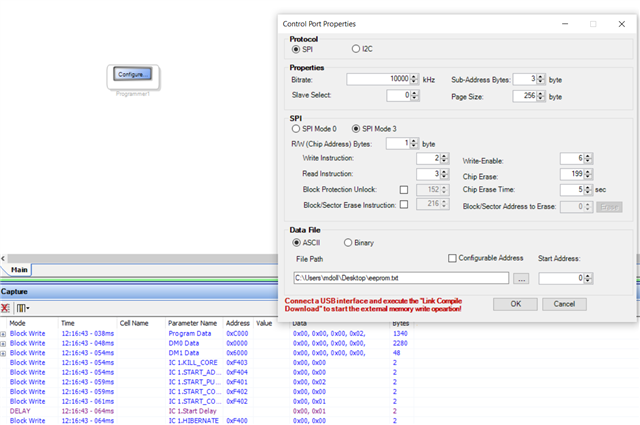
connect the EEPROM to the USBi via SPI, so that EEPROM properties are correctly fetched. So, you can directly click 'ok' without changing anything in the properties window. please refer the picture below.
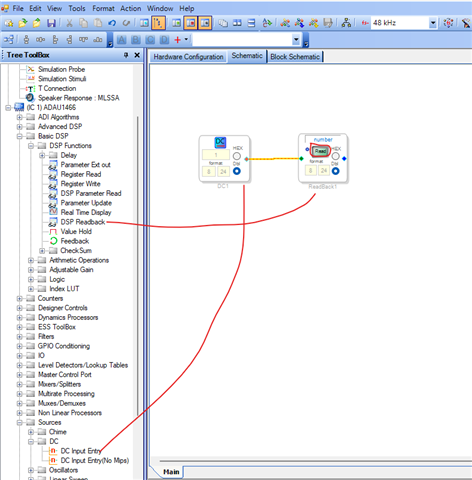
Make sure that your DSP is running, to do that just add a DC cell and readback module to verify the core is running.
click on the read button and see if you are reading '1' in the readback cell.
Regards,
Harish
Hi Harish,
thanks for your quick reply :-)
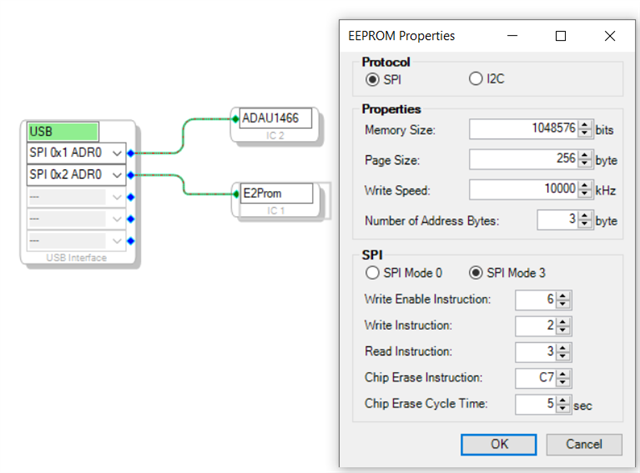
The first thing, I noticed is that the address of the EEPROM is different from EVAL-ADAU1466Z User Guide (Rev. 0, p. 24, fig. 75). I changed the setting as you showed in the first picture and I can measure something on the eeprom lines. Fine :-)
But...
The EEPROM is not programmed. The DSP core is running, I see a triangle wave on the scope.
The schematics:
(Q1 is not mounted yet, I use the switch)
The project:
triangle.dspproj
Regards,
Stephan

Hello Stephan,
wambi said:
The first thing, I noticed is that the address of the EEPROM is different from EVAL-ADAU1466Z User Guide (Rev. 0, p. 24, fig. 75). I changed the setting as you showed in the first picture and I can measure something on the eeprom lines. Fine :-)
The address of the EEPROM connected to the USBi doesn't matter, because there is no direct connection between the EEPROM and USBi. The EEPROM is written via the DSP. However, the reason I want you to connect the EEPROM to USBi via SPI is that when it's connected in SPI, the EEPROM properties window will be fetched with correct values. So, you don't need to change anything, you can just click 'ok' on the EEPROM window and proceed with self-boot.
I have quickly noticed that the pull-up resistor on the SS_M line seems to be missing in your schematic. If it’s not there, then please add a 10k pull-up resistor to the SS_M line and test the self-boot function again.
Regards,
Harish
Hi Harish,
I added the resistor, but with no effect. After writing the EEPROM via DSP, the check fails (AA is missing on first address). When I open the read results in the capture window, I only see zeros.
I changed my program a little and added a DC=1 going directly on MP6. After compiling and downloading my program, I see MP6 going up and on MP5 (untouched in hardware settings) I see a quare signal. After self booting, those pins are set to zero. So there is no program loaded to or from the EEPROM.
Best regards, Stephan
Hello Stephan,
Ok, let's quickly check if you can read and write to the EEPROM properly, we will just write 5 data and try to read that back.
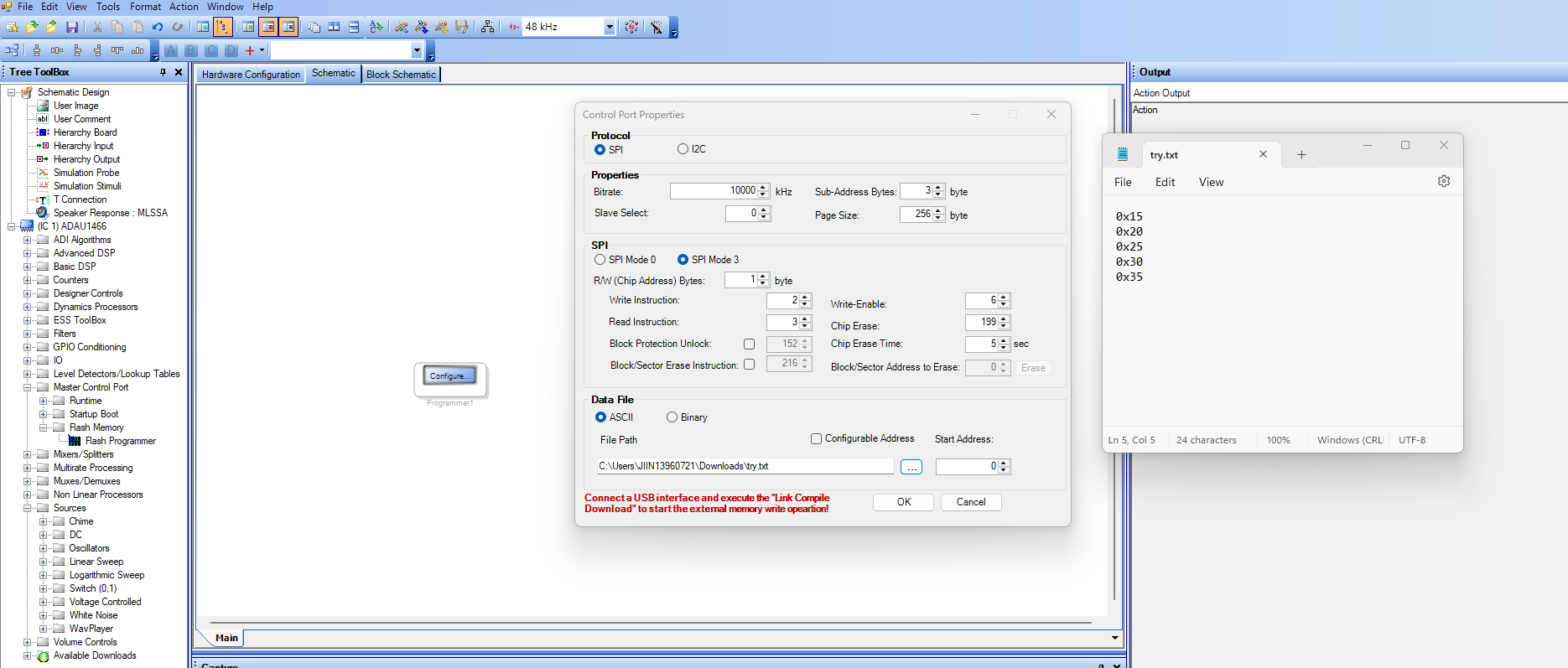
1) Take a flash programmer, set it and write a data file like below.
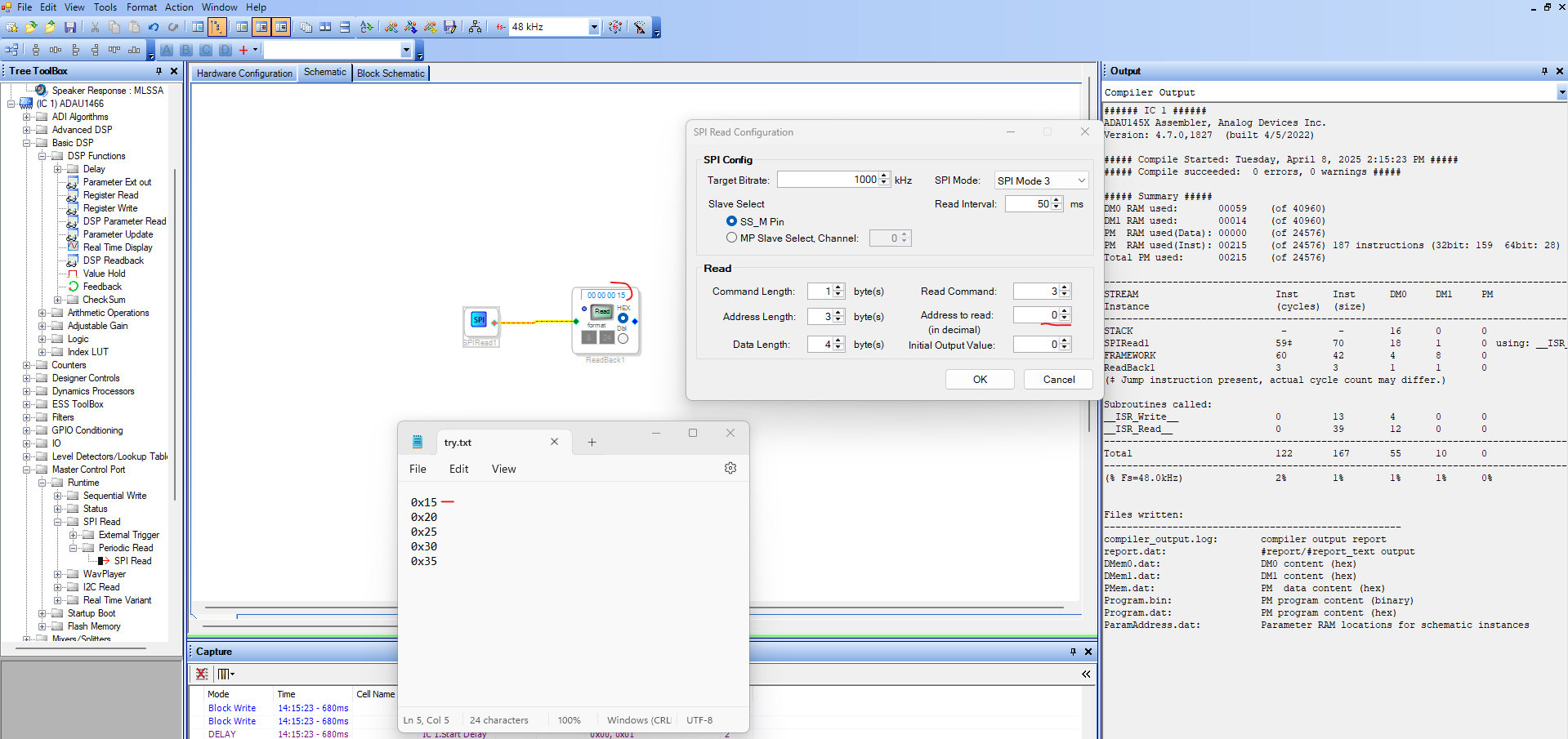
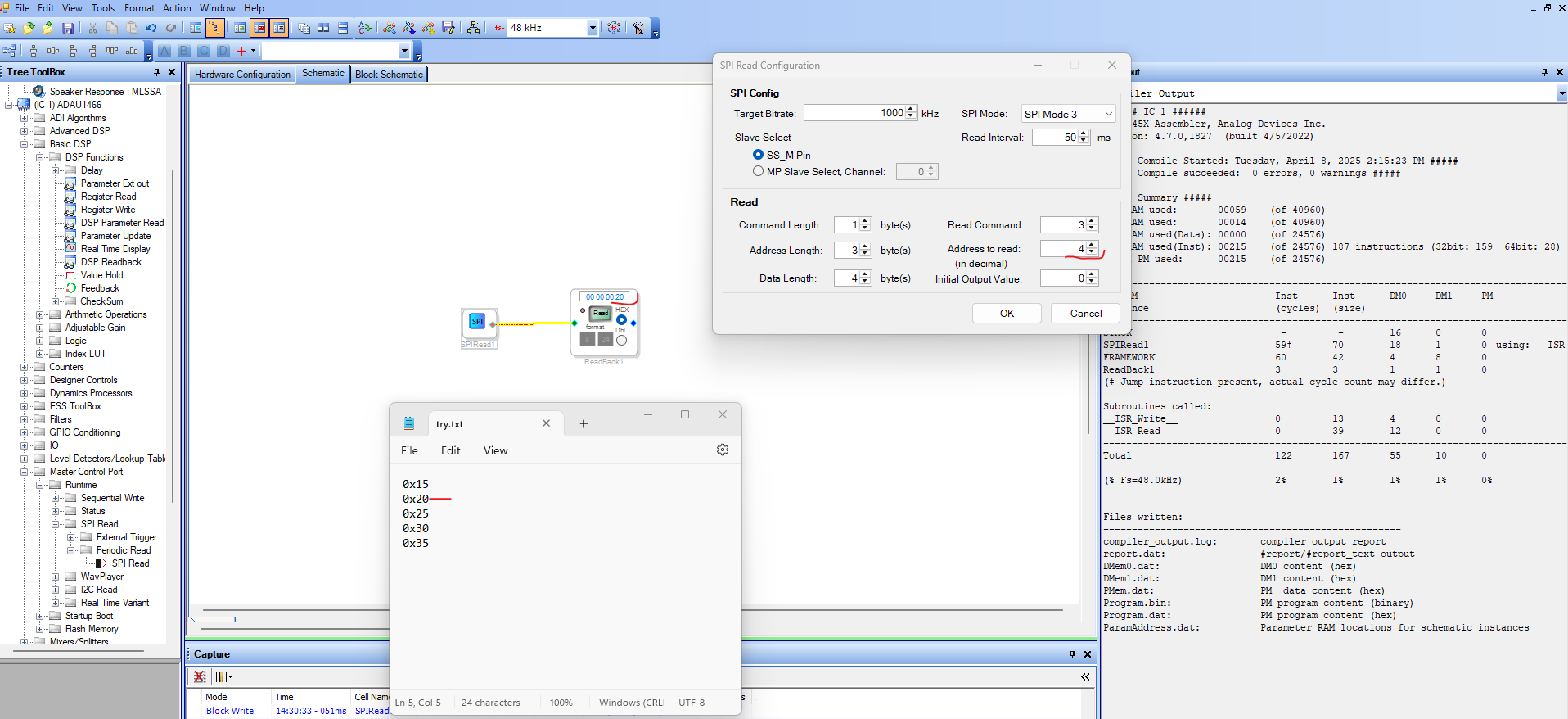
2) take an SPI read module and try to read it back like below.
By doing this, we can verify a basic read and write operation between the EEPROM and the DSP.
Let me know, if you can read and write to the EEPROM basically, then we will move to the self-boot functions.
Regards,
Harish
Thanks again for helping!
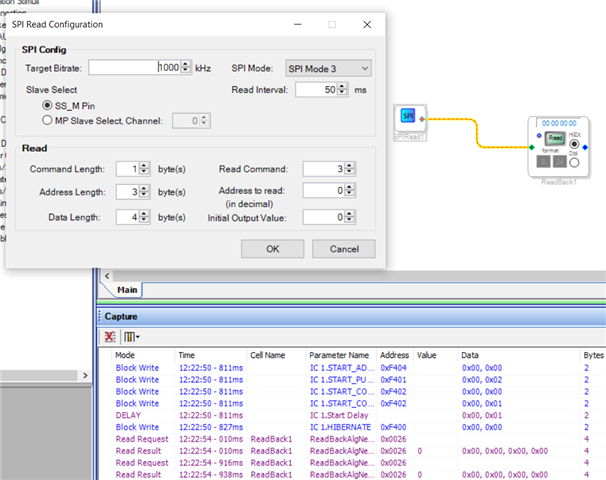
That's what I did:
Link, compile, download
That's the result:
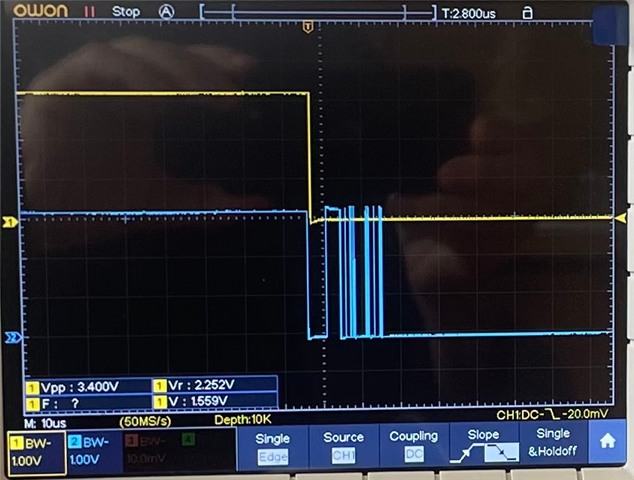
It seems that nothing is written to the EEPROM. Here is screenshot of the scope: SS is yellow and SI is blue. This looks ok.
I tested this with two identical boards. It's the same behaviour on both boards. I mounted 25LC1024 instead of 25AA1024. I compared the datasheets, functional they seem to be identical. But perhaps this is the reason it does not work?
Best regards, Stephan
Hello Stephan,
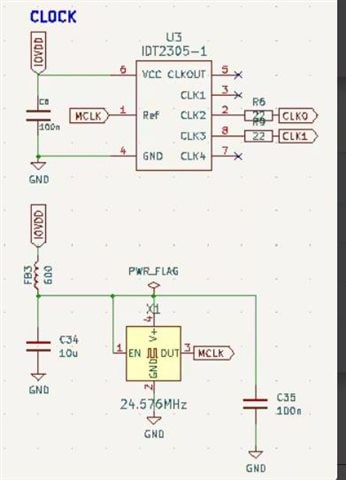
I failed to notice this at first, now I see that you’re using a 24.576 MHz crystal.
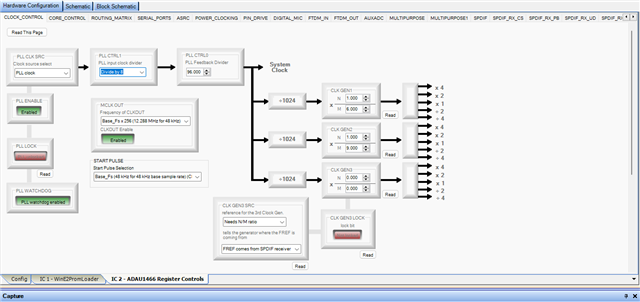
In that case, the PLL Control 1 register needs to be set to divide by 8. Please see the image below for reference.
Please change this and try again.
Regards,
Harish
Hi Harish,
I don't know how to thank you That was the solution of my problem! I see a wonderful triangle wave on my scope after self booting the device.
Kind regards, Stephan
Please log in to reply.