Auto Mute Implement
Hi everyone,
I’m working on an ADAU1466 project in SigmaStudio and would like to implement a “mute on silence” (auto-mute) feature similar to how commercial DSP amplifiers mute their outputs when no audio is present.
My goal is that when the input audio level stays below a certain threshold (around –65 dBFS) for about one second, the outputs should mute automatically, and when audio resumes above that level, they should unmute smoothly. It also needs to be click-free, ideally using a slew-controlled volume or hardware mute pin.
I understand this likely involves using an RMS or signal-detect block feeding a comparator, then controlling a volume or mute stage, but I’d like to confirm the best-practice block chain for this in SigmaStudio and whether there’s an existing Signal Detect macro or other efficient method specifically for the ADAU1466.
Can someone please outline or confirm the recommended approach?
Thank you,
Zac
Audio Signal Processors
software
adau1466 eval board
SigmaDSP Audio Processors
auto mute
SigmaDSP 4.7
adau1466
Show More
Hello Zac,
You're quite correct -- what you have described above will work fine. Often there's a number of ways to do things in SigmaStudio. Your application will help determine which way is best.
ADI does have a Signal Detect block which sets a flag HIGH when its input goes below a set level for a period of time. Apparently it's made for an automatic amplifier or subwoofer, since the default time period is two minutes. You can change it, but not below 2 seconds. It's easy and quite efficient, yet should your application demand one second, it won't do.
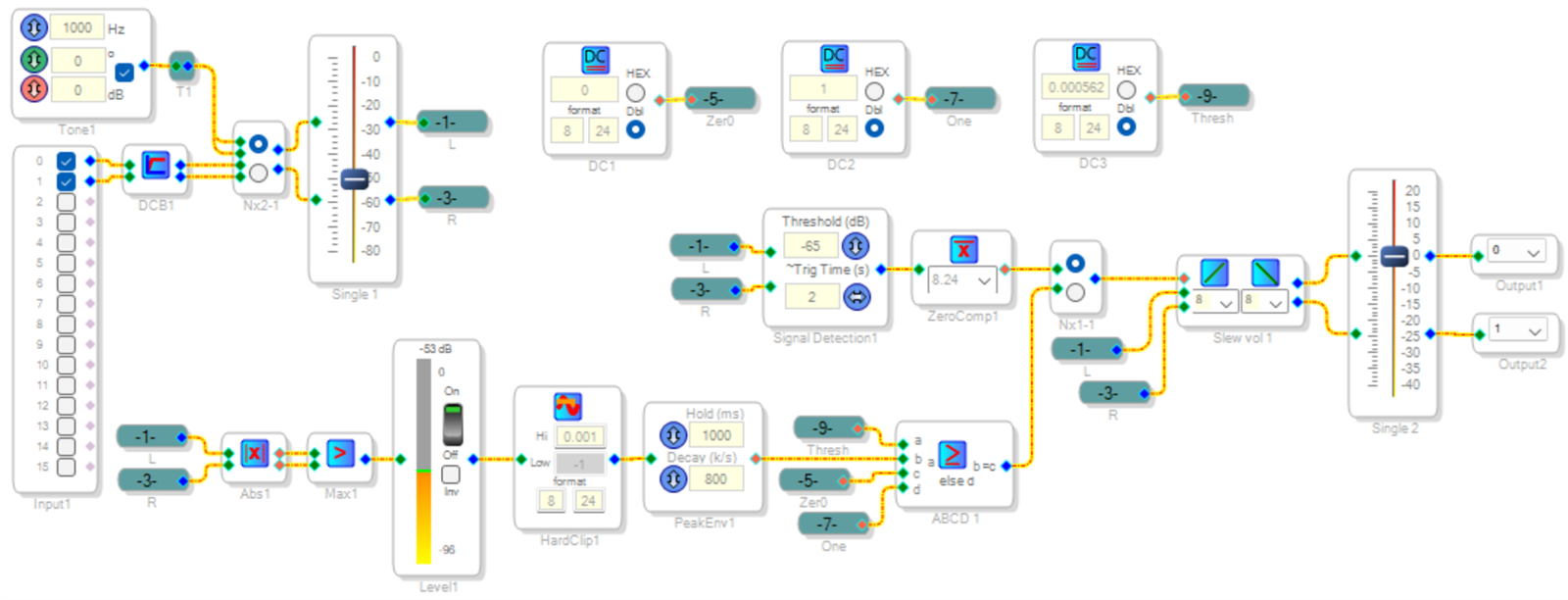
Here's an example project with both the ADI Signal Detect and one made from discrete blocks. The DC Block filter is necessary because any DC offset in the incoming audio affects level measurements. I added a sine wave oscillator to test the thresholds.
The Signal Detect flag goes high for no audio, so the Zero Comparator inverts this logic. A Mux selects either the Signal Detect or the alternative threshold detector for the Slew Volume block. Adjust the slew rates for the desired soft switching. For a description of how these settings work, see:
Sigma-300 Slew Volume Rates
The discrete approach uses a dual ABS block to full-wave rectify both channels. The Max block always picks the louder one. The purpose of the Hard Clip block is to keep levels much higher than threshold out of the Peak Envelope Detector block, which would otherwise cause an extra delay when a loud signal suddenly stops. The Peak Envelope block provides the required 1000 mS hang time. Source DC2 sets the threshold at the desired level, equal to 10^(dB/20). Both the ADI Signal Detect block and the discrete version respond to peak levels -- add 3 dB to either threshold to approximate an RMS response. The level meter is RMS responding, so with the sine wave oscillator it reads lower than the setting on the input volume control.
I ran this on hardware and it works, however the real test is how well it suits your needs. Of course you're free to experiment and come up with ideas which may be more suitable and/or more efficient -- be sure to share them!
Best regards,
Bob
Signal-Detect.dspproj
Hello Zac,
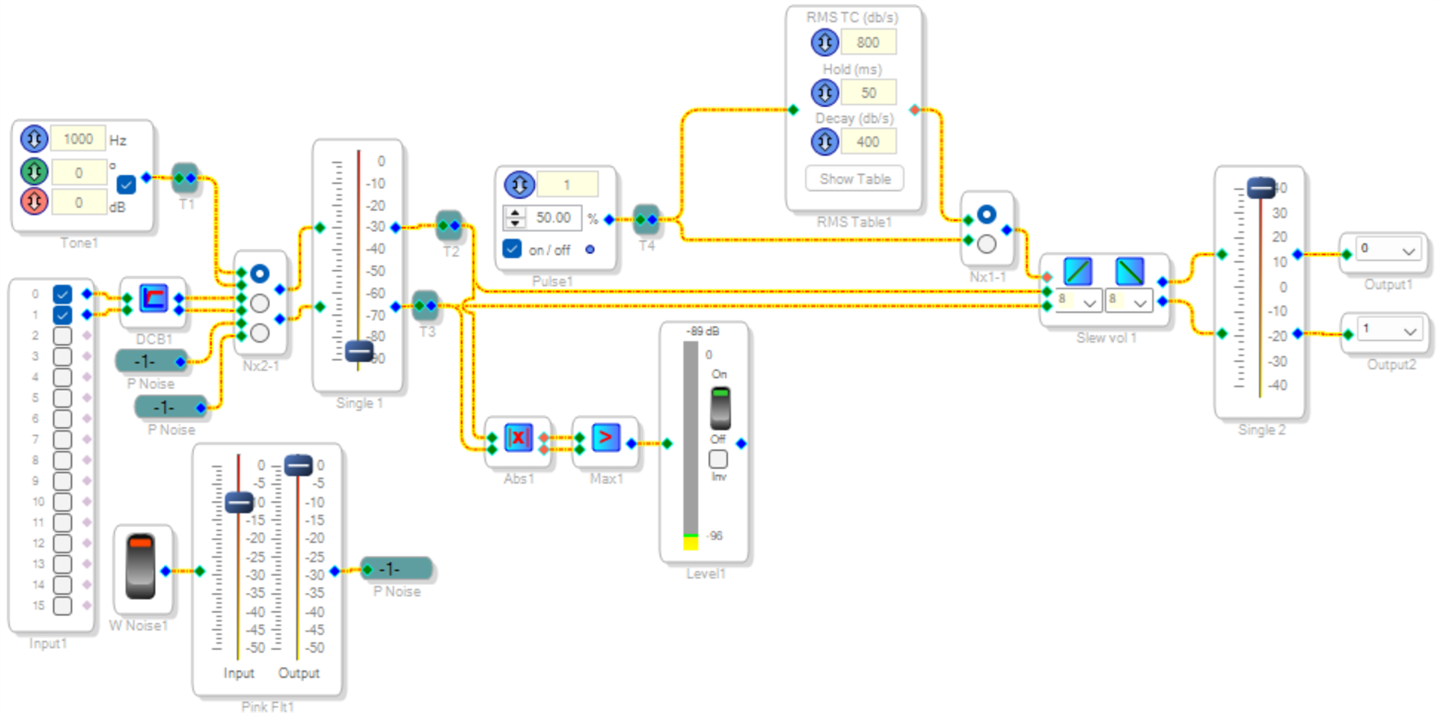
I saw a reply, but it went missing while working on this message. Your method using a RMS Lookup Table is neat and efficient, an excellent choice. As for the clicks or pops the table was apparently causing, I tried duplicating them with the test circuit shown below:
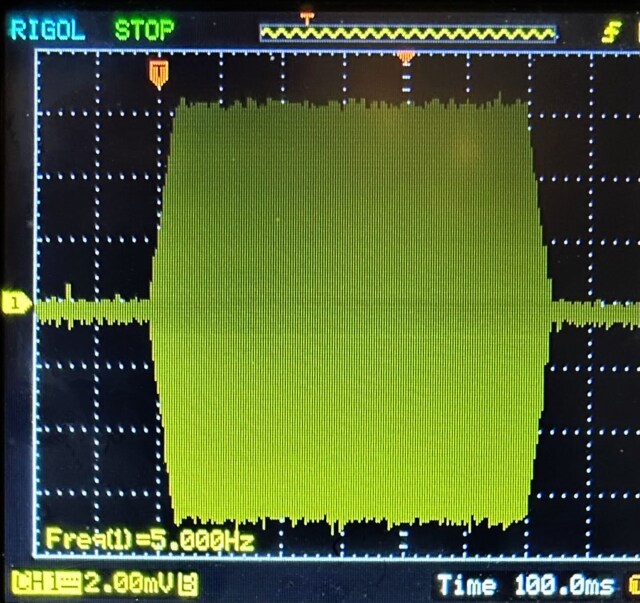
Listening with a pair of cans on my -1466 eval board, I couldn't hear any clicks regardless of source or silence and going through the RMS table or not. Perhaps I need more gain after the eval board output, which I don't have handy. Here's what the output looks like during switching (for this I set the Hold to 50 mS instead of 1000 mS, and raised the pulse frequency to 5 Hz to get a useful picture) At 2 mV per box, some digital hash on a 20 MHz BW scope trace is inevitable:
With the present Volume Control slew settings, switching takes about 40 mS to complete.
Best regards,
Bob
Hey Bob,
Thank you very much for your detailed explanation and for taking the time to verify the circuit behavior on your end. I wanted to follow up and let you know that I now have the auto-mute function operating reliably within my current setup.
My signal chain consists of an XMOS XU316-based USB audio interface feeding I²S into an ADAU1466 DSP, with processed outputs routed to two PCM5102A DAC's -- one dedicated to a subwoofer and the other to a stereo pair of desktop speakers.
After several iterations, I found that using an envelope peak average (similar to RMS Lookup) as the signal-detection source for the ABCD comparator provided the most stable and responsive behavior. The result is a system that reacts immediately to signal loss and restores playback smoothly, with no audible pops or hum, even at low threshold levels.
Your explanations of the Signal Detect and discrete peak-based approaches were extremely helpful in understanding how the various detection methods behave within SigmaStudio. With the auto-mute function now operating as intended, I’ll be proceeding to integrate the crossover and remaining processing stages into the project.
Thank you again for your time and valuable insight.
Kind regards,
Zac
Hello Bob
How to use adau1701 to implement auto-mute?
Best regards,
Power Pan
Please log in to reply.