Write Latest Compilation through DSP / In Field Update
Hello togehter,
I have a question regarding the option to write the selfboot memory through the DSP. In our setup we are connected to the ADAU1452 via I2C and the Selfboot EEPROM 25AA1044 is connect via SPI. When we compile a new DSP firmware we upload it to the DSP via the right-click option "Write Latest Compilation through DSP". The problem we noticed is that fails from time to time. What does that mean.
In 9 of 10 trials everything works fine. But in round about 1 of 10 trials the "Write Latest Compilation through DSP" completes without an error but when we power cycle the DSP it boots not correct or not at all. Either the EEPROM erase or write, we dont know which part, was not correct. When we retry it a second time it works normally.
- Q1: Is this a known issue and do you know why this happens?
The second try is not a problem but the main reason why we ask is that we use the same mechanism in our product for customer updates. Here we encounter the same behavior 1 of 10 tries fails and we have to repeat the update.
- Q2: Is there any way, regarding timings or similiar, we can trim to make it more robust?
I had post which describes our in field update years ago. Here is the link: ADAU1452 selfboot eeprom commands - Q&A - SigmaDSP Processors & SigmaStudio Dev. Tool - EngineerZone
Best regards,
Eric
update
Audio Signal Processors
adau1452
software
eeprom
SigmaDSP Audio Processors
selfboot
Sigma Studio v4.7
Show More
Hello Eric,
Yes, this is a tricky issue. Obviously, there is nothing way off or wrong because it works 9 out of 10 times! So this will be subtle.
A few quick questions. (Some of this was discussed in the old post)
Do you erase the EEPROM before you attempt to write the new program?
Do you lower the Selfboot pin before you try to update the EEPROM?
Dave T
Hello Dave,
as always thanks a lot for the fast reply. Regarding your questions:
Do you erase the EEPROM before you attempt to write the new program?
- Eric: I guess the SigmaStudio tunnel program takes care of erasing the EEPROM or am i wrong? If so, then yes we erase the eeprom before we write it. In the in field update we also ensure that we wait for at least 1 second before we transfer the new command after the erase from the tunnel program.
Do you lower the Selfboot pin before you try to update the EEPROM?
- Eric: Yes the Selfboot Pin is always set to low before we transfer the tunnel program and the DSP file.
Maybe even more interessting is, that excatly the same behavior appears directly with SigmaStudio and USBi from time to time. Here we also have to write the EEPROM twice through the DSP. So maybe it is related to the tunnel program SigmaStudio writes to the DSP, or timings? Did you ever had the same experience or does it always work with the first trial for you?
Best regards,
Eric

Hello Eric,
You are asking some good questions and you have done some great work studying this issue.
Yes, the data serving program is supposed to handle the EEPROM erase. The program does have a couple of parameters that need to be setup to accommodate differences in EEPROMs. Here is the screenshot:
This is the default that is in the program I called up.
I did notice that when I initiate the command from SigmaStudio to program the EEPROM, when it gets to the g_Erase command you screenshotted, you will notice there is a delay before the rest of the lines start scrolling. It seemed to have been around 5 seconds.
So check the chip erase command and the estimated time to accomplish the erase with the chip you are using. There is a chance that you are not quite waiting long enough.
It is good that you are lowering the selfboot pin. But for selfbooting and for this data serving program, I just went looking to see if the soft reset is initiated and it does not seem like it is when you initiate the instruction to program the EERPOM Through the DSP. So that should not trigger the selfboot program to start while trying to load in this exchange program and your new program.
Where it is a problem is when you just click on Link/Compile/Download and the Selfboot pin is high, then SigmaStudio will send a soft reset and that will trigger the selfboot. So now the selfboot state machine routine kicks in while SigmaStudio is trying to write to program memory so that is the problem I found many years ago.
As long as you are not sending a soft reset while the selfboot pin is high then this is not the issue.
So check your EEPROM Properties window settings.
Yes, from time to time I find the write fails. It is so hard to figure out why when I am just hacking away on an eval board. I cannot say that I never have issues.
I also looked for the PLL lock delay. The loading of the data serving program does wait for the PLL to lock.
So I not see anything obvious. There is also the SPI speed you setup.
I wish I had more for you to check on. Check these couple of details I outlined above.
Thanks,
Dave T
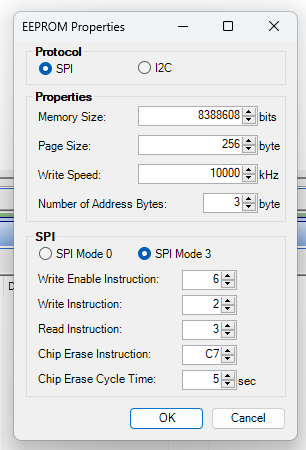
Hey Dave, thanks for your reply. We checked the erase-time. Here it seems that we have 10x times safety overhead. So this shouldnt be a problem. I guess there is no way around measuring the SELFBOOT SPI (Master) lines to the eeprom while "Write Through DSP" and catch the error state. Maybe we find why sometimes it is just not working correct. I will reply it here when we find something.
Best regards,
Eric
Hey DaveThib ,
we catched the error and we know why the upload fails from time to time. Let me explain what we found. The "Data Serving" program follows always the same pattern. No matter if a MCU sends the data or the USBi Programmer.
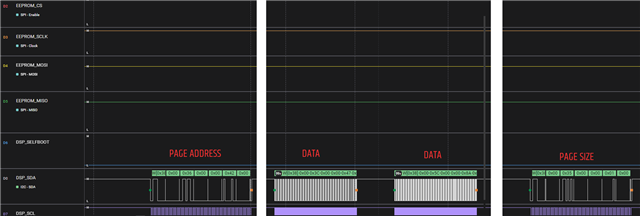
- Part1: Send EEPROM PAGE ADDRESS via I2C
- Part 2: Send EEPROM PAGE CONTENT via I2C (split into 2 chunks if size bigger than 128)
- Part 3: Send EEPROM CONTENT SIZE via I2C
- Part 4: Part 3 triggers the DSP to start the SPI PAGE WRITE
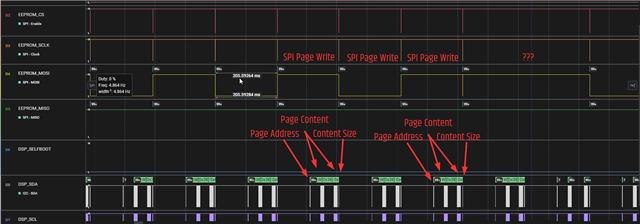
This works normally without any problems. As you can see in the picture below.
But what you also see in the picture is that one SPI PAGE WRITE is just missing. Page 0x41 was written as expected, but Page 0x42 is missing. But when we zoom in the I2C command, we see that all Parts 1-3 are there but Part 4 not. Also all 3 Parts got acknowledged by the DSP. Interesstingly the following Pages starting from 0x43 are send correctly. It is always only 1 random Page that is missing.
It is not related to the specific Page Address. Sometimes a PAGE WRITE is just missing on a random page. It dosent matter if we do it via our MCU or if we do it with the USBi Progammer. It looks like the "Data Serving" program stucks somehow randomly but we dont know why.
Do you have any explanation for it or can you forward the question to the developer team of the "Data Serving" program?
Best regards,
Eric
Hello Eric,
Thanks! I will forward to the team.
Dave T
Please log in to reply.