Sigmastudio+ GPIO inputs always 48 kHz?
Hello,
I am having a problem with Sigmastudio+ and the GPIO inputs.
My DSP runs at 192 kHz, but the GPIO inputs are always at 48 kHz and cannot be adjusted! This causes problems when connecting them via a “buffer gate” and then to an “index sel mux.” See attached image. It cannot be compiled with two different sample frequencies. Setting everything to 48 kHz is not a solution either, as the filter values are then no longer correct. Where can I change the sample frequency for the GPIO inputs?
Best regards,
Ralph
Audio Signal Processors
software
SigmaDSP Audio Processors
SigmaStudio+ 2.4.0
adau1466

Hello Ralph,
Sorry for the trouble, I can see that there is no way to set the sample rate of the GPIO input block unlike sigma studio. I will report this to the respective team.
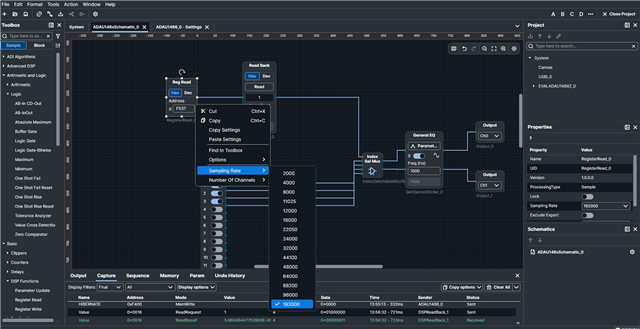
There seems to be a workaround, please try this and let me know if it works for you.
And I don't think you need a buffer gate here. The GPIO input's value is already in the LSB, so you can directly use it to drive an index selectable MUX, since you are using 2x1 MUX, a '0' and '1' from the GPIO input will be enough and no need for bit position changes, so you can directly drive MUX from GPIO.
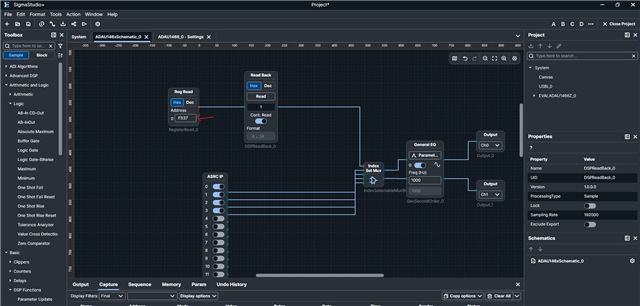
The workaround is to use the register read block from the GPIO read register. This block can be set to 192KHz, so this block will be run at 192KHz, so the value will be read every sample period at 192KHz.
I'm using MP7, so I have used read value register address of MP7.
Regards,
Harish
Hello Harish,
thanks for the quick solution. I tested the workaround and everything is working perfectly now.
Best regards,
Ralph
Hello Ralph,
I reported the issue to the programing team and they wrote back saying they have identified the issue and fixed it in the code. So this will be fixed in the next release. Right now the most recent release of SS+ is 2.4.0 so anything newer than that should have the fix.
Thanks for taking the time to report this.
Dave T
Please log in to reply.