PLL lock issue on ADAU1777
Hello,
I have a problem with the ADAU1777 DSP mounted on a PCB. I am unable to write to certain registers, namely DAC0 mute and DAC0 enabled. I have seen that this is because the DSP's internal PLL must be locked in order to have write access to certain registers. However, I am unable to lock this PLL. I am using a frequency of 20MHz on the MCLKin input. I am interfacing the DSP with the I2C link, which seems to be working because I can write to certain registers with Sigmastudio 4.7. I am using IOVDD 3.3V, and my clock signal is 1.68V, which may not be sufficient. I tried injecting a clock with an amplitude of around 2.5V, but the software tells me “communication failed” during upload, as if the clock voltage were too high. Do you have any ideas on how to lock the PLL so that I can program the registers?
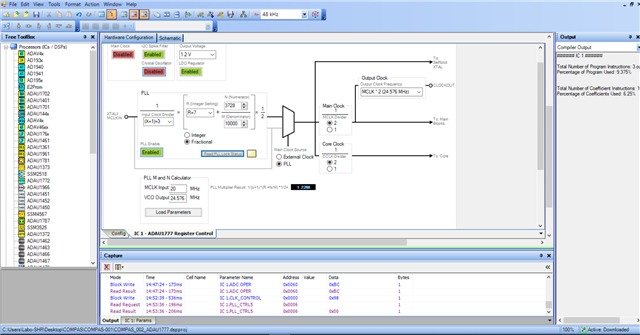
Below is a screenshot of my interface. You can clearly see that register 0x0006 has the value 0x00, meaning it is unlocked.
I am also including the project with the sigma studio file that I use.
4617.test-001.zip
Thank you.
Best regards,
Thread Notes
Harishgowtham - Moved from Processors and DSP to SigmaDSP Processors & SigmaStudio Dev. Tool. Post date updated from Wednesday, October 29, 2025 8:19 AM UTC to Thursday, October 30, 2025 5:30 AM UTC to reflect the move.
Harishgowtham - Moved from Processors and DSP to SigmaDSP Processors & SigmaStudio Dev. Tool. Post date updated from Thursday, October 30, 2025 5:30 AM UTC to Thursday, October 30, 2025 5:30 AM UTC to reflect the move.
hardware
Integrated/Special Purpose A/D Converters
adau1777
Audio CODECs
Hello ALB,
Your screenshot is slightly different from the file you attached but not a huge deal here.
Here I go with my comments:...
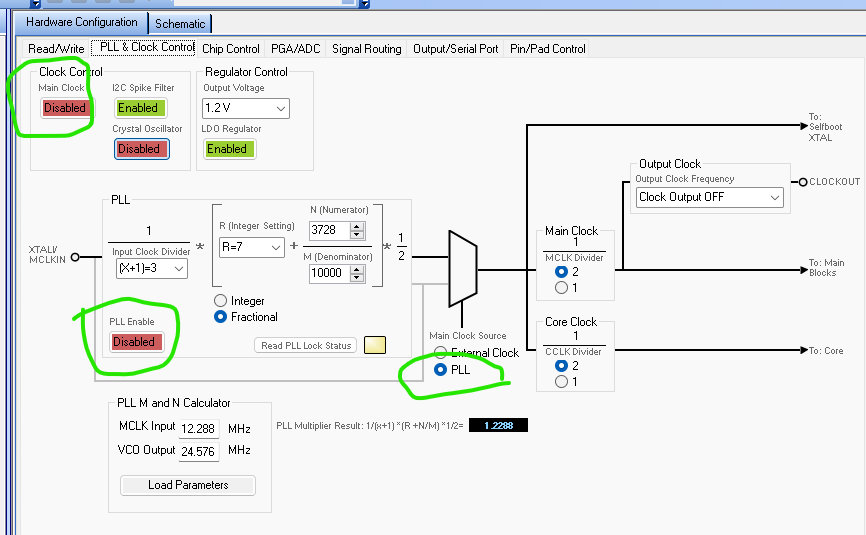
This is the PLL clock page of the registers in the project you attached:
I circled the PLL ENABLE button that in your screenshot you have enabled so that is good. It needs to be enabled.
The CLOCK Control in the upper lift is the main clock enable. With this disabled you have no internal clocks. So that will do it!!
You have the crystal oscillator disabled so I assume you are using a clock generator and not a crystal. So no problem with it disabled.
Then you selected the PLL to feed the internal clocks which is also fine.
I calculated your N/M and R values and I get a PLL output of 24.576MHz which is perfect! Well done!
So the MCLK dividers is fine set to 2.
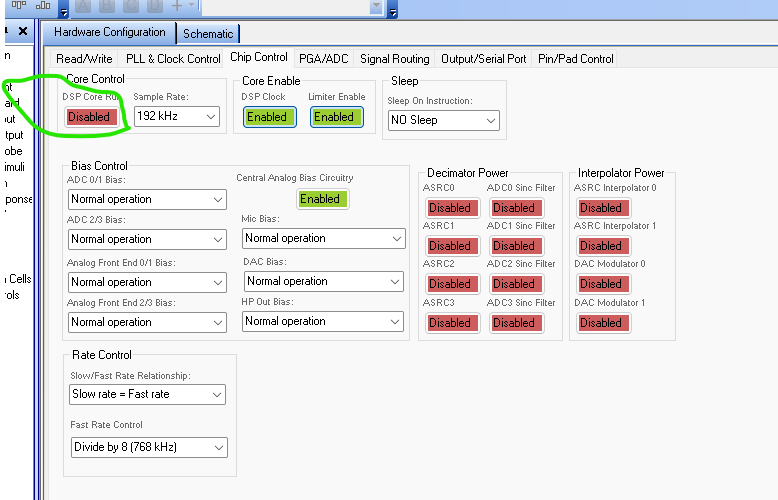
Then on the next tab you need to enable the Core Run bit.
You also have it set to 192kHz. I am not sure what rate you want to run the core.
To address your question about the level of the clock. If your IOVDD = 3.3V then your level is too low. Here is the spec in the datasheet:
2.5V is high enough but I would be a little uncomfortable with it that close to the min. I am not sure of your clock source, I keep having a crystal in my mind where the signal is not always a nice square wave and not a 50/50 duty cycle. So this may mean the clock is above 2.0V for only a very short time making it more of a pulse to the PLL input. I would consider a clock source that is 3.3V or a level shifter.
I think I got to all the issues.
Oh! Make sure your I2C link is also operating at 3.3V. Although, pull-ups help with that because I 2C really only pulls down to ground and lets it float high. However, if the buss is going to lots of other parts that are 1.8V then you have issues.
Dave T

Please log in to reply.