No sound and wrong READBACK value after loading ADAU1701 project via I2C (ESP32)
Hi everyone,
I’m having an issue with my ADAU1701 setup when loading the project from an ESP32 over the I²C bus (Arduino environment).
I created my DSP project in SigmaStudio 4.6
When I load it directly via “Link Compile Download” or from EEPROM using Selfboot, everything works perfectly — I get audio output, the LED on GPIO2 turns on, I can change parameters (e.g. Volume blocks), and the READBACK blocks show valid signal levels.
However, when I try to load the same project into RAM via ESP32 (using the data generated by SigmaStudio), the behavior changes:
- the LED on GPIO2 turns on (so the DSP program is clearly running),
- READBACK values appear, which means the ADAU is alive and processing something,
but there’s no audio output.
Interestingly, the READBACK value for input IN1 is correct and reacts to the audio input, but IN2 shows an incorrect value.
To test it, I created a very simple project: just an audio input directly connected to an audio output and a switch for LED output.
When I load this minimal project via ESP32 I2C it works fine (sound is present and the LED lights up).
I’m attaching my SigmaStudio project with the generated data files.
Could someone please help me verify whether the project itself is correct, or point out what might cause the problems when loading it through I²C?
Thank you :)
2in_4out_diy.zip
Audio Signal Processors
hardware
i2c
SigmaDSP Audio Processors
adau1701
Hello bnemo,
I took a quick look at your project. Nothing stood out to me as being a problem.
Here is part of the compiler output file:
################## Summary ########################
(Note: Estimates are based on a 48 kHz sample rate)
Number of instructions used (out of a possible 1024 ) = 914
Data RAM used (out of a possible 2048 ) = 485
Parameter RAM used (out of a possible 1024 ) = 293
So you are using 914 instructions which is high but should not be a problem.
I noticed you have an EEPROM in the hardware config page. My first question is if you are lowering the SELFBOOT pin? It should be low so it does not try to load in a program at the same time you are loading in a program using the ESP32. That will cause all sorts of issues!!
You mentioned reading the input level 1 & 2. I assume you are using the lvl_reader_in hierarchy board? There is not much between that board and the actual analog input. Just the DC Block so this has to be something that goes bad when loading.
Have you also tried to switch your LED switch from the ESP32 to see if it shuts off and turns back on?
Then of course you can look at levels you setup at the outputs too.
Thanks,
Dave T
Yes, I do have an EEPROM, I’m using the common ADAU1701 board from AliExpress, and it includes EEPROM.
I think this board doesn’t have the SELFBOOT pin brought out (I can't find), so I’m not sure how to safely force it to LOW.
Would it make sense to ask an electronic technician to desolder pin 6 of the ADAU1701 to disable selfboot?
Currently, I only start loading the program from the ESP32 after I see (and hear) that the selfboot program has finished loading from EEPROM.
Then I load my custom program into ADAU RAM over I2C.
Yes, I’m using both lvl_reader_in and lvl_reader_out hierarchy boards to monitor signal levels.
When the program is loaded from EEPROM, all input and output levels display correctly: for a generated sine signal I get around –10 dB on every input and output.
However, when I load the same project from the ESP32, I get the following values:
dB1: -28.60
dB2: 24.08
dB out1: inf
dB out2: inf
dB out3: inf
dB out4: inf
dB1 changes with the input signal (but the value is incorrect),
dB2 is always stuck at 24.08,
and all output levels remain inf.
I also checked LED control I can toggle the LED on and off after loading the program from ESP32, so that part seems to work fine.
Hello bnemo,
I looked at AliExpress but I am not sure exactly which one you have. Ali does say to contact the store to get technical information from them about the board so ask them for a schematic!!
Pin 6 is the selfboot. It should have a pull-up resistor so it should be easy to just ground it. However, I have perhaps an easier suggestion for now while you are developing the program.
The selfboot state machine programmed into the silicon does this. It reads the first byte off of the EEPROM. If it is an 0xA0, then it reads in the rest of the program and runs it. So yes, you could program a long wait period but let me continue.
If the selfboot state machine reads a different value, I will assume 0x00. Then it tries two more times then gives up and releases the I2C bus. So that does not take very long. So I suggest you erase the EEPROM.
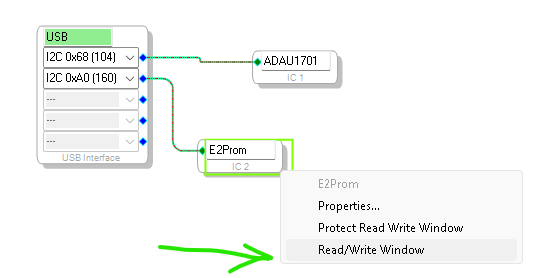
Hover over the EEPROM GUI and right click. then pick this menu option
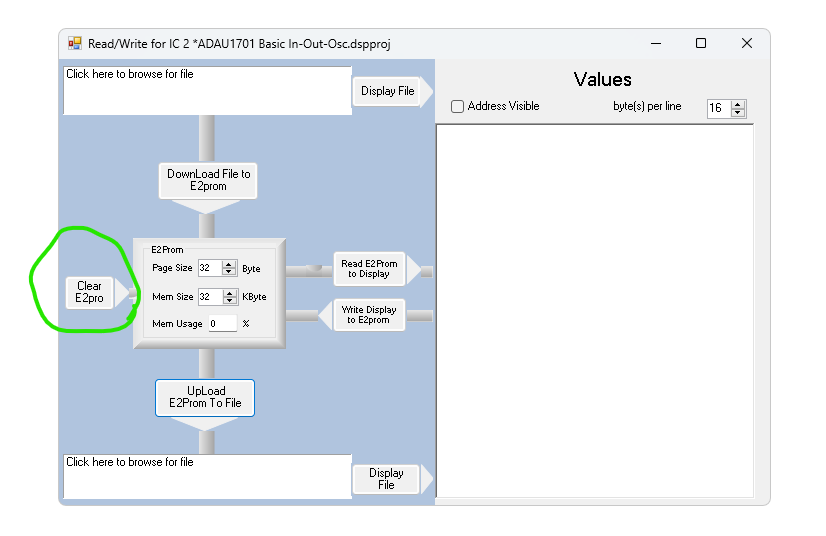
This opens up the EERPOM Read Write Window
Select to Clear the EERPOM.
This should zero it out and even if Selfboot it enabled, it will quickly try three times and give up.
Dave T
Hi DaveThib,
Here’s the photos of the PCB I’m using:
I also contacted the seller asking for the PCB schematic, but honestly, I doubt I’ll get it.
In the meantime, I’ll try to locate the pull-up resistor myself.
DaveThib said:
The selfboot state machine programmed into the silicon does this. It reads the first byte off of the EEPROM. If it is an 0xA0, then it reads in the rest of the program and runs it. So yes, you could program a long wait period but let me continue.
Thank you for this information! I erased the EEPROM, and so far I haven’t noticed any issue with the I2C bus being held.
However, the root cause of my problem turned out to be something else…
I had the wrong memory depth (bytes per register) set when writing the "Param_Data block" I was using a depth of 5, but it should have been 4 for the parameter RAM.
In the end, I used the functions:
- byte getMemoryDepth(uint32_t address)
- void SIGMA_WRITE_REGISTER_BLOCK(...)
from SigmaStudioFW.h, and everything seems to be working correctly now.
Thank you!
Please log in to reply.