Multiple SS bugs
I'm writing to inform of a few issues I'm having with Sigma Studio 4.7 using an ADAU1467 controlled via an ESP32 on my own hardware.
I have designed a sort of DJ mixer around the ADAU1467 chip which is working great apart from the issues I will outline in this support case.
I have attached both my working file and a file with the added blocks which are causing me issues.
I have four issues to report:
1) Audio out from my "FR out" (full range) output mutes when additional output blocks (outputs 4, 5, 6, 7, 16, 17, 18, 19) - This may also mute other outputs however I've not tested this yet.
2) When I add the "Sub Graphic" block one of multiple outcomes occur: Either the whole full range output cuts, or the bass output cuts. I have, on occasion had this block working, however it proves unreliable for some reason, despite the other block (Music Graphic) working perfectly with my hardware.
3) When I cascade the Butterworth filters, as I have, in my crossover network, I do not get the behaviour of a LR24 filter as expected. I am thinking of adding code to handle filter coefficient calculations, however I'd rather just use the filter coefficient blocks if I can - as I understand they will work out the coefficients in real time on the hardware for me so I can just send to an address like with the other blocks.
4) When using the coefficient calc filter block, I am able to use BOOST in order to control overall boost or attenuation at the specified frequency, however when I try to map frequency to one of my pots the audio bugs out and just sends loud, low frequency pulses out.
If you need any additional information, please let me know.REV.2 DEV 0.0.1 - with new blocks.dspprojREV.2 DEV 0.0.1.dspproj
Audio Signal Processors
software
adau1467
sigma studio 4.7
SigmaDSP Audio Processors
Hello zuluzu,
Your .dspproj files are 19MB in size.... I've never seen that!
And there's also something going on with your filters.
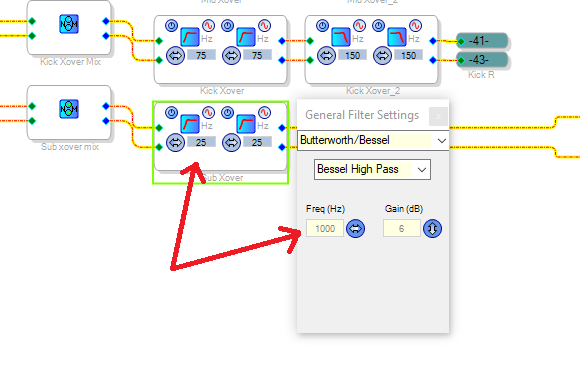
The frequencies in the blocks are not matching with the settings windows.
This goes for all the filters in your cross-over section.
Looks like some kind of corruption to me...
I would start with a new file and draw everything from scratch.
Regards, ODJeetje
Hmm, that doesn't sound great.
Does anyone know if this kind of corruption is common and if there are any behaviours or conditions that lead to this? I have had similar behaviour in the past with other Sigma Studio files also. Maybe a clean install of SS wouldn't hurt.
Thanks :)
Please log in to reply.