Looking for clarification on the Compressor coefficients stored in memory
Hi,
I am designing with SigmaStudio v4.7 for an ADAU1467 processor. My design is using a Dynamic Processor - RMS - Full Range (-140dB to +40dB) - 1 Channel - RMS (no gain).
I will be using a host CPU to provide the User Interface similar to the graph in SigmaStudio and it will be updating Memory parameters via an SPI interface so I am trying to understand how the graph in SigmaStudio is converted into the values that are written into this memory so that my Host CPU can do the same.
My questions:
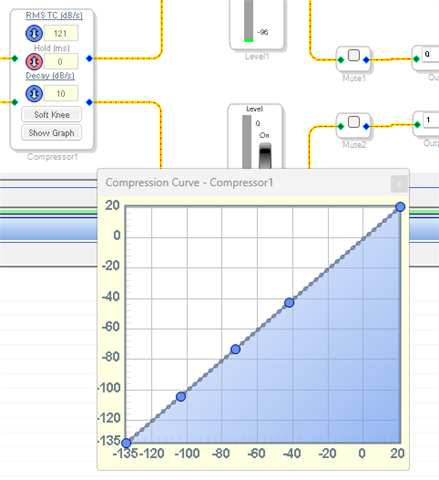
1) when I click "Show Graph" the graph shows -135dB to +20dB on both axes, is it assumed that the -135dB point on the X axis sets the gain for everything below -135dB ? and ditto the +20dB X point (which actually says it is +21dB) sets the gain for everything above +20dB ?
2) When I check the ...PARAM.H file I find the following:
#define MOD_CHANNEL_1_COMPRESSOR1_ALG0_MONONOPOSTGAINS300FULLRANGE1POINTS0_VALUE SIGMASTUDIOTYPE_8_24_CONVERT(1)
... (POINTS1 to POINTS52)
#define MOD_CHANNEL_1_COMPRESSOR1_ALG0_MONONOPOSTGAINS300FULLRANGE1POINTS53_VALUE SIGMASTUDIOTYPE_8_24_CONVERT(0.199289768267751)
#define MOD_CHANNEL_1_COMPRESSOR1_ALG0_MONONOPOSTGAINS300FULLRANGE1TC_VALUE SIGMASTUDIOTYPE_8_24_CONVERT(0.00029026378114394)
Now I can see that this is putting a gain value (converted to 8-24 format) into each of these "POINTS" but I have read the articles "Compressor Table Format - Changing compressors at run-time" which states "The calculation is actually done using 34 points stored in RAM. The first point stored in RAM represents the gain reduction value for any input below -90dB."
Do I assume that article is talking about a different compressor algorithm ?
and can I assume that my chosen algorithm ALWAYS works with the 55 POINTS that I have found in the .h file ?
and that my first point is for any input below -135dB ?
3) I also found in the ".h" file
#define MOD_CHANNEL_1_COMPRESSOR1_COUNT 57
So I have 55 "POINTS" + HOLD + DECAY is it safe to assume this is always the same or is there a safer way to programmatically calculate the number of POINTS in my Compressor ?
All thoughts, advice etc. will be gratefully received
PhilipJ
Audio Signal Processors
compressor
software
4.7
adau1467
parameters
SigmaDSP Audio Processors
Show More
Hello PhilipJ,
I was hoping I had done at last a little about this on one of my videos but I have not. So I will do some explaining here.
We have a number of compressors in the library and there are some differences you will find but these things I am about to explain are pretty much the same for all of them.
When you drop in the compressor it will have the default no compression settings.
The graph works like this:
The level of the signal is determined in the sidechain which is another discussion but for the moment let's keep it simple.
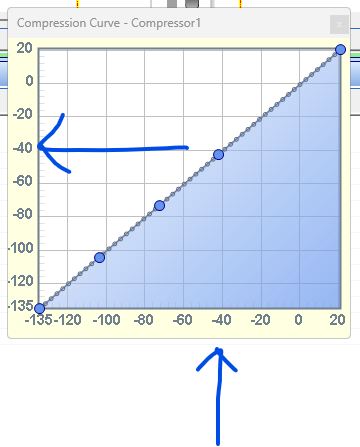
The input signal level is determined, it is measured and let's say in this example, the level is -42dB.
So you go up from the bottom until you hit the line of points.
Then you reflect off of the line and go over to the graph on the left to determine what the output level will be.
In this case there is no gain change, -42dB in will give you -42dB out.
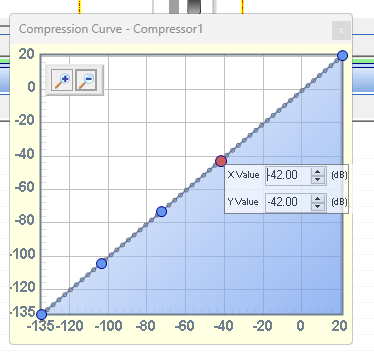
This is because the point is set that way.
I right-clicked on the point and selected "Set Point Value and this control opens up where you can change the values.
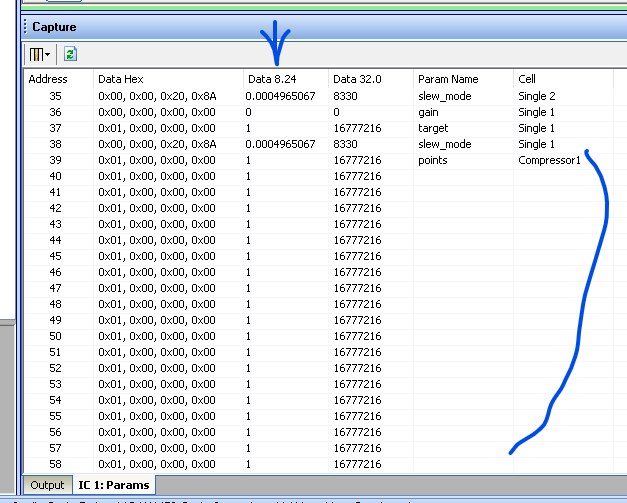
What gets stored in the parameters is the gain factor for each point.
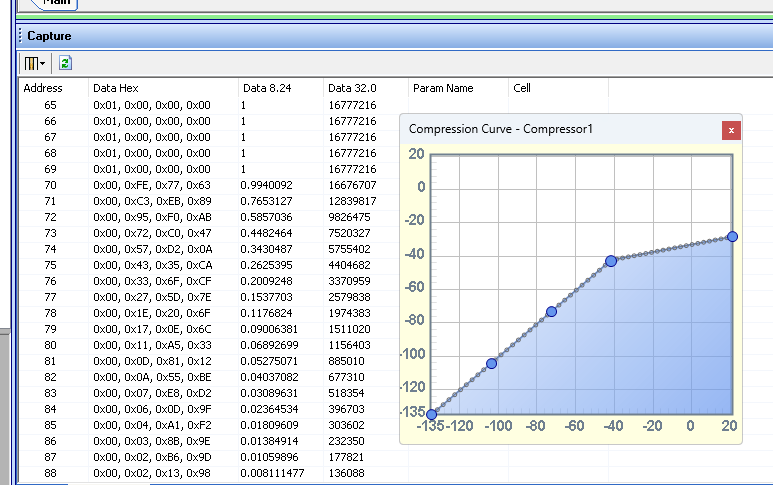
Look at the parameters in the Capture window.
In this program the points start at memory location 39 and go up from there. In this project by the way, there are only 54 points for some reason it is different from yours but no huge deal at the moment.
So you see ALL the points are a gain factor of "1". Look at the 8.24 data column is the best to look at for this parameter.
So the incoming audio is determined to be at a level of -42dB so the program picks up this gain factor from that point and multiplies the audio sample by this gain factor.
So I grabbed the top pint and pulled it down.
It rotated around the -42dB point so that point I can see in the parameters is stored in address 69. Because it is still a gain factor of 1.
But all the points below that in the parameter list (above the point in the graph) is now less than one so there will be gain change if the audio is louder than -42dB in level.
One other thing you should know is that if the level is determined to be between two point values, it will interpolate between the two points using a linear interpolation.
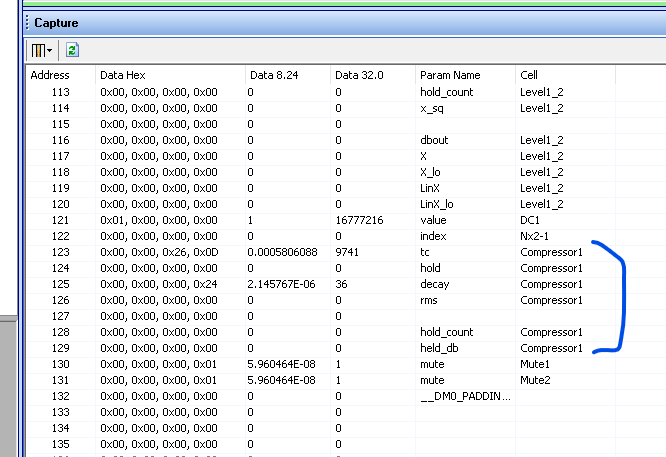
If you scroll down further in the parameter list you will find the time constant and decay parameters stored there and it has a counter for the hold time etc.
If the level is below the lowest point or above the highest point, I am fairly certain it just uses the last point for the gain factor.
I would have to check that but it seems logical to me.
Regarding number of points. You can always add or remove points by right-clicking on the graph.
There are a few little details that I would have to check up on. But there is some info here in the Wiki help files.
RMS (no gain) [Analog Devices Wiki]
Well, this will get you started.
Dave T

Hi Dave,
sorry for not replying earlier but I was bogged down in another thing we are working on.
I will read your reply a few more times to make sure I've absorbed all the details.
Until now we have only used the compressor as a brick wall limiter at -0.1dB to prevent any wrap-around distortion in the DAC that we are feeding the audio to so we've never needed to provide a User Interface but we are now planning a more comprehensive product with a full-in compressor/limiter in the audio chain so hence my question.
I successfully implemented the calculations for the EQ filters that were explained in another document and we have supplied our customers with a 3-band EQ that they seem to like very much and so our next product will add the compressor/limiter with a User Interface allowing them to vary the knee-point and the compression ratio.
Thanks for your assistance, and congratulations on the tutorial videos - very useful.
Kind regards
PhilipJ
Hello PhilipJ,
Thanks for the kind words. Trust me, I know about getting bogged down and not able to get to all the things that need to be done!!
Personally what I like to do if there are available instructions, is to have two "limiters".
I like having a brick wall limiter that is setup fast, a peak limiter, and setup to just protect against clipping. Yes, it adds some distortion when it does kick in, but it is better than hard clipping!! Plus, it also helps to not damage the amps, or the power supplies or the speakers etc.
This limiter is close to the end of the signal path just before the output.
Then earlier in the signal flow, often fairly early to help prevent clipping of things like EQs etc. Having an RMS compressor setup to do the user controlled limiting. You can even do a multi-band compressor! So I suggest you keep your brick-wall limiter in place and add the user controlled one.
I went looking for some of my old example projects. This one is setup to compare different compressors and techniques. It is not an end-example project, just a testing and listening project:
ADAU1452 Output Peak Limiter and Power Limiter.dspproj
This next one is interesting the way I did the final limiter protection for each output.
However, I hope I had an RMS compressor before the crossover but I did not. This is sort of what I am talking about.
3005.ADAU1452 Basic Crossover with EQ and Limiting.dspproj
Dave T
Thanks Dave,
I will get back to your examples when I am next on the "mixer project" that wants a User Compressor.
Kind regards
PhilipJ
Please log in to reply.