No data output in serial port
In my hardware project. ADC is PCM1804,and DAC is PCM1798.To make sure Codec work on the same clock.I configure the serial output port0 to generate LRCLK(4FS=192Khz) and BCLK .So that my ADC and DAC receive the clock from Serial output0 clock. Now my adc receive the clock and it generate the digital data from my audio input correctly.I didn't connect the clock line to DSP input(Backflow from the serial output0's clock)
So I regard the ADC digital output as a ASRC input,To make it work.I use ASRC0 to receive the serial input ch0/1 and put it in DSP Core routing. But I can not get the SDATA OUTPUT.
5633.Test.dspproj
Audio Signal Processors
adau1452
software
SigmaDSP Audio Processors
sigmastudio4.7
Hello EnyaKim,
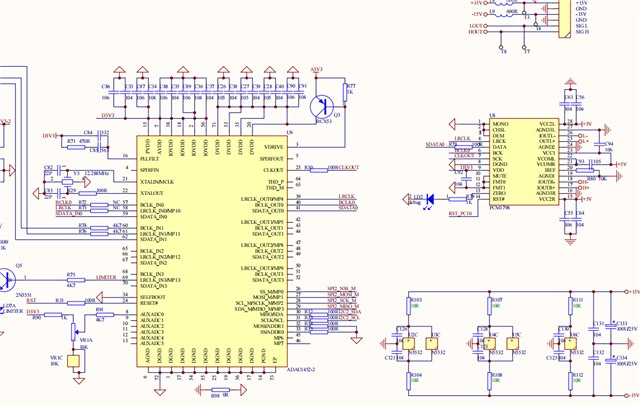
Thank for attaching the project and schematic.
First of all, you don't have to use the ASRC since you are using the serial output port clock (internal clock) as the audio clock source. The serial input port is using the clocks from the serial output port, so they are from the same internal clock domain, hence no need for ASRC.
You are using CLKOUT pin as the MCLK source to the DAC which is good and expected. I hope ADC's MCLK is also from the CLKOUT pin, since the schematic doesn't cover the ADC side, so I just assumed this.
EnyaKim said:
I didn't connect the clock line to DSP input(Backflow from the serial output0's clock)
Here is the problem, since you set the serial input port 0 as slave it doesn't have any clock reference, so you must connect the clocks from serial output port to the serial input port physically. Now your serial output port 0 clocks will be sent to DAC, ADC and serial input port 0 for things to work.
EnyaKim said:
So I regard the ADC digital output as a ASRC input
A data signal alone from ADC without clocks will not work. The serial input port needs clocks and data together. So, connect BCLK and LRCLK to the serial input port physically and try again.
All your configuration seems correct, so just connect the clocks, it will work mostly.
I have updated your project with some debugging elements, and I removed the ASRC parts.
5633.Test_upt.dspproj
Note that, if you are using single pair of clocks going to three different places then you have to check the signal integrity and to make things worse here you are running at 192KHz, a high frequency clocks going to different places will cause some trouble if the PCB is not designed properly. so, you may need a clock buffer to derive the clocks to other places. So, I recommend you work at 48KHz initially, once everything is working properly then you can step up the sample rate all the way to 192KHz.
Feel free to reach out if you need any clarification.
Regards,
Harish
Hello EnyaKim,
I am going to add a few of my opinions in here to add to the great response that Harish provided. I agree fully with his suggestions.
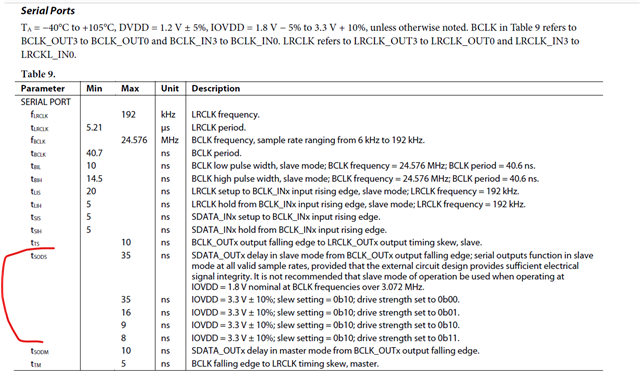
I noticed that you looped the Serial output port 0 to the DAC but also looped it over to the serial input port 0. This make no sense at all and only causes more problems. The clock going out of serial output port 0 is from the same internal source that is available to the serial input port 0 if you set it to be a clock master. It is the same clock but now it will not suffer from the internal delay of the pin pad when it is set to be a slave. Look at the ADAU1452 Rev D datasheet table 9 and you will see the delay this adds!! When running at 192kHz this can be significant!!
You may find in the end that to reduce these delays when a pin is set to slave to a clock is to have the direction of the clocks be the same as the direction of the data.
As Harish mentioned, We are assuming you are sending the same MCLK to the ADC from the CLKOUT pin?
This would be good.
Then set the ADC to be a clock master. Then you only have one SODS delay and one propagation delay from the ADC to the DSP.
If you make the DSP be the clock master then you have the SODS of the ADC and round trip propagation delay!! DSP--> ADC--> DSP for the clocks.
Then for the DAC make the DSP be the clock master. This way the clock and the data are going the same direction and suffering from the same propagation delay. The alignment of the clock edges to the data is very important. This helps solve this problem by have the clocks and the data come from the same place and travel in the same direction over a similar distance. Keep vias to a minimum.
Running at 192kHz fs can be a challenge and these little details will help you make it work and minimize any bit losses.
One other comment more for others who might read it.
In this case the serial output ports that are unused could be turned on to be a clock master and used to drive other parts if needed. Thereby eliminating the need for a clock buffer IC.
Enough for now...
Thanks,
Dave T
As a chinese engineer,I am extremely grateful to have received both your unreserved advice from such a distant place.
I have deal with this bug,It is because the api SIGMA_WRITE_REGISTER_BLOCK.I try to use the stm32 Hardware IIC with its hal API HAL_I2C_Mem_Write to package that api.(It seems to be hard to use because its high abstract and couple)
I thought I communicate with ADAU sucessfully,But unfortunately it can only work without DSP Core.It means that I can only route audio signal bypass DSP Core.
So I try to use GPIO to simulate software IIC,And It work! I get the right SDATA Out.
Thanks again for DaveThib and Harishgowtham.Both of your advice make me more understaning for ADAU.
Whether the Pcb layout or clock line direction.
And another question appeared.I try to use Software IIC_Read to read the DSP Core Status register(0XF405),It is always zero which means DSP Core not work?
But it did indeed output what I want like the Sine wave or white noise(Generate by Source in toolbox).
To make sure the Read API is right,I will try to debug it.
Anything should I notice to read the Register?
Hello EnyaKim,
Since you said, the core outputs the internally generated sine tone and white noise, it shows that the core is running properly. There may be an issue with the register read. You may try reading some blocks in the DSP to know if your communication works correctly.
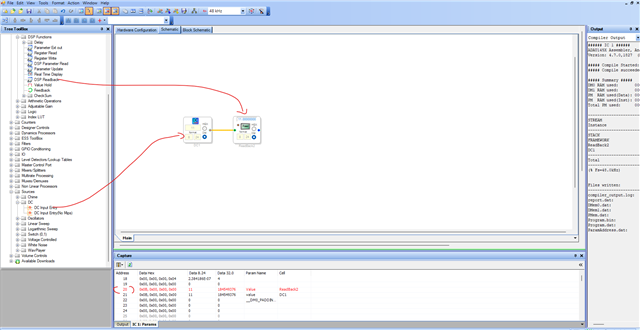
Another way to verify if the DSP core is running properly is, you can simply connect a DC cell to readback cell and read that readback (or DC cell) cell's address. If you get what you wrote to the DC cell, then you can surely say it's running.
Note one thing about the core status register (0xF405), when you read this register, you may often see 'core is sleeping' (0x3) or other values which is not a problem (except you get 0x0 'core not running').
Because the core status of 'core running' means it is running the program. Once the program finishes running for the sample period. The core will go to sleep to wait for the next frame interrupt. So, if the program is small, it is actually difficult to catch the core when it is running the program, it is easy to catch it as it is sleeping since the majority of the sample period it is done with the program and is sleeping and waiting for the next interrupt (because our program is very small).
So, just try the DC block reading test and see if you get correct value.
Regards,
Harish
Please log in to reply.