Simple RMS readout with a Level Detector Designer reading from a readback
Hello all,
I am new to DSP concepts and am working on a project to perform a simple RMS readout using a sine-wave input source. I am reading data from an MCU over an I²C connection. As far as I can tell, the data transfer is working correctly, as I am using the same code used in other projects that does successfully pull from readback memory.
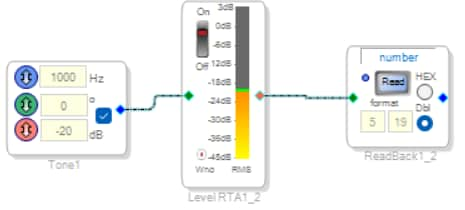
However, I’m confused because the values I’m getting don’t match my expectations. Specifically, I am reading data from the section shown below, and the readback block returns a value of approximately 397793.
After looking through similar questions, I found that to convert this value to dBFS, I should use the following formula:
dBFS = 20 × log₁₀(X)
where X = 397793 / (2¹⁹).
My understanding is that the 2¹⁹ factor shifts the value back into 5.19 fixed-point format, since the readback value is interpreted as a 24-bit number on my MCU.
However, when I apply this formula, I get a result of approximately –2.39 dBFS.
I suspect I’m missing a step or that my configuration is incorrect. Could someone clarify what I might be overlooking?
I have attached my project, thank you in advance for any help!
Dosimeter_DSP_Project.dspproj
Edit Notes
More grammar
[edited by: AsherS at 7:24 PM (GMT -5) on 11 Dec 2025]
Audio Signal Processors
hardware
SigmaDSP Audio Processors
adau1701
Hello AsherS,
Hmmm... I know an Asher S who lives out in the Los Angeles area but he is not an electrical engineer. He is a recording engineer. Anyhow, ...
Thanks for supplying your project. I had a strange thing happen that when I compiled and ran your project and then clicked on the ReadBack cell, the value did not appear in the window of SigmaStudio?... I would see it in the Capture window but not the Readback... I ended up deleting the USBi interface and then pulling it back in and that fixed it. It could have been something in my system because our IT department forced some system updates! you got to love it!!
Now, on to your question and problem.
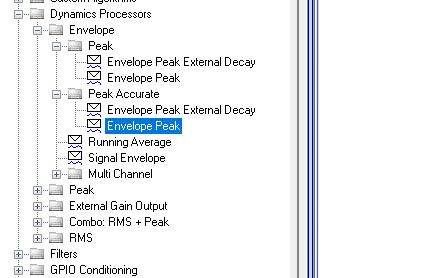
I do not like to use the Level detector objects for things like this. I suggest you just use an envelope generator that generates a value over time of a absolute value of the input signal. We have several but the easiest to use in my opinion is the Peak Envelope generator.
For this application where you want accuracy and can stand to use a few more instructions, the "Accurate" version is good. Here is where you find it:
There is a hold and a decay setting which is handy if you are not polling the data super fast. You can setup the hold time so it holds it long enough for you to read it from your controller.
Decay time also can make a difference, this is your preference and set it up so it works well for you and the type of audio in your application.
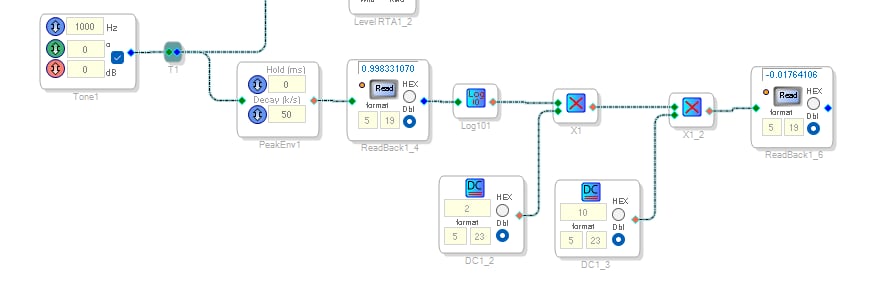
Here is what I added to your program:
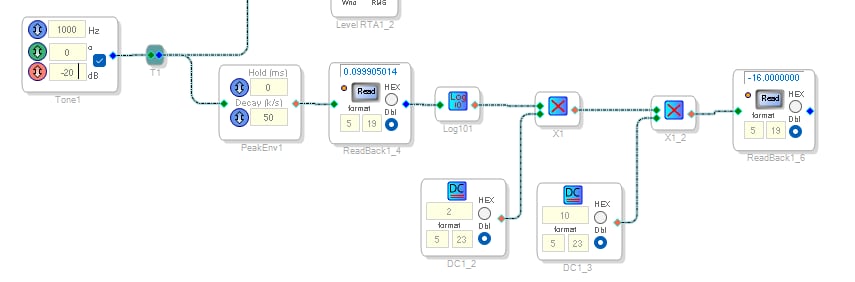
All you need is the PeakEnvelope generator and the Readback. However, for verification purposes, I am doing a little math to test it all out.
I am calculating the formula you posted.
AsherS said:
dBFS = 20 × log₁₀(X)
I am getting the log base 10 and then multiplying it by 20 and looking at the result.
The screenshot above you will see I have the oscillator set to 0dBFS. This for a peak value should give you a full-scale but remember that internally it is all 2's compliment so it cannot quite get to 1.0. It only gets to 0.998-ish which for me is close enough... LOL
Note that the calculated value is slightly below 0dBFS because of that. 0.005dB or so.
Now, to test this out, I will put in some other levels.
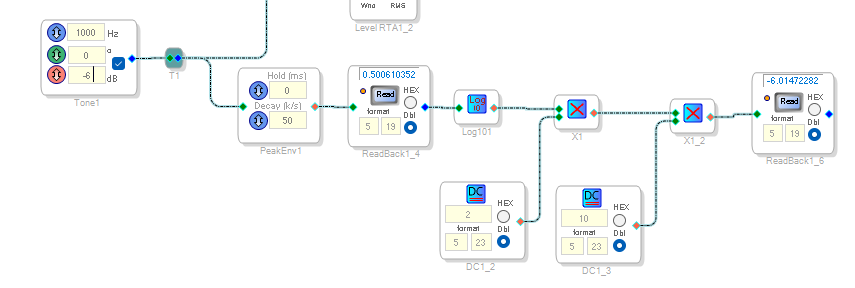
The first logical one is one that is half the peak value which is -6dB
The results are perfect!
I read 0.5 for the peak value and the calculated dB level is -6.01 This is great.
for -10dB I get again, the correct values:
Now, the issue with going lower falls into the limitation of the 5.19 format.
The largest positive whole number we can display is 15.9999.
The largest negative is -16
So if I put in -20dB This is what I get:
The value in the Readback cell is correct, 0.099 but the calculated dB level hits the max negative and saturated at -16.
If I put in -15 I get -15dB
But, you are not trying to calculate the dB level in the DSP so this is not an issue for you. The value you read out of the Readback should work well for you.
Here is my project. I hope this helps.
Thanks,
Dave T
Dosimeter_DSP_Project-DT-Tests.dspproj

Dave,
This is exactly what I was looking for. Thank you so much for your help! Unfortunately, as far as I know, I am not the Asher S that you speak of...
Sorry for the disappointment.
Not the Sound Engineer from LA,
Asher S
Please log in to reply.