Residual Echo Supression module not showing in toolbox
Hello all.
I want to try the Acoustic Echo Cancellation (AEC) and Residual Echo Reduction (RES) modules. I downloaded the plug-in via the Add-Ins Manager, after that the trial AEC module appears in the toolbox and I can drag and drop it to the schematic, but I can't say the same about the RES module.
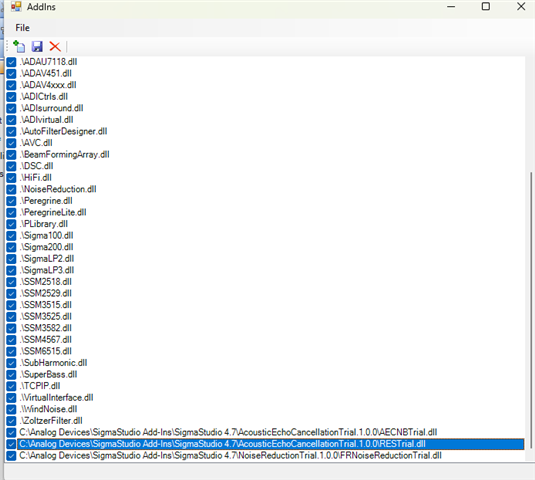
The plug in .dll file is installed, it is listed in the add-ins:
I looked in every folder in the toolbox and it isn't there. I also tried to copy it from an example schematic I found in the forum, but it's not working correctly as you can see in the following screenshot:
Anyone has faced this problem before?
Thank you very much.
Rolf Eberl
Audio Signal Processors
RES
software
toolbox
Rev 1831
adau1467
acoustic echo cancellation
Sigma Studio 4.7 Build 0
SigmaDSP Audio Processors
Residual Echo Reduction
aec
Show More

Rolf,
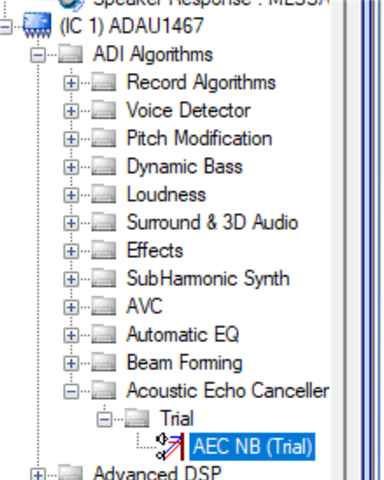
The primary AEC block runs in the normal "stream processing" domain and appears under the ADI Algorithms menu:
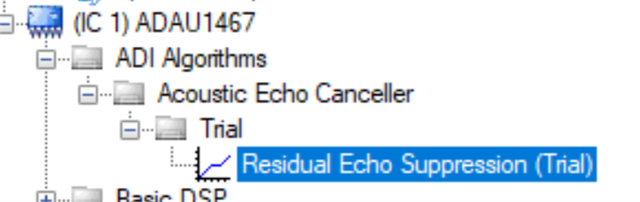
The residual part of the echo canceller runs in the "block processing" domain so it appears in the list under that tab. Switch to the block processing tab at the top of the window:
The tree on the left will change, and you should see different options under the ADI Algorithms menu. You should see the RES block there.
This page in the documentation provides detailed descriptions of these blocks and how they are used in schematics. There are also prebuilt projects here that are an excellent starting point.
Please let us know if you have further problems.
Best regards,
Ken

Please log in to reply.