Read level detector via I2C and convert data
Hello,
I'm picking up on this old topic ADAU1701 Low Instruction Level Detection Readback
I want to read back the level meter data and process it in my controller but I'm stuck with the final conversion.
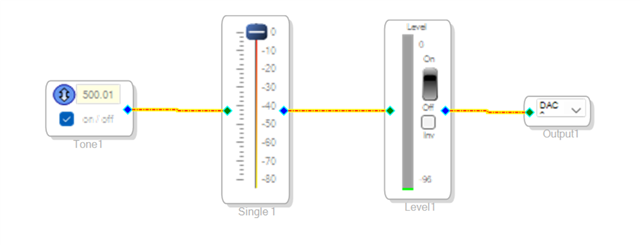
First I generated this very simple project to get myself some test values.
This results in the following register Values from the Trap.Dat file
Instance 3 Signal SingleBandLevelDetwOutDisplay2ndGen1X trap value 40 register
Instance 3 Signal SingleBandLevelDetwOutDisplay2ndGen1LinX trap value 45 register
Instance 3 Signal SingleBandLevelDetwOutDisplay2ndGen1LinX_4 trap value 46 register
Instance 3 Signal SingleBandLevelDetwOutDisplay2ndGen1LinX_lo trap value 48 register
Instance 3 Signal SingleBandLevelDetwOutDisplay2ndGen1X_4 trap value 49 register
Instance 3 Signal SingleBandLevelDetwOutDisplay2ndGen1X_lo trap value 50 register
Next I used a scope to record the I2C bus for different levels. For example here a recording at -11 dB shown at the level meter
I2C, Time, Address, R/W, Data
1,-31.1484ms,0x68,W,0x08 1A 00 A2
2,-30.3461ms,0x68,W,0x08 1A
3,-15.5413ms,0x69,R,0x00 A0 B9
4,-14.4372ms,0x68,W,0x08 1A 00 C6
5,-13.4924ms,0x68,W,0x08 1A
6,-6.93889as,0x69,R,0x03 80 00
7,965.060us,0x68,W,0x08 1A 00 CA
8,1.79494ms,0x68,W,0x08 1A
9,15.8698ms,0x69,R,0x05 48 CE
10,16.9898ms,0x68,W,0x08 1A 00 B6
11,17.8147ms,0x68,W,0x08 1A
12,31.4520ms,0x69,R,0xFE 8C 76
13,32.4421ms,0x68,W,0x08 1A 00 BA
14,33.3045ms,0x68,W,0x08 1A
15,47.2218ms,0x69,R,0x00 0C 66
16,48.2506ms,0x68,W,0x08 1A 00 C2
17,49.1155ms,0x68,W,0x08 1A
18,63.0903ms,0x69,R,0x07 00 00~A
Then I figured out with read matches the Trap.Dat register values. According to the datasheet on page 38 the Data capture registers need the register value as well a the register type specified in the I2C write command. Therefore, if we for example take a look at the first write command.
00 A2 equals to 0000 0000 1010 0010
the last two bit 10 are indicating to read out the MAC_Out trap data, which is the same for all 6 I2C write commands. The rest of the command will translate to
0000 0000 0010 1000 or 0x28 which is 40 decimal.
Here we have our first register "Gen1X". If we repeat this for all I2C write commands we can see that read order is
40 - Gen1x
49 - Gen1_x4
50 - Gen1x_lo
45 - LinX
46 - LinX_4
48 LinX_lo
fabulous. But now I encounter my problems. First of all, which set of registers is correct?
According to this topic Reading meters with a controller on the ADAU1452
The LinX registers are the unchanged input values. While in this conversation ADAU1701 Low Instruction Level Detection Readback the LinX registers seem to be used. I think that the values, which already include some processing like decay and averaging are benefitial. So my guess would be to read the Gen1 registers. Can you confirm?
Next is the unanswered question where in the _x4 registers the additional 4 bits for the 5.23 format are located exactly. From my test data I suspect that I need the lower nibble of the first byte for the calculation. In my example this would be the 3 left to the 0x80 in row 6.
And if I know the location. The final conversion needs to happen how? The 56 bits I get from all those reads are what? A double precision version of the 5.23 format? Does this mean I need to handle the data like 10.46?
For the other cases I think I figured out the conversion.
If I use only the data from the first register. For example Gen1x 00 A0 B9
Convert A0 B9 in decimal = 41145
Divide by 2^19 for the number of bits we have ~ 0,0784778595
And finally 10*log(0,0784778595) = -11,05 dB
But this only works down to values of roughly -40 dB since this first register will then always be set to all 0x00. So for more precision I can use the 4 bits from the Gen1_x4 register.
Convert A0 B9 3 in decimal = 658323
Divide by 2^23 now since we added the nibble of the x4 register ~ 0,0784782171
And convert to dB like to get the known -11 dB.
This works down to roughly - 60 db before the nibble will also be set to 0. Hence if I need even lower dB values I need to work with the whole 54 bit register. But for this case I can't figure out the final conversion. If I use the demonstrated way
A0B930548CE = 11044827515086
I get the closest result by dividing with 2^47. But why 2^47 and not 2^46 or 2^51 which would make more sense to me?
For other cases this becomes even more challenging to me. For example -71 dB reads in my registers to
Gen1X 00 00 00
Gen1_x4 00
Gen1x_lo 05 3A 29
If I only convert 53A29 in decimal and follow the same way I get -86 dB if I use 2^47 as divider. In this case 2^42 would give me the nearest result.
Yours faithfully
Chris
Edit Notes
Added more examples
[edited by: Chris49 at 9:00 AM (GMT -5) on 24 Dec 2025]
Audio Signal Processors
software
i2c
level detector
SigmaDSP Audio Processors
adau1701
Show More
Hello Chris49, All assigned engineers are out of office currently. DaveThib will be back in the week of 1/5/2026 to answer your question!
Hello Chris49,
The post you found called "1701 Low Instruction Level Detection Readback". is the closest to what you are doing. The other post you found about the ADAU1452 does not apply in any way. That core is so different and we improved the core design to make it easier!
The 1701 core is tough because we can only read 24 bits at a time. So the _X_ and _X_lo need to be combined to get the entire 28 bits of data. Keep in mind that it is the top 24 bits and bottom 24 bits so there is an overlap.
The post you found is the low-instruction version which does not integrate the values. It is basically just the most recent sample.
I do want to applaud you for creating a simple project with an oscillator, volume control and meter!! Well done to test your system!!
This is another older post that might be helpful.
(+) ADAU1701 VuMeter Missing parameter address, how can i read that? - Q&A - SigmaDSP Processors & SigmaStudio Dev. Tool - EngineerZone
If you need to use the low -instruction version then you will need to read it more frequently and average the results. Another way to do it would be to get the absolute value in the DSP and send that to an envelope generator and then send that to a ReadBack block but, then that will use more DSP resources.
Dave T
Hello Dave,
thank you for the reply. I understand that the 1701 core can only read 24 bit from the _X_ Trap Register. 24 bits are a 5.19 value. That should be roughly around 40 to 45 dB of dynamic range. Add I another 4 bits to get a 5.23 number this would increase the dynamic range to about 60 dB. If I want even more dynamic range I need to read another 24 bits correct?
Where you lost me is that you say I need to combine the _X_ and _X_lo registers for my 5.23 value. I thought that you are supposed the combine _X_ and _X_4 registers while the _X_LO gives you the double precision resolution. To quote a reply from you in ez.analog.com/.../adau1701-low-instruction-level-detection-readback
Now there are five different addresses to read. There is one more detail to explain. This trap register read in hardware is only 24 bits. The accumulator is 56 bits. So the LinX reads the top 24 bits, the LinX_4 reads the next four bits so that is 28 bits total and then the LinX_Lo will read the next 24 low bits and the last four bits are not able to be read but that is not important anyway. Normally for level meters all you need is the top 24 bits.
Can you provide a graphic showing which bit of each register has what position in the read out value, since you mentioned an overlap between the _X_ and _X_Lo register? From what I understand so far it is supposed looks like this???
Reg
_X_
_X_4
_X_LO
Bit
23
22
21
20
19
18
17
16
15
14
13
12
11
10
9
8
7
6
5
4
3
2
1
0
3
2
1
0
23
22
21
20
19
18
17
16
15
14
13
12
11
10
9
8
7
6
5
4
3
2
1
0
And the remaining question would still be how do I convert the final read out to a dB value from this 56 bit ?
Hello Dave,
any update on my open question?
How does Sigma Studio convert the data it's showing on the screen from the values I see on the I2C bus?
Ok, I think I finally solved the puzzle on how to calculate values below ~ -60 dB.
The trick is to only use the Gen1x_lo register, convert from hex to decimal. Divide the result by 2^19 (since the register is only 24 bit in total). Calculate the 10*log of this result and now subtract -69 dB from this value since this is about the minimum value we get from the combined Gen1X and Gen1_x4 registers. This gives me a very close result to the expected RMS reading shown by Sigma Studio.
Here is a table with I2C records that prove this theory. Would be nice if ADI confirm it but it seems there is no support from ADI on this topic anymore.
RMS
Gen1_X
Gen1_x4
Gen1_Lo
RMS_Calc 2^23
RMS_Calc 2^19
Diff to expected RMS
-3
04
0B
61
04
80
00
01
2E
47
4240916
-2,96230229815575
-31
00
01
98
01
00
00
00
19
1C
6529
-31,088432316671
-52
00
00
03
02
80
00
05
49
93
50
-52,2471989593555
-59
00
00
00
05
00
00
05
CC
83
5
-62,2471989593555
-70
00
00
00
00
00
00
06
92
6C
438982
-0,771232048016357
-69,2287679519836
-75
00
00
00
00
00
00
01
B6
35
112181
-6,69650610552002
-68,30349389448
-82
00
00
00
00
00
00
009
6A
F7
27383
-12,8208889119995
-69,1791110880005
-89
00
00
00
00
00
00
00
15
18
5400
-19,8717615779267
-69,1282384220733
-91
00
00
00
00
00
00
00
0D
92
3474
-21,7874010350456
-69,2125989649544
-96
00
00
00
00
00
00
00
00
D2
210
-33,9735062288172
-62,0264937711828
Please log in to reply.