I2C Readout Seven Band Level Detector
Hello,
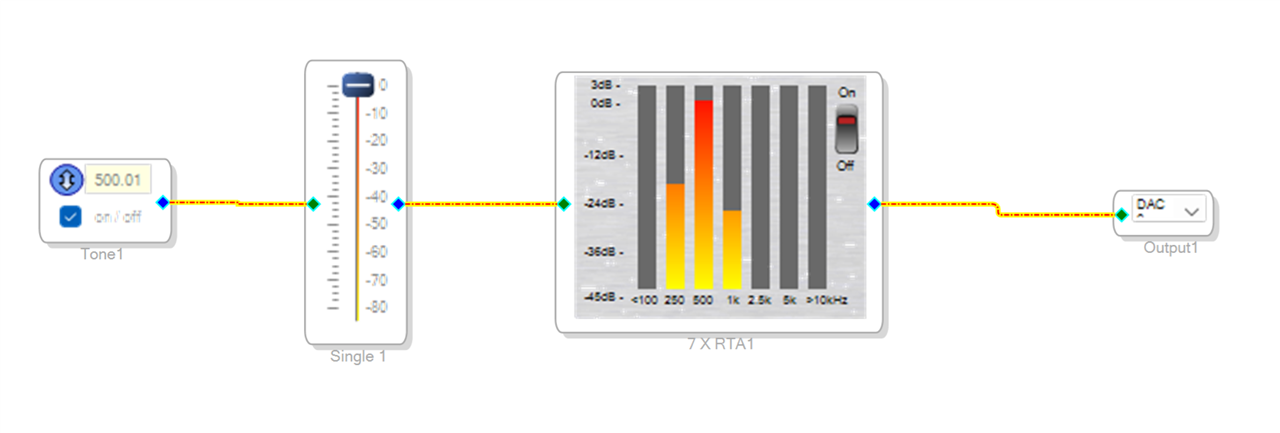
after I mainly solved how to read out a level detector via I2C, I would like to repeat the same for the Seven Band Level detector block. After recording the I2C traffic with my scope and comparing the used registers with the generated Trap Data file it is pretty clear what I'm reading back from the DSP. Only the final conversion is again a mystery to me.
Here is my example
and this is the recorded I2C data
I2C, Time, Address, R/W, Data
1,100.000ns,0x68,W,0x08 1A 01 12
2,782.400us,0x68,W,0x08 1A
3,16.0572ms,0x69,R,0x03 11 9A~A 201108
4,17.0395ms,0x68,W,0x08 1A 01 BA
5,17.8669ms,0x68,W,0x08 1A
6,32.2092ms,0x69,R,0x06 0E B9~A 396985
7,33.3035ms,0x68,W,0x08 1A 02 62
8,34.1408ms,0x68,W,0x08 1A
9,47.5507ms,0x69,R,0x07 B1 B7~A 504247
10,48.4823ms,0x68,W,0x08 1A 03 0A
11,49.2847ms,0x68,W,0x08 1A
12,63.1845ms,0x69,R,0x05 8D 46~A 363334
13,64.1995ms,0x68,W,0x08 1A 03 B2
14,65.0119ms,0x68,W,0x08 1A
15,78.9317ms,0x69,R,0x03 4C 37~A 216119
16,79.9063ms,0x68,W,0x08 1A 04 5A
17,80.7412ms,0x68,W,0x08 1A
18,95.3809ms,0x69,R,0x01 DE 7F~A 122495
19,96.7070ms,0x68,W,0x08 1A 05 02
20,97.5527ms,0x68,W,0x08 1A
21,111.113ms,0x69,R,0x00 00 00~A 0
Now how do I convert this to the shown dB values in the picture above? My ideas was to take the 24 bit readout and convert it down to a 5.19 fixed format which than can be used for a logarithmic conversion. But the results won't match up.
20*log(201108 / 2^19) = -8,32 dB
20*log(396985/ 2^19) = -2,42 dB
20*log(504247/ 2^19) = -0,17 dB
20*log(363334/ 2^19) = -3,18 dB
20*log(216119/ 2^19) = -7,70 dB
20*log(122495/ 2^19) = -6,31 dB
using 10 instead of 20 for the multiplication won't change the fact that the steps between the read outs are not big enough. So how does Sigma Studio converts the data to get to the shown graphics?
Best regards
Chris
Audio Signal Processors
software
SigmaDSP Audio Processors
adau1701
Hello Chris49, All assigned engineers are out of office currently. DaveThib will be back in the week of 1/5/2026 to answer your question!
ADI North America will be on winter shutdown starting December 24, 2024; perhaps another community member can assist you until our return on January 2, 2025.
Hello Chris,
You have posted about this a number of times now so I am having trouble keeping up with where you are with this?
I responded yesterday to this post:
Read level detector via I2C and convert data - Q&A - SigmaDSP Processors & SigmaStudio Dev. Tool - EngineerZone
This post also talks about this but does not go into details of calculating the levels.
Seven Band Level Detector via I2C - Q&A - SigmaDSP Processors & SigmaStudio Dev. Tool - EngineerZone
I have been communicating with one of our programmers. He has responded but I need to clarify some of the details.
this is part of your post. I want to clarify that this is the data you read or was the answer (201108) something you calculated?
I am trying to understand what you are showing here? So #1 and #2 are Writes??
Why are you writing when you want to read the meter?
What is the memory location 0x68 and 0x69? What does the Params file say this is?
Chris49 said:
I2C, Time, Address, R/W, Data
1,100.000ns,0x68,W,0x08 1A 01 12
2,782.400us,0x68,W,0x08 1A
3,16.0572ms,0x69,R,0x03 11 9A~A 201108
So you are taking the 201108 to then try to calculate the level?
Thanks
Dave T
Hello Dave,
yes both of my problems are quiet similar. I don't know how Sigma Studio is converting the data it reads from the DSP to show the information I see. There is just no documentation.
Here in this case I try to understand the 7 band level detector. Similar to my question regarding the single band detector I recorded the I2C communication between Sigma Studio an my ADAU1701 DSP.
The Trap file gives me those registers and indicates a read out from the MAC_OUT trap data
Instance 3 Signal SevenBandLevelDet1rta0_out trap value 68 register mult_out 0100 0100 10 01 12
Instance 3 Signal SevenBandLevelDet1rta1_out trap value 110 register mult_out 0110 1110 10 01 BA
Instance 3 Signal SevenBandLevelDet1rta2_out trap value 152 register mult_out 1001 1000 10 02 62
Instance 3 Signal SevenBandLevelDet1rta3_out trap value 194 register mult_out 1100 0010 10 03 0A
Instance 3 Signal SevenBandLevelDet1rta4_out trap value 236 register mult_out 1110 1100 10 03 B2
Instance 3 Signal SevenBandLevelDet1rta5_out trap value 278 register mult_out 0001 0001 0110 10 04 5A
Instance 3 Signal SevenBandLevelDet1rta6_out trap value 320 register mult_out 0001 0100 0000 10 05 02
Sigma Studio reads 7 registers from the DSP. Therefore my idea was that each register represents one "band" of the 7 band level detector. But it is only a 24 bit value. From what I've seen with the single band detector my idea was to convert the result of each read into decimal. Divide it by 2^19 and finally convert it to logarithm. With this 5.19 value you should be able to go down to roughly -40 dB what matches the 7 band graph seen in Sigma Studio.
Only it does not work. As you can see, I converted each read back. For example the fist line read result 0x03119A converts to decimal 201108 which gives us -8,32 dB, when divides by 2^19. But the already does not matches the picture you see from what Sigma Studio was showing in this moment. Same for all of the other conversion. From the picture you would expect
100 Hz < -45 dB
200 Hz ~ -20 dB
500 Hz = 0 dB
1kHz ~ -24 dB
2.5 kHz < -45 dB
5 kHz < -45 dB
10 kHz < -45 dB
instead I do get
20*log(201108 / 2^19) = -8,32 dB
20*log(396985/ 2^19) = -2,42 dB
20*log(504247/ 2^19) = -0,17 dB
20*log(363334/ 2^19) = -3,18 dB
20*log(216119/ 2^19) = -7,70 dB
20*log(122495/ 2^19) = -6,31 dB
So how does Sigma Studio calculate those values I see? Are those 7 registers not equal to the 7 frequencies the graph shows?
In the end all I want to archive is that the display on our Amp shows some movement. Level of left and right channel and well maybe some spectrum.
Hello Dave,
any update on my open question?
Please log in to reply.