How to use the ADAU1466 MFxLMS training mode and running mode?
Hello, I am using the ADAU1466 MFxLMS to design the noise reduction module.
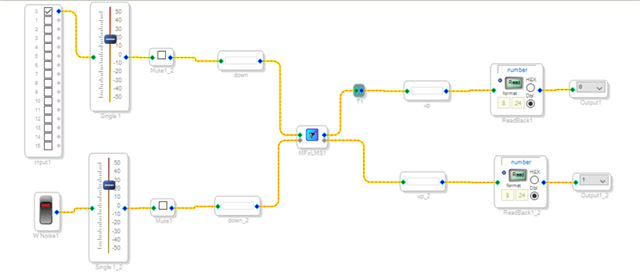
According to the recommended usage on the web page, I have already installed the relevant circuits,
but I don't know how to use the training mode and the runtime mode.
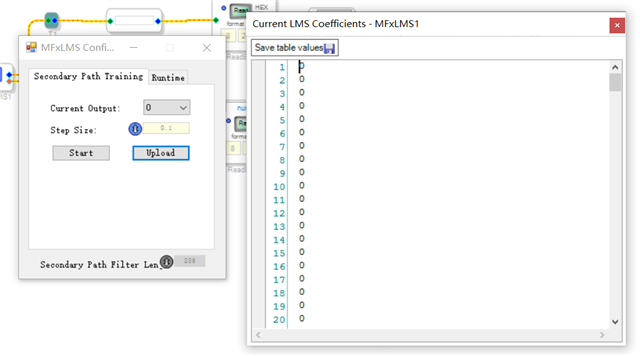
The table value after each training is all 0.
First I click on the Secondary Path Training,
then download the circuit to the development board, then click start, wait for 5 minutes,
click stop, and then click upload. the data in it are all 0.
Please tell me how do I use this?
Audio Signal Processors
software
4.7
SigmaDSP Audio Processors
ADI North America will be on winter shutdown starting December 24, 2024; perhaps another community member can assist you until our return on January 2, 2025.
Hello,
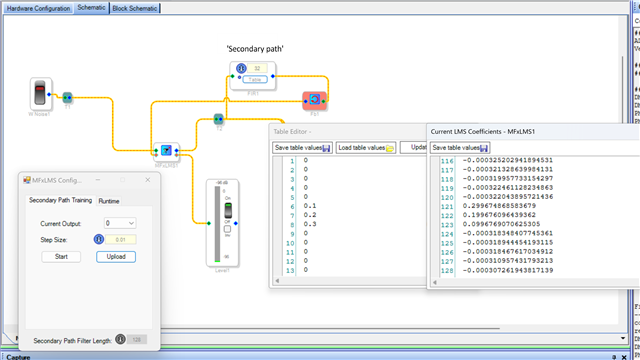
The antinoise output from the MFxLMS needs go through the 'secondary path' back to the error input of the MFxLMS. You have a noise source at the MFxLMS error input, so that wont work, it should be an input. I attached a project that uses a FIR to simulate the secondary path. The MFxLMS secondary path training will converge to the FIR. Note the coefficients are in reverse order.
MFxLMS test FIR.dspproj
I used MFxLMS test FIR.dspproj to generate coefficients, but the output pin is not output.MFxLMS_2.dspproj
Please log in to reply.