ADAU 1701 to 1467 connect
Hi! I have two 1701 boards I want to use to add additional analog inputs to my ADAU1467. I see I need to config the MP GPIO pins on the 1701 for serial data and clock. Can you give me a quick template or cut sheet on what register control settings I need to accomplish in both chips to make this connection? I am planning on only running blocks in the 1467, so I would like to simply route input 0/1 into the serial data stream to the 1467. Do I use DAC0/1 as output for this or DIG 1/2? Also, what are the input blocks used in the 1467? I am also building up a couple of 1977s to do the same, so if I can get this basic understanding I assume it will be very similar with that platform. Thanks for your help!!
Audio Signal Processors
hardware
adau1467
SigmaDSP Audio Processors
adau1701
1467
Show More
Ok, I have solved this issue. For anyone who might be looking into this, it is not too bad. I wanted to add additional inputs to my EVAL ADAU1467 board. So I obtained a couple of 1401/1701 board and dug into the serial registers for both devices.
1467 PORT Configurations/ADAU1937 ADAC: For the 1467, there are four ports, 0-3 for both input and output (SDATA_IN0-3 and SDAT_OUT0-3). There is a total of 48 possible channels with 16 channels each possible on both Ports 0 and 1, and 8 channels each on ports 2 and 3. The Eval Board already has an onboard ADC/DAC, the 1937, which provides 4 inputs and 8 outputs. It occupies some of these port assignments as well as the augmented streams for SDATAIO, 0-7. The 1937 uses these SDATAIO connections, but they are not required for the 1401/1701 as we are only connecting two channels of I2C serial data. So the 1937 uses SDATA IN 2, SDATA OUT 0, and 4 of the SDATAIO connections, where SDATA 4 is the additional 2 inputs, and SDATA 5-7 carries the 6 additional outputs which are anchored, respectively to the SDATA IN 2 and SDATA OUT 0.
Serial Port Assignments: I highly recommend studying pages 47-49 of the ADAU 1467 data sheet to understand these relationships. I also recommend creating a spreadsheet so that you can see all three stream connections and how they support the on board 1937. Once you see this relationship and understand the PORT configs of 16 or 8 channels, you will see where you need to connect your 1401/1701, and in this case, you would use the smaller PORT, PORT 3 which is an 8 channel port.
Register Settings, 1467, 1401/1701: In your register settings on the 1467, you would configure under Serial Ports Tab, Serial Inputs, PORT 3, for 2 channel I2C with LRCLK and BCLK as master. I2C is the audio format. This is the only setting you need to serially bridge the input. On the 1401/1701, you will go to your GPIO settings and ensure that PINS MP6 is set to Output Sdata_out0, MP10 is In Lrclk_out, and MP11 is In Blck_out.
Wired Connections: Connect the MP6, 10 and 11 pins to the J8 header pin cluster on the 1467 board to pins 1,3,5 with your MP6 connecting to IN3SDATA (1), MP10 to LRCLK(3) and MP11 to BCLK(5). Connect a ground pin, as well.
EEPROM Heads Up: I also carried over a 5volt link from the 1467 board to power the 1401/1701 board so that when I disconnected the USBi, power was maintained on the board. The reason is obvious, but without a microcontroller or EEPROM, the board will lose configuration when powered down and not uploaded from SS on power up. This problem will be solved with the addition of 24LC256 EEPROM with an 12C interface which will allow the board to boot up each time with the last stored configuration.
SigmaStudio: In Sigma Studio, the Output pins to drive the Serial Connection to the 1467 are Output blocks, DIG0 for Channel 1, and DIG1 for channel 2. These are in the 1701 schematic. To get these into the project on the 1467, use input block 40-47 which correspond to PORT3. After compiling both, you will have IN1 on the 1701 board show up in your 1467 schematic as Input 40, and IN2 will appear as 41.
Expansion: I will be adding another 1401/1701 board to for another 2 channels, having to use the Port0 16 channel serial interface, but this is fine as I do not need any further inputs. I would like to eventually change this out with one of the 4 port ADCs such as the 1977, but for now, the availability of the 1701 boards is a quick solution to the problem. If anyone has any recommendations, here, I would appreciate it. Relatively simple once you read and comprehend the serial data configs in each data sheet. Thanks and hope this helps!
Hello ElsaDog,
Sorry this reply is a little late. Your question came in later on Friday.
There are a few little details I am not so sure you have workout out. You have done a great job at figuring out a lot of his!
The first is that you mentioned you do not want to use the DSP core of the 1401, well, there is no way to route the ADC outputs to the serial output port directly without going thru the core. So you need a simple program to pass the data through.
I will attach my example project for using the serial port on the 1701/1401 here. I am just sending an oscillator to the serial output port in this example, you would just change it to send the ADC signal instead.
5852.ADAU1701 Digital Out with Digital In Loopback test.dspproj
The next questions/details have to do with clocking.
I see you set the 1401 serial port to be a clock master.
this means you have to set the ADAU1467 serial input port to be a clock slave.
Then for the ADAU1467 you have to either set the DSP core start pulse to follow this clock from the 1401 serial port as its sampling rate, or you have to run the 1401 through the sample rate converters. However, the best way in my opinion is to use the CLKOUT of the ADAU1467 and send that to the ADAU1401 MCLK input so both DSPs will run at exactly the same rate using the same master clocks.
There are probably some other details I missed. But, this is a start.
Dave T
Ah, yes, thank you! Yes, I was a bit sloppy in the description of using the 1401 core, I meant to say that I want "the bulk of" the schematic - anything where I need to do register read and writes, to be handled by the 1467. I did put some passive notch filters to cut out the CW ID on the channel in the 1401 to offload a bit of processing power from the 1467. I appreciate your clarification on the clock settings, and that probably explains my occasional pop I am hearing which is probably clock jitter as the sync drops for a cycle or two. I will make those changes. I am getting close to the limits of the 1467 with 82% of the block limit currently. I am stripping back non essential level reads, found a routing table that I could sub in a mixer with a couple mutes, but I have a question - are there larger DSP chip resources out there if I were to create more complex schematics, or would you suggest breaking them across different platforms and addressing on I2C depending on who is running what? Any other ideas you have would be great. This, as you can tell, is only dealing with a top frequency of around 6k, so with 48k sampling rate, I am probably extremely conservative and might be able to decrease sample rate? But I have to be careful as there are some high Q filters working at 100Hz that benefit from the higher clock rates. Anyway, thanks for your continued help!!
Hi, Dave:
I don't think I have the 1401 set as master, but maybe I am missing something. Here are the Serial Output settings as well as the GPIO pin assignments I am using on the 1401 to connect to the 1467. I am using MP10 and 11 to go to the 1467 board J8 pins 3 and 5. And I do have the 1467 set to master on Serial PORT3, SDATA_IN3 as shown.
It does seem to be working, but if there are some optimal settings, I would love to understand. Thanks!!! Elsa.
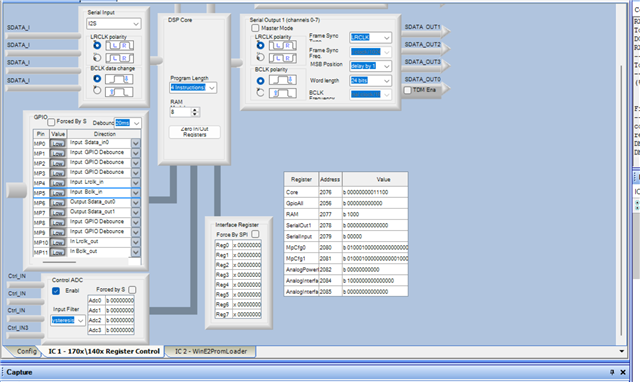
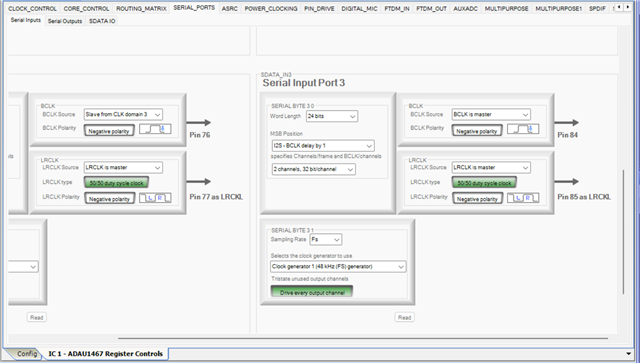
Hello Elsa,
OK, thanks for the screenshots. Yes, you are using the 1401 as a clock slave and you are sending the clocks from the 1467 serial input port 3 so that is all fine. Since you are using slower sampling rates this setup is fine. If you were trying to run at 192kHz or using TDM-8 or more, then you would have timing issues but at 48kHz this is not a problem unless the PCB layout is really bad!! Like a very very long distance between the DSPs and lots of trace capacitance.
To your question about sample rates. Yes, I think you should run at a lower rate, 24kHz would be fine. Going down to 12kHz is pushing it for your 6kHz bandwidth. You could do 16kHz I suppose.
The rest of your system comes into play here to see if this makes sense. If the core is running at this lower rate you will have more instructions per sample period. But, I assume you have other things in the system that needs to run faster?
I want to get back to one of my earlier comments. What is the source of MCLK for the 1401? If it is its own crystal then you really would need to use a sample rate converter in the 1467 because you will be repeating or skipping samples every once in a while.
The best way to fix this is to take the CLKOUT pin in the 1467 and send that to the MCLK of the 1401. Then they will be in sync and no need to use an ASRC.
Dave T
Great information, Mr. T. Thanks and I will implement the clock solution and play around with sample rates a bit. I have everything loaded now, and running around 80% of block resources, so maybe I will just let it cook. Thanks again!
Please log in to reply.