Setting the audio serial transmitter and receiver ports as slaves to another clock domain.
We designed an ADAU module with two ADAU1466 chips. A 24.576MHz MCLK is supplied externally. An external microcontroller sets parameters and reads meters through SPI.
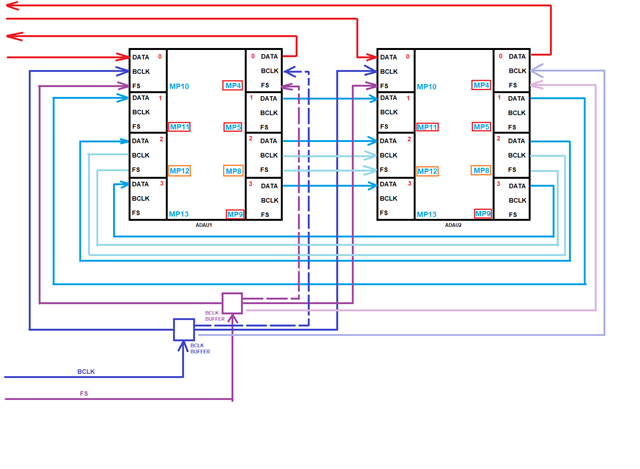
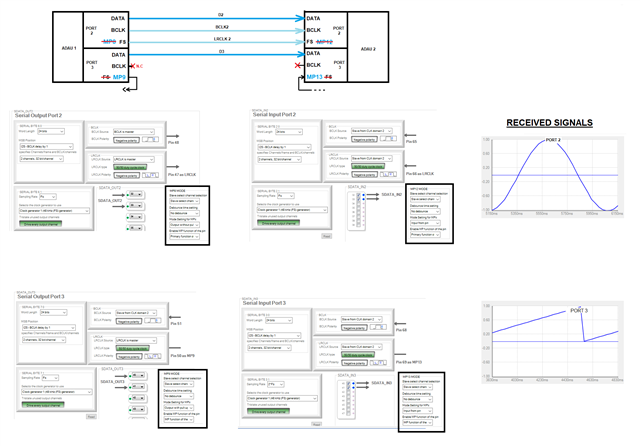
I’m attaching a diagram to illustrate some of the connections.
What we wanted to achieve a module as generic as possible to reuse it in different projects which translates in the following requirements:
As many MPs free as possible to use GPIO signalling between the ADAUs or between ADAUs and other chips (microcontroller, SHARC, FPGA, I/O expanders)
In the diagram I show the MPs that are connected somewhere else boxed in red; the ones with an orange box can be used as MPs or clocks depending on the project
I don’t show any the other MPs that do not share pin with clocks as are irrelevant
External I/O TDM16 (red connections in the diagram) the clocks come externally from a SHARC DSP.
Internal TDMs between the ADAUs (blue connections in the diagram)
Share the clocks for the internal TDMs so the LRCLKs pins are free to be used as MPs (GPIOs) instead of clocks.
Debugging
In order to allow for Sigma Studio debugging we modified one of the modules by interrupting the microcontroller side of the SPI bus and connecting the SPI bus signals to the USBi. We are able to debug both ADAUs, sequentially, by changing the project and connecting the relevant chip selects.
[???]: Is there a better way of debugging with Sigma Studio? By better I mean simultaneously rather than sequentially.
External TDMs
When we tried to test the module we were horrified that we couldn’t make the external TDMs work and the reason was that it’s impossible to share clock domains between input and output ports! (quite shocking to be honest). We added the BCLK and LRCLK to the output side of port 0 in the ADAU 1 (in dashed lines in the diagram). I haven’t modded the ADAU2 port 0 outputs but it’s not needed (faint coloured in the diagram)
Internal I2S/TDMs - Parallel data lines, sharing clocks.
I’ve tried to set up a full duplex I2S and TDM8 between both chips, using the ports 2 since they are fully populated buses. It works fine.
The next step was trying to use the other audio data connections (ports 1 and 3) but without clocks (as their LRCLKS are used as GPIOs). I tried setting both input and output ports 1 and 3 as slaves to their respective clock domains 2 but I can't make it work. I’ve also set the MP13 and MP9 on both chips as MP function so there is no way of interfering with the clocks.
[???]: Is there any problem with setting the transmitter or receiving serial ports as slaves to another serial port (port 2 in my case). Is it not possible to share the clocks internally and need to be routed externally? Does the MP/LRCLK function of the pins have anything to do?
Thank you very much in advance.
Edit Notes
[EDIT TO CHANGE CLOCK LINES TO ADAU2 AS SOLID AS THEY WERE THERE ALREADY]
[edited by: JordiP at 4:32 PM (GMT -5) on 9 Feb 2026]
Audio Signal Processors
hardware
SigmaDSP Audio Processors
adau1466
Hello Jordi,
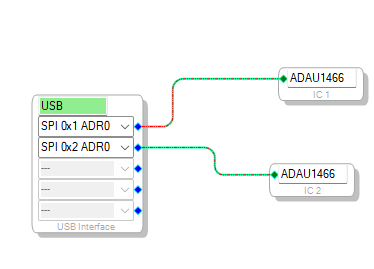
Yes, you can debug both ADAU1466 DSPs simultaneously using Sigma Studio.
The EVAL-ADUSB2EBZ supports multiple latch (chip select) signals. By default, CLATCH1 is connected through the ribbon cable, and this can be used for ADAU1466_1. For the second DSP, you can use CLATCH2.
When using multiple latches, the additional SPI latch signals from the USBi that are not routed through the ribbon cable must be manually wired to the target board. For more details, please refer to the EVAL-ADUSB2EBZ user manual - Using the EVAL-ADUSB2EBZ | Analog Devices
In Sigma Studio, you need to select the appropriate device latch in the Configuration Window based on the latch number being used
Additionally, I have shared an example project that demonstrates running two ADAU1466_ devices simultaneously.
ADAU1466_two_.dspproj
Regarding the clock sharing, I am working on implementing the test setup from my side and will update you shortly.
Regards
Harish

Hello JordiP,
I just want to make one little comment. You started by saying you are sending a 24.576MHz MCLK to both DSPs from some external source. Correct?
I assume the SHARC is also receiving this same clock? If this is true then all of the parts are running at the same rate which gives you some more options. You can run some of the serial ports using internal clocks to free up some of the GPIO pins as you mentioned. When it comes to TDM-16 you have to be more careful because of signal integrity and timing reasons so for those connections I always like to have the clocks running in the same direction as the data. However, if you are using the same MCLK then you do not need to use an ASRC which is great.
The serial input ports have a one sample period delay to allow for the external data to arrive at slightly different times.
Dave T
1104.Design 1.dspproj8802.Design 2.dspproj
Hi Dave,
Thank you for taking interest in my question.
No, the FPGA, ADC and DAC receive a buffered copy from a 24.576 low noise oscillator. The FPGA uses a PLL to generate 49.152MHz for the SHARC and it also sends 24.576MHz to the module where a clock buffer distributes it to each ADAU.
I have comms with the SHARC; I tried I2S, and it works perfectly (SNR better than 150dB) with no ASRC so that proves the 24 and 49 MCLKs are perfectly synchronous (PLL’ed inside the FPGA). At some point I’ll try a 16TDM at least to/from the first ADAU with the SHARC but unless there is any SI problem I doubt it will fail. TDM8 would be enough anyway so I may move it to ports 2 or 3.
I can also set an audio connection between the ADAU’s port 2 but that’s easy since the bus is complete with clocks.
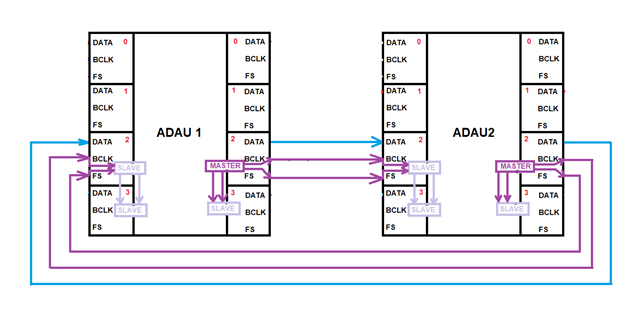
Now, the real problem is having several I2S (or TDM) between the ADAU chips. As you can see the ports 2 I/O are fully populated buses but the ports 1 and 3 aren’t (to free up their MPs). My intention is having 3 full duplex data lines: Port 1 ⇔ Port 1, Port 3 ⇔ Port 3 and Port 2 ⇔ Port 2, all sharing the same BCLK and LRCLK lines from the Port 2. In other words, all transmitters will be sending clocks but all are generated by each chip’s transmitting port 2.
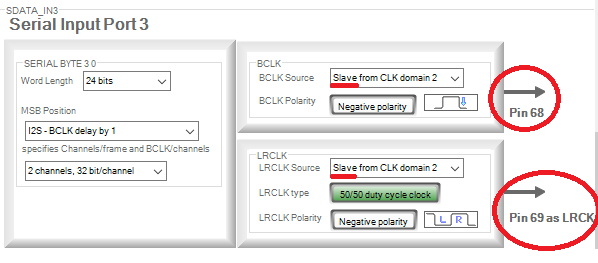
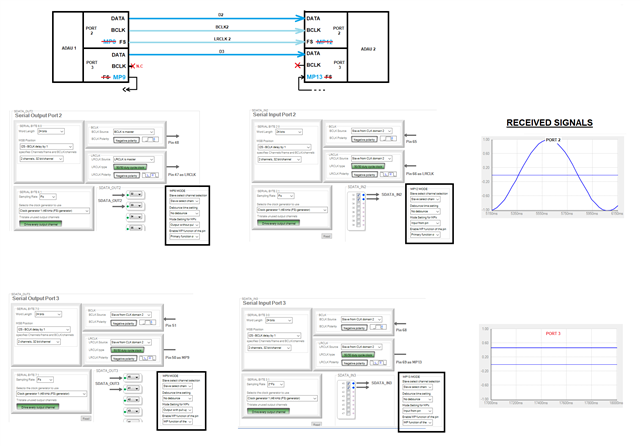
I’m sharing a very simple project where I try to set up an experiment to test this, although just with Ports 2 and 3. I also include a diagram to illustrate it. The port 3 is set up as a clock domain 2 slave. Eventually, port 1 will also be configured exactly as port 3, allowing me for 3 lines with TDM8 for a total of 24 channels, more than enough to send control signals across.
This is how I try to set it up:
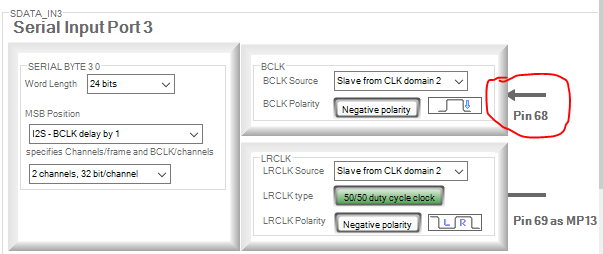
NOTE: Please note there is a bug on the GUI. When you open a project and go to serial ports, the arrows are incorrectly drawn pointing outwards rather than inwards even if the settings say “Slave from CLK domain X”) which is confusing. The same happens with the LRCLK and the pin configured as MP.
In an attempt for the IDE to understand that I want to share the domains internally I disconnect the LRCLKs by setting the pins 9 and 13. I can see that the input arrow in the GUI changes to no arrow. But the BCLK still is showing an arrow inwards…
But the BCLK still is showing an arrow inwards… Does that mean that the chip is expecting to have the CLOCK signals routed externally to the chip or am I missing to configure something else? (pin drive section?) I read in the manual that it’s possible to slave clocks to domains on the same side (I or O) and the option is there to select.
I attach the projects for both ADAUs that implement the diagram in this post. Apologies if they are two separate projects rather than one but had them before I read your colleague Harish's answer about multi DSP projects debugging (which sounds great by the way!)
Thank you for your help
Hi Harish,
Thank you very much for your suggestion and for taking your time to check my design. I didn't think you could have two ADAU schematics and register settings and that's fantastic. I'll modify the debugger to include that extra latch signal.
Jordi
Hello JordiP,
You earlier learned the "little" detail that there are no buses for the slave-clocks between the input and output serial ports.
Well, I have one more "little" detail for you to learn about. It makes some sense...
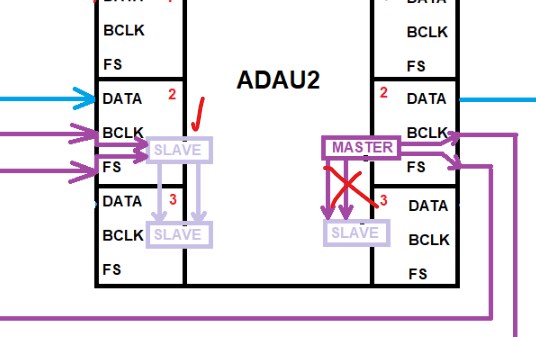
I took a screenshot of your screenshot and marked it up:
On the input port side, Yes, you can make any one of them slave to an external clock and then this incoming clock can also clock any of the other serial input ports. So you show port 2 set to slave and port 3 set to slave from the port 2 clocks! Perfect! Works fine.
On the output side this will not work!!
There are actual slave clock busses. The only way to have a clock on that bus is to set it to slave! If you set serial port 2 to be a master, there will be nothing on the slave clock bus for port 2. This actually makes sense. Why would you set a port to be a master from the internal clocks, then have it send that clock down another internal bus. This would add some latency, and then have another serial port slave from this when that serial port could just as easily use the internal bus that port 2 is using? With no hit on latency!!
So I drew an X/ Serial output port 2 will work but with serial output port set to slave from port 2, there will be no clock there so no data will come out!!
Now, regarding the other comments you mentioned about the graphics and the serial port settings and the multipurpose (GPIO) settings on the pin.
This is not in error. This is still true. Here is the best way I can describe this without making drawings.
First let's talk about when the pin is an output:
The actual pin output driver has a MUX (A MOSFET swtich) at its input. It selects if the pin will output from the serial port or from the GPIO MPx pin circuits. This switch knows nothing about the settings of the serial port or the GPIO port. It just takes its signal from there even if it is nothing but sitting high or low.
If the pin is set to be an output, then the opposite but similar thing is going on. The pin takes in the signal and sends it to a MOSFET switch. The switch will determine if this input signal goes to the GPIO circuits or to the serial port circuits. If you are trying to use the serial port but the pin is set to GPIO then the clock will not reach the port. It will be on the GPIO instead.
Now, with regards to the serial output port and the graphics.
You can STILL use the serial port even though you have the LRCLK pin for that port set to be a GPIO. Yes, the clock will not be on the pin but it still will be on the serial port circuit so it will still clock the data out!! The only thing that will NOT work is to slave from that pin because it is set to GPIO. But, in your case, serial port 3 LRCLK pin can be set to be GPIO and you can set that port to either slave from another port or to use the internal clocks so you will get data!!
This is super handy for times like when you are going to a codec with multiple I2S lines. You only need one clock output so use the other serial port's LRCLK pins as GPIO and the serial port will still function.
So the arrows are still true, it will tell you the serial port is expecting a clock in or out. The only detail is that it cannot get it from it's own pin if that pin is set to be a GPIO. You will get no clock.
In your project I noticed that all the multipurpose pins are still set to their primary function which is not the MP (GPIO) function.
Also, I only see one project in your post but it was enough. Thanks for including.
You are doing great figuring this stuff out. It took me a while to grasp it all as well and I already was used to clocking etc. A lot of this I studied on the bench in the lab and also talked to the digital designer.
This would be a good video for my channel, I will put this in my notes for future videos.
Dave T
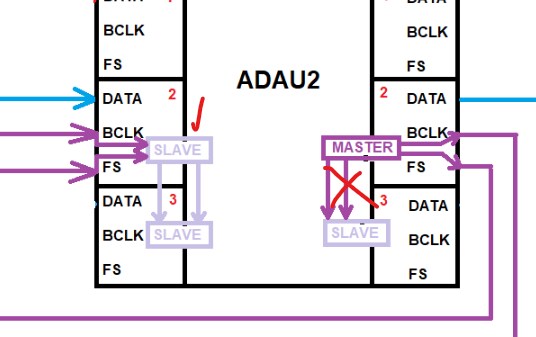
Hello JordiP,
You earlier learned the "little" detail that there are no buses for the slave-clocks between the input and output serial ports.
Well, I have one more "little" detail for you to learn about. It makes some sense...
I took a screenshot of your screenshot and marked it up:
On the input port side, Yes, you can make any one of them slave to an external clock and then this incoming clock can also clock any of the other serial input ports. So you show port 2 set to slave and port 3 set to slave from the port 2 clocks! Perfect! Works fine.
On the output side this will not work!!
There are actual slave clock busses. The only way to have a clock on that bus is to set it to slave! If you set serial port 2 to be a master, there will be nothing on the slave clock bus for port 2. This actually makes sense. Why would you set a port to be a master from the internal clocks, then have it send that clock down another internal bus. This would add some latency, and then have another serial port slave from this when that serial port could just as easily use the internal bus that port 2 is using? With no hit on latency!!
So I drew an X/ Serial output port 2 will work but with serial output port set to slave from port 2, there will be no clock there so no data will come out!!
Now, regarding the other comments you mentioned about the graphics and the serial port settings and the multipurpose (GPIO) settings on the pin.
This is not in error. This is still true. Here is the best way I can describe this without making drawings.
First let's talk about when the pin is an output:
The actual pin output driver has a MUX (A MOSFET swtich) at its input. It selects if the pin will output from the serial port or from the GPIO MPx pin circuits. This switch knows nothing about the settings of the serial port or the GPIO port. It just takes its signal from there even if it is nothing but sitting high or low.
If the pin is set to be an output, then the opposite but similar thing is going on. The pin takes in the signal and sends it to a MOSFET switch. The switch will determine if this input signal goes to the GPIO circuits or to the serial port circuits. If you are trying to use the serial port but the pin is set to GPIO then the clock will not reach the port. It will be on the GPIO instead.
Now, with regards to the serial output port and the graphics.
You can STILL use the serial port even though you have the LRCLK pin for that port set to be a GPIO. Yes, the clock will not be on the pin but it still will be on the serial port circuit so it will still clock the data out!! The only thing that will NOT work is to slave from that pin because it is set to GPIO. But, in your case, serial port 3 LRCLK pin can be set to be GPIO and you can set that port to either slave from another port or to use the internal clocks so you will get data!!
This is super handy for times like when you are going to a codec with multiple I2S lines. You only need one clock output so use the other serial port's LRCLK pins as GPIO and the serial port will still function.
So the arrows are still true, it will tell you the serial port is expecting a clock in or out. The only detail is that it cannot get it from it's own pin if that pin is set to be a GPIO. You will get no clock.
In your project I noticed that all the multipurpose pins are still set to their primary function which is not the MP (GPIO) function.
Also, I only see one project in your post but it was enough. Thanks for including.
You are doing great figuring this stuff out. It took me a while to grasp it all as well and I already was used to clocking etc. A lot of this I studied on the bench in the lab and also talked to the digital designer.
This would be a good video for my channel, I will put this in my notes for future videos.
Dave T
Hi Dave,
Thank you for your answer although I still couldn’t make it work. In your explanation I think you mixed up ports 2 and 3 and input/output in your text.
Maybe you could just modify the configuration of my projects and upload it so I can test it? I think that would be very helpful. If you can’t, please check my settings below.
With regards to your question as to why would someone set up port 2 as master the answer is that’s the only way to send clocks and data to the second chip. The reason why I would set port 3 as slave is because I obviously can’t set it as master because the clock lines are not connected to the second ADAU.
These are my settings,
I tried all options with the scope probe on one hand and the mouse on the other. Since I just wanted to see data out of Port 3 I set its clocks as master to get just some data out. I then changed the ports back to what they should be and I noticed that the data was still going out when BCLK goes MCLK → Slave and even if I change LRCLK to be slave as well but in that case the I2S code seems the same (probably the SPORT keeps that last sample repeated forever and that’s what I can see in the real time display, just a horizontal line). If reprogramming then the data completely disappears from output port 3. (the reset probably clearing the last sample that was on repeat)
Hi Dave,
I've tried again but just having the Port 3 BCLK = slave of clock domain 2 and LRCLK = MASTER with output configured as MP.
This keeps working after reprogramming.
Is this correct? It works but it contradicts many of the things you said. If it is, next I'll try full duplex with TDMs and several lines in parallel and then will redesign our PCB module.
Regards,
Jordi.
Please log in to reply.