External EEPROM configuration
Another challenge in digging through available documentation. I read the doc on controlling using an external EEPROM. I have an AT24256 chip on a board with the A0-2 select pins. The write up says the 1401 will look for the EEPROM at A1 (161). In SigmaStudio, this address is not available in the USBi interface. Should I be using an external burner for this, even tho it references this can all be done from SS? If I go with the external write method using another piece of software to manage the AT, what export file is the correct one to load? I assume it is the file with the .hex extension, but while I am asking the question, I just want to be sure this is the compiled code to be captured. Thanks!
software
4.7
1401/1701
Ok, I solved this problem and even tho obvious, might help someone else. I found it was an issue with base 7 vs 8 in SS.
The AT24C256 datasheet shows 7-bit addresses:
0x50 (default, A2-A0 = 000)
0x51 through 0x57 (with pin strapping)
SigmaStudio shows 8-bit WRITE addresses:
When you see "A0" in SigmaStudio, that's the 8-bit write address
A0 (hex) = 0xA0 = (0x50 << 1) + 0 (write bit)
The corresponding READ address is 0xA1 = (0x50 << 1) + 1 (read bit)
Your solution: Select A0 in SigmaStudio, and configure your AT24C256 with all address pins grounded (A2=A1=A0=0). This gives you:
7-bit address: 0x50
8-bit write address: 0xA0 (what SigmaStudio uses)
8-bit read address: 0xA1 (what the ADAU1701 uses to boot)
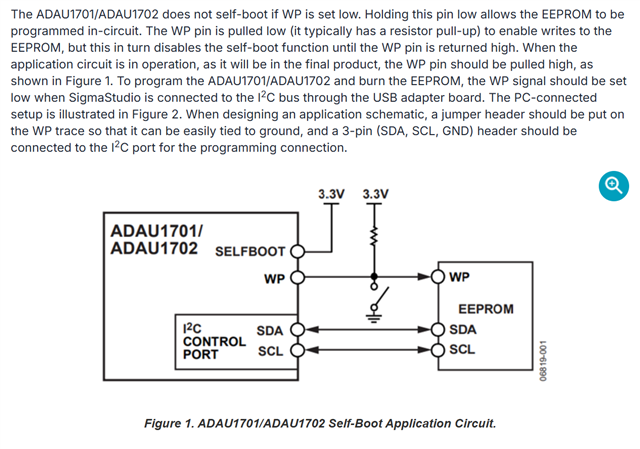
Also, I found further details on the on board EEPROM settings which are adequate for my program. The 1401 board stores a modest size program and allows for self boot. Once I found the WP line, I was able to hold low and write the program to the on board storage.
Hello ElsaDog,
Glad that you resolved it, thanks for taking your time to update us.
Regards,
Harish
Please log in to reply.