IPAT
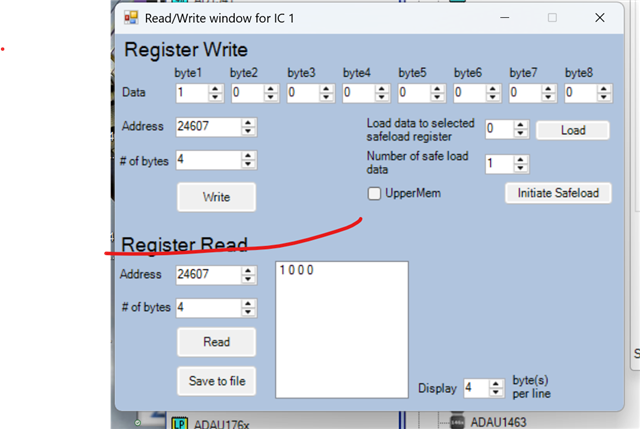
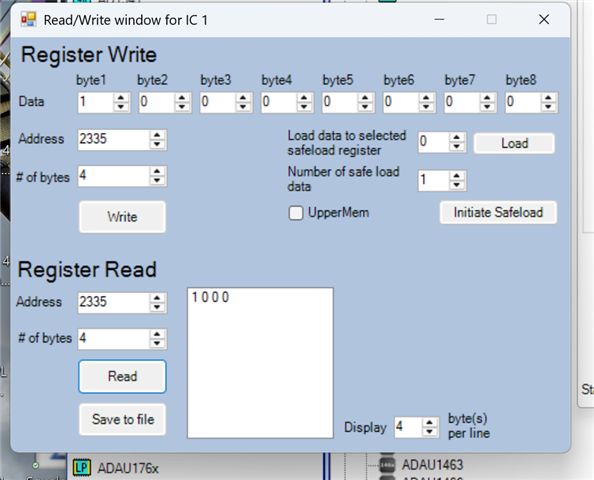
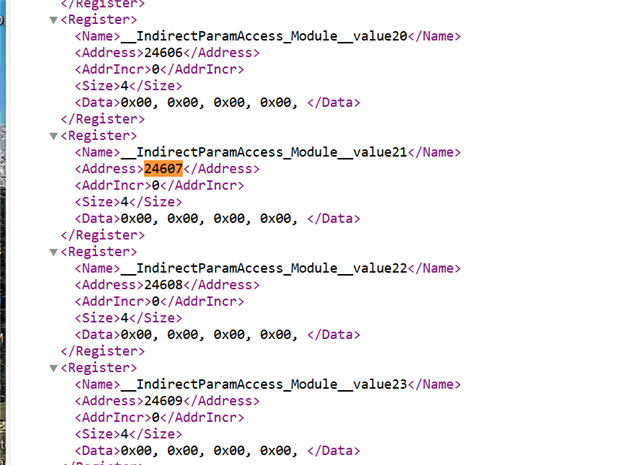
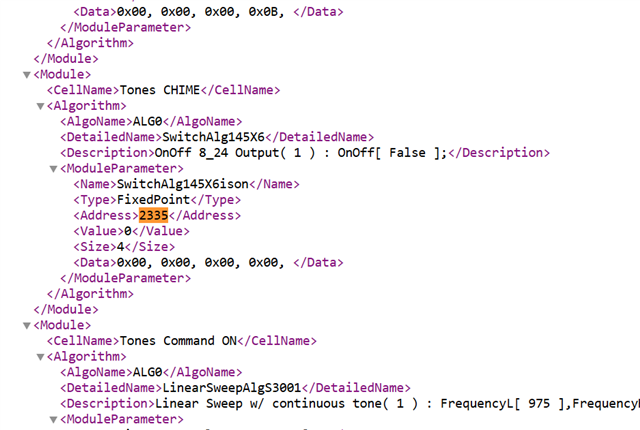
Hi, still working through some issues with IPAT. Dave T. replied that it looks like everything is set up correctly in my file. Yes, I am using decimal to read and write the registers. My MC code can write and read any of the Param Addresses without any problem. I can also read and write to the Indirect Parameters, and see the states changing. So I went even simpler, and with SS connected to the board after compiling, I pulled up the Register Write window to run the same test. In my IPAT, I have a simple switch that will open a gate to allow an Oscillator to pass signal, so this is a very simply write value of "1" to toggle the switch controlling the gate. The Schematic/Parameter register address is 2335. When I write to this register location the Osc does indeed toggle on and off as expected. I then substituted the IPAT address of 24607 which corresponds to the Param/Schematic address. This register does indeed read and write when I execute the command (see attached), but the toggle switch does not activate and the Osc is not being gated on. So it appears that the association between the Param and Indirect Address is not taking place in the program. I tried the combinations of reading first, and then write and it is still not controlling the associated module, but the register at the Indirect Address does, indeed change. So I am at a loss as to how these associations are not being achieved. Perhaps some global setting?
This successfully writes to the register, and this is the IDP Address for this switch, but does not operate the switch.
This works, and toggles the switch on.
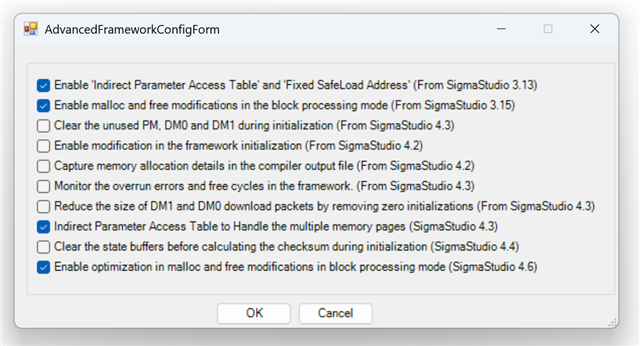
Here are the Advanced Framework Configs, I have selected IPAT as indicated in the documentation.
Thanks in advance for giving me some additional things I can check as this program definitely needs this IPAT function to ensure I do not have to keep updating my code. Elsa.
Audio Signal Processors
software
4.7
IPAT
adau1467
SigmaDSP Audio Processors
Show More
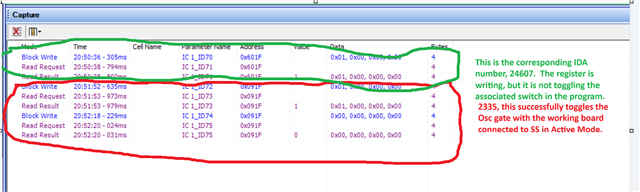
Also, here are the references to the IPAT in the export file. I am not readily seeing how this is associated with the actual parameter address in the program?
Just passing on in case there is something revelatory, here..
Hello ElsaDog,
The Indirect Parameter Access IPAT) must be written in a specific order.
Follow the steps below to initiate the parameter load
Write the value(s) to the indirect parameter address.
Write the indirect address to the start_address register.
Write the number of parameters to the num_of_loads_and_trigger register.
The required write sequence is shown below:
<action instr="writeXbytes" len="6" addr="24586" AddrIncr="0" CellName="__IndirectParamAccess_Module__" ParamName="values_0" DspName="IC 1">00 00 00 00</action>
<action instr="writeXbytes" len="6" addr="24584" AddrIncr="0" CellName="__IndirectParamAccess_Module__" ParamName="start_address" DspName="IC 1">00 00 60 0A</action>
<action instr="writeXbytes" len="6" addr="24585" AddrIncr="0" CellName="__IndirectParamAccess_Module__" ParamName="num_of_loads_and_trigger" DspName="IC 1">00 00 00 01</action>
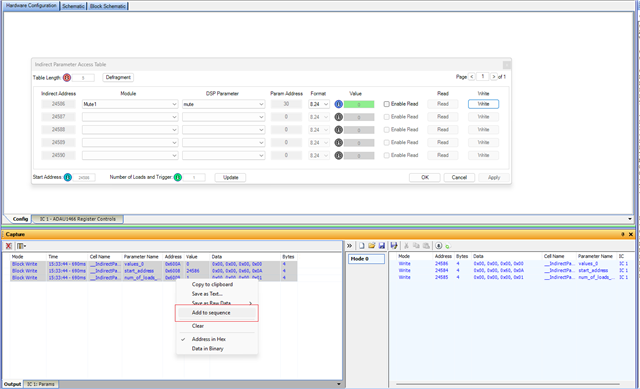
Instead of using the Register Write window, you can use the Sequence window, which makes updating values easier and ensures the correct write order.
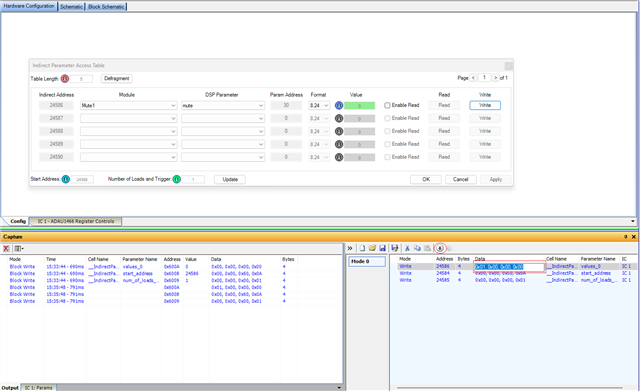
Create a sequence as shown in the below example,
then modify the required value and click Download.
This method automatically follows the correct sequence and updates the parameter reliably.
Regards
Harish
Hi, Harish.
Thanks for the breakdown! Your screen shots, however are not sufficient resolution to see the register values you used. Can you resend with a bit clearer images? Thank you!
Or, what would be even better, if you could give me the example sequence for the Tones CHIME switch, here, 24607/2335. Thanks!
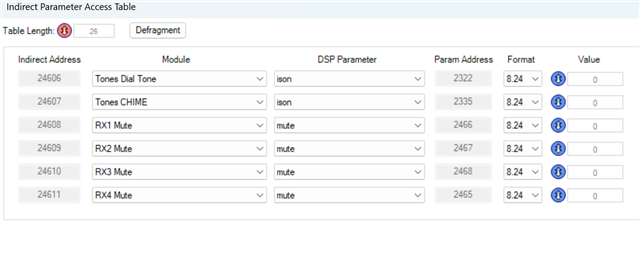
BTW, I want to understand the syntax here and what the function is of each of these registers, and to confirm that it actually will take three instructions to change a register where it only take one with the Schematic register.
Hello Elsadog,
Apologies for the low image resolution earlier. I have now uploaded a high-resolution image—please take a look.
Could you please share your project file? I will create the example sequence and share it with you.
Regards
Harish
Hello ElsaDog,
Yes, there is a tradeoff here and you have the choice.
If you export the System files and import this into your controller code then you can directly read or write into a target register/parameter address.
However, this means that EVERY time you make the slightest change in the DSP program that could change the location of a parameter, then you HAVE to export the system files and recompile and update your controller code!! This can be, and usually is, a hassle!! Then you need to fully test everything again especially if this is a product that has certification like automotive or medical etc.
What the IPAT table does for you is to setup a set of locations to hold this data when you want to update a parameter. So this is memory locations that the DSP program itself is not actively using. Then you "trigger" an update that is done at the end of the code for that sample period. The IPAT table code takes the data from this safe holding location and moves it into the active parameter memory updating that parameter. Once you setup the table the address of the table items does NOT change when you make changes in the DSP program. So you can edit your DSP program and as long as you do not change the name of a block, the IPAT table will be updated with the new memory location but your controller does NOT have to be changed because the table address for that parameter is still the same!
So this falls into your project development progress. Some projects the DSP code is simple and does not change much if any, so using the old regular system files export and import into your controller code will be fine. However, if you are planning on working a lot on the DSP program development once the controller code is written, then the table is handy because you do not need to change the controller!!
This is why we added this feature. Yes, it is more write especially for only one parameter, but it makes it easier for you, the developer/programmer. Shoot, some companies will outsource the writing of the FPGA controller code so any small change will cost you!!
But, you are writing the DSP code and fine tuning your product. This IPAT table will make your life simpler!
One other little thing, is that you can update a number of parameters that are sequential if you list more than one update. (num_of_loads)
So that saves a little on the overhead.
I hope this is not too confusing...
Dave T
Yes, Dave, thanks, yes I get the reason for the IPAT table, which is, of course, why I want to use it as I cannot have occasional updates and improvements to break working parts of the existing code. My question, however, is in the difference in syntax which I am trying to understand. It appears that three commands need to be sent to three different registers to read or modify any parameter, vs a single command to alter the direct Schematic Register. Harish sent example table screen shots, and I cant read them due to poor resolution, so I cant see exactly what he was doing in his examples. So I am asking is you can take the register I sent you on my table screen shot, and give me the sequence of operations to read/write that location. I don't understand the Start Address registers role, if it needs to be sent before any command, and the number of loads register syntax and requirement to complete a parameter update. Thanks.
Please log in to reply.