Unconventional application of the ADAU1452 audio processor
I used an audio processor in a non-standard way for a metal detector. I want to be able to select a project (program) that will be loaded into the ADAU1452 from EEPROM by pressing buttons connected to MP6 and MP7. Please advise on how to implement this.
Thread Notes
asvlab - Moved from SigmaDSP Processors & SigmaStudio Dev. Tool to Processors & DSP. Post date updated from Friday, March 6, 2026 8:18 AM UTC to Saturday, March 14, 2026 5:21 PM UTC to reflect the move.
Santhakumari - Moved from Processors & DSP to SigmaDSP Processors & SigmaStudio Dev. Tool. Post date updated from Saturday, March 14, 2026 5:21 PM UTC to Tuesday, March 31, 2026 5:01 AM UTC to reflect the move.
Audio Signal Processors
adau1452
hardware
processors and dsp
SigmaDSP Audio Processors
Processors and Microcontrollers
Show More
Hello asval,
I hope I understand your requirement correctly. Your plan is to self-boot two different programs from EEPROM by changing the MP pins Please correct me if I am wrong.
If this is your requirement, it is not possible to boot two different programs from a single EEPROM using the self-boot process. During self-boot the DSP can load only one program from the EEPROM. Let me explain the self-boot sequence.
When power is applied and becomes stable, all internal level translators are enabled. After that, the MCLK is routed to the PLL and other internal subsystems. Once the initialization sequence is completed, the internal reset is released. At this point, if both the Self-boot pin and Reset pin are high, the device starts the self-boot procedure.
The master port is then configured and the DSP reads the first 16 bytes from the EEPROM. These bytes contain the PLL configuration and basic MCLK routing information. This initial step is performed at a slow speed. The device then waits for the PLL to lock before continuing.
After the PLL locks, the DSP loads the register settings, data memory, and program memory from the EEPROM. The register section includes various configuration settings such as power management parameters.
Once the EEPROM read process is complete and the program is loaded the checksum is verified. If the checksum is valid, the DSP sets the start address and begins executing the program.
If any part of the process fails—for example, if the first EEPROM byte is not 0xAA or if the checksum verification fails the DSP will retry the process two more times. If it still fails after these attempts, the DSP enters a panic state and goes to sleep.
This entire process is implemented in internal firmware and cannot be modified. The only configurable option is the ability to disable the checksum verification.
If you want to load two different programs, you can consider the following solutions:
1. Use two EEPROM devices
Store one program in each EEPROM and use an SPI or I2C bus switch to select which EEPROM is connected to the DSP during the selfboot.
2. Use a microcontroller
A microcontroller can load different DSP programs into the DSP at startup. This allows you to select which program is written to the DSP.
3. Use internal switching in Sigma-Studio
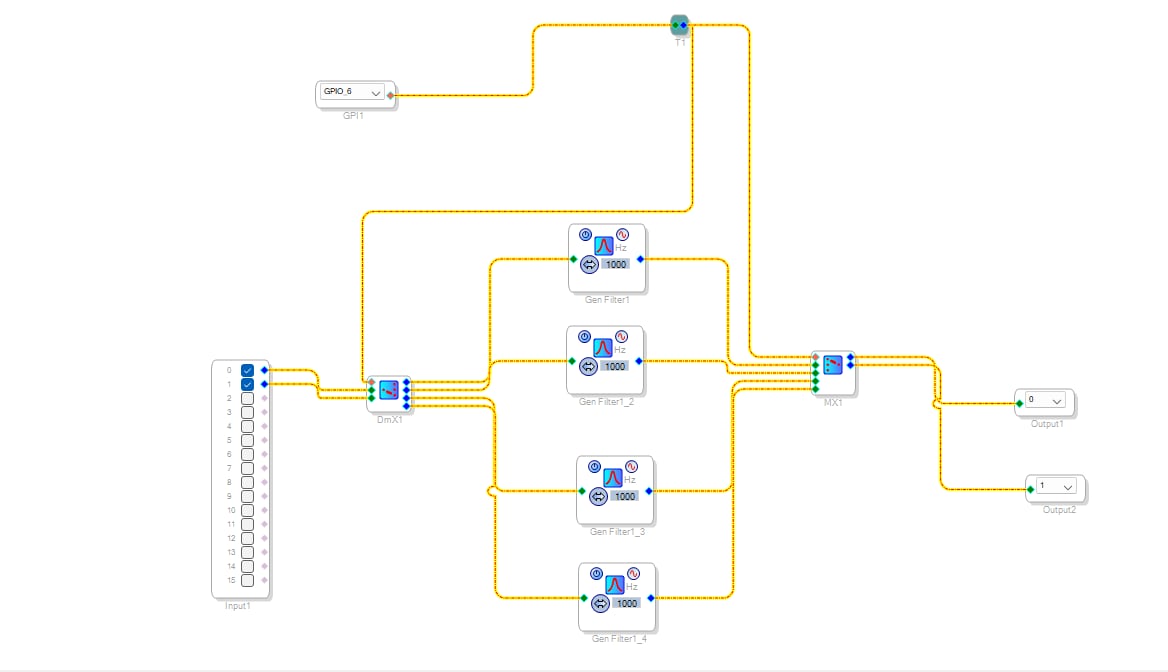
Another approach is to design two different processing paths inside a single Sigma-Studio project. Using a MUX block, you can switch between the two processing paths using an MP pin.
Please refer to the image below for an example of how the processing paths can be selected.
Regards
Aravindh
Hello asvlab,
I want to add to what Aravindh has explained. Yes, you cannot boot one of two different programs using the selfboot feature.
However, there is a feature where you can load up different sets of parameters based on GPIO pins.
I know nothing about your program so I do not know if this is a possibility but it does give you creative options.
You could even have sections of the program be bypassed or more likely, spilt the signal path and have two different paths and then select which one is active. This could be done simply using a GPIO controlled switch from an MP pin. As simple as that.
However, if you just might need to have different EQ curves or compressor/gain parameters then the Real Time Variant feature might fit the bill for you.
Real Time Variant [Analog Devices Wiki]
This is not a feature I have used a lot so I thought I did not have an example program but I do!
I will paste it in below.
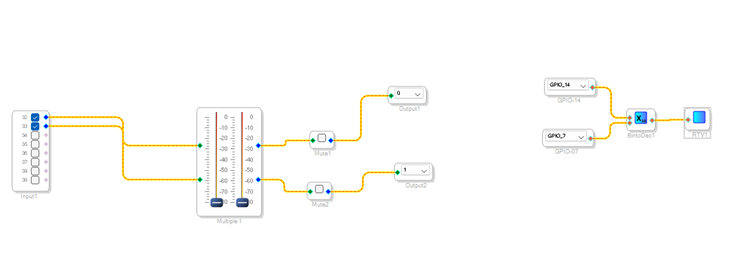
It is a rather simple program setup to use two GPIO pins to select three different sets of parameters.
The program converts the two switches to take in binary and output a decimal value.
You need to compile this project first to allow the Real Time Variant block to figure out what is in the program. Then you can click on the blue square and it will open up. It will not open until you have compiled at least once.
Here is the entire project:
When you click on the blue square the editor window will open up.
So this feature might or might not be handy for you.
Here is the program file:
6557.Design 1_rvt check-DT-Edits.dspproj
Thanks,
Dave T

Thanks for the reply! I’ll try the option with the realtime variant block, or I may install a socket for the EEPROM so I can swap it easily. I’d prefer not to add a separate microcontroller — it would be great to keep everything implemented directly on the ADAU1452.
Please log in to reply.