ADAU1701 - 2.1 setup for new a noob
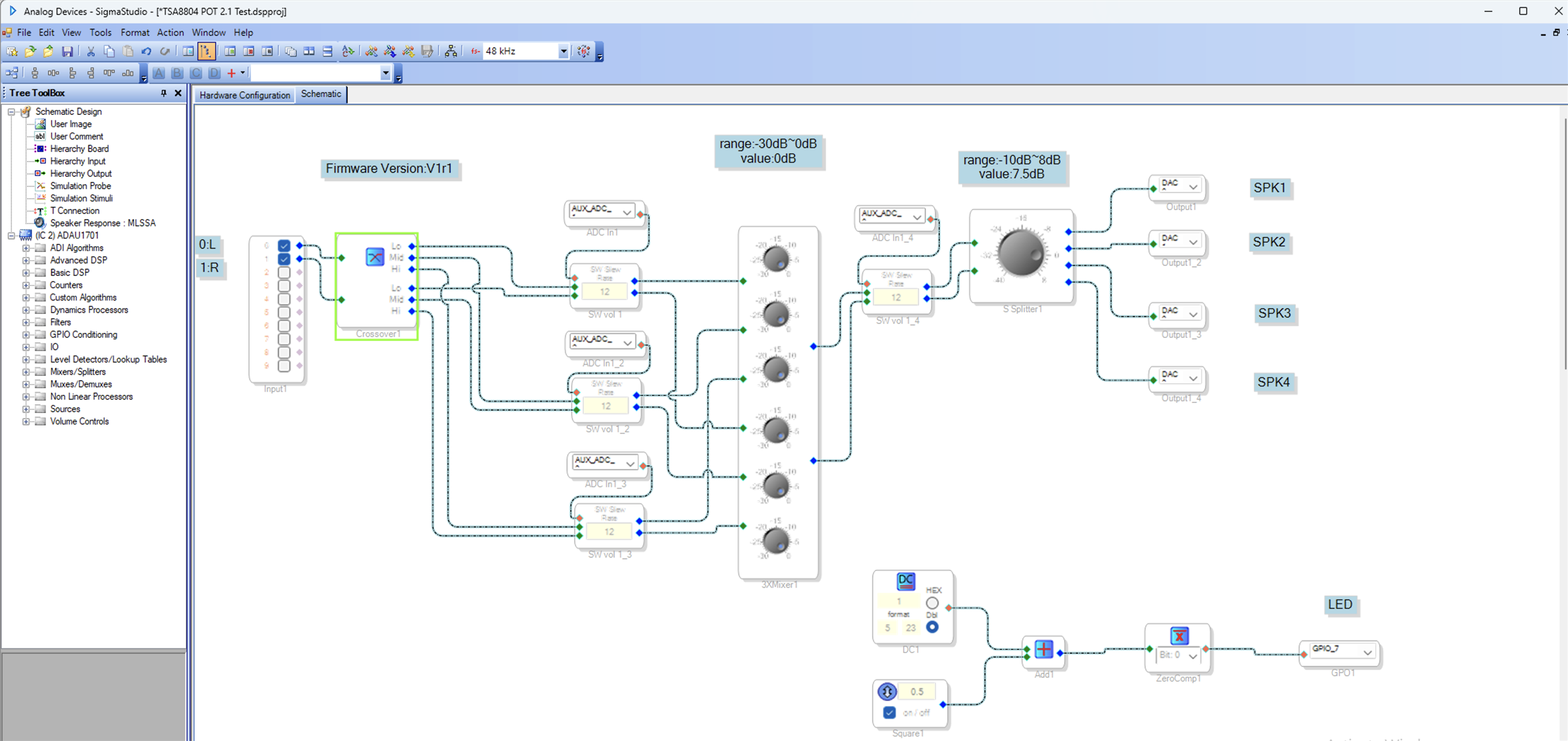
I would like to program a 2.1 system using the TinySine TSA8804 V2 4-channel amp. I intend to use full-range drivers on channels 1 & 2 (Left and Right) and bridge channels 3 & 4 for a subwoofer. TinySine has a DSP program with potentiometers that I have to start with (see below). I need to figure out how to bridge channels 3 & 4 into mono. These are my goals:
Utilize the potentiometers for Volume, Lo, Mid, and Hi (this is a prewired kit that I purchased from TinySine)
Crossover control for Lo, Mid, and Hi
Subwoofer control with EQ ability or something of the sort. Dynamic Bass, maybe.
I don't need/want anything super complicated. I want the ability to fine-tune the sound quality of each speaker driver independently.
Thank you for your time.
Thread Notes
MayanCruz - Moved from SigmaDSP Processors & SigmaStudio Dev. Tool to Processors & DSP. Post date updated from Saturday, March 7, 2026 5:21 PM UTC to Thursday, June 18, 2026 4:02 AM UTC to reflect the move.
MayanCruz - Moved from SigmaDSP Processors & SigmaStudio Dev. Tool to Processors & DSP. Post date updated from Thursday, June 18, 2026 4:02 AM UTC to Thursday, June 18, 2026 4:02 AM UTC to reflect the move.
Audio Signal Processors
hardware
processors and dsp
SigmaDSP Audio Processors
Processors and Microcontrollers
adau1701
Show More
Hello MayanCruz,
I do not know how I missed your question. I have lots of examples on the forum of these sorts of applications.
Here is one example where I generate a sub output and a high and low out for a three-way system. But it is mono.
2388.ADAU1701 Crossover with Sub Output.dspproj
The example you show was decent too. But no way to output an analog subwoofer channel due to the number of DACs.
Dave T
Thank you for your reply. In your reply, you mention that your example is only mono. Can you explain? I'm so new at this that I don't always understand the concepts.
Please log in to reply.