ADAU1772 Input 1KHz, output 5x Hz less
I input a 1 KHz sinewave from my APx555 into input 0 and route it straight through to L output and see ~5x Hz drop in frequency. Why?
1588.SigmaStudio_1772_AnalogIN01 to AnalogOUTLR.dspproj
Edit Notes
had freq. difference incorrect
[edited by: bklein at 12:34 AM (GMT -4) on 11 Mar 2026]
Thread Notes
bklein - Moved from Audio to Processors & DSP. Post date updated from Wednesday, March 11, 2026 12:17 AM UTC to Thursday, March 12, 2026 3:49 PM UTC to reflect the move.
bklein - Moved from Audio to Processors & DSP. Post date updated from Thursday, March 12, 2026 3:49 PM UTC to Thursday, March 12, 2026 3:49 PM UTC to reflect the move.
hardware
adau1772
processors and dsp
Integrated/Special Purpose A/D Converters
Processors and Microcontrollers
Audio CODECs
Show More
Hello bklein,
Glad to hear from you! Seems like it has been a while since I have seen a question from you!
Thanks for attaching your project!! It is so helpful.
So I am not sure how you are seeing that big of a frequency shift? I connected it to the analog outputs of the AP2700 that is on my desk and sent the output back to the AP to be analyzed.
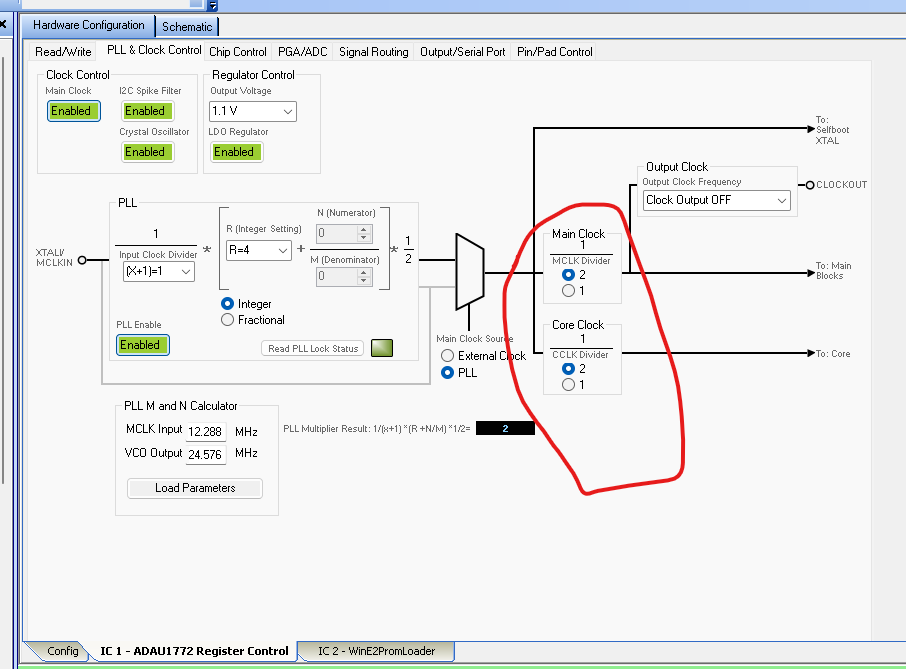
I load up your program, compile and download it and all seems fine! It works. However, I do see a problem with your clocking setup but it does not seem to cause a problem on my setup. However, you need to fix this.
It looks to me that you are either using a crystal or external oscillator that is 12.288MHz correct?
Then I see you are using the PLL and have it setup to output 24.576MHz which is all good. However, you need to divide the PLL output by 2 so the internal blocks and core will receive 12.288MHz. So you are overclocking the internal blocks.
You need to select divide by 2 as I show in this screenshot of your project. You have it set to divide by 1.
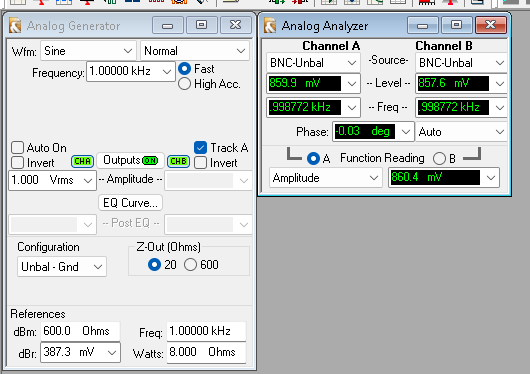
Here is a screenshot of the Audio Precision. I am seeing a small level drop but I would call 0.99877kHz as 1 kHz.
I can see you are not using the serial ports. This signal flow is about as simple as it gets!! You have the sample rates set correctly from what I can see.
So I am stumped as to why you are seeing the frequency difference. I am going to ask you what I would do myself, Unplug the connectors to the board and connect the generator output to the analyzer input with jumper leads and see if you still see it? Yes, you could select Generator Monitor in the AP but I would do it using the cables just to be certain. Make me wonder if there is some setting in the AP that is wrong?
Dave T
Hi Dave,
My earlier replies didn't get added here - just as well.
I had tried to update the project with your changes but then the winloader says the path to schematic is no longer available. I took added date filename changes off but it still doesn't like the path. My FPGA generated master clock frequency seems good - by using my scope to see.... My understanding is that I now have to create a new project .HEX file and then point to it with the winloader. I have forgotten all the trick with this section of SigmaStudio and am struggling. Hard to figure out, but now AI exists for some ideas... I have forgotten which link/compile buttons to use when... I can't seem to make a new .hex file image with the change incorporated.
Barry
I was able to create a new project, on the C: drive, and create the .hex file we need. However it looks like it did not create a .bin file. I had taken screen shots of tab data of the original work so hopefully it matches up.
Weird that I could not seem to resolve the issues with the original attempt at this.
No, the .HEX file is empty. I am striking out on every approach I take to this. I need to get on the phone with someone and go through the motions. It's taking me days when someone who knows how to do it can get it done in minutes....
I moved everything to a new folder that is closer to the root. I eliminated spaces in the filenames. I am able to do a compile/link/download without error. But that doesn't get me the .hex and .bin files.
When I go to File/Properties it shows the old filename with spaces in it. Why?
Hello bkline,
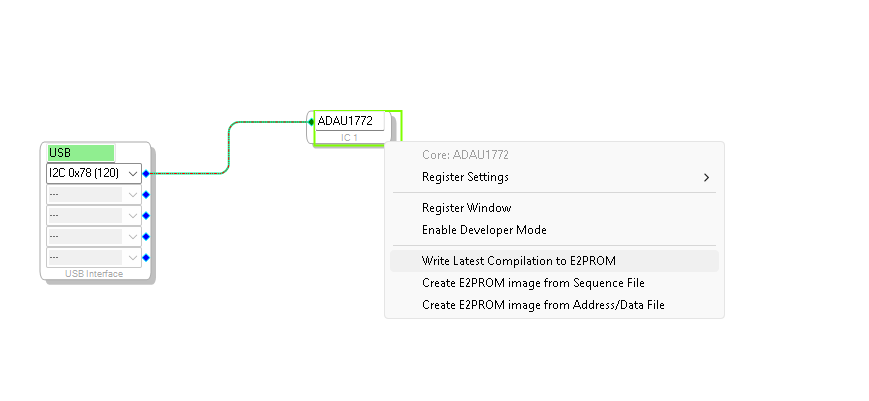
Right click on the ADAU1772 icon and then select to "Write latest compilation to EEPROM" and the hex file should be updated.
I am going to use one of my hacking programs since for some reason I cannot get your program to load into my eval board. But, this is an issue with my setup.
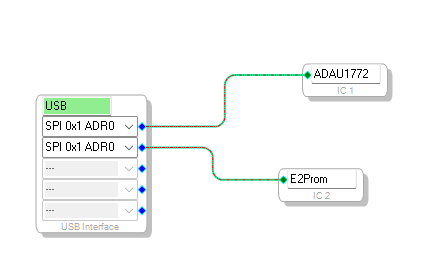
Now you have to have the EEPROM. I did check your file and you do have the EEPROM as IC2
Then after you Write the latest compilation to EEPROM a folder with your program name and IC2 will be added:
Then in that folder you will find the hex files:
I hope this helps...
Dave T
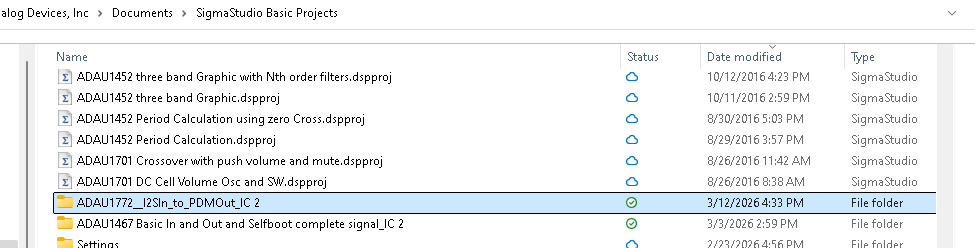

Yes! Finally. I had some issue with the program wanting to use the old filename with spaces.
For the E2Prom window in the programmer, I have Page Size 32 byte and Mem Usage 32 kByte. Are these correct?
Also in the EEPROM Properties I have memory size 262144bits, Page size 32 byte, Write speed 100kHz. Number of address bytes 2 byte.
Are these correct? Seems the buffer data repeats so I'm thinking maybe I have it set too big...
Thanks for your help!!!
Oh, I verified answer before trying the EEPROM to see if it eliminates the 57Hz drop in freq. Still have to see what's going on if this not it. You indicated it may not be related...
Unfortunately, changing those two settings killed the codec output.
I suppose I could do some things with the 1772 eval board - make it use our FPGA master clock, then tweak those settings...
GeminiAI is saying to go back to original 1,1 clock/core settings and bypass the PLL.
Hello bklein,
Yes, this may be part of the issue when trying to selfboot and it is not working.
The default EEPROM settings from the library are rather large.
262144 bits / 8 = 32,768 bytes.
If you then divide that by 1024
32,768 / 1024 = 32.
This means it is a 32 kbyte EEPROM.
The EEPROM we use on our ADAU1772 eval board is only a 4kbyte EEPROM!!
If I remember correctly from issues I have seen in the past, if you try to address above the amount of actual memory in a chip it will wrap around and overwrite the lower pages. So that will certainly screw up the program and it will not load.
I do not know what actual EEPROM chip you are using so I cannot see what the actual size is but this is important little detail to check.
Oh!! One more thing,...
In another post you mentioned you are getting a 57Hz drop in frequency.
In your first post of this thread you said -5x Hz drop.
So I read that as a 5 times drop so if you input 5kHz you get 1kHz. This is rather different from only 57 Hz.
So if you put in 1kHz you get 943Hz is that correct?
I have seen signal generators and/or frequency analyzers be off and yes, that is more than I would expect but I do not think it is out of the question. I put in 1kHz and I get like 997Hz. This is what I expect but I do not know the test gear you are using. Check that out if you can.
Thanks,
Dave T
We are using the same EEPROM as the eval board - 4KB. Our configuration will likely always be pretty simple so I'd think it's fine.
I was seeing the buffer data repeat so I was wondering if I should change the buffer size parameters in SigmaStudio.
Yes - I meant a 50 something reduction in frequency - around 57Hz, using my scope jumps around a bit. The input reads 1KHz +- a few Hz.
I'll try bypassing the PLL and putting the clock/core dividers back to "1" and see what happens.
Barry
Success. Set divides by 2, disabled PLL, External Clock, and we get output and the frequency difference went away. I found there was an issue with the PLL & Clock control settings. Byte 16 was being set to 01 and it should be 00. I found that the Numerator/Denominator at 0/1 would cause this even though they were greyed out. I had to set to Fractional mode to enable them, and set to 00, then back to Integer. Is there a way or reason to use the PLL in our design - where all codecs are driven by the 12.288 Master clock from a FPGA? Any special directions on the Load Parameters button - like do we do everything else on this tab before clicking it?
Barry
Hello Barry,
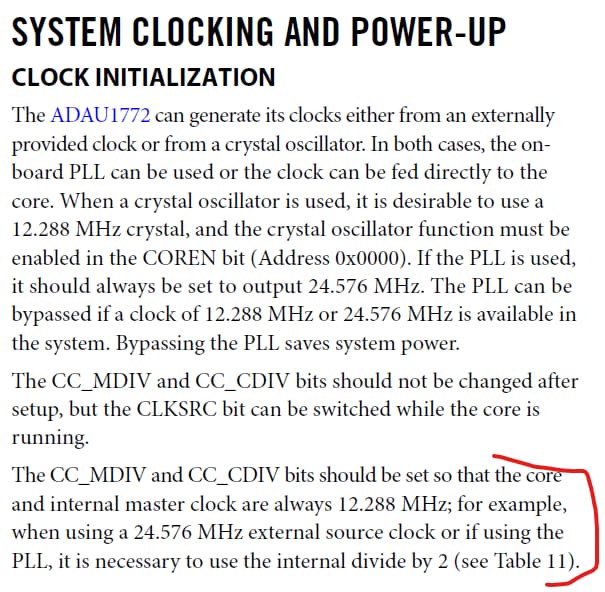
I am not sure if I have followed everything here but I need to point out that is you are using a 12.288MHz MCLK then you should NOT be dividing the clock to the core by 2. This is detailed in the datasheet. the PLL output should always be 24.576MHz and then you divide it by two to obtain the internal 12.288MHz core clock. If you bypass the PLL and are using a 12.288MHz MCLK then you set to divide by 1 so the core again will get 12.288MHz.
I agree with you that with a system clock that is decent quality as far as jitter and frequency, then bypass the PLL and drive the part directly and save the power and hassle.
Here is the relevant section of the datasheet about what I was talking about:
Dave T
OK, I'll give that a try in a day or two.
Your March 9 reply above advised me (red circle) to set the divides to "by 2"...
What's going on here? :-)
I suppose it is possible that I screwed up and got this wrong but here is what I had tried earlier:
Divide by 2, PLL enabled (Failed, no output)
Divide by 2, PLL bypassed (Passed)
Divide by 1, PLL bypassed (didn't try)
Divide by 1, PLL enabled (Failed, 57Hz drop in freq from 1 KHz)
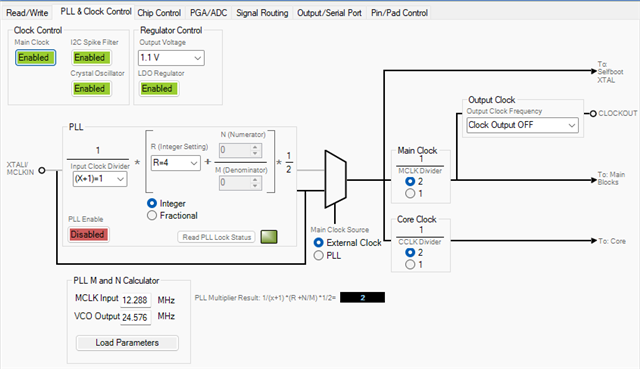
My settings for Divide by 2, PLL bypassed (Passed) are below:
Where the instructions say the divide by settings should not be changed after setup, what does "after setup" actually mean? Just change in EEPROM pre-boot?
I didn't try the "Divide by 1, PLL bypassed" eeprom image. I would imagine it will also work as the PLL settings would be a "don't care".
I may move to the UG-477 eval board to try this stuff just to see if it is different.
Barry
Hello Barry,
In one of my earlier posts I might have thought you were sending 24.576MHz to the part as an MCLK, not 12.288MHz. I was a little confused early on. In the end, for a 48kHz/96kHz/192kHz, etc., based sample rate the internal core clock needs to be 12.288MHz.
If you use the PLL then the PLL output has to be 24.576MHz so you would need to divide by two.
I want to discuss the " no changes after setup" question. It is in the datasheet but not all that easy to pick up on the details.
I will take it a piece at a time:
Follow these five instructions if using the PLL but even if you are just setting it up with zeros and not using it, once the COREN bit is set, you cannot write to these registers anymore. But the big deal with the COREN bit is the rest of the registers. You cannot write to them until the bit is set. So setup all the PLL stuff in addressees 0-5. If you are not using the PLL then the PLL lock is not important. Then set the COREN and start setting up registers above address 07. Notice I skipped 06. This is because that is the PLL Lock bit so it is read only anyway.
See, the name of the bit is not great in my opinion. It should have been something like "Internal MCLK" Or "Internal Core Clock". It is not to make the core actually run,... that is a little later.
So with the COREN bit set to ON, then you write the program and parameters and set the other registers etc...
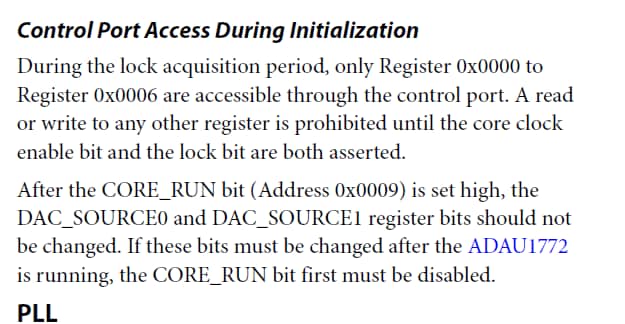
So the next paragraph in the datasheet details some of what I just said:
Then the datasheet just jumps to the CORE_RUN bit with little to no explaination....
This will actually start the core running the program. Note, it talks about the DAC registers will be locked out and not able to be changed. So again, once the core itself is running you cannot change the source of the DACs.
I am still scratching my head about the 57 Hz drop... But, it looks like you are close to getting this all working.
Dave T

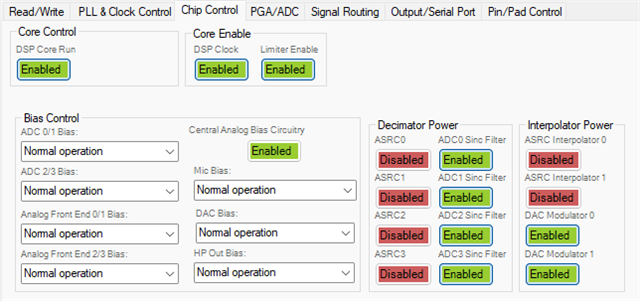
We are not at the point where we set any of these parameters. We just succeeded in programming the EEPROM and that's as far as any programming has gone. I set the audio paths in EEPROM and then would test performance with the APX. As we don't need to run the PLL it looks like that will save some grief. I had sent you the project file but does that have all the settings set as I have on the Hardware Configuration tabs? For example, the PGA/ADC page has aDC0/1 2/3 Sample rate at 192 kHz? Chip control:
I'm going back to the eval board to play with things to see behavior is any different than our development setup.
Do you have access to one?
Barry
I hooked up the eval board and the behavior is obviously different than our development board. In/out delay is around 40uS whereas with our dev board I recall something like 400uS. The "bad" eprom image (frequency offset) works ok on the eval board - no frequency difference. We did not put in the hooks for the USB programmer on our development board - I'm going to see if I can manage to wire it in temporarily. We don't have EEPROM read buffer dump capability. The dev board uses the .bin file rather than the .hex file for programming. The dev board is doing some register reads like checking for PLL status - I don't know what happens to this if I configure to bypass the PLL.
I figure it shouldn't hurt to configure all the enables in the Chip Control to green(?). No difference noted using the eval board.
Barry
I wired in the USB loader to the EEprom chip on our dev board and can write and read it successfully. I've been querying GeminAI back and forth to work out how to program the EEProm. It says there are distinct advantages to using the PLL so I am enabling it. I went with R=8, I have to type in 98.304 into the VCO Output window and not click the Load Parameters button. This should give a 49.152 MHz signal to the Main and Core Clocks, which should be set to divide by 1. I programmed the part on the dev board and read it back good, but can't test it today as the FPGA has to be reloaded to use it and the guy left for home already.
Well, AI suggestion didn't work. I went back to R=4, 24.576 MHz into the two dividers, and then divide by 2. Works on the eval board; will try on the dev board tomorrow.
R=4 works, Divide by 1 or 2 both seem to work.
I was having a lot of trouble when I would change a setting and want to save the configuration AND new EEPROM files to a new project name. The application wanted to stick to the original project name. If I said to save with new project name it would not give me the .hex and .bin files for the new project name. I could do the Action to write all files to a folder but it would give me a blank .hex file, no .bin file, and 20 or so other files I had no use for....
Please log in to reply.