SigmaStudio move to 192KHz from 48KHz
I've been asked to reconfigure our dev board to 192KHz from 48KHz. So I decided to start with the eval board first.
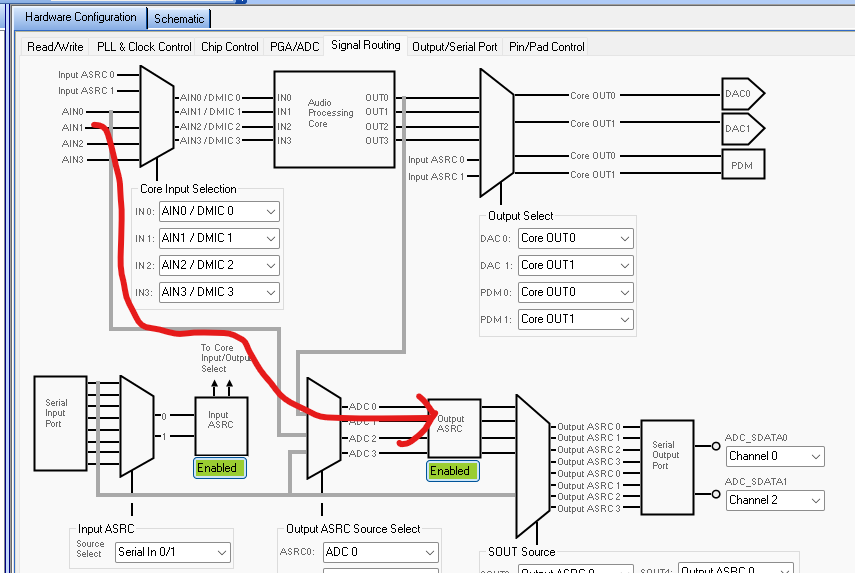
I asked AI for some help with this but it gave most of the registers different names and just added to my confusion. In SigmaStudio the PGA/ADC tab in Hardware Configuration has a Sample Rate section for ADC0/1 and ADC2/3 for 192KHz or 96 KHz. Also in the Output/Serial Port tab there is a Serial Port FS set to 48KHz or most any other desired rate. I'm left confused why 48KHz isn't an option in the PGA/ADC tab but is in the Serial Port FS tab, and why there are two areas to set... AI didn't cover using these; instead it ask for bit/byte setting with the Read/Write tab app.
Barry
Thread Notes
Santhakumari - Moved from Processors & DSP to SigmaDSP Processors & SigmaStudio Dev. Tool. Post date updated from Friday, March 27, 2026 12:24 AM UTC to Friday, March 27, 2026 5:08 AM UTC to reflect the move.
software
adau1772
processors and dsp
Processors and Microcontrollers
Hello Barry,
This is because this part was designed to be used in a noise cancelling headphone. So the sample rates needed to be high for low latency. Then for the serial port it can be difficult to run them at high rates so we put in sample rate converters between the serial ports and the inside signal paths.
So the setting you see for the serial port is for the output of the serial port. It will take either the 96kHZ or 192kHz fs from the ADCs and convert them to 48kHz for the serial data.
48kHz for an ADC that is used for noise cancelling would perform horribly so it was not even considered as an option! We chose to keep the part simpler and then just use ASRCs to interface via the serial ports.
Dave T
Please log in to reply.