Creating a New Project from an Existing One using SAVE AS
I have an existing project in its own dedicated folder.
I want to change some of the configuration and save as a new project to a new folder dedicated for it.
When I do a save as to the new location it only transfers the dspproj file and the Settings folder. It will refer to the original folder for a majority of things and I don't want that as I may want to delete or change the stuff in the original folder. If I do, the new project is forever corrupted (targeting files I deleted for example) and I have to start a NEW project and work from my memory of how things were set...
What's the trick?
Barry
software
4.7
Hello Barry,
I have not experienced this at all. Which processor are you using?
Usually if you do a Save As and then close the file in SigmaStudio. Then Select Open File and navigate over to this new folder and open the file from that new folder then it should use that folder.
Try that if that does not work then supply some more details.
Thanks,
Dave T
Still the ADAU1772. I go to where the .dspproj is that is to be my copy-from project. I create a folder to put the renamed project in. I open the project and verify everything looks right. I do a save as, name it, open the new folder to put it in and hit return to put it there. I go to that folder and there is nothing in it.
Am I not allowed to put a "save as" project anywhere but the original folder it's predecessor resides in?
I want to be able to have a base structure to work from and change setting(s) and have a new eeprom file to try. I need to set up several such dspprj projects each with the hex and bin files. I can stay in one folder and change parameters to try, save the eeprom file but I will corrupt the original dspprj project. I suppose I could make a master, make a test folder, copy the master to it, change what parameters I want and save the project, as a process - but a save as approach should work but doesn't appear to.
I have seen a bug in SigmaStudio 4.7 that may be related to this. Relative paths for project resources do not seem to work as expected.
When browsing for a Sequence File in a Master Control Port item, I get an error that the file is not found. This is true even when I use the dialog box to browse to the file and select it. I have learned that if I hand-edit the path to be relative to the project folder, then the Sequence File is correctly found and used in the build of the firmware.
In your case, it seems that this mysterious base directory remains pointing to the old project file.
If the folks at Analog Devices could clarify the default directory that is used for a project, and perhaps correct the issues in the dialog box that adds things like Sequence Files, then it might be easier to duplicate a project in a new location.
It might help, Barry, if you mention the specific things (files) that are in your project folder besides the dspproj and Settings. In my case, Sequence Files are giving me trouble. In your case, you may be having issues with multiple file types.
Hello Barry,
I am not seeing this at all. Let me detail what I did and tell me where I am doing something different from what you want and need to do?
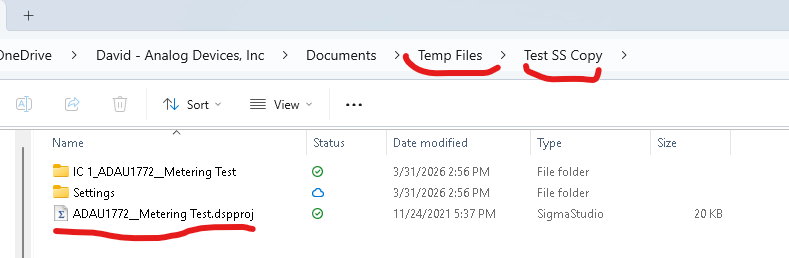
I created a folder called "Temp SS Copy" that is in the Temp Folder.
Then I copied and pasted a project using an ADAU1772. I did NOT use SigmaStudio to make this copy.
So the only thing in this folder is the project file.
So I open up the file using SigmaStudio.
Then I link/compile/download and then look at the folder contents and this is what I see:
It created the IC_1 folder and the expected files are in that folder.
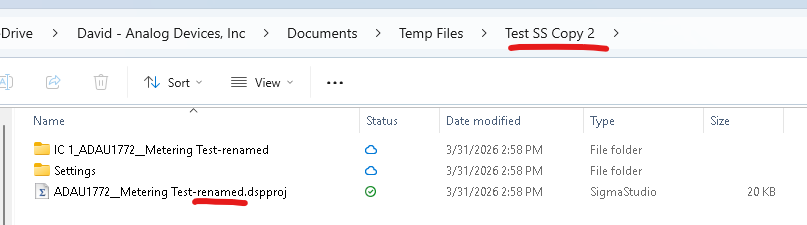
OK, so then using SigmaStudio, I did a Save-AS and created a new folder called "Test SS Copy 2"
Then I renamed the project and dropped it into this new folder.
So all that is in the folder is the new project.
So actually, I do not even think I closed the project file and reopened it. but, I might have. So I Link/Compile/Download and then look at the contents of the new folder. I see the new files that compiling creates. So I am not seeing the behavior you are seeing at all.
Here is a screenshot of the two folders.
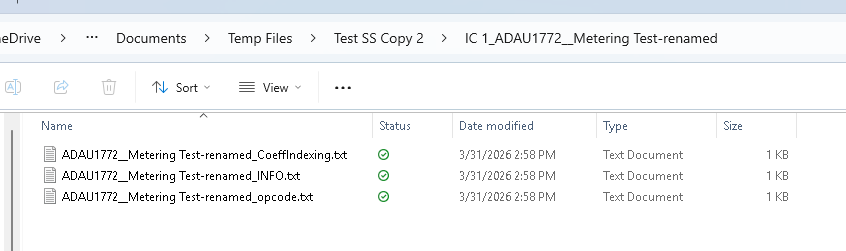
Here is the contents of the folder after I compiled
If I open the IC_1 folder I see the files it created with the new name.
I am stumped as to what you might be doing differently?
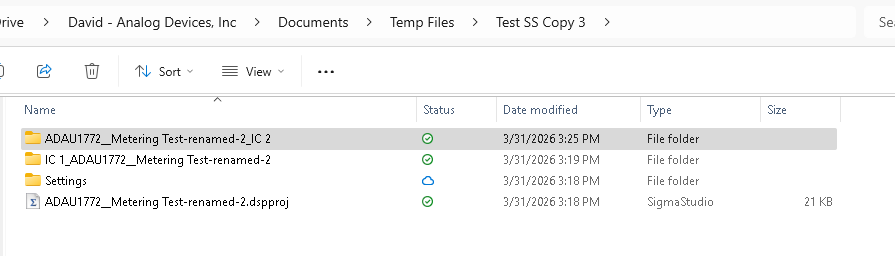
Now I did find some flakiness with the EEPROM file when I dropped in an EEPROM. When I compiled the project it did not create the folder for IC_2. It took a few tries and the second time I tried it the only time the folder was created for IC_2 was when I wrote the EEPORM image from the last compilation to the EEPROM.
Is this the issue you are seeing?
Dave T

Hi Dave,
I copied your procedures and got your same results. Yes, I am always including an EEPROM and did have instances where I could not get the EPROM files to be created. You have to go back to the Configuration tab and write the files to EEPROM after you do the compile/download. Bugs me that it is writing the EEPROM but cannot just give me the HEX/BIN files without doing that. Then there is the floppy icon Export System Files that exports a slew of files but not the correct HEX/Bin files. The HEX file it creates is empty.
I'll have to work with this more to see where/when I'm deviating from your sequence. I should be able to find some old projects that gave me the network error and determine what's needed to make them work.
Barry
Please log in to reply.