ADAU1452 and AUXADC for EQ
Hello, I am French and new to digital audio. Some time ago, I built a sound board for a pinball machine, but it was 100% analog. Today, I would like to convert it to digital. The audio signals come from a Teensy via the I²S bus.
I bought a board with an ADAU1452. I managed to configure the ADAU’s I²S inputs in slve mode. Basic tests are working correctly (mute, internal EQ).
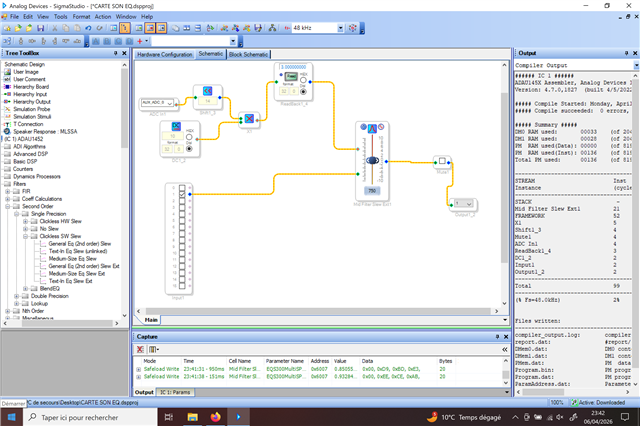
My problem is that I would like to control 5 filters (60 Hz, 200 Hz, 750 Hz, 3 kHz, 9 kHz) using 5 external potentiometers connected to the AUXADC pins, but everything I try does not work.
Does anyone have a solution for me? Thank you for your feedback.
adau1452
dsp
software
sigmaStudio 4.7
processors and dsp
equalizer
auxadc
Processors and Microcontrollers
Show More
Hello RAFALE2,
This is a good platform for your new design so let's getting it working like you envision!!
If you could attach your project file it would be helpful to see what might be going wrong. Sometimes the issues can be somewhat subtle.
I will attach a couple of projects where I had controlled EQ objects via AUXADC pots. These might be helpful for you. However, the different EQ blocks can sometimes require very different numbers in the parameters. So I need to study your project a bit more. This week is a tough week for me. We have an internal convention here in town and I am involved in several events. So I might not be able to respond but Harish, or others, might be able to step in.
Dave T
ADAU1452 AUXADC Controlled Coeff Calc Filter.dspprojADAU1452 AUXADC Controlled State variable Filter.dspproj
A big thank you to you, Dave!
I adapted your example and now I have an equalizer adjustable with 5 potentiometers. I still need to test the different available filters so that my project can match the quality of a real hi-fi equalizer.
My next challenge is to control the volume directly with my microprocessor via the I²S port. Do you know if that’s possible, or is it absolutely necessary to use an external pin (AUXADC)?
Thanks.
Hello RAFALE2,
Great! Glad you got it working!! Good job!!! You are picking this stuff up quickly!
This is again, a quick answer before I run out the door....
Once data is in the core it is data. You can do with it as you please. You may have to adjust the numbers etc., but basically you can do this a couple of ways.
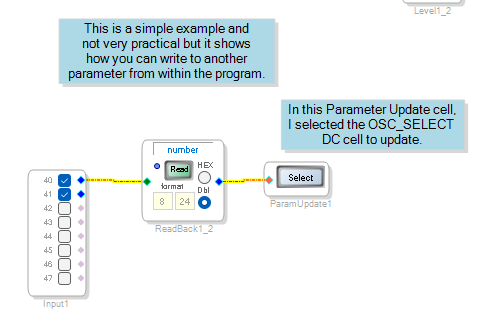
One way is to use the Parameter Update block to update a parameter in your project. I am showing a Readback to you can check the data and also you may have to adjust it as I mentioned earlier.
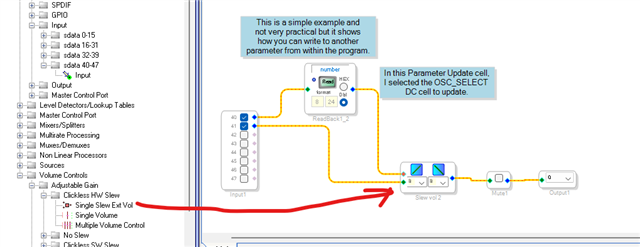
Another easy more direct way is to use the externally controlled volume control. The takes a number between 0 and 1 to give you no output to full volume.
You could also pack the control data into one or two channels coming in then use logic and data manipulating library blocks to split up the control data to control more than one object. It is up to your imagination!!
Have fun!!!
Dave T
Please log in to reply.