Hierarchy Input/Output blocks not visible in Sigma Studio+
I am using SigmaStudio+ with ADAU1452 DSP.
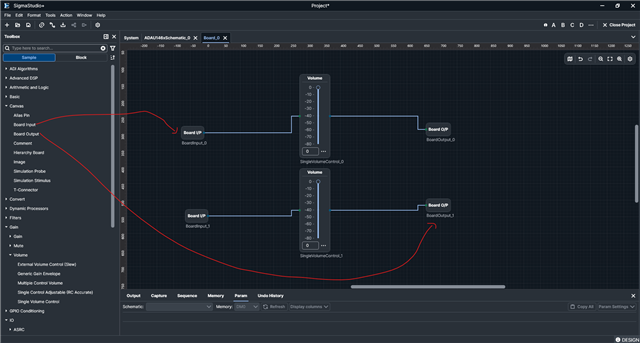
I am trying to implement a hierarchical design similar to examples shown in SigmaStudio documentation, where Hierarchy Input and Hierarchy Output blocks are used to connect different boards.
However, in my SigmaStudio+ environment, I am unable to find any "Hierarchy Input" or "Hierarchy Output" blocks in the toolbox.
I also tried searching for "Hierarchy" but no such blocks are available.
Could you please clarify:
1. Whether Hierarchy Input/Output blocks are supported in SigmaStudio+?
2. If not, what is the correct method to implement hierarchical (multi-board) designs in SigmaStudio+?
3. How can signals be passed between different schematic pages (boards)?
I would appreciate step-by-step guidance or an example.
Thank you.
Thread Notes
hibatt - Moved from SigmaStudio for SHARC to Processors & DSP. Post date updated from Thursday, April 16, 2026 4:37 AM UTC to Thursday, April 16, 2026 9:07 AM UTC to reflect the move.
adau1452
sigma studio
Sigma Studio+
software
processors and dsp
Processors and Microcontrollers
hierarchy
Show More
Hello hibatt,
Please follow the below steps.
First drag and drop the Hierarchy board (initially input and outputs are shown in the board)
Double click on the board, now you will be inside the board. Here you can see the inputs and outputs.
Once you designed the number of inputs and outputs, those input and output dots will be available in the main schematic.
I'm using the latest version SS+ 3.3.0. I recommend you download the latest version if you are using an older one.
H_board_test.ssprj
Regards,
Harish

Please log in to reply.