Cannot find address in SigmaStudio
Hello Analog devices,
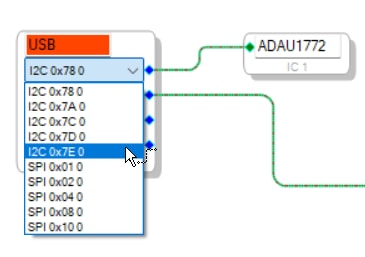
I'm having trouble establishing communication between the ADAU1772 and my laptop using the Ardvark, I'm using the I2C interface, the I2C address is 0x3C however in sigma studio I cannot see 0x3C as an option.
Am I missing something?
Thanks,
Poster
software
adau1772
sigma studio 4.7
I2c address
Sigma Studio Version 4.7 Build 0. Rev 1831
processors and dsp
Processors and Microcontrollers
Show More
Hello Poster,
Thanks for bringing this up. I had never noticed this detail before since we usually use SPI on our eval boards.
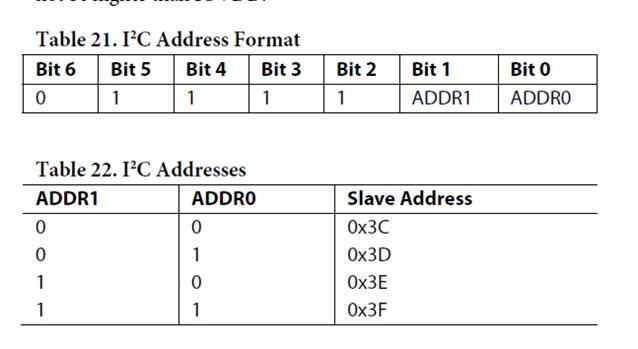
Here is what is in the datasheet:
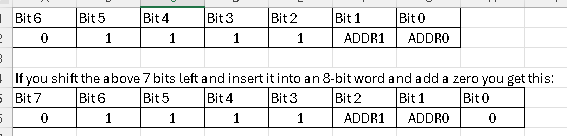
Note that Table 21 only shows 7 bits but in I2C there are 8 bits!!
The table really should show all 8 bits and that the LSB is just an added zero. Then all the addresses you see in the USBi and the Aardvark interface makes sense.
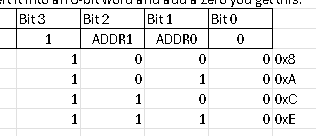
However, There is one setting that this does not explain. Here is what I get by setting the two address bits in all combinations:
The only strange thing is that both the USBi and the Aardvark show one more setting. 0x7D. Hmmm, That would make the LSB a "1".
So I have no answer for that one but in your case you need to select the 0x78 setting since you are setting both address pins to a low.
Thanks!
Dave T
Thanks that makes sense, When I clicked link compile download, I got a communication failure error: A USB communication failure has occured
I'm using Windows11, using Aardvark adaptor, I have a colleague who was using windows10 and it was able to communicate with the ADAU1772 through I2C with no issues
Do you have experience with using Sigma Studio 4.7 (not plus) using windows 11?
Thanks,
Poster
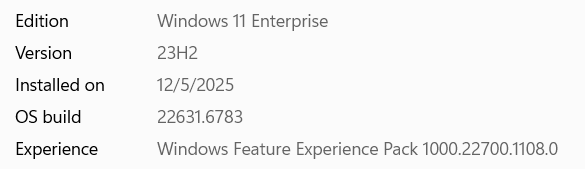

More information, I noticed that the USB is not turning green, however, when using control center software for Aardvark, I can get the send I2C signals out of the Aardvark
Another thing to note is that with modern laptops, there is no USB 2.0 ports anymore, I have a USB2.0 to USB type C adaptor in between my laptop and my USB2.0 cable
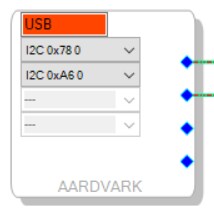
I got it working now, instead of using the Aardvark, I switched to using the USBi EVAL-ADUSB2EBZ, connected the I2C line and it works now on Windows 11
Please log in to reply.