RMS index selectable compressor
Hi all
I think the RMS index selectable compressor with external gain could be very usefull for my project. I need to select 1 of up to 6 different compression curves. Same timing for all.
I am not sure exactly how it works:
Ext. dectect input L and R - what is this for. How to deactivate? DC input = 0?
Index Input - from 0 to x ? And when it's set to x and I adjust the curve - is that then saved in the project?
Thank a lot.
John
software
ADAU1787
4.7
processors and dsp
Processors and Microcontrollers

Hello John,
You were little vague as to what you are looking for but I will start you out with what I think is most of what you are looking for.
Here is a project with an index controlled RMS compressor.
I am showing two ways to control it. One directly with a DC cell and another with a DC cell set to a real number using a lookup table.
If you use an AUX ADC then you would have to multiply it by the number of sections-1.
Also, if you use an external control I suggest you use the table that has limit protections.
In this project I set the first section to send out unity gain roughly when a 0dB signal is sent to it.
Note, I have an oscillator set to 0dB
Then the next section I set it for -10dB
Then the next one to -20dB and the last to -30dB.
So you can easily see in the meters which section is active. Also, remember that the meter will read -3dB for a 0dB signal so -10dB will read -13dB etc.
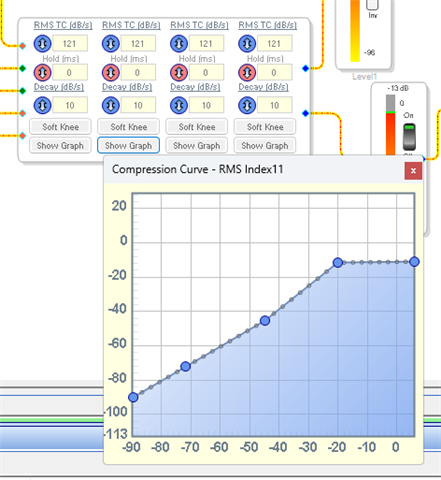
The curves are setup like this one example:
Here is the project.
ADAU1787 Index controlled RMS Compressor.dspproj
Dave T

Great. Very useful.
Thanks a lot.
Hi Dave
What are the ext.detect pin for? How do I connect them so they have no influence?
I'm using the version with gain output.
I just have 1 input.
BR John
Please log in to reply.