Problem with externally controlled peaking filter
Hi, Have most of the info for my DSP project with the ADAU1701 and the Dayton audio KABD250. I'm using SigmaStudio 4.51 Beta. I'm having a problem putting in a peaking control. I copied the circuit exactly from Dayton's sample projects. I'm using the Filters > Second Order > Lookup > Double Precision > 2 Ch > General 2nd Order w var Param/Lookup/Slew along with a DC Constant block and an ADC 3 for the mechanical control. I first tried to set the curves to 19 like the Dayton Example, but it would only go to 15.999999. So I tried it with 12 curves. Whenever I turn the knob up half way, I get a pop in the speakers and silence. The only way it won't pop is if I set the maximum curves to 3. I did a very simple schematic to test and the problem persists. I'll see if I can attach screenshots. Is there an incompatibility with this block? Is there a way around this using a different block and combinations? Thanks so much for your help!
4.51 Beta
software
ADA
processors and dsp
SigmaDSP Audio Processors
Processors and Microcontrollers
Show More

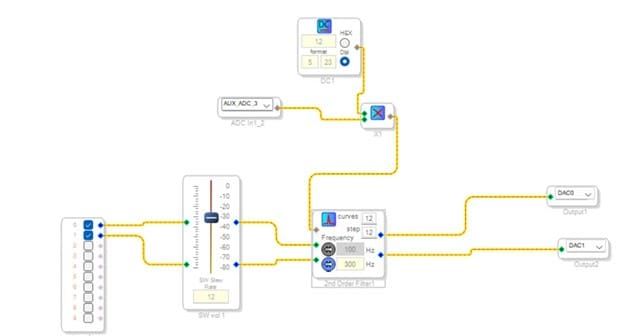
Please disregard this. I discovered that the DC Constant Block was incorrectly set to 5.23, when it should have been set to 28.0. Now it works fine. I'll use the excuse that I'm just a beginner.
Hello,
Sorry for not being able to respond earlier.
We are glad that you have resolved it yourself, Happy learning!
Please have a look at Dave's YouTube channel, it will be very handy when you start with SignamDSP and Sigma studio. I have attached the link below.
https://www.youtube.com/channel/UCHFzVRIj3YoH1Vdt866BZHw
Regards,
Harish
Sorry for the delayed reply. I'll check it out. By the way, I'd gladly pay for a downloadable manual for the toolbox.:)
Hello,
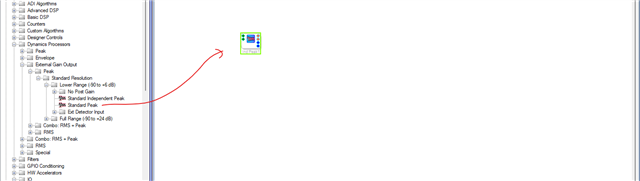
If you want the details about any blocks in tree toolbox then highlight the block and press F1, it takes you to the wiki page where every detail about the block is given.
For example,
I highlighted (green border around the block) a compressor block and pressed F1, it took me to this below wiki page.
Regards,
Harish

Thanks Harish. That's definitely helpful. I was thinking that it would be nice to have a manual you can take with you to read up on SigmaStudio when you aren't at your computer.
Please log in to reply.