time dependencies in compressors
Hi,
It's me again, and I have another question about compressors :-)
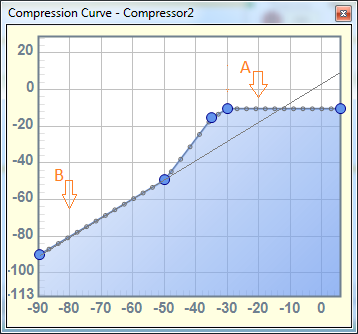
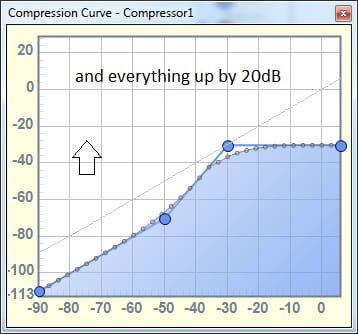
I'm trying to implement automatic gain control, including a noise gate, in a range of about 20 dB. So I used an RMS compressor block with a 4 dB/s attack time, 250 ms sustain, and 2 dB/s release. The curve looks like the one in the picture.
The circuit works well when the signal is within the 20 dB I want to compensate. Limiting the gain for no signal also works, but the time response isn't what I'd expect.
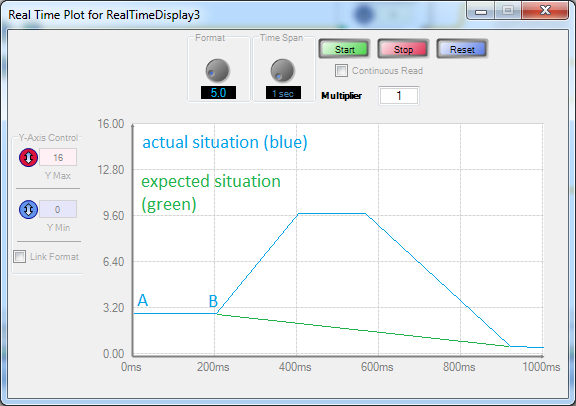
When the broadband test signal (pink noise) suddenly transitions from point A to point B, the compressor's automatic control does something like the one in the blue graph. I'd like it to do what I've drawn with the green line.
Is there a way to do this?
Thank you and best regards, Kuba.
software
Hello Kuba-s,
This is a little tricky but makes sense once you understand how the graph is setup.
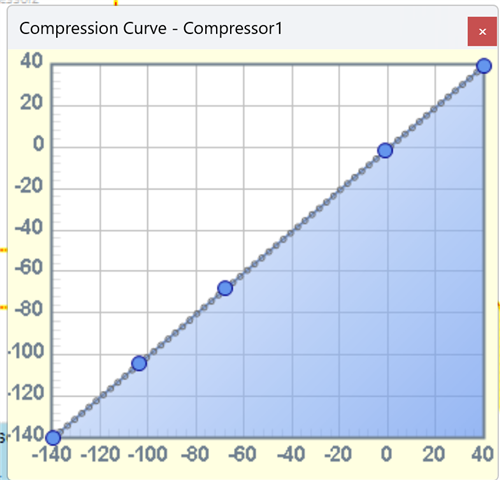
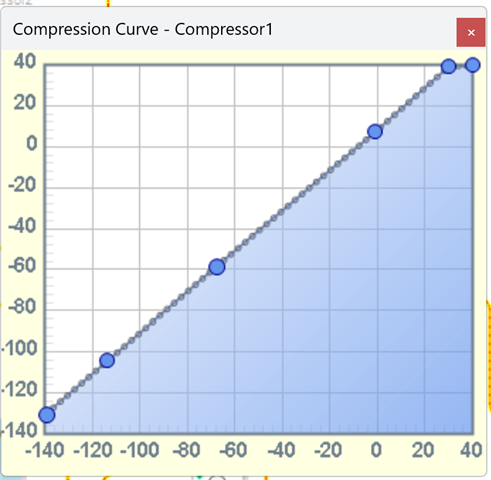
Let me start by showing the graph for unity gain at all levels. So input = output no matter the level.
You can set this easily by right-click and select "Set to Flat".
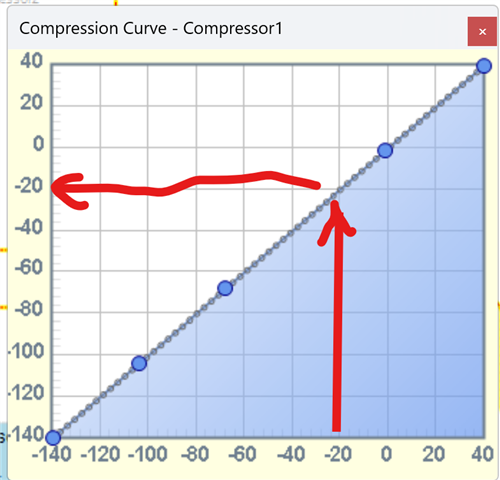
So pick a level, um... -20dB, if the input to the compressor is -20dB then go up to the graph point and follow it over to the left margin to give you the output level. In this case it will be -20dB. Here is a graph of what I am talking about...
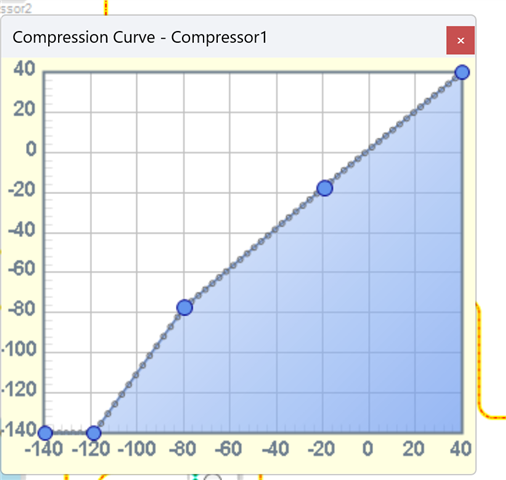
So if I want an even 10dB of gain at all input levels I simple move this line so it is exactly 10db above the "zero" line. Like this:
So looking at your graph, You want about 3dB of gain at most levels then when the level goes below point "B" you want to lower the gain at a constant rate depending on how far you are from point B. Is that correct?
So this should do the basic thing you are asking for.
I also wanted to capture the pop up window showing the levels of the point but it does not stay when I try to capture the screen!! UGH!
If you hover over a point and right click you can set the point value that way. It is a handy feature!
See if this helps..
Dave T
I wrote a reply, but it failed to load, so I have to write it again.
Thank you for your reply. Yes, I know how to set the values in the graph, and they're not random.
Generally speaking: I need an AGC (automatic volume control) that adds no more than 20 dB, and adds 0 dB when the signal is below the noise floor.
I want it to work slowly for usable values (such as -40...0 dB), and quickly for signals outside the usable level, below -40 dB.
Hello Kuba-s,
Which processor are you using?
Dave T
Hello Kuba-s,
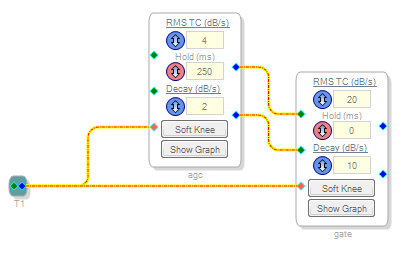
I have been thinking of many ways you can do this using basic objects. Rectify the signal, accumulate it and then drive a Mux to cause a mute and just add 20dB for the rest. But, I think you want a little more control so my suggestion is to simply use two compressor blocks in series! The first one would be the main one for the gain and the second one would be for the noise floor.
You could also use the ones with an external sidechain, sum the audio and send it to both compressor blocks so they do not interact with each other.
I think this is the best solution. I looked at the AVC block but it tries to make the output stay at a certain level and not enough gain range.
Dave T
I use the adau1701, the most common. I'd like a more powerful one, but currently, the vast majority of devices available have the adau1701. It will be a long time before devices with a more powerful processor become available.
That's why I have to be mindful of every MIPS.
I connected two compressors: the detectors in parallel, the gain in series. It works quite well.
Please log in to reply.